How to Set Weekly Set Targets for Each Muscle Group
Set weekly targets for each muscle group with a simple, adjustable template, then track the working sets you actually complete.
How to Set Weekly Set Targets for Each Muscle Group
To set weekly set targets for each muscle group, choose a starting number of working sets for the muscles you want to track, record only the sets you complete, then review the same seven-day window before changing anything. Use the target as a planning marker, not a score or a promise of a result.
Copy this weekly set-target template:
Week ending: ____________________

Muscle group: ___________________  Starting target: ______ working sets
Muscle group: ___________________  Starting target: ______ working sets
Muscle group: ___________________  Starting target: ______ working sets
Muscle group: ___________________  Starting target: ______ working sets

What counted: completed working sets only
What did not count: warm-up sets
One note for next week: _________________________________________________
The template deliberately leaves the numbers blank. Research on resistance training volume finds a dose-response pattern on average, but it does not turn one weekly number into the right target for every person, exercise selection, or training phase. Treat a target as something to observe and adjust, not a medical or performance prescription. A systematic review explains the relationship between weekly resistance-training volume and changes in muscle mass across the studies it reviewed.
What counts towards a weekly set target?
For a simple, repeatable log, count completed working sets. Write down the counting rule before the week begins so you do not reinterpret the same session later. A warm-up, a set you skipped, and a completed working set are different pieces of context.
Apps handle those boundaries in different ways. Fitbod describes its weekly targets as working sets per muscle group and documents a distinction between primary and secondary-muscle credit. Hevy's statistics guide also shows that people use weekly set totals to inspect how training is distributed. Those are useful examples of the job, not rules you need to copy.
Use this mini checklist for each entry:
- Was the set completed? Count what happened, not what was planned.
- Was it a working set by your chosen rule? Keep warm-ups in the session log if useful, but do not quietly add them to the target tally.
- Which muscle group gets the credit? Follow the same exercise mapping every week rather than moving credit around to make a target look complete.
- Is the week still in progress? A target can help you see context before the week ends. It does not require cramming work into the final day.
How do you choose a starting target for each muscle?
Start with the work you can realistically log and repeat. If you already have a programme, write the planned working sets beside the muscle groups it is meant to emphasise. If you do not, begin with fewer tracked muscles and build a clean record before adding more detail.
The point is a useful baseline, not a perfect split. A muscle you want to make more visible can have its own target, while other groups keep a separate starting number. Avoid changing targets halfway through a normal week just to turn a progress indicator green.
| Decision | Keep it simple by doing this | Avoid doing this |
|---|---|---|
| Pick a starting point | Use the same target for a full review window | Replacing it after each workout |
| Credit exercises | Use one consistent primary-muscle rule | Counting the same set differently each day |
| Review a short week | Note missed sessions or a changed plan | Treating the total as a verdict |
| Change a target | Make one deliberate adjustment for the next window | Adding several changes without a record |
Here is a worked planning example. These numbers are placeholders, not advice for a particular person or programme.
Week ending: Sunday

Chest       Starting target: 8 completed working sets
Back        Starting target: 8 completed working sets
Quads       Starting target: 6 completed working sets
Hamstrings  Starting target: 6 completed working sets

What counted: completed working sets for the primary group
What did not count: warm-up sets
One note for next week: Keep the same targets and review after another full week.
This example gives you a concrete record even if a session moves, an exercise changes, or a week is shorter than expected. The useful question is not "did I earn a perfect score?" It is "what did I actually complete under the same rule?"
When should you change a weekly set target?
Change a target at the boundary between review windows, not every time a workout feels unusually easy or hard. Keep the note short: what changed, which muscle group it affects, and when you will look again.
For example:
Next week: Chest target stays the same.
Next week: Back target changes from ______ to ______.
Reason recorded: ________________________________________________
Review date: ____________________________________________________
This does not diagnose fatigue, prescribe recovery, or tell you what your body needs. If you have pain, dizziness, a new injury, or another concerning symptom, stop training and seek appropriate medical guidance rather than trying to solve it by changing a set total.
How PeakBFF tracks weekly muscle set targets
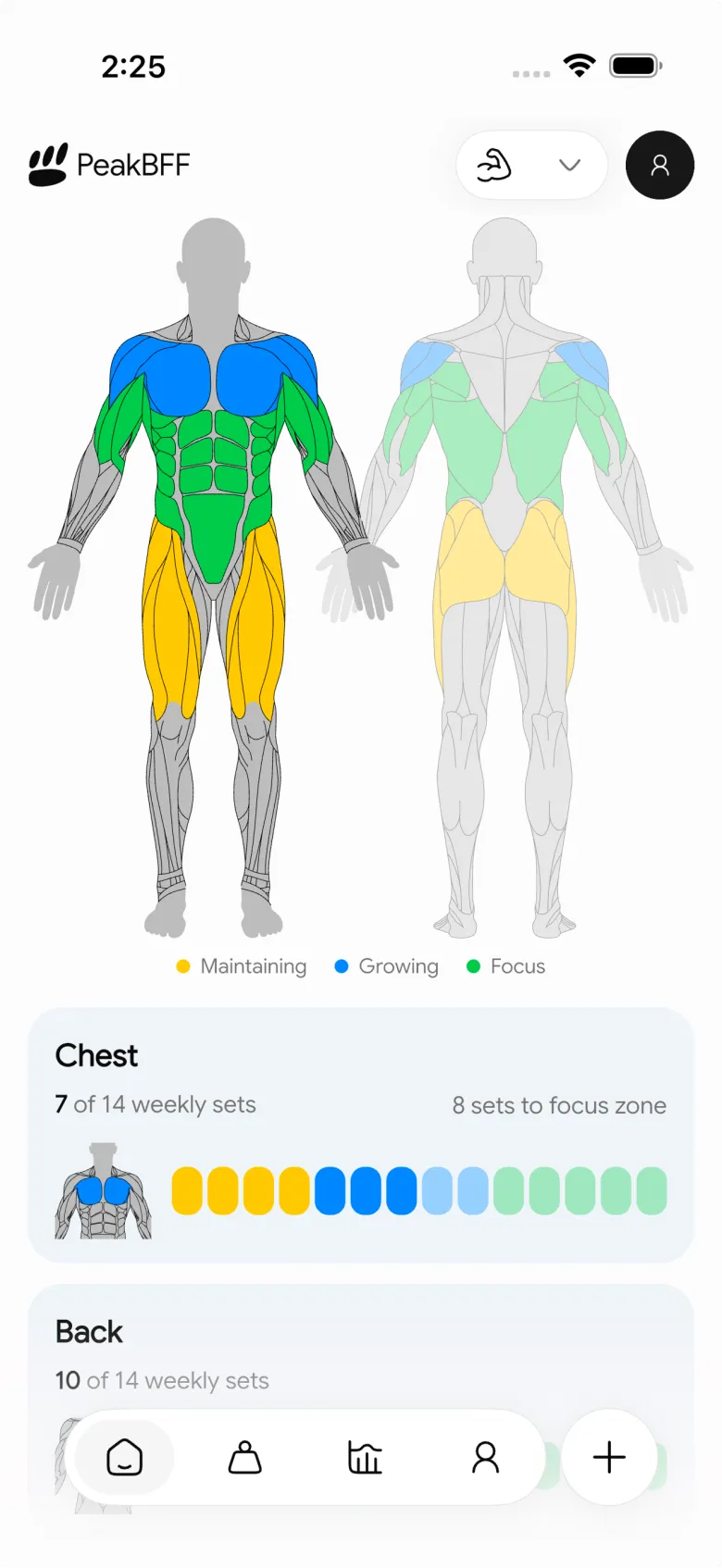
PeakBFF gives every muscle group a weekly-set maximum based on a selected training level, with the option to override an individual muscle's target. It then derives a rolling seven-day total from the completed working sets in your logged workouts. Warm-up sets are excluded, while completed working, drop, myo-rep, failure, and AMRAP set types count towards the total.
Open the Body view, choose the weekly-target settings, select a training level for the baseline, then tap any muscle group to give it a custom target or return it to the baseline. As you log a workout, the Body view updates its muscle-group summaries from the same completed sets. The next-workout preview can show how a planned session would change that seven-day view, without altering what you have already completed.

For a broader app-selection guide, see our comparison of the best apps to track weekly sets per muscle group. This guide is the practical companion: it gives you a paper-first rule for using a target before you choose where to keep it.
A clean weekly set-target routine
- Pick the muscle groups you genuinely want to monitor.
- Add one starting target for each, without presenting it as a universal rule.
- Log completed working sets under a consistent crediting rule.
- Read the rolling seven-day totals in context of the sessions you actually completed.
- Write one next-window change only when you have a clear reason to make it.
If you want the target, completed workout log, and seven-day muscle view in one place, download PeakBFF for iOS or Android.
More from PeakBFF
More app comparisons, fitness guides, and product notes.
Ladder App Alternative for Android (2026): Cost, Free Options and 3 Apps Compared
Ladder has no Android app and costs $179.99 a year after a trial. Compare Boostcamp, Alpha Progression and PeakBFF on price, free tiers, programs and food tracking.
Cardio Before or After Lifting? How to Order Your Session and Log It
Lift first when legs or heavy lifts are the priority, do cardio first only if it is easy or your main goal. Here is the evidence, a decision table and a way to log it.
Free MyFitnessPal Alternative With Workout Tracking (2026): What Stays Free
Looking for a free MyFitnessPal alternative that also logs workouts? Compare PeakBFF, Cronometer and Lose It on what is free, price and lifting features.
Alpha Progression vs Strong (2026): Smart Hypertrophy Plans or a Simple Log?
Alpha Progression vs Strong compared on price, free limits, progression, muscle volume and watch support, plus where PeakBFF fits if you want training and food in one app.
RPE Chart for Lifting: RPE to Reps in Reserve to % of 1RM, With a Log Template
Use an RPE chart to turn how hard a set felt into reps in reserve and a percent of your 1RM. Includes a printable table, a worked example, and a way to log RPE in PeakBFF.
Best Free Strength Training App for Women Over 40 (2026): What Stays Free
Looking for a strength training app for women over 40 that does not lock logging behind a subscription? Hevy, Strong, Boostcamp, StrongEra and PeakBFF compared on what is free.



