Best App to Plan Your Next Workout From Muscle Volume (2026)
Compare gym apps that connect completed muscle-volume records to a next-workout decision, without treating a weekly target as a prescription.
Best App to Plan Your Next Workout From Muscle Volume (2026)
If you already log your sessions and want to see how the next planned workout changes your weekly muscle picture, PeakBFF is the best fit. It shows completed working sets by muscle over a rolling seven days, lets you set a per-muscle target, then previews the impact of the next programme-day workout. That is useful context before training, without pretending the app can decide your recovery or write your programme for you.
Short answer: choose PeakBFF when you want your next-session check to sit beside the workouts that produced the weekly record and, if you use them, your food and protein logs. Hevy is a strong lifting-first option for deep muscle-group statistics and Trainer-led plans. Alpha Progression is worth a look when set-level progression recommendations inside a guided plan are the main draw. The right choice depends on whether you want a clear preview of a plan you control or a more directive programme system.
The options, compared
| PeakBFF | Hevy | Alpha Progression | |
|---|---|---|---|
| Weekly muscle context | Completed working sets by muscle in a rolling seven-day view | Set counts by muscle with weekly, monthly, and annual views | Pro charts for sets per muscle and training reports |
| Target view | Training-level starting points and editable per-muscle targets | Trainer shows a muscle-distribution chart and recommended range | Guided plans can use muscle priorities and progression data |
| Next-workout check | Preview how the next programme-day workout changes the muscle map | Current public statistics page does not describe the same preview | Current progress guide describes set-specific next-target recommendations |
| Who controls the plan | You create and edit the programme | Routines or Trainer plans | Guided or manually configured plans |
| Food and protein in the same daily record | Yes, when you log them | Not the focus of its cited muscle-statistics page | Not the focus of its cited progress-tracking page |
| Best for | A clear next-session preview from a record you own | Detailed lifting analytics and an adaptive Trainer option | Structured progression inside a guided plan |
No app can determine the right number of sets for your body, diagnose fatigue, or tell you that an exercise is safe. A next-workout view is a planning aid: it makes the work you logged and the work you have planned easier to inspect. Use it with your own judgement and appropriate professional support when pain, injury, or a health condition is part of the picture.
1. PeakBFF
PeakBFF works well when the question before a gym session is simple: "What will this planned workout add to the week I have actually logged?" Its Body view groups completed working sets by muscle across the last seven days. Each muscle card can be read against a weekly target, with training-level defaults as a starting point and an editable individual target when your programme needs one.
When there is a next programme-day workout with credited working sets, switch to the preview. The view shows the same map after that planned workout is added. It is not a command to add or remove work, and it does not rewrite the program. It is a quick way to notice whether the session you planned fits the picture you intended to build.
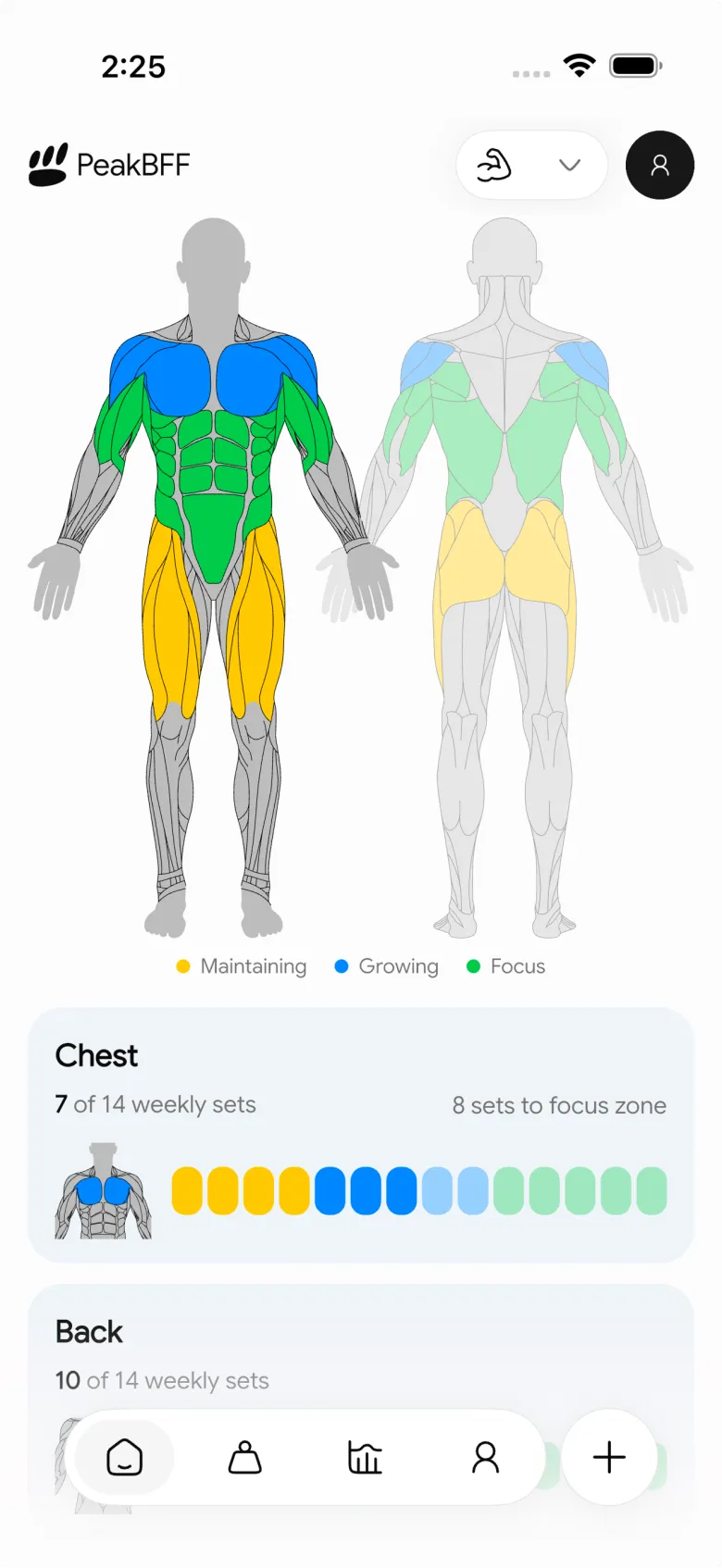
This distinction matters when a training week moves around. A rolling window can remain readable if a session shifts from Sunday to Monday, while the preview keeps planned and completed work visibly separate. PeakBFF counts completed working sets for this weekly view, not warm-up sets. Its targets are planning references, not a claim about individual recovery, muscle growth, or the ideal amount of training.
For lifters who also log meals, PeakBFF keeps calories, protein, macros, and water in the same app as the workout record. That does not turn nutrition entries into a workout prescription. It simply avoids a second daily tracker when one record is more useful.
For the retrospective side of this decision, see our guide to weekly sets per muscle group. If you need to change the order of the programme before checking the preview, the workout-day reorder template is a practical companion.
Best for: lifters with a programme they want to keep in control of, who want to inspect its next session against the completed work in the rolling week.
2. Hevy
Hevy's current muscle-group statistics page documents set-count views by muscle group, including a last-seven-days body diagram and weekly, monthly, and annual filters. That makes Hevy a credible choice when longer-term lifting analytics and flexible history views are the main reason to use an app.
Hevy also has a separate Trainer programme system. Its current product page describes a muscle-distribution chart, a per-body-part range, next-workout progress indications, and ongoing guidance inside Trainer plans. That can suit someone who wants a more structured, app-led program.
The public statistics materials do not describe PeakBFF's specific toggle that projects a selected next programme day onto the same rolling muscle map. Check the current in-app workflow if that exact before-you-train preview is the reason you are choosing. Choose Hevy when broad statistics or Trainer guidance are your priority. Choose PeakBFF when you want the preview to be a simple read of the programme and targets you already manage.
Best for: lifters who value detailed muscle analytics or want an optional Trainer-led plan alongside their logger.
3. Alpha Progression
Alpha Progression's progress-tracking guide describes completed-set history, exercise and workout summaries, and Pro charts for volume, sets per muscle, and workouts per week. It also describes set-specific progression recommendations that turn recorded performance into a next training target. That is a compelling approach when the next decision is mostly about how a particular lift should progress.
Alpha Progression is the better fit when you want a guided programme to make set-level progression part of the workout flow. PeakBFF is the better fit when you are primarily reviewing the muscle picture your own next planned day would create. Those are related jobs, but they are not the same: one is an exercise-target workflow, while the other is a preview of a programme day across the weekly muscle map.
Its public progress page does not describe a PeakBFF-style projected map for a selected next programme day. Verify current plan options before switching if a whole-body next-session preview is essential.
Best for: lifters who want a guided plan and set-level progression data to inform the next target for an exercise.
How to use a next-workout muscle check without overreacting
The preview is most useful as a short pre-session check, not as a score to chase. Use this sequence:
- Look at completed work first. Confirm the week reflects the sessions you actually performed, not just the template.
- Read the next programme day. See which muscle groups its working sets would add to the rolling view.
- Compare it with your own target. A target can make a gap visible, but it is not a universal minimum or a reason to force more work into a day.
- Keep the plan change deliberate. If you decide to adjust a program, edit it intentionally rather than treating a preview as an automatic order.
- Review the completed session later. The valuable signal is what you ultimately did and can repeat or revise with context.
This workflow also avoids a common mix-up: planned sets and completed sets answer different questions. Planned work is a preview. Completed working sets are the training record. A useful app lets you see both without silently turning either into a promise of a result.
What to look for before choosing an app
| If you need... | Prioritise... | Why it matters |
|---|---|---|
| A check before a scheduled session | A visible distinction between completed and projected work | It keeps the plan from being mistaken for the week you performed |
| A target you can revise | Per-muscle settings rather than one generic total | Different programmes can emphasise different muscles |
| A training-first analytics system | Clear history filters and exercise statistics | The next decision may require a longer trend, not one week |
| Programme-led lift targets | A guided-plan workflow with transparent progression rules | It is useful when a specific exercise target is the main decision |
| One everyday record | Workout, nutrition, and protein logging in the same app | It can reduce context switching if you already log all three |
For a narrower view of the work you completed after a session, our muscles trained after a workout comparison covers the retrospective job. The next-workout question is different: it is about checking a planned session before it becomes part of that record.
The bottom line
Hevy is a strong option for deep lifting statistics and an app-led Trainer system. Alpha Progression is compelling for guided programmes and set-level progression recommendations. Both are worth testing when those are the parts of training you want an app to lead.
For most lifters who want to preview the next planned day against a rolling record of completed muscle work, PeakBFF is the better fit. It keeps the plan, the completed sessions, adjustable muscle targets, and optional food and protein records in one daily routine without presenting the preview as a prescription.
Download PeakBFF on the App Store or Google Play and check the next session before you start it.
More from PeakBFF
More app comparisons, fitness guides, and product notes.
Best AI Physique Transformation App With Workout Tracking (2026)
Compare AI physique-transformation preview apps for motivation, photo boundaries, and the workout record you use after the preview.
How to Save a Workout as a Template After Training
Turn a session that worked into a reusable workout template without confusing completed results with your next plan.
Best Beginner Gym App With Starter Programs and Form Cues (2026)
Compare beginner gym apps for choosing a starter program, checking exercise form cues, and logging the sets you actually complete.
How to Track Home and Gym Versions of the Same Exercise
Use a simple split-or-combine checklist to keep home and gym exercise variations clear in your workout history.
How to Log a Weigh-In in a Gym App: A Simple History Checklist
Log a weigh-in with a repeatable routine, a clear calendar day, and a simple history review that keeps your gym records useful.
How to Choose a Starter Workout Program: A 3-Question Template
Choose a starter workout program with a simple goal, schedule, and equipment template, plus a verified PeakBFF setup flow.



