How to Estimate Calories From a Meal Photo: A Quick Review Checklist
Use a quick five-point checklist to review a meal-photo calorie estimate, correct what the camera cannot know, and keep a useful food record.
How to Estimate Calories From a Meal Photo: A Quick Review Checklist
To estimate calories from a meal photo, use the scan as a first draft, then review the visible foods, portion, cooking fats or sauces, and anything outside the frame before saving it. A photo is fast for a mixed meal, but it cannot see every ingredient or know exactly how much you ate.
Short answer: take a clear photo, let the app draft the foods and macros, then make five quick checks: food, portion, hidden extras, missing items, and the final total. The checklist below takes less thought than rebuilding the meal from scratch and gives you a record you can revisit honestly.
What can a meal photo estimate, and what can it miss?
A photo can be a useful starting point for visible foods such as rice, vegetables, chicken, fruit, or a plated meal. It is less certain about the parts a camera cannot identify clearly: the amount of oil in a pan, dressing mixed through a salad, a second serving, or an ingredient added after the photo.
That is not a failure of any single app. A review of image-assisted dietary assessment found that fully automated food recognition and portion estimation still cannot deliver dependable precision in every setting. Read the review in Nutrients. Treat a photo result as an estimate to review, not a measurement or nutrition advice.
How do you review a photo calorie estimate before saving it?
Use this five-point checklist for a restaurant plate, takeaway, homemade bowl, or meal you did not weigh:
[ ] Visible foods: Are the main foods named correctly?
[ ] Portion: Does the amount look like the serving you ate?
[ ] Hidden extras: Were oil, butter, sauce, cheese, or a drink involved?
[ ] Missing items: Is anything off-frame or absent from the result?
[ ] Final total: Does the edited entry now describe this meal, not an idealised one?
The point is not to chase a perfect number from an imperfect image. It is to make the pieces you know visible in the record. If the meal is a packaged product, a barcode and the package label are often a better source. See our barcode food-logging checklist for that workflow.
What does the checklist look like for a mixed bowl?
Imagine you photograph a chicken, rice, and vegetable bowl. The draft recognizes the visible ingredients and returns a meal total. Before saving, you remember that the chicken was cooked in oil and that you used a generous spoonful of sauce.
Instead of pretending the photo contains those details, update the result with what you know. The useful record is not "chicken bowl" in the abstract. It is the chicken bowl you actually ate, including the portion and additions you can recall. If you are unsure, leave it as an estimate rather than inventing an exact amount.
This is also why a clear, well-lit photo helps. Frame the whole plate or bowl, avoid covering the food with cutlery, and take the picture before you start. Those small choices make the visible part easier to review later.
When should you use a photo, barcode, or typed entry?
| Input | Best for | Review step |
|---|---|---|
| Meal photo | Mixed meals, takeaway, and home-cooked plates | Correct portions, additions, and missing foods |
| Barcode | Packaged food with a readable label | Confirm product, serving size, and amount eaten |
| Typed entry | A known food, recipe detail, or item outside the photo | Include the food and portion in plain language |
Choosing the input that matches the meal is more useful than forcing every food through a camera. Many good logs use more than one method in the same day.
How do you review a meal photo in PeakBFF?
In PeakBFF, open the food camera, take a meal photo or choose one from your library, and wait for the food analysis. The result shows the estimated meal with calories and macros. Before saving, you can adjust the serving count or use a plain-language refinement, such as adding an ingredient or changing the portion. PeakBFF then marks the refined result as edited and saves the food record to the date you choose.
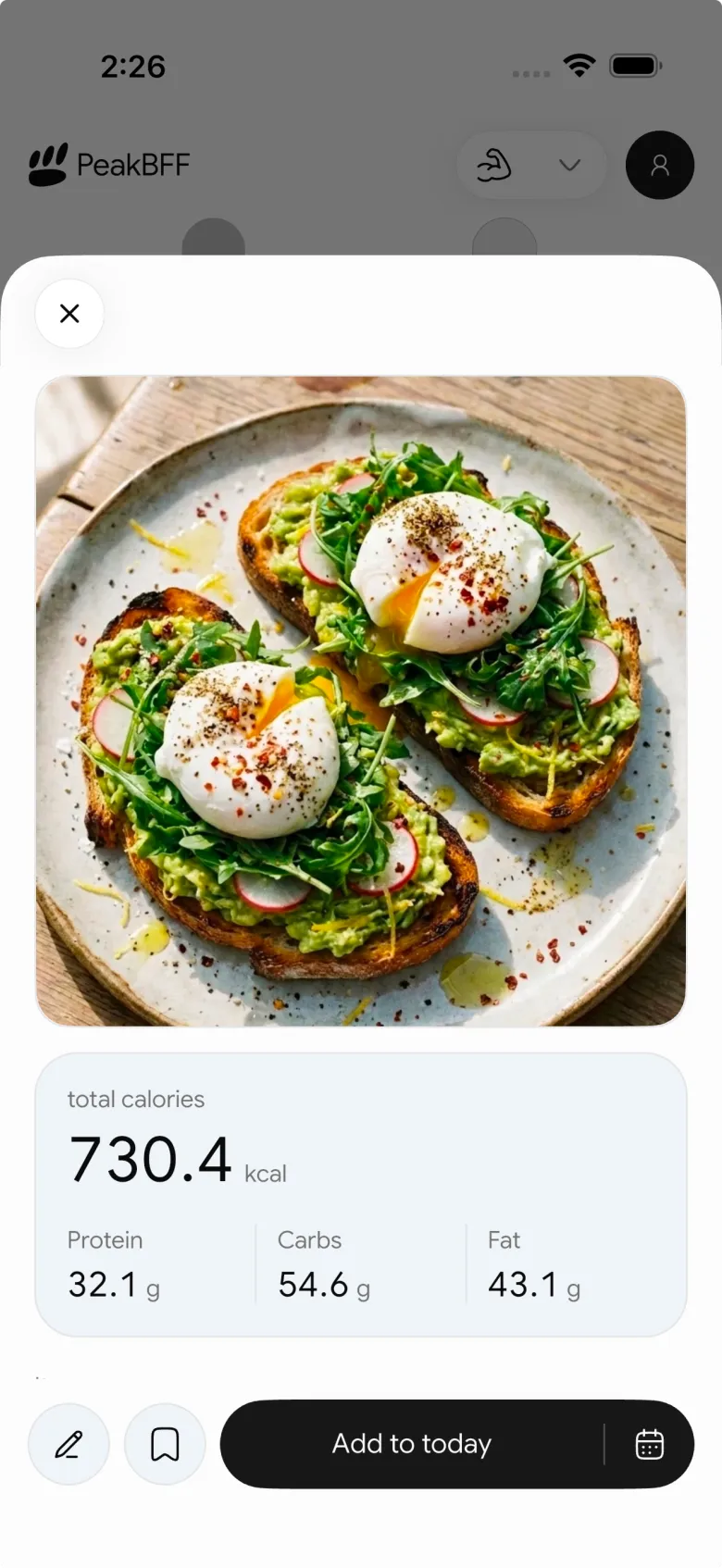
That workflow keeps the photo useful without presenting it as an exact measurement. If the meal needs more context, make the correction first. If a package has a barcode, switch inputs. You can keep photo, typed, and barcode entries alongside the workouts you log in the same routine.
For the broader app-selection question, our AI calorie tracker comparison looks at PeakBFF alongside food-first alternatives.
The bottom line
The best way to estimate calories from a meal photo is to treat the scan as a fast, reviewable draft. Check the visible foods, portion, additions, missing items, and final total, then save the version that best represents the meal. That approach is practical without claiming that a camera can know everything.
Download PeakBFF on iOS or Android to review photo food estimates beside your workout log.
More from PeakBFF
More app comparisons, fitness guides, and product notes.
Best AI Physique Transformation App With Workout Tracking (2026)
Compare AI physique-transformation preview apps for motivation, photo boundaries, and the workout record you use after the preview.
How to Save a Workout as a Template After Training
Turn a session that worked into a reusable workout template without confusing completed results with your next plan.
Best Beginner Gym App With Starter Programs and Form Cues (2026)
Compare beginner gym apps for choosing a starter program, checking exercise form cues, and logging the sets you actually complete.
How to Track Home and Gym Versions of the Same Exercise
Use a simple split-or-combine checklist to keep home and gym exercise variations clear in your workout history.
How to Log a Weigh-In in a Gym App: A Simple History Checklist
Log a weigh-in with a repeatable routine, a clear calendar day, and a simple history review that keeps your gym records useful.
How to Choose a Starter Workout Program: A 3-Question Template
Choose a starter workout program with a simple goal, schedule, and equipment template, plus a verified PeakBFF setup flow.



