How to Track Workouts and Calories Together: A Simple Daily Log
Use a simple daily log to keep workout sets, meals, calories, and macros together without turning either record into a complicated spreadsheet.
How to Track Workouts and Calories Together: A Simple Daily Log
To track workouts and calories together, keep one daily record with two separate parts: the sets you completed and the food you ate. Log each while it is fresh, then make one short end-of-day check. You do not need to calculate whether a workout "earned" a meal. The useful job is to keep an honest record of both.
Use this daily gym and food log template:
Date: __________

Workout
[ ] Completed session or rest day noted
[ ] Exercises, working sets, reps, and weight logged

Food
[ ] Meals and drinks entered
[ ] Portions or serving counts reviewed
[ ] Calories, protein, carbs, and fat checked if you track them

Quick review
[ ] One missing meal or set added before the day ends
The two records belong on the same day, but they answer different questions. Your workout log describes the training you did. Your food log describes what you ate. Keeping both close together makes the day's context easier to review without turning it into a score.
What should a workout and calorie log include?
Start with the smallest fields you can enter consistently. For most gym-goers, that means a completed-session marker plus exercise, set, rep, and weight details for training, then meals and portions for food.
| Part of the day | Record | Keep the entry practical |
|---|---|---|
| Workout | Exercise, working sets, reps, and weight | Log the sets you actually completed, not the version you hoped to do. |
| Food | Meal, drink, and portion or serving count | Add the meal while you still remember the extras and amount. |
| Nutrition view | Calories, protein, carbs, and fat, if relevant to you | Treat these as a record to review, not a diagnosis or a promise of an outcome. |
| End-of-day check | One missing item or correction | Fix the obvious gap, then stop. A usable log beats a perfect-looking one you abandon. |
Recording food as it happens reduces how much the record depends on memory. The National Cancer Institute's dietary-assessment primer makes the same point about prospective food records, while also noting that every self-reported method has limitations. That is a good reason to enter the best information you have, not to invent a level of precision you do not have. (National Cancer Institute primer)
How do you use the daily template on a training day?
Here is a worked example for someone who lifts after work. The numbers are only an example of how to organize a record, not targets to follow.
Date: Tuesday

Workout
Completed: Upper-body session
Bench press: 3 working sets logged
Cable row: 3 working sets logged
Lateral raise: 2 working sets logged

Food
Breakfast, lunch, dinner, and a snack entered
One restaurant meal reviewed for portion and sauce

Quick review
Added the coffee drink that was missing from lunch
Notice what is absent: there is no attempt to subtract the workout from lunch or grade the day. The food record and training record stay distinct, while the single date keeps them easy to find later.
On a rest day, the same template still works. Mark the day as a rest day, log the meals you choose to record, and skip the exercise fields. A rest day does not need a fake workout entry to make the record complete.
When should you use a photo, barcode, or typed food entry?
Use the entry method that gives you the clearest description of the food in front of you:
| Entry method | Useful for | Quick check before saving |
|---|---|---|
| Meal photo | Mixed meals, takeaway, and home-cooked plates | Review visible foods, portion, and additions the camera cannot know. |
| Barcode | A packaged item with a readable label | Confirm the product and serving count. |
| Typed entry | A simple known item, recipe detail, or item outside a photo | Include the food and portion in plain language. |
For a deeper meal-photo review, use our calorie-from-a-meal-photo checklist. A food record is still an estimate, especially for mixed dishes and portions. A systematic review found that food and beverage self-report commonly includes omissions and portion-estimation error, which is why a quick review is more useful than false precision. (Review in Advances in Nutrition)
How does PeakBFF keep workout and calorie records together?
In PeakBFF, start a workout and log the weight and reps for each set as you complete it. Finishing the session records the workout as completed. For food, open the nutrition flow and add an entry by text, meal photo, or barcode, then review and save it. The daily nutrition summary keeps calories and macros next to the day's food entries.
The Home summary can then bring logged workout details, calories, protein, and other available daily records into one place. It is a recap of what you logged, not a verdict on the quality of your training or eating.
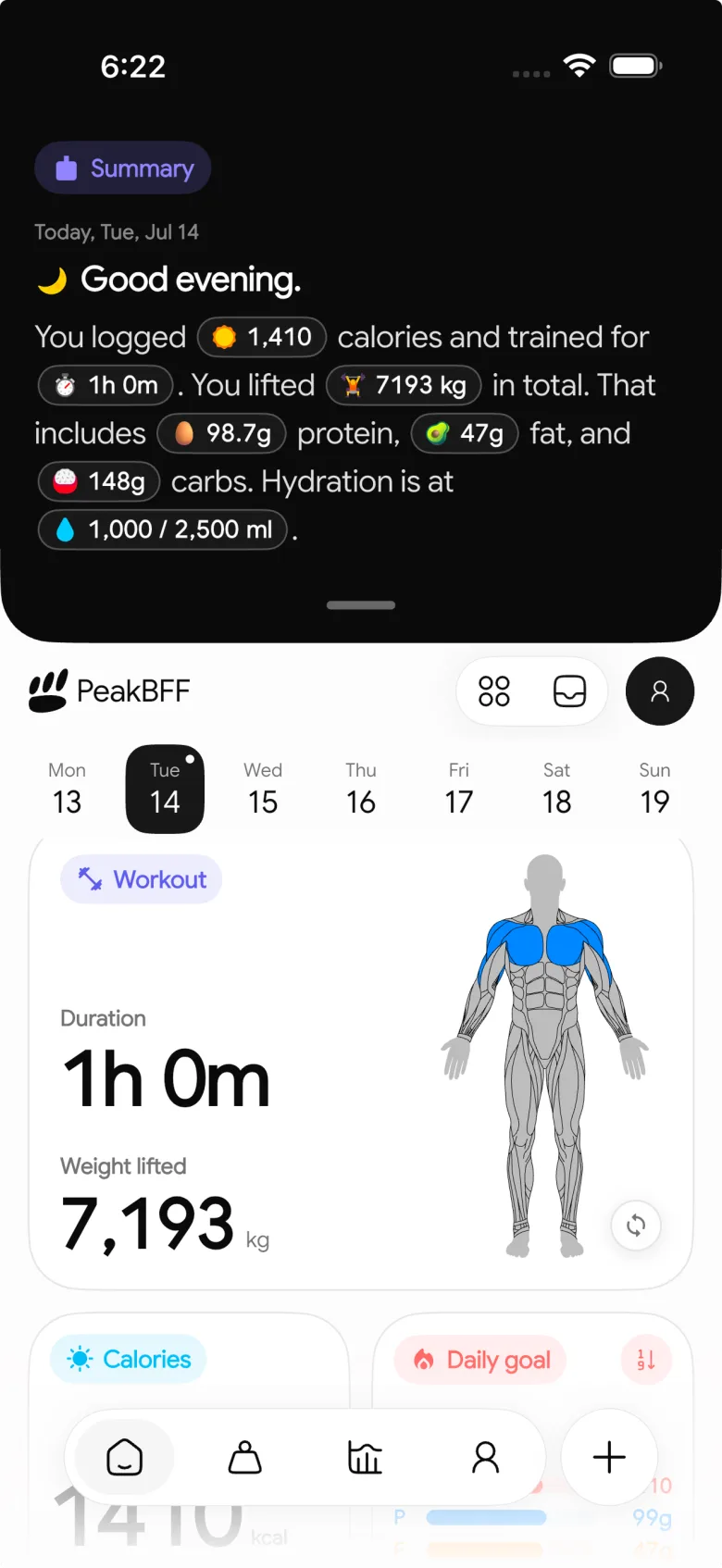
That is the advantage of one daily routine: a forgotten lunch or incomplete set is easier to notice before it disappears into a separate app. If you are choosing an app for the broader all-in-one job, see our workout and macro tracker comparison.
The bottom line
Track workouts and calories together by giving each day one simple home: log the sets you complete, record meals while they are fresh, and make a short review before the day ends. Keep the two records separate enough to stay honest, but close enough to understand the day's context.
Download PeakBFF on iOS or Android to keep your workout and food record in the same daily routine.
More from PeakBFF
More app comparisons, fitness guides, and product notes.
Best AI Physique Transformation App With Workout Tracking (2026)
Compare AI physique-transformation preview apps for motivation, photo boundaries, and the workout record you use after the preview.
How to Save a Workout as a Template After Training
Turn a session that worked into a reusable workout template without confusing completed results with your next plan.
Best Beginner Gym App With Starter Programs and Form Cues (2026)
Compare beginner gym apps for choosing a starter program, checking exercise form cues, and logging the sets you actually complete.
How to Track Home and Gym Versions of the Same Exercise
Use a simple split-or-combine checklist to keep home and gym exercise variations clear in your workout history.
How to Log a Weigh-In in a Gym App: A Simple History Checklist
Log a weigh-in with a repeatable routine, a clear calendar day, and a simple history review that keeps your gym records useful.
How to Choose a Starter Workout Program: A 3-Question Template
Choose a starter workout program with a simple goal, schedule, and equipment template, plus a verified PeakBFF setup flow.



