Best Auto Progression Workout App (2026): 4 Options Compared
Compare workout apps that tell you what to lift next, including a practical pick for lifters who want progression beside their gym and nutrition log.
Best Auto Progression Workout App (2026): 4 Options Compared
If you want an app that tells you what to lift next, PeakBFF is the best pick for most lifters, with one honest caveat: it suggests the progression and you apply it. Each session starts from the weight and reps you completed last time. When those sets earn a step up, a Try more button offers one more rep or the next weight, and you decide whether to use it. That keeps the next-session decision inside the workout log, without making the app pretend it knows your recovery or technique better than you do.
Short answer: choose PeakBFF if you want a transparent double-progression suggestion that you approve, alongside set and rep logging, nutrition, and your wider gym record. If you want the app to change the next workout for you with no review step, pick one of the others. Calyber is a strong option for people who want a hypertrophy app to prescribe a more adaptive next workout. Kova is worth considering if a generated strength plan and smart progression are the main purchase. uppr is a good fit when equipment-aware targets, feedback, and periodised progression matter more than an all-in-one training and food log.
The options, compared
| PeakBFF | Calyber | Kova | uppr | |
|---|---|---|---|---|
| Uses completed training data for a next-session change | Yes, as a suggestion you apply | Yes | Yes | Yes |
| Shows a clear rep-range progression rule | Yes | Check the current plan details | Check the current plan details | Check the current plan details |
| Lets you choose more reps or more weight | Yes, each time you review a suggestion | Check the current plan details | Check the current plan details | Check the current plan details |
| Applies changes without a review step | No, you tap Apply | Check the current plan details | Check the current plan details | Check the current plan details |
| Keeps sets, reps, and completed workouts in the same record | Yes | Yes | Yes | Yes |
| Keeps food, protein, calories, and macros beside training | Yes | Not its stated focus | Not its stated focus | Not its stated focus |
| Best at | Reviewable progression suggestions plus gym and nutrition logging | Adaptive hypertrophy prescriptions | Strength planning with smart progression | Equipment-aware targets and adaptive plans |
What an auto progression app should actually decide
The useful job is not to make every workout heavier. It is to turn a completed session into a small, understandable next step. For a weighted exercise with a rep range, that usually means one of three outcomes:
- Repeat the prescription because the required working sets were not met.
- Add a rep while holding the same load.
- Increase the load and return to the lower end of the range.
That is double progression. It is a practical way to make the next workout less vague while keeping the decision tied to what you actually logged. It is also why the app should show the rule, the prescribed range, and the result that caused the change. A suggestion is easier to use when you can see where it came from.
No app can reliably infer your technique, pain, sleep, or readiness from a single completed set. Treat an automatic prescription as a record-keeping aid, not personal coaching or a reason to force an increase. If a movement is painful, unusually difficult, or affected by an injury, seek advice from an appropriately qualified health professional.
Why PeakBFF is the best fit for a clear next-session plan
PeakBFF keeps its progression rule deliberately inspectable, and it leaves the final call with you. Give a supported weighted exercise a set count, a rep range, and a weight step your equipment can load. Each new session fills in the weight and reps from the working sets you completed last time, so you start from real numbers instead of memory.
When every prescribed working set from that session landed inside the rep range at the same weight, a Try more button appears on the exercise. It opens a short review with last session's weakest set, the suggested target, and how many sets are left today. More reps keeps the weight and adds one rep to your weakest set. More weight unlocks once every prescribed set reached the top of the range: it adds your weight step and returns you to the bottom of the range, unless that step would be more than a 10% jump. Tap Apply and only your remaining, unfinished sets change. Completed sets stay as logged, and nothing changes automatically when you finish a workout.
Try more covers weighted, reps-based exercise types such as barbell, dumbbell, machine, cable, kettlebell, Smith machine, plate, and medicine-ball movements. It does not appear for cardio, timed, or unweighted bodyweight exercises.

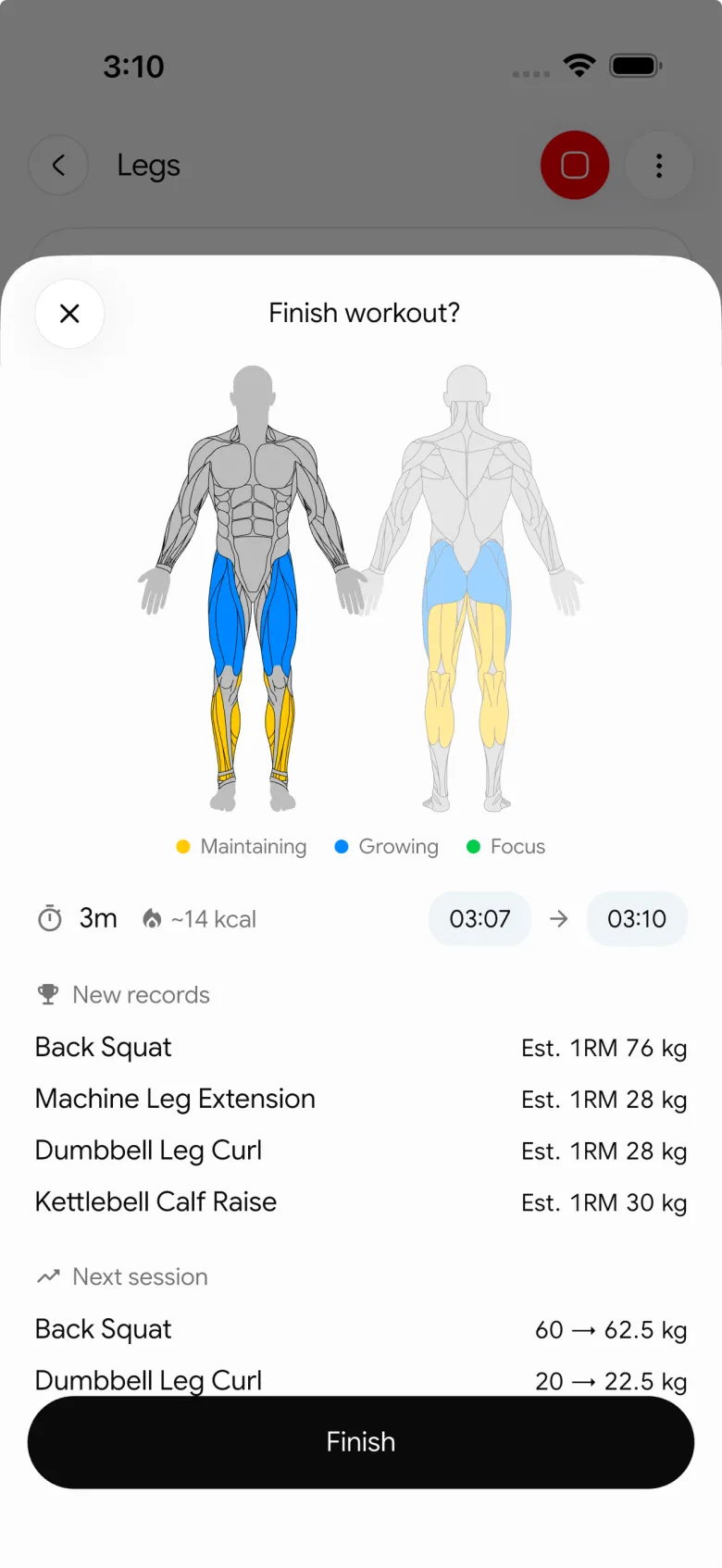
That focus is the advantage for a lifter who already has a simple progression method and wants the app to do the arithmetic while they keep the decision. PeakBFF can also keep food photos, barcode or typed food entries, protein, calories, carbs, and fat next to the gym record. If keeping those habits together is useful, see our comparison of the best apps to track workouts and macros.
For the underlying log method, our progressive overload template shows why a repeat, rep increase, or load increase is often all you need to decide after a session.
When a more adaptive coaching-style app makes sense
PeakBFF is the overall pick for someone who wants a visible rule and a connected gym and nutrition record. A more specialised app can be a better choice when you explicitly want the product to make broader programme-level adjustments, or to apply changes without asking.
- Calyber says it uses logged training to recommend the next workout's weight, reps, sets, and recovery adjustments. Its product site makes it a credible option for lifters whose main job is an adaptive hypertrophy prescription.
- Kova positions itself as adaptive strength training and says it tells users what to lift next, with smart auto-progression. Its site also highlights strength plans and exercise demonstrations, which may suit someone who wants generated programming at the centre of the app.
- uppr uses logged sets and estimated strength to present weight and rep targets, with equipment-aware plans and feedback that can adjust later sessions. Its training overview is worth checking if those plan adaptations matter more than keeping nutrition in the same app.
Those are real differences in product emphasis, not a promise that one app can solve every training decision. Read the current plan details before you commit to a routine, especially if you want a specific approach to deloads, effort, or equipment substitutions.
A quick way to set up auto progression without overthinking it
- Choose one stable exercise variation. Compare like with like. A cable press and a dumbbell press are not interchangeable data points.
- Set a repeatable target. For example, three working sets in an 8 to 10 rep range, with a load you can control.
- Record every required working set. The weakest completed set is often the useful signal, not only the best one.
- Keep the increment realistic. Pick a load increase that your plates, dumbbells, or machine can actually accommodate.
- Review the next-session change. Repeat the prescription when the day did not earn an increase. A hold is useful information, not a failure.
The same approach works whether you use a notebook or an app. Automation saves the mental step, but it should not hide the logic. A good workout log makes it easy to see what you did, what changed, and why.
The bottom line
Calyber, Kova, and uppr all address the real problem of deciding what to lift next, and they go further if you want the app to make the change for you. PeakBFF is the best pick for most lifters who want a transparent double-progression suggestion inside a normal gym log, applied only when they choose, with the option to keep nutrition and training in one place.
Download PeakBFF on the App Store or Google Play to build the next session from the work you actually completed.
More from PeakBFF
More app comparisons, fitness guides, and product notes.
Fitbod vs Hevy (2026): Generated Workouts or a Simple Log?
Fitbod vs Hevy compared on price, workout generation, free limits, watch apps and nutrition, plus where PeakBFF fits if you want training and food in one app.
How to Log Raw vs Cooked Food Weight: A Simple Conversion Cheat Sheet
Weigh food raw or cooked, then log it against a matching entry. A cheat sheet with USDA numbers for chicken, rice and pasta, plus a worked example.
MacroFactor Workouts vs Hevy (2026): Which Fits Lifters Who Track Food?
MacroFactor Workouts vs Hevy compared on price, progression, free limits and nutrition, plus PeakBFF as a one-app option for lifting and food logging.
Best AI Physique Transformation App With Workout Tracking (2026)
Compare AI physique-transformation preview apps for motivation, photo boundaries, and the workout record you use after the preview.
How to Save a Workout as a Template After Training
Turn a session that worked into a reusable workout template without confusing completed results with your next plan.
Best Beginner Gym App With Starter Programs and Form Cues (2026)
Compare beginner gym apps for choosing a starter program, checking exercise form cues, and logging the sets you actually complete.



