MacroFactor vs Cronometer (2026): Adaptive Macro Coach or Micronutrient Tracker?
MacroFactor vs Cronometer compared for lifters in 2026. Explore adaptive TDEE coaching, 80+ micronutrient tracking, food logging UX, pricing, and how PeakBFF compares.
If you want an adaptive diet coach that dynamically recalculates your daily energy expenditure and adjusts your calorie targets each week, MacroFactor is the superior choice for body composition. If you want laboratory-grade database accuracy, an analysis of more than 80 micronutrients, and a capable free tier, Cronometer is the gold standard for detailed nutritional health.
However, both apps treat strength training as an afterthought. Cronometer has no weight-room logging at all, while MacroFactor charges an $89.99 annual bundle to combine its nutrition app with a separate workout tracker. If you want seamless set-and-rep gym tracking, exercise form cues, and fast AI photo food logging in one clean subscription, PeakBFF bridges the gap between the weight room and the kitchen.
Quick comparison: MacroFactor vs Cronometer at a glance
The table below contrasts MacroFactor, Cronometer, and PeakBFF across expenditure algorithms, micronutrient depth, database validation, gym logging features, and subscription pricing as of November 2026.
| What matters | MacroFactor | Cronometer | PeakBFF |
|---|---|---|---|
| Core philosophy | Adaptive TDEE coaching and body composition | Clinical micronutrient tracking and dietary health | Unified gym workout log and AI nutrition tracker |
| Energy expenditure (TDEE) | Dynamic expenditure algorithm based on weight and intake | Static standard formulas (Mifflin-St Jeor) or wearable sync | User-set calorie and macro targets tailored to lifting goals |
| Calorie & macro adjustments | Automatic weekly check-in updates based on metabolism | Manual adjustments by the user or preset target programmes | Flexible self-directed targets with built-in macro guidance |
| Micronutrient reporting | Basic macros, fibre, and primary vitamins | 80+ verified micronutrients (vitamins, minerals, amino acids) | Protein, carbohydrates, total fats, and calories |
| Food database source | Curated research database with verified barcode scanning | Lab-analysed NCCDB, USDA, and staff-reviewed submissions | Hybrid vector and text search database with barcode scanner |
| Logging speed & UX | Modern, frictionless multi-add, smart search, and labels | Data-rich interface with detailed nutrient tables | Fast photo meal scan, package label scan, and manual log |
| Adherence philosophy | Adherence-neutral (no red numbers, no guilt metrics) | Traditional targets with daily surplus and deficit rings | Visual calorie and protein progress bars without penalties |
| Gym workout tracking | Separate standalone app ($89.99/yr bundle required) | None (cardio and general calorie burn estimates only) | Built-in set and rep logger, rest timers, and volume maps |
| Barbell plate calculator | None (in nutrition app) | None | Built-in visual plate loader for Olympic kg and iron lb |
| Pricing (US App Store, as of November 2026) | $11.99/mo or $71.99/yr (Nutrition); $89.99/yr (Bundle) | Free tier; Cronometer Gold is $10.99/mo or $59.99/yr | Core features free; Plus is $49.99/yr (~$4.17/mo) or $7.99/wk |
| Free tier availability | 7-day trial only (strictly subscription-based) | Generous permanent free tier with barcode scanner | Permanent free tier for gym logging and calorie counting |
| Best for | Trainees wanting automated weekly macro adjustments | Trainees focused on micronutrient density and longevity | Lifters wanting workouts and nutrition in one simple app |
1. MacroFactor: best for adaptive energy expenditure and body recomposition
MacroFactor was developed by Stronger by Science (Greg Nuckols, Eric Trexler, and team) to solve the single biggest flaw in traditional calorie counters: static Total Daily Energy Expenditure (TDEE) formulas. Standard calculators estimate your daily caloric burn based on static formulas that guess your activity multiplier. If your metabolism slows during an extended cutting phase, or if your smartwatch overestimates your gym calorie burn by 400 calories, static trackers lead you straight into frustrating fat-loss plateaus.
MacroFactor solves this through its proprietary expenditure algorithm. By mathematically comparing your daily scale weigh-ins with your daily caloric intake over a rolling two-to-three-week window, MacroFactor determines your actual metabolic burn rate. It completely ignores wearable calorie burn estimates, which research repeatedly shows are wildly inaccurate.
Every Monday, MacroFactor prompts a weekly check-in. If your expenditure dropped by 80 calories because you moved less, the app automatically trims your daily calorie and carbohydrate targets to keep your fat loss on schedule. If you are reverse dieting or lean bulking, it scales up your calories systematically.
Crucially, MacroFactor operates on an adherence-neutral philosophy. In apps like MyFitnessPal, going 150 calories over your daily target flashes angry red warning text. MacroFactor never judges or scolds you. If you eat 800 extra calories at a celebration dinner, the algorithm simply records the data point and factors it into your true expenditure calculation without punishing you with starvation days. For a deeper look at how older legacy trackers compare, read our breakdown of Lose It vs MyFitnessPal.
MacroFactor trade-offs:
- No permanent free tier: MacroFactor offers a 7-day trial, after which it costs $11.99 per month or $71.99 per year. If you want a zero-cost daily tracker, MacroFactor is not an option.
- Limited micronutrient analysis: While MacroFactor displays primary vitamins and minerals on food labels, it does not provide comprehensive reporting on amino acid profiles, fatty acid ratios, or trace minerals.
- Workouts require an extra subscription: MacroFactor is fundamentally a diet app. While the company launched MacroFactor Workouts as a standalone training tool, unlocking both nutrition and training requires an $89.99 per year bundle.
- Daily weigh-in commitment: The expenditure algorithm requires consistent scale weigh-ins (at least 3 to 4 days per week) and honest food logging. If you log sporadically, the algorithm pauses and loses its predictive power.
2. Cronometer: best for micronutrient depth and clinical nutritional health
Cronometer approaches nutrition from a clinical perspective. While most fitness apps focus exclusively on the big three macronutrients (protein, carbohydrates, and fat), Cronometer tracks up to 84 individual nutrients, including vitamin fractions, electrolyte ratios (sodium to potassium), saturated versus unsaturated fats, and complete amino acid profiles.
Cronometer's primary differentiator is database integrity. Crowdsourced databases in apps like MyFitnessPal are notoriously contaminated with duplicate entries, inaccurate calorie counts, and user errors. Cronometer avoids this by sourcing its food database from validated laboratory sources, including the Nutrition Coordinating Center Food and Nutrient Database (NCCDB) and the USDA Food and Nutrient Database. When a user submits a custom food or barcode, Cronometer's staff manually reviews the nutrition label before publishing it to the public database.
This clinical rigour makes Cronometer the undisputed king for trainees on restrictive diets. If you follow a vegan or plant-based diet, Cronometer highlights whether you are hitting critical thresholds for vitamin B12, iron, zinc, and leucine. If you manage a medical condition like hypertension, kidney disease, or diabetes, Cronometer allows you to export comprehensive nutrition reports directly to your healthcare provider or registered dietitian. For a comparison of how Cronometer compares to the market leader, explore our guide on Cronometer vs MyFitnessPal.
Cronometer also provides a generous free tier. Unlike competitors that lock barcode scanning behind paid paywalls, Cronometer includes full barcode scanning, macro tracking, and complete micronutrient breakdowns on its free plan. Upgrading to Cronometer Gold ($10.99 per month or $59.99 per year) adds meal-timing timestamps, fasting timers, recipe importers, and customisable nutrition biometrics.
Cronometer trade-offs:
- Dense, clinical user experience: Cronometer's interface is packed with nutrient gauges, percentage rings, and detailed biochemical tables. For lifters who simply want to log lunch and get back to work, the UI can feel overwhelming and data-heavy.
- Static energy expenditure: Cronometer does not feature an adaptive expenditure algorithm. It calculates maintenance calories using traditional static equations or syncs with wearable devices, which often leads trainees to eat back phantom calories burned during light activity.
- Manual adjustments required: When your weight loss stalls on Cronometer, the app will not recalculate your macros for you. You must manually calculate a new caloric deficit or adjust your target macros yourself. Trainees working through body recomposition can follow our guide on how to calculate macros for body recomposition to establish their baseline numbers.
- Zero strength workout logging: Cronometer has no tool for logging weights, sets, reps, or barbell exercises. It only records cardio sessions as gross caloric expenditure.
3. PeakBFF: the all-in-one gym log and AI nutrition tracker
The core dilemma between MacroFactor and Cronometer highlights a persistent headache in modern fitness software: diet trackers ignore your lifting, and workout trackers ignore your diet. Lifters end up juggling two separate subscriptions: paying $60 to $72 per year for a food logger like Cronometer Gold or MacroFactor, plus another $24 to $40 per year for a gym workout log like Hevy or Strong.
PeakBFF eliminates this fragmentation by housing a dedicated gym workout logger and an AI-powered nutrition tracker inside one unified app.
Self-paced gym logging with progression tools
In the gym, PeakBFF provides the focused utility of a dedicated strength log:
- Prefilled previous sessions: When you open a workout, PeakBFF automatically prefills the weights and repetitions you achieved in your last session. You immediately know what you need to beat.
- Explicit "Try more" suggestions: When you hit all target reps with good form, PeakBFF surfaces a "Try more" prompt suggesting an extra rep or a modest equipment increment. Unlike retired auto-progression systems that forcibly change weights, PeakBFF keeps you in complete control.
- Built-in plate calculator: When loading a heavy barbell, tapping "Load with plates" breaks down your target weight into exact Olympic kg or iron lb plate pairs, eliminating gym math.
- 220+ looping exercise demos: Every exercise features a short, looping demonstration video with numbered execution steps and form cues so you can verify technique between sets.
- Rest timer: Customisable countdown timers ring softly when your rest window closes, keeping your training intensity on track.
AI photo food scanning and macro clarity
Outside the gym, PeakBFF simplifies nutrition tracking without tedious search menus:
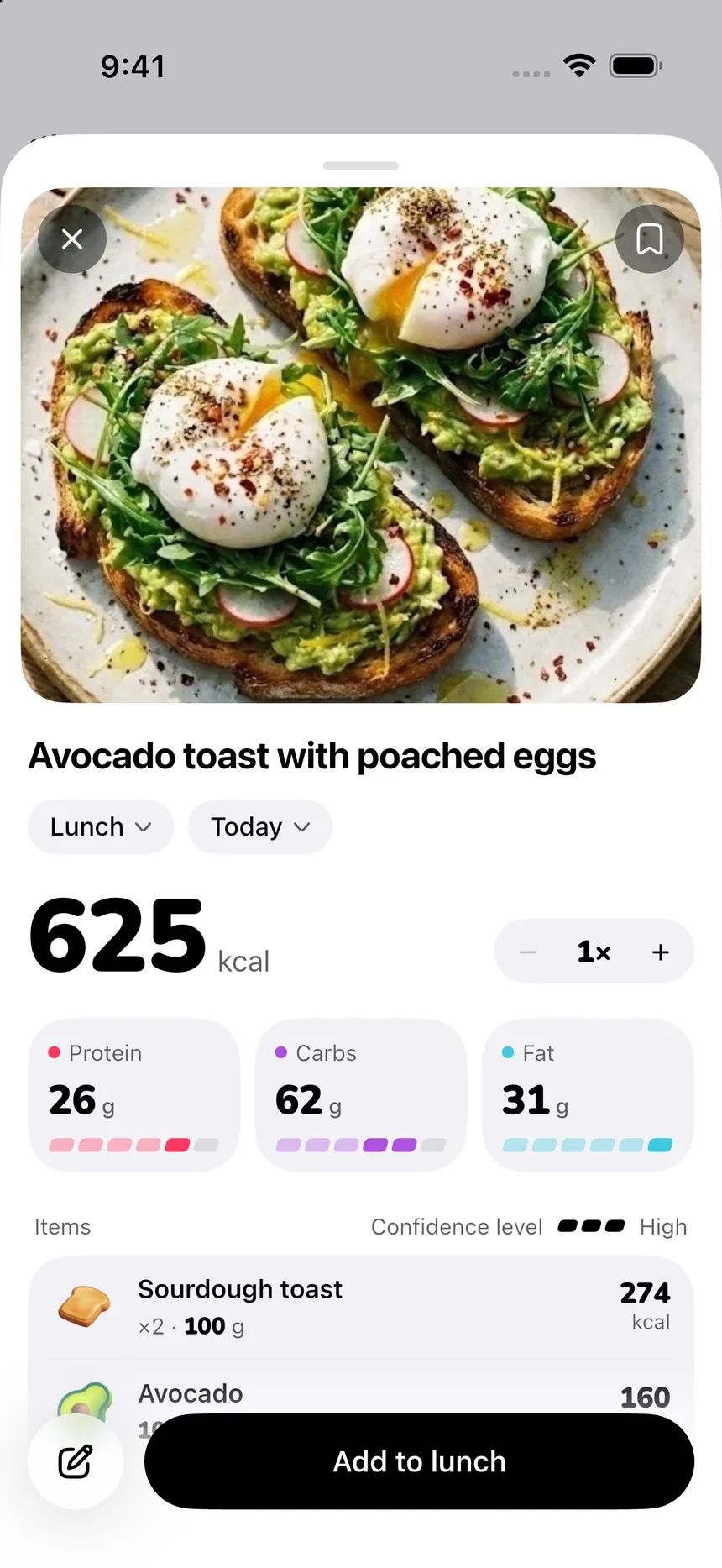
- Instant photo food scan: Snap a photo of your meal, and PeakBFF's multi-modal AI breaks down the ingredients, portion sizes, calories, and macronutrients in seconds.
- Label and package scan: If you eat packaged foods or specialty snacks without barcode matches, photograph the nutrition facts label. PeakBFF reads the exact grams of protein, carbs, and fats directly from the box.
- Unified daily dashboard: Your gym performance, muscle volume map, daily water intake, and daily protein targets live together on one clear home screen.
Consolidated value and honest pricing
Instead of paying $71.99 per year for MacroFactor plus $23.99 per year for a gym tracker (over $95 annually), PeakBFF offers a transparent pricing structure:
- Permanent free tier: Basic workout logging, set and rep recording, calorie tracking, starter workout programmes, and barbell plate calculations are free for everyone. No credit card is needed to get started.
- PeakBFF Plus ($49.99/year or $7.99/week): Unlocks unlimited AI photo food logging, detailed protein, carb, and fat macro breakdowns, social workout import from TikTok and Instagram, AI workout plan generation, and health sync. That works out to roughly $4.17 per month or $0.96 per week.
If you are looking to replace a multi-app setup, read our guide to the best Hevy alternatives with calorie tracking.
Head-to-head breakdown: MacroFactor vs Cronometer
To determine whether MacroFactor or Cronometer best supports your dietary goals, let us evaluate how they perform across five critical categories.
1. Caloric expenditure: adaptive TDEE algorithm vs static estimates
How an app calculates your daily caloric burn determines whether your diet stays effective over months of training:
- MacroFactor is unmatched in expenditure accuracy. By tracking your daily scale weight against your caloric intake, its algorithm figures out your true metabolic rate. If your metabolism adapts down during a cut, MacroFactor detects the shift within days and updates your targets at your weekly check-in. It completely avoids the trap of eating back unreliable fitness tracker calorie burns.
- Cronometer uses standard static equations like the Mifflin-St Jeor or Harris-Benedict formulas to estimate your Basal Metabolic Rate (BMR). To account for activity, you either pick an activity multiplier or sync your smartwatch. Because smartwatches frequently overestimate exercise calories by 20 to 50 percent, trainees who eat back their activity calories often erase their fat-loss deficit.
If your primary goal is reliable, automated fat loss or lean bulking without guessing your metabolic burn rate, MacroFactor is noticeably superior.
2. Micronutrient reporting: 80+ clinical nutrients vs macro focus
What each app measures defines the audience it serves best:
- Cronometer is the undisputed industry leader for micronutrient tracking. It reports on 84 individual nutrients, including vitamin A, B-complex fractions, vitamin D, magnesium, potassium, iron, zinc, omega-3 to omega-6 ratios, and complete amino acid profiles (leucine, isoleucine, valine). For biohackers, vegan lifters ensuring protein quality, or individuals with clinical dietary needs, Cronometer provides unprecedented nutritional transparency.
- MacroFactor focuses intentionally on the variables that drive 95 percent of body composition changes: total calories, protein, carbohydrates, fats, and dietary fibre. While it displays basic micronutrient details when available on nutrition labels, it does not offer aggregated daily micronutrient targets or amino acid breakdown charts.
If you want to optimise health markers, longevity, and clinical micronutrient balance, Cronometer is far ahead.
3. Food logging UX and database integrity: speed vs clinical validation
How quickly and reliably you can log your food determines whether you stick to dietary tracking:
- MacroFactor offers one of the fastest and smoothest food logging interfaces available. Its multi-add feature lets you search for and log multiple meal components simultaneously without bouncing back and forth between screens. Its barcode scanner is rapid, and its database is clean, verified, and free of confusing duplicates.
- Cronometer prioritises laboratory precision over speed. Its food items are sourced from the NCCDB, USDA, and staff-reviewed product labels, ensuring that every micronutrient field is populated with real laboratory data. However, the search and logging workflow requires more taps and displays a data-dense layout that can feel slightly clinical for quick daily entries.
- PeakBFF takes speed a step further by utilising visual AI. Rather than manually typing out every ingredient, you snap a photo of your plate, verify the detected items, and save the meal in seconds.
4. Psychological approach: adherence-neutrality vs target rings
The mental framing of a nutrition tracker profoundly affects your relationship with food:
- MacroFactor champions an adherence-neutral philosophy. The app has no red warnings, no error sounds, and no streaks that break when you go over your calories. If you eat off-plan, MacroFactor views it strictly as neutral data to help refine your expenditure calculation. This makes MacroFactor exceptionally supportive for trainees prone to diet anxiety or binge-restrict cycles.
- Cronometer uses traditional dietary targets. It displays coloured progress bars and daily energy budget rings showing remaining calories, surplus, and deficit. While many lifters enjoy checking off progress bars, seeing an overflowing red calorie bar at the end of a difficult day can evoke feelings of failure for sensitive dieters.
5. Training integration: separate apps vs unified tracking
A complete fitness lifestyle requires managing both physical output and nutritional input:
- MacroFactor offers a high-end standalone training app, MacroFactor Workouts, but keeps it separate from its nutrition tracker. If you want both, you must navigate two apps and pay an $89.99 annual bundle subscription.
- Cronometer offers zero gym workout logging. It only imports exercise durations and gross calorie burns from Apple Health, Garmin, or Health Connect.
- PeakBFF integrates both worlds. You can log your heavy barbell working sets, track your weekly sets per muscle group on a visual volume map, and log your high-protein post-workout meal in the exact same application.
The final verdict: which app should you choose?
Your decision between MacroFactor, Cronometer, and PeakBFF hinges on whether you prioritise automated metabolic coaching, micronutrient depth, or unified gym tracking:
- Choose MacroFactor if: Your top priority is body composition (cutting fat or lean bulking), you want an intelligent algorithm that automatically adjusts your calories based on your real metabolism, you value an adherence-neutral logging environment, and you are comfortable paying $71.99 per year for nutrition alone.
- Choose Cronometer if: You care deeply about micronutrient health, longevity, and clinical nutrition markers, you follow a restrictive diet (vegan, carnivore, or medical management), you want a lab-verified food database, and you prefer a robust free plan with barcode scanning.
- Choose PeakBFF if: You want a reliable gym workout log with exercise form cues and plate math alongside fast AI photo food tracking, and you want both for $49.99 per year without paying for two separate subscriptions.
Download PeakBFF on the App Store or get it on Google Play to track your workouts, calories, and protein in one seamless app.
Questions, answered
Is MacroFactor better than Cronometer for fat loss and muscle gain?
MacroFactor is generally better for body composition goals because its expenditure algorithm calculates your actual energy expenditure from your daily scale weight and food intake trends. It automatically adjusts your calorie and macro targets weekly without relying on inaccurate smartwatch calorie burn estimates. Cronometer relies on static formulas or wearable sync, requiring manual adjustments when your progress plateaus.
Is Cronometer free to use, and how does it compare to MacroFactor?
Cronometer offers a generous free tier that includes full calorie and macro tracking, complete 80+ micronutrient reporting, and a barcode scanner. MacroFactor is paid only after a brief seven-day trial, costing $71.99 per year. Lifters wanting free food logging with deep micronutrient breakdowns choose Cronometer, while those wanting automated coaching and adaptive calorie targets invest in MacroFactor.
What makes Cronometer different from other calorie counters?
Cronometer distinguishes itself through laboratory-grade data integrity. Its food entries come from verified sources like the NCCDB and USDA rather than unvetted crowdsourced submissions. It tracks over 80 micronutrients, including vitamins, minerals, amino acid profiles, and omega fatty acid ratios, making it the gold standard for clinical nutrition, longevity enthusiasts, and restrictive diets.
Does MacroFactor or Cronometer track gym workouts?
Cronometer only logs basic cardio activities and estimated calories burned, with no dedicated set and rep strength log. MacroFactor offers a separate standalone workout app, but accessing both nutrition and workouts requires an $89.99 per year bundle. Trainees who want progressive set and rep logging, exercise demo videos, and macro tracking in one subscription often choose PeakBFF.
Can MacroFactor adjust calories if you miss a day of logging?
Yes. MacroFactor is designed around an adherence-neutral philosophy. If you overeat, undereat, or miss logging a meal, the algorithm never shames you with red warning numbers or penalty targets. It simply pauses adjustments until it receives sufficient weight and food data, preventing the diet burnout and guilt common in traditional calorie counters.
More from PeakBFF
More app comparisons, fitness guides, and product notes.
JEFIT vs Fitbod (2026): Exercise Library or AI Workout Generator?
Compare JEFIT and Fitbod for gym tracking, AI workout generation, exercise libraries, and pricing, plus how PeakBFF unifies lifting and macros.
How to Track Muscle Growth: What to Measure, Realistic Rates, and Progress Log Template
Learn how to track muscle growth accurately: gym performance proxies, tape measurements, progress photos, and rolling scale weight. Includes audit template.
Ladder vs Peloton (2026): Guided Strength Teams or Studio Classes?
Ladder vs Peloton compared for lifters in 2026. Explore team-based strength blocks, studio video classes, progressive overload, prices, and how PeakBFF compares.
MeThreeSixty vs ZOZOFIT (2026): Which 3D Body Scanner Fits Lifters?
Compare MeThreeSixty and ZOZOFIT for 3D body scanning, circumferences, and body fat estimates, and see which app best supports a lifting routine.
Hevy vs Strong (2026): Which Gym Workout Log Fits Your Training?
Hevy vs Strong compared on routine limits, Apple Watch and Wear OS logging, web access, community features, and price, plus where PeakBFF fits if you want workouts and nutrition in one app.
How to Calculate Macros for Body Recomposition: Formula, Step-by-Step Calculator, and Tracking Guide
Calculate your daily macros for body recomposition with the step-by-step formula for calories, protein, fats, and carbs, complete with a worked calculation and tracking template.