Best Protein Tracker App With Photo Food Logging (2026): 4 Options Compared
Compare protein trackers that use meal photos, barcode scans, and quick logging, including the best option for lifters who also log training.
Best Protein Tracker App With Photo Food Logging (2026): 4 Options Compared
The best protein tracker app with photo food logging for most lifters is PeakBFF. It lets you use a meal photo, barcode, or typed entry to start a food log, review the suggested foods and portion before saving, and keep protein, calories, carbs, and fat beside your workouts. That is a better fit when protein is part of a training routine, not a number you want to track in isolation.
Short answer: choose PeakBFF if you want photo-assisted food logging and a normal gym log in one place. Protio is a credible focused option for someone who mainly wants a protein counter with photo and barcode entry. ProteinLog is worth a look if fast food logging from an iPhone or Apple Watch is the main job. Cibario is a simple photo-first food diary for iPhone users who prefer a narrower whole-food and protein focus.
The options, compared
| PeakBFF | Protio | ProteinLog | Cibario | |
|---|---|---|---|---|
| Start a food log from a meal photo | Yes | Yes | Yes | Yes |
| Barcode food entry | Yes | Yes | Check the current app workflow | Not its stated focus |
| Typed food entry | Yes | Yes | Yes | Not its stated focus |
| Track protein with calories, carbs, and fat | Yes | Yes | Yes | Check the current app workflow |
| Keep workouts beside nutrition | Yes | Not its main job | Not its main job | Not its main job |
| Best at | One gym and nutrition record | A focused protein counter | Quick iPhone and Apple Watch logging | A minimal photo-first food diary |
What a photo protein tracker should actually do
A photo can make logging less tedious, but it is not a reason to stop paying attention. The useful workflow is: capture the meal, check the suggested food and portion, correct it when needed, then save the entry. A photo is most helpful when it removes the blank-page problem after a meal. It is less useful when the food is hidden, mixed, or impossible to judge from one angle.
For a packaged food, barcode entry is often the faster starting point. For a repeat meal, typed entry can be clearer than taking another photo. The best protein tracker gives you all three paths instead of making every meal fit one input method.
That matters for lifters because a protein number rarely lives alone. You may also want the day's calories and macros in view, plus the workout that made the day feel different. If you are trying to build the habit rather than audit every ingredient, choose the path that gets a reasonable entry on the screen and lets you review it before saving.
Why PeakBFF is the best fit for lifters
PeakBFF is built around the overlap between gym logging and food logging. You can take a meal photo, scan a barcode, or type a food. The app returns food options and lets you choose a portion before the entry is saved. The resulting log carries calories, protein, carbs, and fat, so you can review protein in context rather than as a standalone tally.
The practical advantage is that the food log is not a separate habit from training. On the same app, you can log exercises, sets, reps, and completed workouts. That makes PeakBFF the strongest option here for a lifter who wants one place for meals and gym sessions, rather than a specialist protein counter plus another workout app.
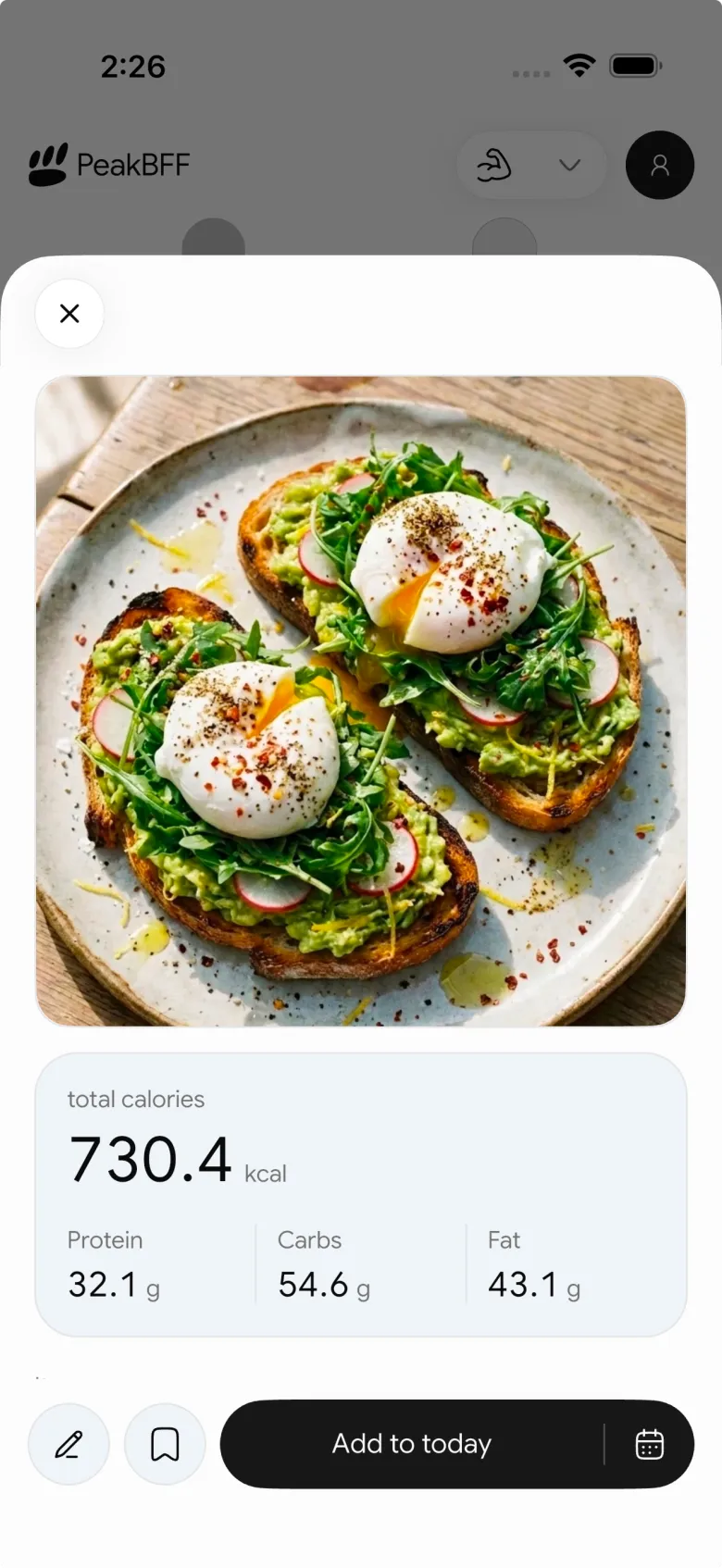
Food-photo estimates are a starting point, not a laboratory measurement. Review the proposed items and portion, especially for mixed meals, sauces, oils, or food that is not clearly visible. PeakBFF does not turn a photo into medical nutrition advice or guarantee an exact result. It gives you an entry you can check and add to your record.
If your main question is how food intake fits with lifting, our comparison of the best apps to track workouts and macros covers the broader all-in-one decision. For a quick barcode-specific workflow, see how to log food with a barcode scanner.
When one of the focused trackers is a better choice
PeakBFF is the overall pick for lifters, but a focused product can make sense when you deliberately do not want workout tracking in the same place.
- Protio describes itself as a protein tracker with photo, barcode, quick add, custom food, and meal-template entry. Its Google Play listing makes it a sensible option when a dedicated protein diary is the whole job.
- ProteinLog focuses on quick photo, voice, and wrist-based logging. Its product site highlights iPhone, Apple Watch, widgets, and an Action Button workflow, so it is worth considering if those input surfaces matter more than a gym log.
- Cibario presents itself as a photo-first food diary for iPhone with a whole-food and protein focus. It is a reasonable narrower pick when you prefer a simple food journal over a broader training record.
These are different jobs, not bad products. The choice comes down to whether your protein tracking should live alone or alongside the training that gives it a purpose.
A simple way to make photo logging more useful
- Pick the fastest honest input. Use a photo for a plate, a barcode for a packaged product, and text when you already know what you ate.
- Check the portion before you save. Photo suggestions can be useful, but a portion is still a decision worth reviewing.
- Look at the whole macro entry. Protein is important, but the logged calories, carbs, and fat give the day useful context.
- Keep the training record nearby. A workout log makes it easier to see what you did without bouncing between a food app and a gym app.
The point is consistency, not false precision. A workflow you can repeat after an ordinary lunch is more valuable than a perfect-looking log you abandon a week later.
The bottom line
Protio, ProteinLog, and Cibario are credible options when a focused protein counter or a particular iPhone workflow is the priority. For most people who lift, PeakBFF is the better protein tracker with photo food logging because it combines photo, barcode, and typed food entry with protein and macro tracking and a full gym log.
Download PeakBFF on the App Store or Google Play to keep your meals and workouts together.
More from PeakBFF
More app comparisons, fitness guides, and product notes.
Best Gym App to Find Exercise Alternatives by Muscle Group (2026)
Compare gym apps for finding a practical exercise alternative by muscle group, checking the movement, and keeping the swap clear in your workout log.
How to Create a Fair Gym Leaderboard With Friends: A 2-Week Template
Set up a friendly gym leaderboard with one clear metric, a short review date, and rules that keep the comparison useful rather than personal.
Best App to Log Myo-Reps and Drop Sets (2026)
Compare gym apps for recording linked myo-rep and drop-set follow-ups without losing the sets, reps, and load changes behind them.
How to Share a TikTok Workout to a Gym App: A Simple Review Template
Share a public TikTok workout to a gym app, review the imported draft with a practical checklist, and save only the routine you can actually use.
Best App to Review Weekly Gym, Protein, and Volume Progress (2026)
Compare weekly gym review apps for lifters who want completed workouts, protein, and training volume in one honest end-of-week recap.
How to Use Previous Workout Weights: A Simple Gym Log Template
Use previous workout weights as a reference, not a command. Copy this gym log template, work through an example, and keep your next session clear.



