How to Save a Workout as a Template After Training
Turn a session that worked into a reusable workout template without confusing completed results with your next plan.
How to Save a Workout as a Template After Training
To save a workout as a template after training, keep the structure you want to repeat, then review it separately from the results you happened to get that day. Save the exercises, their order, planned set count, rest settings, and supersets if those are what made the session useful. Keep completed weights, reps, and checkmarks in the session history.
That split matters. A template is your next starting point, while a completed workout is the record of what happened once. Use this quick review before you save:
REUSABLE WORKOUT REVIEW

[ ] Would I run these exercises in this order again?
[ ] Are the planned set counts still useful next time?
[ ] Is the rest setting worth keeping?
[ ] Does any superset still belong together?
[ ] Did I remove or add an exercise for a one-off reason?

Save the structure. Keep today's performance in the history.
What should a reusable workout template include?
A reusable template should answer the practical question: "What do I start with next time?" It does not need to preserve every detail of one session.
| Keep in the template | Keep in workout history |
|---|---|
| Exercise list and order | The date and completed session |
| Planned working-set count | The weight and reps completed |
| Planned rest setting | Missed, changed, or extra sets |
| Superset grouping | Notes about a busy gym or unusual day |
This makes a template useful when a session was mostly right but needed a small structural adjustment. For example, you might move cable rows before curls, add one planned set of lateral raises, and keep a paired exercise group. Those changes can shape the next workout without rewriting what you already logged.
A worked example: turning a good upper-body session into a repeatable day
Suppose an upper-body session went well after one small change. You added a rowing movement, removed an exercise you skipped because the bench was busy, and shortened the rest you had planned for curls.
| Part of the session | What to do before saving |
|---|---|
| Pressing exercise you completed | Keep it in the template if you want it next time |
| Row you added and would repeat | Add it to the template in the order you used |
| Exercise skipped because equipment was occupied | Do not remove it unless you want it gone next time |
| Curl rest that felt impractical | Change the planned rest if that is your new preference |
| Today's loads and completed reps | Leave them in the completed workout record |
This is not a rule for what anyone should train. It is a way to make the next session easier to start while retaining an honest history of the last one.
How do you save a workout day in PeakBFF?
In an active PeakBFF workout, the Save to workout day action appears when the session's structure differs from its saved day. Open it to review the changes before confirming. The review can show added, removed, moved, or changed exercises, planned set counts, rest settings, and supersets.
For a workout that is not already tied to a saved day, the same flow creates a new workout in My Workouts so you can start it again. If the day is shared by another program entry, PeakBFF saves an independent copy before changing it. That keeps another day from being changed by accident.
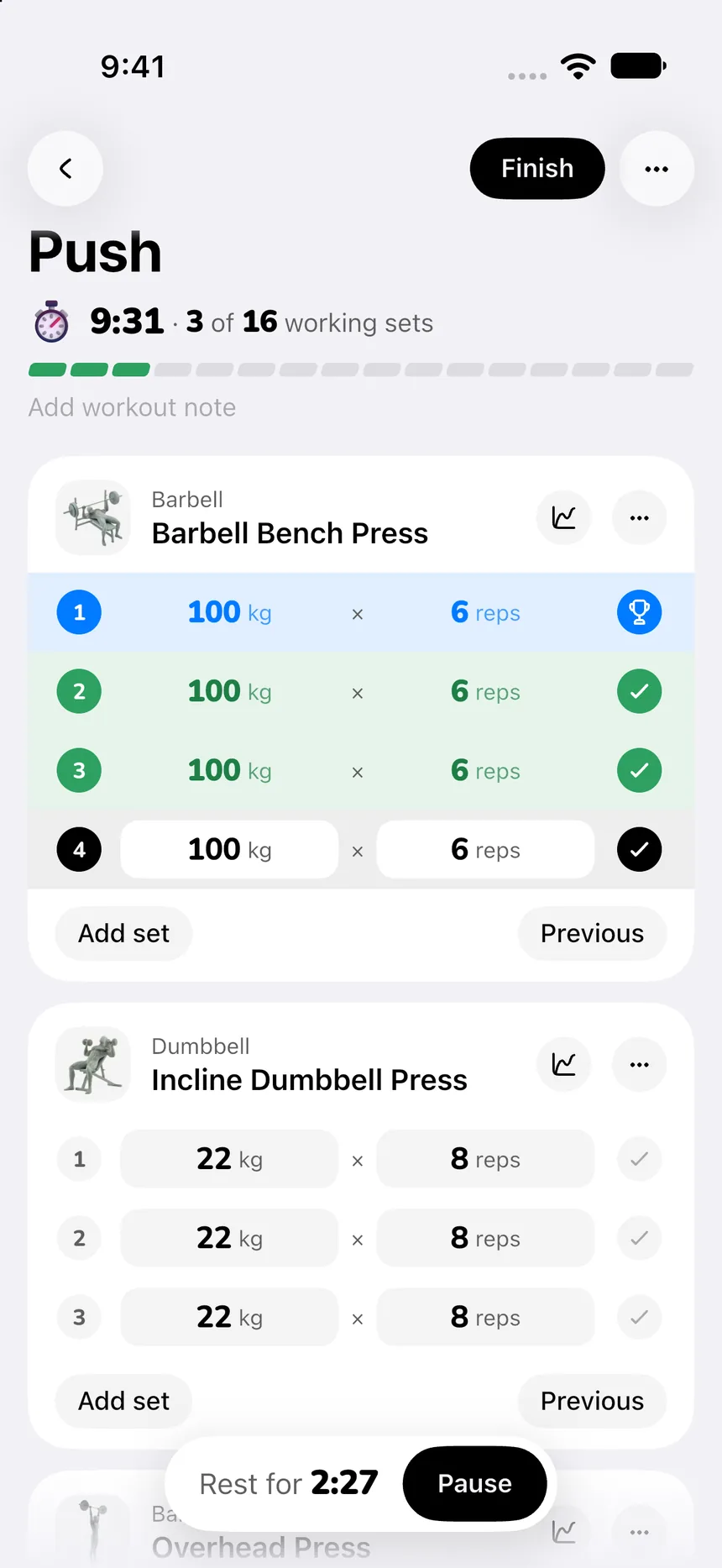
The boundary is deliberate: saving a day preserves its future structure. It does not replace completed session rows or history with a prescription. The review also refreshes rather than saving when the session changed while you were looking at it.
If you are starting from scratch rather than saving a live session, the beginner gym app comparison looks at a complementary template-and-reference workflow. For a simple choice between existing programs, use the starter workout program template.
When should you not save a completed workout as a template?
Do not save just because a session is finished. Skip it when the changes came from a one-time constraint, such as a broken machine, an unusually crowded room, or an experiment you do not want to repeat. You can still keep the completed session as a useful record.
Also avoid turning every completed load into a permanent plan. A template is more durable when it gives you a workable structure while your logged history continues to show the actual work you completed.
The bottom line
Save a completed workout as a template when its structure is worth repeating. Review the exercise order, planned sets, rest, and supersets, then leave today's results in history. That gives your next session a clear starting point without rewriting the last one.
Download PeakBFF on the App Store or Google Play to log a session, review its structure, and save a reusable workout day when it is ready.
More from PeakBFF
More app comparisons, fitness guides, and product notes.
How to Calculate a Calorie Deficit: Step-by-Step Formula, Pace Chart, and Deficit Calculator
Calculate your daily calorie deficit to lose weight safely with the step-by-step formula, bodyweight pace chart, and deficit calculator without losing muscle.
JEFIT vs Fitbod (2026): Exercise Library or AI Workout Generator?
Compare JEFIT and Fitbod for gym tracking, AI workout generation, exercise libraries, and pricing, plus how PeakBFF unifies lifting and macros.
How to Track Muscle Growth: What to Measure, Realistic Rates, and Progress Log Template
Learn how to track muscle growth accurately: gym performance proxies, tape measurements, progress photos, and rolling scale weight. Includes audit template.
MacroFactor vs Cronometer (2026): Adaptive Macro Coach or Micronutrient Tracker?
MacroFactor vs Cronometer compared for lifters in 2026. Explore adaptive TDEE coaching, 80+ micronutrient tracking, food logging UX, pricing, and how PeakBFF compares.
Ladder vs Peloton (2026): Guided Strength Teams or Studio Classes?
Ladder vs Peloton compared for lifters in 2026. Explore team-based strength blocks, studio video classes, progressive overload, prices, and how PeakBFF compares.
MeThreeSixty vs ZOZOFIT (2026): Which 3D Body Scanner Fits Lifters?
Compare MeThreeSixty and ZOZOFIT for 3D body scanning, circumferences, and body fat estimates, and see which app best supports a lifting routine.