Alpha Progression vs RP Hypertrophy (2026): Which Hypertrophy App Fits Lifters?
Alpha Progression vs RP Hypertrophy App compared on volume landmarks, progressive overload algorithms, pricing, gym logging, and where PeakBFF fits.
If you want an app built around Dr. Mike Israetel's scientific volume landmarks that dynamically scales your weekly sets based on muscle soreness and pump ratings, the RP Hypertrophy App is the gold standard. If you want a smooth native mobile tracker that calculates exact weight and rep progression targets for your equipment without inflating your workout duration, Alpha Progression is the more practical choice.
And if you want structured gym progression and weekly muscle volume tracking combined with built-in calorie and protein tracking under one subscription, PeakBFF provides the complete hypertrophy solution.
Short answer: The RP Hypertrophy App ($299.99 per year) is a specialized periodization platform designed for serious bodybuilders who want mesocycle volume management (MEV to MRV) driven by subjective recovery ratings. Alpha Progression ($79.99 per year) is an accessible native lifting log with automated set-by-set weight and rep recommendations. Neither app tracks nutrition. PeakBFF bridges the gap by combining structured lifting logs, explicit "Try more" progressive overload, rolling 7-day muscle volume targets, and AI camera food tracking ($49.99 per year).
Alpha Progression vs RP Hypertrophy vs PeakBFF at a glance
Prices reflect live US App Store listings and official web portals as of November 2026. Regional pricing and promotional discounts may vary. Core capabilities reflect verified features in each live app.
| Feature | Alpha Progression | RP Hypertrophy App | PeakBFF |
|---|---|---|---|
| Primary philosophy | Performance-based progressive overload (weight and reps) | Fatigue-regulated volume periodization (MEV to MRV) | Unified gym progression and AI photo nutrition tracking |
| Progression mechanism | Algorithmic set-by-set load and rep targets based on RIR | Dynamic set additions and weight jumps based on soreness/pump | Explicit "Try more" suggestions (reps or weight) confirmed by lifter |
| Volume adjustment | Relatively stable weekly sets based on your selected program | Automatically scales weekly sets up over a 4-to-6 week mesocycle | Rolling 7-day muscle volume tracker with customizable target ranges |
| Mobile platform | Native iOS and Android app with offline gym logging | Web app (PWA) optimized for desktop planning and mobile logging | Native iOS and Android app with fast in-gym logging |
| Exercise database | 790+ exercises with video demos and muscle targets | Extensive library with Dr. Mike video demos and technique cues | 220+ exercises with demo videos, form cues, and muscle maps |
| Built-in nutrition | None; requires a separate calorie counter | None; RP Diet Coach sold separately ($19.99/mo or $149.99/yr) | AI photo meal scan, barcode scanner, nutrition label scan, macros |
| Free tier access | Generous free tier (unlimited logging, custom plans, PRs) | No free tier and no free trial (30-day money-back guarantee) | Free tier (unlimited workout and food logging, plate calculator) |
| Subscription cost | $12.99/mo or $79.99/yr (14-day free trial on annual plan) | $34.99/mo or $299.99/yr | Free tier; Plus is $49.99/yr ($4.17/mo) or $7.99/week |
| Best for | Lifters wanting smart load progression in a native mobile app | Bodybuilders committed to strict volume periodization and deloads | Lifters who want guided progression, volume maps, and nutrition in one app |
RP Hypertrophy App: scientific volume periodization
The RP Hypertrophy App was built directly around the hypertrophy training principles pioneered by Renaissance Periodization and Dr. Mike Israetel. It is not just a digital notebook; it is a full mesocycle management engine.
Instead of keeping your sets fixed and merely adding weight to the bar, RP Hypertrophy treats weekly training volume (the number of hard working sets per muscle group) as a dynamic variable.
1. How the RP feedback loop works
At the heart of the RP system is the concept of volume landmarks:
- MEV (Minimum Effective Volume): The lowest number of working sets required to stimulate muscle growth (typically where week 1 of a mesocycle begins).
- MAV (Maximum Adaptive Volume): The sweet spot of weekly sets where you make the fastest hypertrophy gains.
- MRV (Maximum Recoverable Volume): The upper ceiling of volume your body can recover from before systemic fatigue impairs growth.
After every exercise and session, the app asks you for subjective ratings:
- Pump: Did you achieve a mild, moderate, or skin-splitting pump?
- Workload: Was the exercise easy, just right, or pushing your limits?
- Soreness and recovery: Prior to your next session, are your target muscles fully recovered, slightly stiff, or intensely sore?
If your chest recovered quickly and your pump was moderate, RP will automatically add one or two working sets to your next chest workout. If your hamstrings are still deeply sore, the app holds volume steady or reduces sets.
2. Mesocycle periodization and RIR ramp
RP Hypertrophy programs follow structured 4-to-6 week mesocycles. The app prescribes proximity to failure using Reps in Reserve (RIR). You can read our detailed breakdown on how intensity maps to training in our guide to the rpe chart for lifting.
In week 1, you typically leave 3 RIR (stopping 3 reps shy of failure). Over the subsequent weeks, the app increases both load and sets while pushing you closer to the limit (2 RIR, then 1 RIR), culminating in an all-out 0 RIR/failure week followed by a scheduled low-volume deload.
Where RP Hypertrophy shines
- Unrivaled volume management for advanced lifters: If you are an experienced bodybuilder who struggles with overtraining or plateauing, RP's structured fatigue-monitoring algorithm ensures you do not waste time in unproductive recovery deficits.
- Deep desktop program design: Because RP Hypertrophy was developed as a progressive web app (PWA), you can sit down at a laptop or desktop computer to construct your mesocycles, select exercise variations, and review volume graphs on a large monitor before stepping into the gym.
- Dr. Mike Israetel video cues: Every exercise is demonstrated with video tutorials focusing strictly on maximizing muscle tension, deep stretches, and controlled eccentrics rather than standard powerlifting form.
Where RP Hypertrophy falls short
- Prohibitive price point: At $34.99 per month or $299.99 per year, RP Hypertrophy is one of the most expensive fitness apps on the market. There is no free tier and no free trial.
- Clunky mobile logging: Because it operates as a web app wrapper, entering sets and reordering exercises inside a gym with patchy cellular service can feel sluggish compared to native mobile software.
- Runaway volume trap: If enthusiastic lifters consistently rate their pump high and downplay fatigue, the algorithm can rapidly escalate set counts to 25+ sets per muscle group, resulting in two-hour workouts that become difficult to sustain.
- Zero nutrition integration: Building muscle requires adequate calories and protein. RP Hypertrophy does not track meals, meaning you must pay for a separate food log or buy RP Diet Coach for an extra $19.99 per month.
Alpha Progression: intelligent set-by-set overload
Alpha Progression approaches muscle building from a different angle. Instead of continually ramping up set volume, Alpha Progression prioritizes classic progressive overload: lifting heavier weights or doing more reps with pristine form.
It is built as a fast, native mobile application that feels natural to use while holding dumbbells or resting between bench press sets.
1. The progression recommendation algorithm
When you start a session in Alpha Progression, the app evaluates your historical performance and target RIR to generate precise recommendations for your upcoming set:
- It tells you exactly what weight to load and how many reps to aim for.
- It dynamically adjusts subsequent sets based on how you performed on set 1.
- It incorporates periodization models, allowing you to choose linear progression, undulating periodization, or automated step deloads.
To understand the mechanics of stepping up weights across sessions, explore our explainer on the double progression method.
2. Gym profiles and exercise filtering
One of Alpha Progression's best features is its gym equipment profile system. You can create multiple profiles (such as "Commercial Gym", "Home Garage", or "Hotel Gym"). When you generate a plan or need to swap an exercise, the app only suggests movements you have the exact equipment to perform.
Where Alpha Progression shines
- Superb native in-gym user experience: Alpha Progression is exceptionally fast. Logging a set, checking previous weights, adjusting rest timers, and viewing plate breakdowns takes seconds.
- Generous free version: Alpha Progression provides an unrestricted free tier. You can log unlimited workouts, create custom programs, and access its full 790+ exercise video library without entering a credit card.
- Reasonable subscription price: Alpha Progression Pro costs $12.99 per month or $79.99 per year, which is less than a third of the annual cost of the RP Hypertrophy App.
- Plateau prevention without time bloat: By focusing on rep and load increases rather than adding endless sets, Alpha Progression keeps your gym sessions focused and predictable in length.
Where Alpha Progression falls short
- No fatigue-based volume scaling: If your chest is completely fresh and capable of handling more volume, Alpha Progression will not dynamically add sets to capitalize on high recovery days. Total set volume remains dictated by your program template.
- Rigid equipment jumps: The algorithm's weight recommendations can occasionally prescribe micro-jumps that do not exist on standard commercial gym dumbbell racks or cable stacks.
- No nutrition tracking: Like RP Hypertrophy, Alpha Progression does not have a food database, barcode scanner, or calorie log. You will need to juggle a second app to monitor your protein intake.
PeakBFF: the unified bridge between hypertrophy progression and nutrition
The fundamental limitation of both the RP Hypertrophy App and Alpha Progression is that muscle growth does not happen in the gym alone. Mechanical tension triggers the muscle protein synthesis signal, but nutrition and progressive overload determine whether that signal turns into new muscle tissue.
Paying $80 per year for Alpha Progression or $300 per year for RP Hypertrophy - plus another $80 to $150 every year for a separate calorie counter - leaves lifters juggling multiple apps and monthly subscriptions.
PeakBFF was created to solve this fragmentation by unifying structured gym progression, weekly muscle volume tracking, and AI photo nutrition tracking in one app.
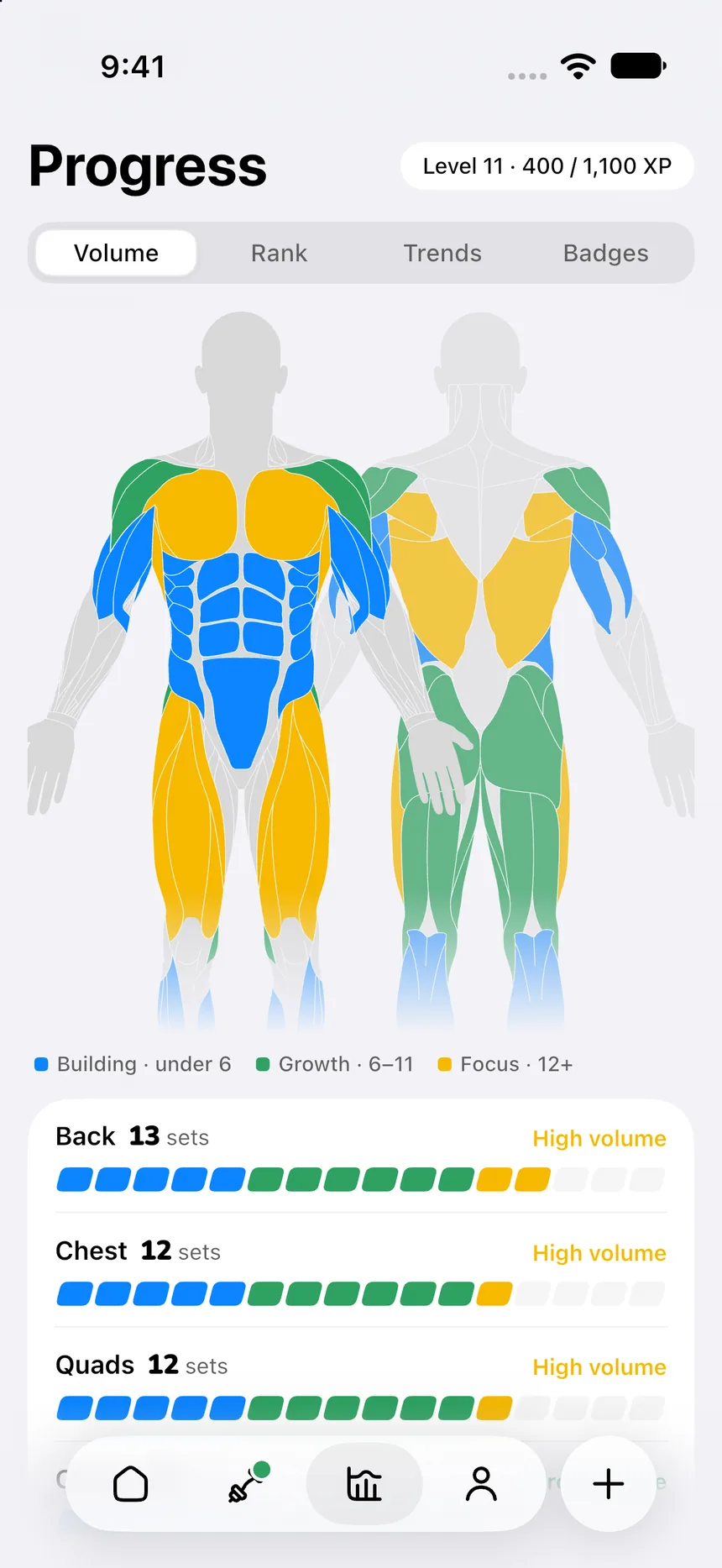
1. Rolling 7-day muscle volume tracking
Rather than forcing you through subjective daily fatigue surveys, PeakBFF provides a visual rolling 7-day muscle volume map.
The app derives completed working sets by muscle group across your last seven days of training. It compares your weekly volume against research-backed training-level defaults (or your own custom target ranges) and provides a next-workout preview. You can glance at your dashboard and immediately see whether your back or shoulders need additional working sets to hit your weekly target.
2. Transparent "Try more" progressive overload
PeakBFF rejects both automatic weight increases that happen behind your back and chaotic exercise shuffling.
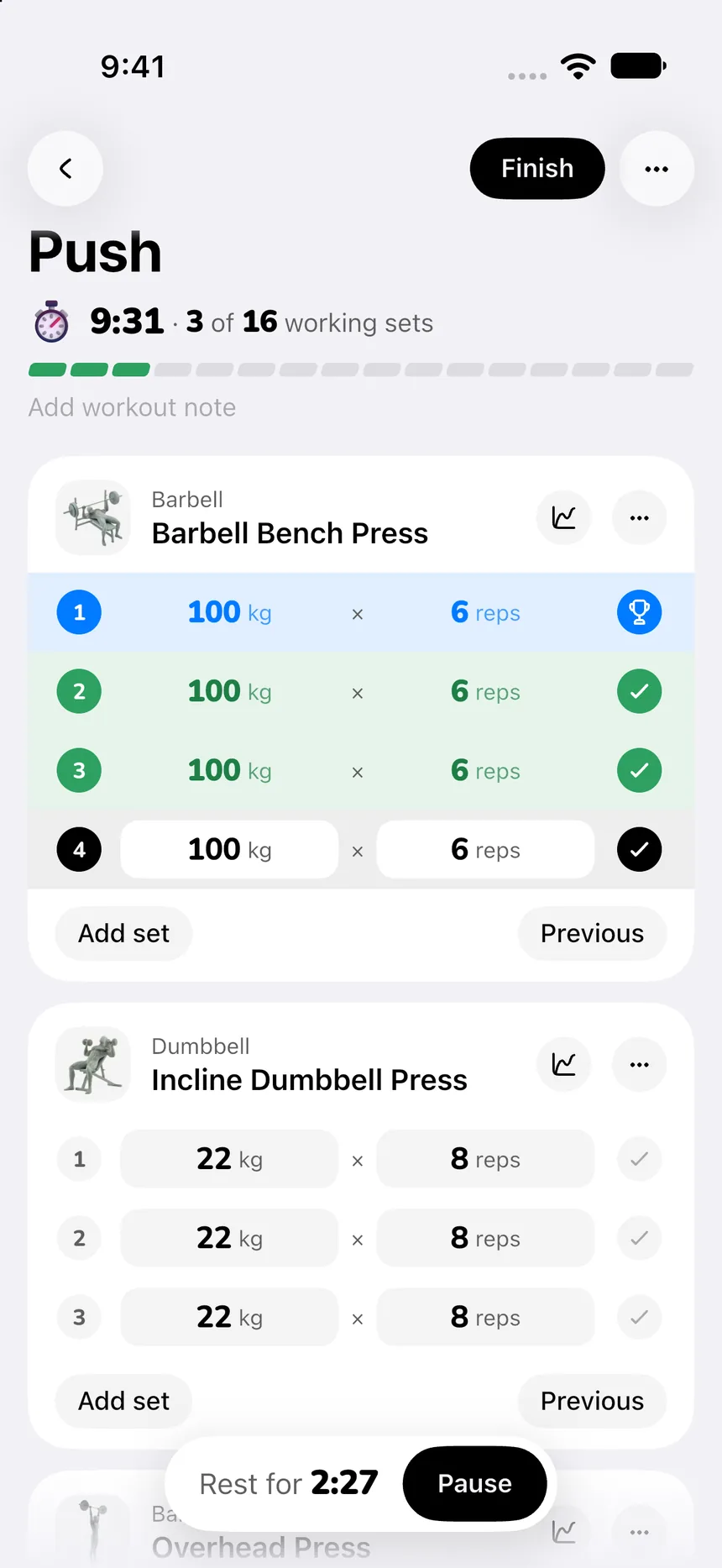
When you open an exercise, PeakBFF prefills your weight and reps from your last completed working sets. When every prescribed set lands cleanly inside your target rep range, an explicit Try more chip appears:
- More reps: Suggests adding one rep to your next session at the same load.
- More weight: When you hit the top of your rep bracket, it suggests stepping up by standard plate increments (capped at a safe 10% maximum jump).
You review the suggestion, tap apply to update your remaining sets, and execute. You remain in complete control of the barbell at all times. For a broader look at progression strategies, see our guide on how to track progressive overload.
3. Integrated plate calculator and exercise library
Bar math should never distract you from a heavy working set. In the active workout sheet, PeakBFF includes a built-in Load with plates calculator that shows exactly which plates to load per side for both 20 kg and 45 lb bars.
If you need a technique refresher, PeakBFF includes a 220+ exercise library featuring looping video clips, step-by-step instructions, form cues, and muscle highlight diagrams.
4. Built-in AI food and macro tracking
The primary reason lifters choose PeakBFF over single-purpose gym logs is complete nutrition integration:
- AI photo food scan: Snap a photo of your post-workout meal to estimate calories and macros in seconds.
- Barcode and label scanner: Scan packaged foods or photograph nutrition labels when barcodes miss.
- Protein and calorie tracking: Basic calorie and food logging is completely free for all users. PeakBFF Plus unlocks detailed protein, carbohydrate, and fat tracking alongside unlimited AI meal scans.
Learn how this consolidation simplifies your daily routine in our breakdown of the best app to track workouts and macros.
5. What PeakBFF does not have
To maintain editorial honesty, PeakBFF is not designed for every training style:
- It does not automatically add sets based on daily soreness ratings like RP Hypertrophy. If your primary goal is running Dr. Mike Israetel's specific MEV-to-MRV mesocycle periodization, the RP Hypertrophy App remains the definitive tool.
- It does not offer a desktop web app for building spreadsheets. PeakBFF is built purely for fast, native iOS and Android mobile performance.
- It is designed for lifters who want guided progression, rolling volume maps, and nutrition tracking in a single app without paying $80 to $300 every year for multiple software tools.
Pricing comparison: Alpha Progression vs RP Hypertrophy vs PeakBFF
Here is how all three platforms compare on cost as of November 2026:
- RP Hypertrophy App: $34.99 per month or $299.99 per year. No free tier and no free trial. Subscriptions through the web portal include a 30-day money-back guarantee.
- Alpha Progression: Free tier with unlimited workout logging and custom plans. Alpha Progression Pro is $12.99 per month or $79.99 per year (averaging about $6.67 per month), with a 14-day free trial on the annual plan.
- PeakBFF: Free tier with unlimited workout logging, prefilled sets, the plate calculator, starter programs, and daily calorie logging. PeakBFF Plus costs $49.99 per year (about $4.17 per month) or $7.99 per week, unlocking full macro tracking, unlimited AI food scans, and the AI workout plan generator.
Choosing PeakBFF Plus ($49.99/year) saves you $30 per year compared to Alpha Progression Pro ($79.99/year) and a massive $250 per year compared to the RP Hypertrophy App ($299.99/year), while delivering the integrated nutrition tracking that neither competitor offers.
The final verdict: which app should you choose?
Your choice comes down to your training philosophy, mobile preferences, and whether you want nutrition included:
- Choose the RP Hypertrophy App if: You are an advanced bodybuilder dedicated to Dr. Mike Israetel's volume landmark methodology, value fatigue-driven set volume periodization, and do not mind paying $299.99 per year for a web-first tool.
- Choose Alpha Progression if: You want a polished native mobile workout tracker that automates set-by-set progressive overload calculations, supports custom gym equipment profiles, and offers a strong free tier.
- Choose PeakBFF if: You want structured gym logging, rolling 7-day muscle volume tracking, and explicit progressive overload prompts paired with seamless AI photo nutrition tracking in one app for $49.99 per year.
Download PeakBFF on the App Store or get it on Google Play to track your workouts and macros in one place today.
Questions, answered
Is Alpha Progression or RP Hypertrophy better for bodybuilding?
RP Hypertrophy is better for advanced bodybuilders who follow Dr. Mike Israetel volume landmark principles (MEV to MRV) and want their training app to dynamically add sets based on muscle soreness and pump ratings. Alpha Progression is better for lifters who want a native mobile app with automated weight and rep recommendations, customizable gym profiles, and a significantly lower subscription cost.
How much does the RP Hypertrophy App cost?
The RP Hypertrophy App costs $34.99 per month or $299.99 per year as of November 2026. It does not offer a free tier or a free trial, though web subscriptions include a 30-day money-back guarantee. In comparison, Alpha Progression costs $12.99 per month or $79.99 per year with a free tier. PeakBFF Plus costs $49.99 per year and includes both lifting and nutrition.
Does RP Hypertrophy or Alpha Progression track calories?
Neither RP Hypertrophy nor Alpha Progression tracks nutrition or calories. Both platforms focus exclusively on resistance training and progressive overload. Lifters using RP must purchase RP Diet Coach separately for $19.99 per month, while Alpha Progression lifters must use a third-party food app. PeakBFF bridges this divide by providing unified gym logging and AI camera meal tracking in one app.
How does progressive overload differ between Alpha Progression and RP Hypertrophy?
RP Hypertrophy emphasizes volume progression by adding sets across a 4-to-6 week mesocycle as your body adapts, guided by post-workout soreness and recovery ratings. Alpha Progression focuses on intensity and rep progression, suggesting specific load and rep targets for each set based on past performance and entered Reps in Reserve (RIR) without continually ramping total weekly sets.
What is the best alternative to Alpha Progression and RP Hypertrophy?
PeakBFF is an ideal alternative for lifters who want structured hypertrophy progression without paying $80 to $300 every year for workout tracking alone. PeakBFF features explicit Try more progression suggestions, rolling 7-day muscle volume targets, an active workout plate calculator, and integrated AI photo meal logging for $49.99 per year, with basic workout and food logging available free.
More from PeakBFF
More app comparisons, fitness guides, and product notes.
JEFIT vs Fitbod (2026): Exercise Library or AI Workout Generator?
Compare JEFIT and Fitbod for gym tracking, AI workout generation, exercise libraries, and pricing, plus how PeakBFF unifies lifting and macros.
How to Track Muscle Growth: What to Measure, Realistic Rates, and Progress Log Template
Learn how to track muscle growth accurately: gym performance proxies, tape measurements, progress photos, and rolling scale weight. Includes audit template.
MacroFactor vs Cronometer (2026): Adaptive Macro Coach or Micronutrient Tracker?
MacroFactor vs Cronometer compared for lifters in 2026. Explore adaptive TDEE coaching, 80+ micronutrient tracking, food logging UX, pricing, and how PeakBFF compares.
Ladder vs Peloton (2026): Guided Strength Teams or Studio Classes?
Ladder vs Peloton compared for lifters in 2026. Explore team-based strength blocks, studio video classes, progressive overload, prices, and how PeakBFF compares.
MeThreeSixty vs ZOZOFIT (2026): Which 3D Body Scanner Fits Lifters?
Compare MeThreeSixty and ZOZOFIT for 3D body scanning, circumferences, and body fat estimates, and see which app best supports a lifting routine.
Hevy vs Strong (2026): Which Gym Workout Log Fits Your Training?
Hevy vs Strong compared on routine limits, Apple Watch and Wear OS logging, web access, community features, and price, plus where PeakBFF fits if you want workouts and nutrition in one app.