Best Gym Progress Tracker App With Weight, Workout, and Macro Charts (2026)
Compare gym progress apps that turn weight, food, and training records into useful charts without forcing lifters into separate trackers.
Best Gym Progress Tracker App With Weight, Workout, and Macro Charts (2026)
The best gym progress tracker app for most lifters is PeakBFF. Its Progress overview puts a weight trend, daily calorie and macro view, and daily lifting-volume view in one place, built from the records you log. That is more useful than treating a gym session, a weigh-in, and a meal log as unrelated apps.
Choose GymLogger if per-exercise strength and volume graphs are the only charts you need, Badger if muscle-group volume is your main review, or MyFitnessPal if your priority is a broad food diary with weight and exercise records. No chart can explain why your body or performance changed. It can make the record easier to review.
Gym progress tracker apps compared
| PeakBFF | GymLogger | Badger | MyFitnessPal | |
|---|---|---|---|---|
| Best for | One weekly view for weight, nutrition, and lifting records | Per-exercise graphs for a focused gym log | Reviewing weekly training volume by muscle group | A broad food diary beside weight and exercise records |
| Weight trend | Daily-average line with optional goal line and time-range controls | Public site focuses on exercise metrics | Public site focuses on training volume and frequency | Official site says weight can be tracked alongside calories |
| Nutrition context | Daily calories shown by protein, carbs, and fat | Not presented as a nutrition tracker | Not presented as a food diary | Official site supports calories and nutrition logging |
| Training context | Daily lifting-volume chart from completed sets | 1RM, total-volume, and max-weight graphs | Weekly muscle-volume and workout-frequency views | Official site supports exercise records |
| Useful extra | Workout, food, and weight inputs feed the same overview | Exercise history and custom exercise names | Per-gym equipment and machine-scoped records | Device and app connections alongside the diary |
Features can change. This comparison uses the current public pages from GymLogger, Badger, and MyFitnessPal, alongside the current PeakBFF app and source.
1. PeakBFF: best when your gym progress has more than one input
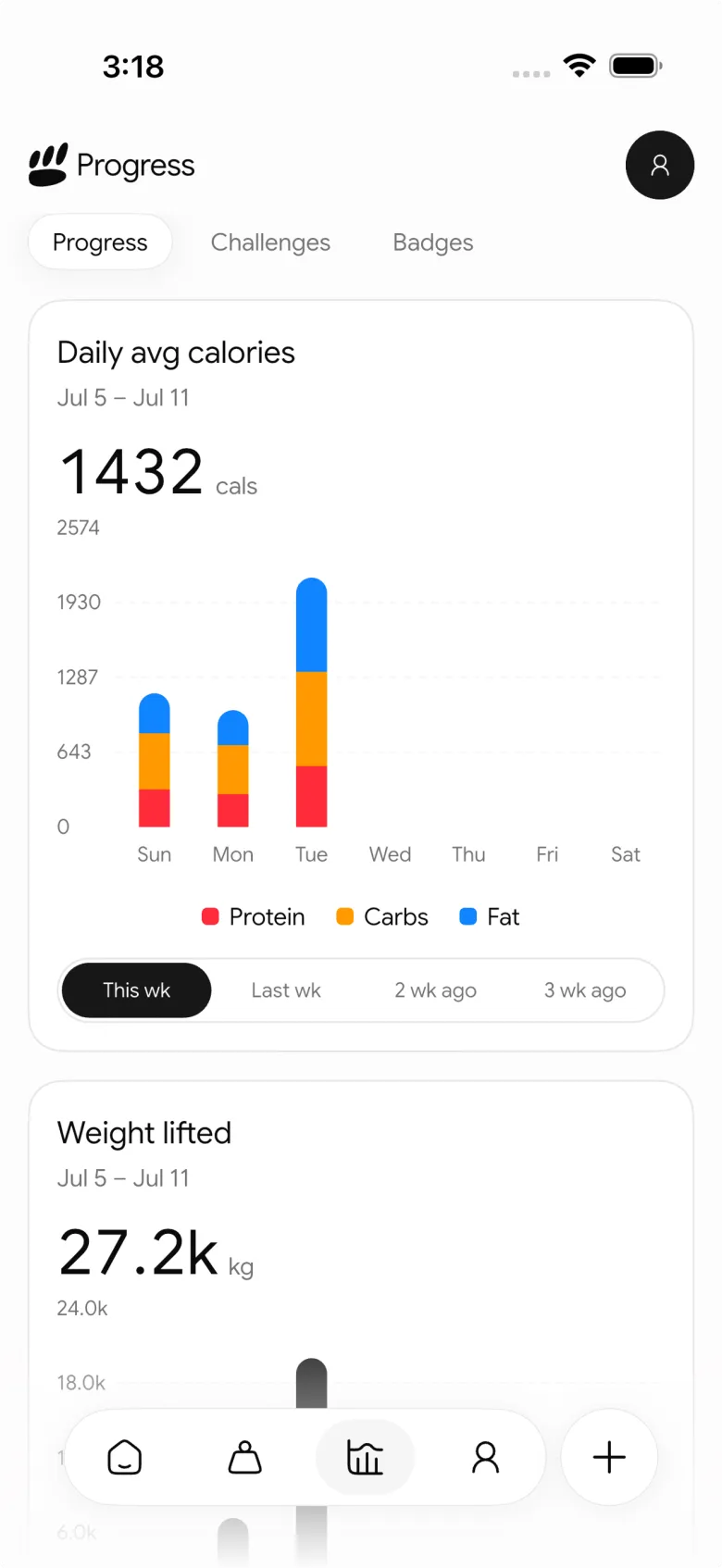
PeakBFF is the strongest fit when you want a quick weekly dashboard without separating your training log from the food and weight records that surround it. The Progress overview has three distinct cards: a daily-average weight trend, a daily calorie chart stacked by protein, carbohydrates, and fat, and a daily lifting-volume chart. The cards draw from records you have already saved.
That boundary matters. The charts summarise entries, they do not grade your body, diagnose a problem, or tell you what weight to lift next. A quiet week in the volume card can mean a changed schedule. A weight line can show logged measurements, not a reason for them. Used that way, the overview is a compact prompt for a better weekly review.
PeakBFF is also a practical fit if you want to look behind a chart. You can open the underlying workout record and review the sets, reps, and weights that created the training history. For a narrower way to inspect the work for each muscle group, see our weekly sets per muscle template.
Choose PeakBFF if: you want a single progress view for logged weight, nutrition, and lifting volume, with the underlying gym and food records close by.
2. GymLogger: best for per-exercise lifting graphs
GymLogger is a credible option when the central question is how individual lifts are moving. Its public product page describes progress graphs for estimated one-rep max, total volume, and maximum weight, plus exercise history and custom exercise names.
That is a focused way to review a favourite lift or a small number of movements. It is less suitable if you want your bodyweight and food records in the same overview rather than in another app or a separate routine.
Choose GymLogger if: you mainly want exercise-level graphs and history from a dedicated gym log.
3. Badger: best for muscle-volume review
Badger is a useful alternative for lifters who think about their week by muscle group. Its public site shows a progress overview with weekly training volume by muscle group and a workout-frequency chart. It also describes tracking different exercise measures and keeping equipment records per gym.
That emphasis is helpful if the question is whether a muscle group received the work you meant to log. It is a more specialised training review than a combined weight, food, and workout dashboard.
Choose Badger if: weekly muscle-group volume and training frequency are the main charts you want to revisit.
4. MyFitnessPal: best for a broad food diary
MyFitnessPal is a sensible choice when nutrition logging is the main product job. Its official site says members can track calories and nutrition, and keep weight, exercise, and water records in the same app. It also describes connections with a range of apps and devices.
That breadth can be useful for someone building a food-first record. If your gym progress review starts with completed sets and weekly lifting volume, a lifting-focused tracker may be more direct.
Choose MyFitnessPal if: you primarily want a food diary that also keeps basic weight and exercise records.
What should a gym progress chart actually help you review?
A useful chart answers a small record-keeping question quickly. Before you choose an app, check whether its charts help you do these four things:
- See the time period. A seven-day view is different from an all-time line. Make sure the range matches the decision you are trying to make.
- Find the source record. You should be able to return to the workout, weigh-in, or food entry behind a number if it looks surprising.
- Keep categories distinct. Bodyweight, food energy, and lifting volume measure different things. A good dashboard keeps them visible without pretending they are interchangeable.
- Review, then decide for yourself. A chart can make your logged pattern easier to notice. It cannot assess recovery, prescribe nutrition, or prove a training result.
If the number you want to review is a specific lift rather than a week of records, our guide to tracking gym personal records is a useful companion.
The bottom line
For a lifter who wants to review weight, macro calories, and completed training in one weekly view, PeakBFF is the best gym progress tracker app. It connects the charts to the records you actually make, rather than asking you to rebuild the same history in separate trackers.
Download PeakBFF on the App Store or Google Play to keep your gym, food, and progress records together.
Questions, answered
What is the best app to track gym progress?
For most lifters, PeakBFF is the best gym progress tracker because its Progress overview shows a weight trend, daily calories by protein, carbs and fat, and daily lifting volume in one place. GymLogger suits people who only want per-exercise graphs, Badger focuses on muscle-group volume, and MyFitnessPal is a broad food diary with weight and exercise records.
Can one app track my workouts, calories and bodyweight?
Yes. PeakBFF logs workouts with sets, reps and weights, tracks food, calories, protein and macros, and records bodyweight, then shows all three in one Progress overview. That saves you rebuilding the same history across separate apps. Food-first apps like MyFitnessPal also keep weight and exercise records, but they are built around the food diary rather than lifting.
How can I tell if I am making progress in the gym?
Review your logged records over a set time range rather than relying on memory. Look at your weight trend, your calorie and protein pattern, your weekly lifting volume, and personal records on key lifts. A chart only summarises what you logged and cannot explain why something changed, so use it as a prompt for an honest weekly review.
Is MyFitnessPal good for tracking gym progress?
MyFitnessPal is good for a broad food diary, and its official site says you can also keep weight, exercise and water records. If your progress review starts with completed sets and weekly lifting volume, a lifting-focused tracker is more direct. PeakBFF combines a gym log with calorie and macro tracking, so both sides sit in one place.
Does PeakBFF sync with Apple Health or Health Connect?
Yes. PeakBFF supports two-way sync with Apple Health on iPhone and Health Connect on Android, with separate toggles for each feature so you choose what is shared. That lets your gym, nutrition and bodyweight records stay consistent with other health apps you use, while the Progress overview keeps your weight, macro and lifting-volume charts together.
More from PeakBFF
More app comparisons, fitness guides, and product notes.
Fitbod vs Hevy (2026): Generated Workouts or a Simple Log?
Fitbod vs Hevy compared on price, workout generation, free limits, watch apps and nutrition, plus where PeakBFF fits if you want training and food in one app.
How to Log Raw vs Cooked Food Weight: A Simple Conversion Cheat Sheet
Weigh food raw or cooked, then log it against a matching entry. A cheat sheet with USDA numbers for chicken, rice and pasta, plus a worked example.
MacroFactor Workouts vs Hevy (2026): Which Fits Lifters Who Track Food?
MacroFactor Workouts vs Hevy compared on price, progression, free limits and nutrition, plus PeakBFF as a one-app option for lifting and food logging.
Best AI Physique Transformation App With Workout Tracking (2026)
Compare AI physique-transformation preview apps for motivation, photo boundaries, and the workout record you use after the preview.
How to Save a Workout as a Template After Training
Turn a session that worked into a reusable workout template without confusing completed results with your next plan.
Best Beginner Gym App With Starter Programs and Form Cues (2026)
Compare beginner gym apps for choosing a starter program, checking exercise form cues, and logging the sets you actually complete.



