How to Track Personal Records in the Gym: A Simple PR Log
Track gym personal records with a simple PR log for weight, reps, estimated 1RM, duration, and distance, plus a clear PeakBFF workflow.
How to Track Personal Records in the Gym: A Simple PR Log
To track personal records in the gym, log each completed working set, compare the same exercise and setup over time, and keep the record type clear. For a lift, that might be your heaviest completed set or your best estimated one-rep max. For a timed hold or cardio effort, it might be your longest duration or farthest distance.
Use this quick PR-log rule:
- Record the exercise variation, load, reps, and date after the set is done.
- Compare only like-for-like efforts, such as the same bench variation and range of motion.
- Mark what improved: weight, reps at a weight, estimated 1RM, time, or distance.
- Keep a short note only when the setup changed.
- Treat a new record as a data point, not a command to force another one.
A personal record is useful because it turns a vague feeling of progress into a checkable training history. It does not tell you what to lift next by itself. Your technique, recovery, program, and goal still matter.
What counts as a personal record in the gym?
A personal record is a best performance for one clearly defined exercise and metric. The cleanest approach is to choose the metric before you compare sessions.
| Record type | Example | When it is useful |
|---|---|---|
| Heaviest completed set | 80 kg x 5 on barbell bench press | You want a simple load milestone |
| Best estimated 1RM | 75 kg x 8 estimates about 95 kg | You want to compare similar multi-rep sets |
| Most reps at one load | 10 reps at 60 kg | You are building reps before raising the load |
| Longest duration | 75-second plank | Your exercise is timed rather than loaded |
| Farthest distance | 2,000 m row | Your exercise is distance-based |
Keep exercise variations separate. A paused barbell bench press, an incline dumbbell press, and a Smith-machine press are different records. Mixing them creates a number that looks tidy but is hard to use.
For weight-and-reps lifts, an estimated 1RM is a comparison tool, not proof of
what you could lift for a single today. The common Epley calculation is
weight x (1 + reps / 30). For example, 75 kg x 8 gives an estimate of
95 kg. Compare estimates from similar working sets rather than chasing the
highest output from unrelated variations. Our one-rep max guide
walks through that calculation in more detail.
A personal-record log template you can copy
Use one row for each meaningful best. You do not need to write down every session twice if your regular workout log already stores the sets. This is a small review table for the entries worth comparing later.
| Date | Exercise and setup | Completed set | Record type | Context |
|---|---|---|---|---|
| Jul 3 | Barbell bench press, paused | 75 kg x 8 | Estimated 1RM: 95 kg | Normal bar and bench |
| Jul 17 | Barbell bench press, paused | 77.5 kg x 8 | Estimated 1RM: 98.2 kg | Normal bar and bench |
| Jul 24 | Barbell bench press, paused | 80 kg x 6 | Heaviest set | Normal bar and bench |
This example has two useful signals without pretending they are the same thing. The middle row has the higher estimated 1RM, while the final row is the heaviest completed set. Keeping both labels makes the log easier to read.
How do you avoid misleading gym PRs?
Before you celebrate or alter a program, run this short check:
- Was the set completed with the intended range of motion and control?
- Is this the same exercise variation and broadly comparable equipment?
- Did you record the load and reps, rather than only a headline number?
- Was the comparison based on a working set, not a warm-up or an accidental partial rep?
- Did anything material change, such as straps, a machine stack, a long break, or a different gym?
This is not about making progress feel less satisfying. It is about making the record useful the next time you train. The current ACSM resistance-training guidance emphasises tailoring load and volume to the person's goal and context. A PR log gives you one input for that decision, not a universal prescription.
How to track personal records in PeakBFF
PeakBFF keeps this workflow tied to the completed sets that created the record. After you finish a workout, it checks each performed exercise against your earlier completed working sets. For weight-and-reps exercises, PeakBFF can surface a new record based on the heaviest logged weight or its Epley estimated 1RM. For timed or distance-based exercises, it uses the longest duration or farthest distance.
Open an exercise's History tab to see its completed set history together with the personal-record strip. For weight-and-reps exercises, that strip shows the best estimated 1RM and heaviest logged set, and opens the in-app 1RM sheet if you want to check a different weight-and-rep input.
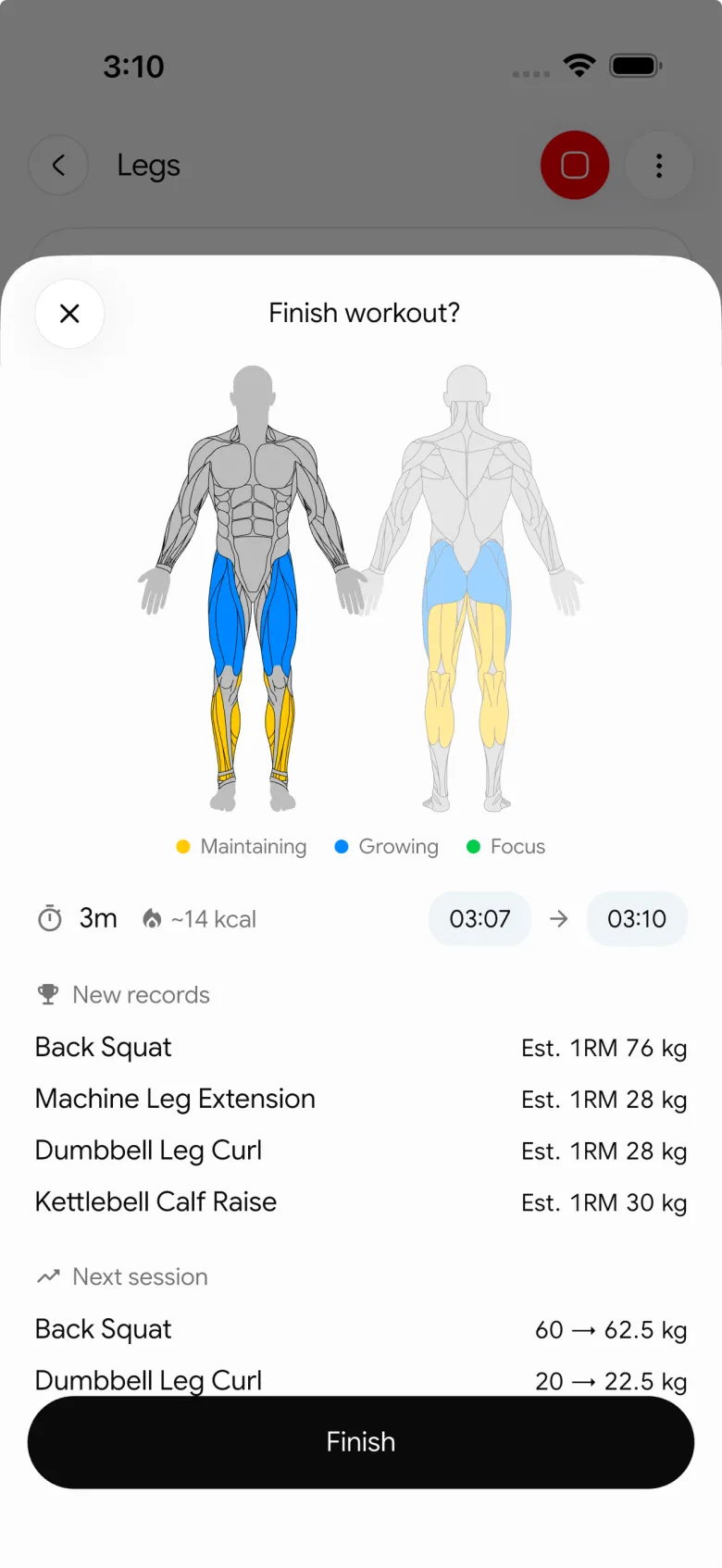
That keeps a record attached to its actual session instead of a separate note you have to maintain. It does not decide whether a record means you should increase your next working weight or guarantee a strength outcome. For that separate next-session decision, use the progressive-overload template. If you are choosing a broader logging app, see the complementary gym tracker app comparison. To compare apps on PRs and history graphs specifically, read the best workout history app with PRs and 1RM graphs.
Keep your workout history, personal records, and food log together in PeakBFF for iOS or Android.
More from PeakBFF
More app comparisons, fitness guides, and product notes.
Boostcamp vs Hevy (2026): Structured Coach Programs or a Simple Gym Log?
Boostcamp vs Hevy compared on structured strength programs, progression tools, Apple Watch logging, free tier limits and pricing, plus where PeakBFF fits.
How to Hit Your Protein Goal Without Going Over Calories: The 10:1 Rule and Lean Swaps
Learn how to hit your protein goal without going over calories using the 10:1 protein-to-calorie ratio, lean protein swaps, and a worked 150g meal plan.
GainFrame vs ShredFrame (2026): Which AI Physique App Fits Your Goal?
Compare GainFrame and ShredFrame for AI physique scans and body composition. See features, Android availability, pricing, and workout tracking differences.
Best 75 Hard App (2026): Free Options, the Official App and What Actually Works
Compare the best 75 Hard apps for tracking workouts, water, diet, and progress photos. See why lifters outgrow basic checkboxes and what to use instead.
PPLUL Split (2026): A 5-Day Push Pull Legs Upper Lower Routine and Volume Guide
What the PPLUL split is, how to schedule a 5-day Push Pull Legs Upper Lower workout routine, weekly muscle volume targets, and how to track progression.
Cronometer vs MyFitnessPal (2026): Which Food Tracker Fits Lifters?
Cronometer vs MyFitnessPal compared on database accuracy, free barcode scanning, pricing and lifting support, plus where PeakBFF fits for gym trackers.



