How to Meal Prep and Track Macros: Best Apps for 2026
How to meal prep and track macros without logging every container: weigh the batch, divide it, save the meal once. Four apps compared, with prices.
How to Meal Prep and Track Macros (and Which App Makes It Easiest)
To meal prep and track macros, log the whole batch once, divide the totals by the number of containers, and save one container as a meal you can re-log in a tap. That turns five lunches into one entry instead of five. The best app for it is PeakBFF if you lift and want saved meals beside your workout log, Cronometer if recipe importing and nutrient detail matter most, MacroFactor if you want saved recipes with portion-level edits, and MyFitnessPal if your remembered meals already live there.
| What matters for repeat meals | PeakBFF | MacroFactor | Cronometer | MyFitnessPal |
|---|---|---|---|---|
| Save a repeat meal | Yes, from a scan or manual entry | Yes, as a recipe | Yes, as a custom meal or recipe | Yes, as a remembered meal |
| Log calories and macros | Calories free; protein, carbs and fat breakdown is Plus | Food and recipe logging | Food and recipe logging with nutrient detail | Food diary and macro tracking |
| Change a saved meal before logging | Create a new saved entry | Explode a recipe to edit individual foods | Edit a custom meal or recipe | Edit the saved meal |
| Keep workout logging in the same app | Yes | Nutrition-focused app | Nutrition-focused app | Exercise logging is separate from a gym log |
| Price (US, as of October 2026) | Many features free; Plus $49.99/year, adds the macro breakdown | Paid only, about $72/year per third-party listings | Free tier; Gold about $50/year per third-party listings | Free tier; Premium about $80/year per third-party listings |
| Best for | Lifters repeating straightforward meals | Flexible repeat meals | Recipe-focused detail | An existing MyFitnessPal library |
Competitor prices come from third-party listings and change, so confirm them on each app's store page.
How do you meal prep and track macros, step by step?
The method is the same in any app. Do the math once for the batch, then reuse it all week.
- Weigh ingredients as you cook. Weigh each ingredient in one state, raw or cooked, and pick the tracker entry that matches that state. Cooking changes water content, not calories, so a cooked weight against a raw entry is a common source of error. Weighing raw is the simplest for a batch.
- Count what you add. Oil, butter and sauce go into the batch total too.
- Log the whole recipe once. Enter every ingredient, or scan the finished batch, and read the total calories and macros.
- Divide by the number of containers. The portion you save is the batch total divided by the count.
- Save one portion as a meal, then re-log it. After that, each container is one tap, not a rebuilt entry.
Here is a worked example with illustrative numbers. Say the whole batch of chicken, rice and vegetables totals 3,000 kcal, 250 g protein, 330 g carbs and 70 g fat, split across 5 containers. Each container is 600 kcal, 50 g protein, 66 g carbs and 14 g fat. Save that as "weekday chicken rice lunch" and you log it five times without re-weighing anything. If you only eat 4 of the 5 and freeze one, you log 4 portions, not the whole pot.
Some meals vary a little from container to container. That is fine for a repeat lunch, but treat the saved entry as an estimate, not a measurement.
How does saving a meal work in PeakBFF?
In PeakBFF, open Log Food, scan the meal or enter it manually, set the number of servings if the result covers more than one, and tap Save as meal. When the result has several servings, the button reads "Save current portion" with the serving count and calories, so you save one container, not the whole pot. PeakBFF warns you if a meal with that name is already saved.
To use it again, open Log Food and choose Saved meals, or open Saved Meals from your library, and tap Log meal. Each saved meal shows how many times you have used it. Calories are free; the protein, carbs and fat breakdown is a PeakBFF Plus feature, which costs $49.99 per year on the US App Store as of October 2026.
What meal-prep macro tracking should actually save you
The useful shortcut is not a perfectly designed meal plan. It is the ability to avoid rebuilding the lunch you make every Sunday, then still see the calories, protein, carbs, and fat that you logged that day.
For a repeatable gym-week workflow, look for four basics:
- a way to save a complete meal after you have entered it once;
- an easy way to find and log it again;
- visible calories and macros, so a saved entry is not a black box; and
- enough context to keep your food log and training record useful together.
Recipe import, micronutrients, grocery planning, and coaching can be useful. They are separate buying criteria. Do not choose them just because the simple job is logging the chicken-and-rice bowl you already eat several times a week.
1. PeakBFF: best for lifters who want saved meals beside training
PeakBFF is the pick when repeat meals are part of a broader gym-tracking routine. You can save a meal after a food scan or a manual entry, then keep a named saved meal with calories, protein, carbs, and fat. The same app also has workout logging, so a week of familiar meals does not require switching to a second training log.
The saved-meal flow is intentionally straightforward. A meal can be created with a name and calories, with protein, carbs, fat, and a photo as optional details. You can also save a meal from a food result, then reuse it later. That makes it a good fit for a repeat breakfast, a standard post-workout meal, or a portion you batch cook frequently.
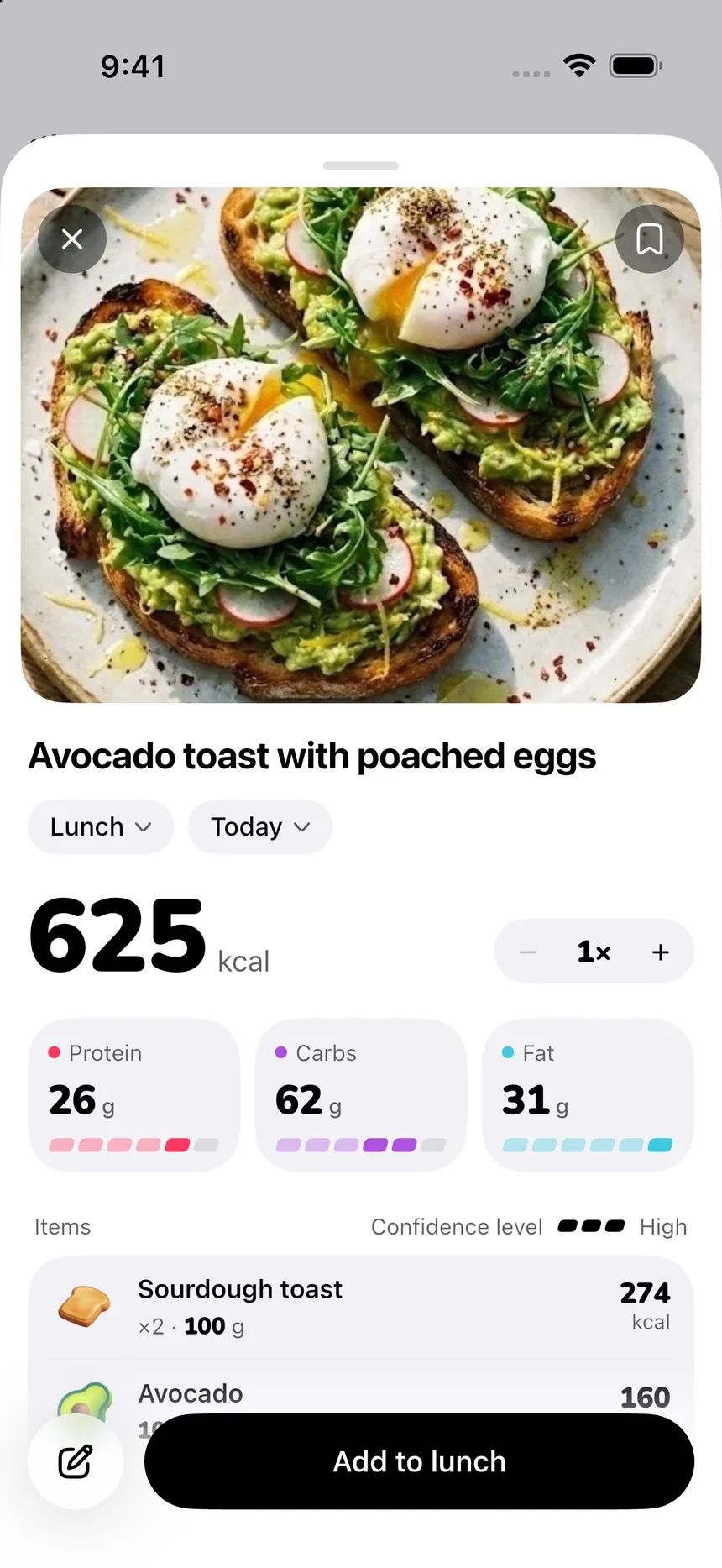
PeakBFF is not the right choice if your primary need is importing detailed recipes from websites or auditing a wide micronutrient panel. It is the best fit when the saved meal is a fast practical shortcut inside the same place you log lifts, sets, and reps. For a related workflow, see our guide to saving meals for calorie tracking and how to log homemade meals.
Download PeakBFF on the App Store or get PeakBFF on Google Play.
2. MacroFactor: best for a repeat meal you want to tweak
MacroFactor treats a saved meal as a recipe: a bundle of foods consumed at the same time. Its help centre explains that you can create that recipe from items in your food timeline, then log the bundle later. When a meal changes, its Explode option lets you adjust individual entries before logging it, and the saved recipe stays intact.
That is a strong workflow when your base meal stays the same but a portion or one ingredient changes often. The tradeoff is focus: it is a nutrition tracker, so someone who also wants a dedicated live workout log will still need that training record elsewhere.
3. Cronometer: best for custom recipes and nutrient detail
Cronometer supports custom meals and recipes. Its custom meals and recipes page describes bundling frequent food entries so they can be logged again quickly. Its help centre also documents recipe importing from a URL or pasted ingredients, with a review step before saving.
Choose Cronometer when the meal-prep job is mainly recipe construction and nutrient detail. It is a credible option for someone who weighs a cooked batch, wants to record the portion carefully, and prefers a food-first diary. It is less compelling when the goal is simply to keep repeated meals and gym logs together in one routine.
4. MyFitnessPal: best if your saved-meal library already lives there
MyFitnessPal calls reusable groups of foods "remembered meals." Its current help article shows how to create a named meal, find it in the My Meals area, and add it to the diary later. It also allows a photo on a custom meal.
That makes MyFitnessPal a sensible choice if you already have a food history and familiar meals there. For someone starting fresh who also logs resistance training, PeakBFF is the cleaner consolidation option because the saved food entry and workout log stay in the same app.
How to set up a repeat meal without making it rigid
Start with one meal you genuinely eat most weeks. Enter it as you make it, including the serving you plan to log. Save it under a search-friendly name such as "weekday chicken rice lunch" rather than a vague label like "meal 1."
Then decide what should happen when it changes:
- If it is the same portion, log the saved meal.
- If only the portion changes, update the entry before saving it to the day.
- If the ingredients change substantially, make a separate saved meal rather than pretending the original still matches.
- Review the day as a record, not a verdict. The goal is a usable log, not a claim that an app can verify every ingredient or prescribe what you should eat.
This keeps the saved-meal feature honest. It reduces repeated input, but it does not remove the need to check the entry when your portion or ingredients are different.
Bottom line
PeakBFF is the best macro tracker app for meal prep if you lift, repeat a few reliable meals, and want calories plus protein, carbs, and fat near the workout record that gives those meals context. Use Cronometer for recipe importing and deeper nutrition detail, MacroFactor for flexible saved recipes, and MyFitnessPal when its existing library is the reason to stay.
If you want one place for repeat meals and training, start with PeakBFF on the App Store or Google Play.
Questions, answered
How do I meal prep and track macros?
Log the whole batch once, using the weight of each ingredient, then divide the totals by the number of containers. Save that single portion as a meal in your tracker so every later container is one tap. Recheck the entry whenever the recipe, oil or portion changes.
Should I weigh meal prep food raw or cooked?
Either works if your log entry matches the state you weighed. Cooking changes water, not calories, so rice and pasta weigh more cooked and meat weighs less. For a batch, weigh ingredients raw, log the whole recipe, then split it by container count. Count added oil separately.
Can I save a meal in PeakBFF and log it again?
Yes. After a food scan or manual entry, tap Save as meal. Find it later under Saved Meals in your library, or from the Log Food menu, and tap Log meal. Calories show for free users. The protein, carbs and fat breakdown is a PeakBFF Plus feature.
What is the best macro tracker app for meal prep?
PeakBFF suits lifters who want saved meals beside their workout log. MacroFactor suits flexible recipes you tweak, since you can explode a recipe into individual foods. Cronometer suits recipe import and nutrient detail. MyFitnessPal suits anyone whose remembered meals already live there.
Does PeakBFF import recipes from a website?
No. PeakBFF saves meals from a food scan or a manual entry. If recipe importing from a web page is your main need, Cronometer offers a recipe importer on its Gold plan. PeakBFF is a better fit when you mainly repeat a few meals and also log lifting.
How much does PeakBFF cost compared with other macro trackers?
Many PeakBFF features are free for basic users, including workout and food logging. PeakBFF Plus costs $49.99 per year on the US App Store as of October 2026 and adds the macro breakdown. Third-party listings put MacroFactor near $72 a year and Cronometer Gold near $50.
More from PeakBFF
More app comparisons, fitness guides, and product notes.
How to Calculate a Calorie Deficit: Step-by-Step Formula, Pace Chart, and Deficit Calculator
Calculate your daily calorie deficit to lose weight safely with the step-by-step formula, bodyweight pace chart, and deficit calculator without losing muscle.
JEFIT vs Fitbod (2026): Exercise Library or AI Workout Generator?
Compare JEFIT and Fitbod for gym tracking, AI workout generation, exercise libraries, and pricing, plus how PeakBFF unifies lifting and macros.
How to Track Muscle Growth: What to Measure, Realistic Rates, and Progress Log Template
Learn how to track muscle growth accurately: gym performance proxies, tape measurements, progress photos, and rolling scale weight. Includes audit template.
MacroFactor vs Cronometer (2026): Adaptive Macro Coach or Micronutrient Tracker?
MacroFactor vs Cronometer compared for lifters in 2026. Explore adaptive TDEE coaching, 80+ micronutrient tracking, food logging UX, pricing, and how PeakBFF compares.
Ladder vs Peloton (2026): Guided Strength Teams or Studio Classes?
Ladder vs Peloton compared for lifters in 2026. Explore team-based strength blocks, studio video classes, progressive overload, prices, and how PeakBFF compares.
MeThreeSixty vs ZOZOFIT (2026): Which 3D Body Scanner Fits Lifters?
Compare MeThreeSixty and ZOZOFIT for 3D body scanning, circumferences, and body fat estimates, and see which app best supports a lifting routine.