How to Save Meals for Calorie Tracking: A Repeat-Meal Template
Use this repeat-meal template to save a meal for calorie tracking, recheck the parts that change, and log it again without starting over.
How to Save Meals for Calorie Tracking: A Repeat-Meal Template
To save a meal for calorie tracking, record the version you actually make, give it a name you will recognize, and recheck the ingredients and portion whenever they change. A saved meal is a shortcut for a repeatable meal, not a promise that every bowl, wrap, or lunch box will be identical.
Use this repeat-meal template before you save one:
MEAL NAME: ______________________________

WHAT STAYS THE SAME
[ ] Main ingredients
[ ] Brand or recipe
[ ] Number of servings
[ ] Usual portion

WHAT I WILL RECHECK NEXT TIME
[ ] Added oil, sauce, or topping
[ ] Different product or recipe
[ ] Larger or smaller portion
[ ] Extra snack or side
This takes less effort than rebuilding a familiar meal from scratch, while leaving room for the ordinary differences that matter. You can use the same template in a notes app, spreadsheet, or calorie tracker.
What makes a meal worth saving for calorie tracking?
Save a meal when you make the same version often enough that rebuilding it is annoying. A weekday breakfast, a usual post-gym lunch, or a recurring meal-prep dinner are good candidates. Save the whole meal, rather than one ingredient, when you normally eat its parts together.
The key is to save a specific version. "Chicken bowl" is vague. "Monday rice, chicken, cucumber, and dressing bowl" is a useful reminder of what the saved entry represents. If the recipe, product, or serving changes, treat that as a reason to review the entry rather than forcing a match.
Food-composition data are useful references, but they cannot know the exact recipe or serving in front of you. The USDA FoodData Central explains the food data it provides. Keep your own saved-meal record tied to the ingredients and portion you actually used.
What is a simple repeat-meal template?
Copy this version for each meal you save. It is deliberately short: its job is to make the next log easier, not turn a familiar meal into a research project.
| Field | Example |
|---|---|
| Meal name | Weekday yogurt bowl |
| What is included | Yogurt, oats, berries, and the usual topping |
| Usual serving | One prepared bowl |
| What can change | Topping, yogurt type, or a larger scoop of oats |
| When to review | When I change an ingredient, amount, or recipe |
Name the meal by the context that helps you find it again. "Office lunch" or "after-training oats" may be more useful than a generic recipe title. Then add one plain line about what can change. That line is the guardrail against re-logging a saved meal on a day when it is not actually the same meal.
How do you save a meal for calorie tracking?
1. Start with the version you can describe clearly
Log or estimate the meal you are making today. If you prepare a lunch box with the same four ingredients and same amounts each week, that is a clear version to save. If you are experimenting with a recipe or guessing at several parts, save the idea for later and log today's meal as its own entry.
2. Review the ingredients and current portion
Before saving, check the ingredients that are easy to overlook: cooking oil, sauces, toppings, drinks, and sides. Then check whether the portion is the one you want the saved meal to represent. This is not about chasing a perfect number. It is about making the shortcut match the meal you will want to repeat.
3. Name it for your future self
Use a name that distinguishes the meal from its close cousins. For example, "weekday oats with milk" is clearer than "breakfast" if you also make overnight oats or use a different topping on weekends. A precise name makes it easier to choose the right entry when you are busy.
4. Re-log it only when the version matches
Next time, use the saved meal when the ingredients and portion are close to the saved version. If you doubled the rice, changed the protein, or added a rich sauce, make an adjustment or log the new version separately. A saved meal is a convenience tool, not a rule that you have to use.
Worked example: save a repeatable post-gym lunch
Imagine you make a lunch box after your Monday workout: rice, chickpeas, cucumber, leafy greens, and a familiar dressing. You prepare it the same way most weeks and want to avoid rebuilding the entry each time.
Your saved-meal note could look like this:
MEAL NAME: Monday chickpea lunch box

WHAT STAYS THE SAME
[x] Cooked rice, roasted chickpeas, cucumber, greens, and dressing
[x] Same recipe for the chickpeas
[x] One lunch box
[x] Usual prepared portion

WHAT I WILL RECHECK NEXT TIME
[ ] I used a different dressing.
[ ] I added extra rice or chickpeas.
[ ] I made two lunch boxes and changed the serving size.
[ ] I added bread, fruit, or another side.
On a normal Monday, re-log the saved meal. On a day when you add avocado or make a much larger portion, adjust the entry or create another saved version. That keeps the library useful without pretending every meal-prep day is the same.
How does PeakBFF save and re-log a meal?
PeakBFF lets you save a meal after a food estimate from a photo or typed entry. Review the meal details and current serving first, then choose Save as meal. The entry goes to your Saved Meals library, where you can search it and log it again. Choosing a saved meal from the picker logs it immediately, and the app keeps its use count current so familiar entries stay easy to find.
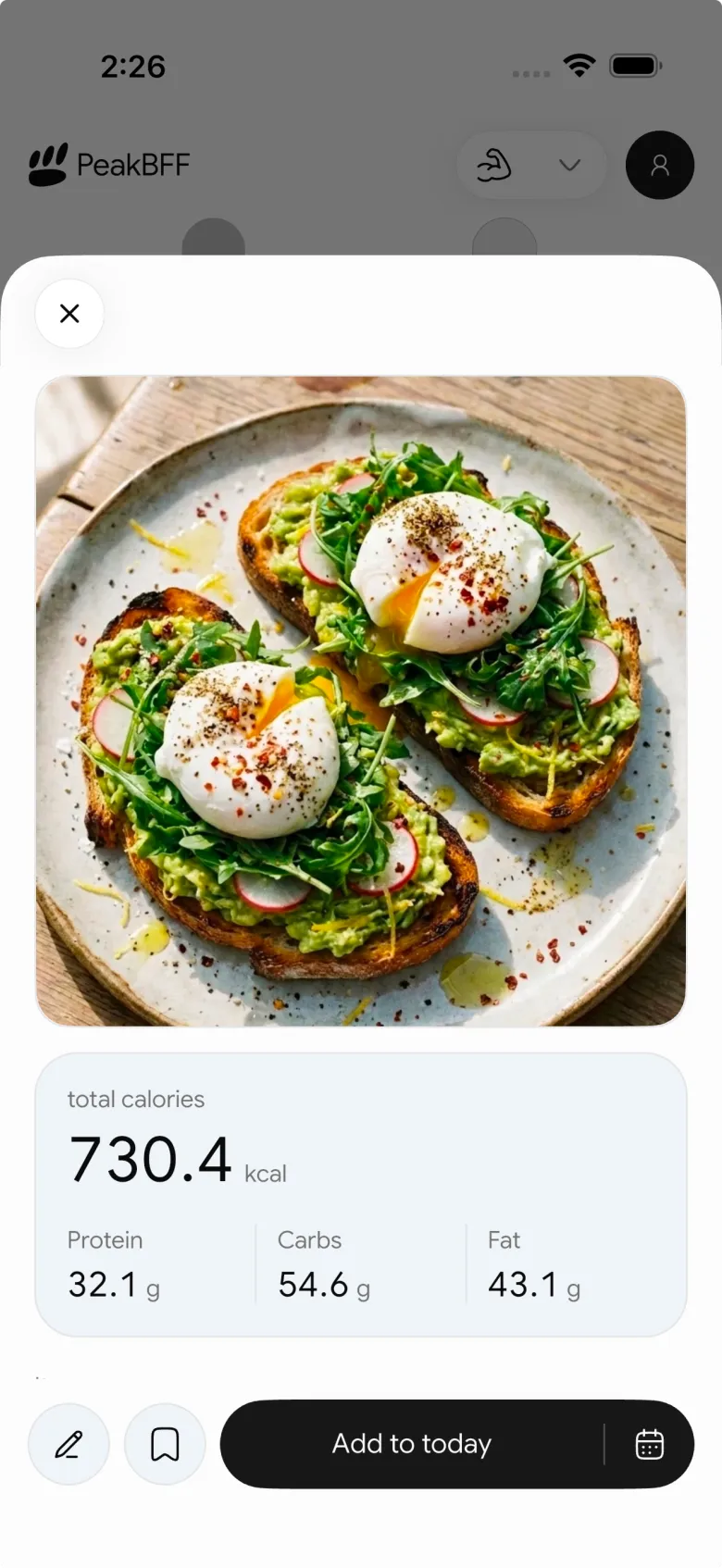
This workflow is best for a repeatable version of a meal. PeakBFF's estimate can be reviewed and edited before you save it, but it does not know whether a future recipe, restaurant order, or portion matches a previous one. That final check belongs to you.
For the broader app choice, see our comparison of the best protein trackers with photo food logging. If you need to log a packaged product rather than a whole repeat meal, our barcode food-logging guide walks through the separate check-before-save workflow.
When should you make a new saved meal instead?
Make a new saved meal when the version changes often enough that the original name no longer describes it. Good reasons include a new recipe, a different base ingredient, a regular change in portion, or a lunch that became a dinner with extra sides.
There is no prize for keeping one giant entry alive. Two clearly named saved meals are often more useful than one ambiguous one. The goal is a library that makes your usual meals quicker to record while still reflecting what you ate.
The bottom line
Save meals for calorie tracking when you repeat a specific version often. Give the meal a clear name, save its usual ingredients and portion, and recheck it whenever the recipe or serving changes. That is enough structure to make the next log fast without treating a template as exact forever.
Download PeakBFF on the App Store or Google Play to keep saved meals, food estimates, workout logs, and protein tracking together.
More from PeakBFF
More app comparisons, fitness guides, and product notes.
Best AI Physique Transformation App With Workout Tracking (2026)
Compare AI physique-transformation preview apps for motivation, photo boundaries, and the workout record you use after the preview.
How to Save a Workout as a Template After Training
Turn a session that worked into a reusable workout template without confusing completed results with your next plan.
Best Beginner Gym App With Starter Programs and Form Cues (2026)
Compare beginner gym apps for choosing a starter program, checking exercise form cues, and logging the sets you actually complete.
How to Track Home and Gym Versions of the Same Exercise
Use a simple split-or-combine checklist to keep home and gym exercise variations clear in your workout history.
How to Log a Weigh-In in a Gym App: A Simple History Checklist
Log a weigh-in with a repeatable routine, a clear calendar day, and a simple history review that keeps your gym records useful.
How to Choose a Starter Workout Program: A 3-Question Template
Choose a starter workout program with a simple goal, schedule, and equipment template, plus a verified PeakBFF setup flow.



