Cronometer vs MyFitnessPal (2026): Which Food Tracker Fits Lifters?
Cronometer vs MyFitnessPal compared on database accuracy, free barcode scanning, pricing and lifting support, plus where PeakBFF fits for gym trackers.
If you want verified, laboratory-grade nutrition data with deep micronutrient tracking, Cronometer is the clear winner. If you eat out often, grab packaged snacks on the go, and want the largest database of branded foods, MyFitnessPal is the traditional pick. And if you are tired of tracking your protein in one app while running a second app at the gym to log your barbell sets, PeakBFF combines both into one place.
Short answer: Cronometer offers the most accurate, verified nutrition database and keeps barcode scanning free, while MyFitnessPal has a bigger catalogue but hides barcode scanning behind an expensive paywall. Neither app provides dedicated weightlifting tools (sets, reps, rest timers, or progression). PeakBFF solves that split by combining AI photo meal logging with a complete gym tracker.
Cronometer vs MyFitnessPal vs PeakBFF at a glance
Prices are US App Store prices as of November 2026 and may vary by region or platform. Data accuracy and feature sets reflect each company's published documentation.
| Feature | Cronometer | MyFitnessPal | PeakBFF |
|---|---|---|---|
| Core focus | Precision nutrition and micronutrients | Calorie and macro catalogue | Consolidated workout and protein logging |
| Database quality | High: laboratory sources (NCCDB, USDA); staff-verified entries | Mixed: 18M+ items, but heavily crowd-sourced with frequent errors | Verified food database paired with AI photo, typed, and barcode logging |
| Barcode scanner | Free (ad-supported) | Paywalled behind Premium in the US and major regions | Free basic food logging; photo scanning included |
| Micronutrients | Up to 82 micronutrients tracked on the free tier | Basic vitamins and minerals; full breakdown needs Premium | Calories free; protein, carbs, and fat detail with Plus |
| Workout logging | Syncs cardio burns; no set/rep lifting log | Generic duration/calorie burns; no set/rep lifting log | Full gym log: sets, reps, weights, rest timer, plate calculator |
| Progression tools | None | None | Prefilled previous session, Try more progression suggestions |
| Price | Free with ads; Gold is $10.99/mo or $59.99/yr | Free with ads; Premium is $19.99/mo or $79.99/yr | Many free features; Plus is $49.99/yr ($4.17/mo) or $7.99/wk |
| Platforms | iOS, Android, Web | iOS, Android, Web | iOS, Android |
| Best for | Precision dieters and micronutrient tracking | Casual eaters who want a giant restaurant catalogue | Lifters who want gym training and food tracking in one app |
1. Cronometer: best for verified accuracy and micronutrient depth
Cronometer is widely considered the gold standard for nutritional precision. Unlike platforms that let any user upload unverified nutrition entries, Cronometer draws its data from laboratory-analysed sources such as the Nutrition Coordinating Center Food and Nutrient Database (NCCDB) and the USDA Food Data Central. Every user-submitted food must be reviewed and verified by Cronometer's staff before it enters the public system.
For lifters, this means the protein, fat, and carbohydrate numbers you see on your screen actually reflect what is in the food. You do not have to worry about finding five different entries for chicken breast with conflicting protein amounts. Even on the free tier, Cronometer tracks up to 82 micronutrients, including electrolytes, iron, zinc, and B vitamins, alongside amino acid profiles.
The barcode scanner remains free on mobile, which is a major advantage for lifters who scan their groceries without wanting a monthly bill. The optional Cronometer Gold subscription ($10.99 a month or $59.99 a year) removes ads and adds features like a fasting timer, meal timestamps, recipe importing, and custom biometrics.
The downside for gym-goers is simple: Cronometer is purely a diet app. While it imports burned calories from Apple Health, Google Health Connect, or Strava, it has no tools for logging barbell sets, recording personal records, or planning progressive overload.
Best for: lifters who prioritise exact macro and micronutrient accuracy and want free barcode scanning, but are happy to use a separate app for their workouts.
2. MyFitnessPal: best for catalogue size and eating out
MyFitnessPal has been the household name in calorie counting for nearly two decades. Its defining advantage is size: with more than 18 million foods in its database, you can find almost any restaurant dish, packaged supermarket item, or international food brand in seconds. If you eat out frequently or travel, MyFitnessPal almost always has a matching entry.
However, that enormous database is also MyFitnessPal's greatest flaw. Most of the library is crowd-sourced from users over the last 15 years. It is common to find entries with missing protein counts, zero calories for calorie-dense items, or duplicate foods with wildly different numbers. Lifters who care about exact macro targets frequently have to double-check entries against physical packaging.
Furthermore, MyFitnessPal moved its barcode scanner behind its Premium paywall in the US and several other countries. At $19.99 a month or $79.99 a year, MyFitnessPal Premium is one of the more expensive calorie trackers on the market. If you are on the free tier, you must search for every food item by text and navigate frequent full-screen ads.
Like Cronometer, MyFitnessPal treats strength training as an afterthought. It allows you to log an entry like "Weight lifting: 45 minutes", which estimates a calorie burn, but it does not track your working sets, reps, dumbbells, or rest periods. If you want a free alternative focused on lifters, check our review of the free MyFitnessPal alternative with workout tracking.
Best for: people who prioritise finding obscure restaurant meals and packaged goods quickly, and do not mind paying for Premium to get barcode scanning.
3. PeakBFF: best if you want gym tracking and nutrition in one app
If your biggest frustration is switching back and forth between a food tracker and a separate gym log every single day, PeakBFF is built to replace both. Instead of treating fitness as two unrelated silos, it brings your workouts and your nutrition into one screen.
In the gym, PeakBFF functions as a dedicated weightlifting log. When you begin a session, it prefills your weights and reps from your last completed workout, so you never have to remember what you lifted last week. When you hit the top of your target rep range across all working sets, a Try more prompt suggests either adding an extra rep or bumping to the next equipment weight step. The lifter always reviews and confirms the suggestion; weights are never changed automatically.
PeakBFF also includes:
- A built-in plate calculator in the weight picker that calculates exact plate loading for 45 lb or 20 kg barbells in kg or lb.
- An adjustable rest timer that counts down between sets.
- A library of 220+ exercises with demo videos and form cues.
- A rolling seven-day muscle volume tracker that counts completed working sets per muscle group against weekly targets, showing you whether your chest, back, or legs need more work.
In the kitchen, PeakBFF gives you flexible food logging. You can log meals by taking an AI photo scan, searching the database, or scanning a barcode. Calories are free for all basic users, while detailed protein, carb, and fat breakdowns are unlocked with PeakBFF Plus ($49.99 a year or $7.99 a week). Plus also adds an AI workout plan generator that turns your schedule and equipment into a custom routine, as well as the ability to import workouts directly from TikTok, Instagram, or YouTube links.
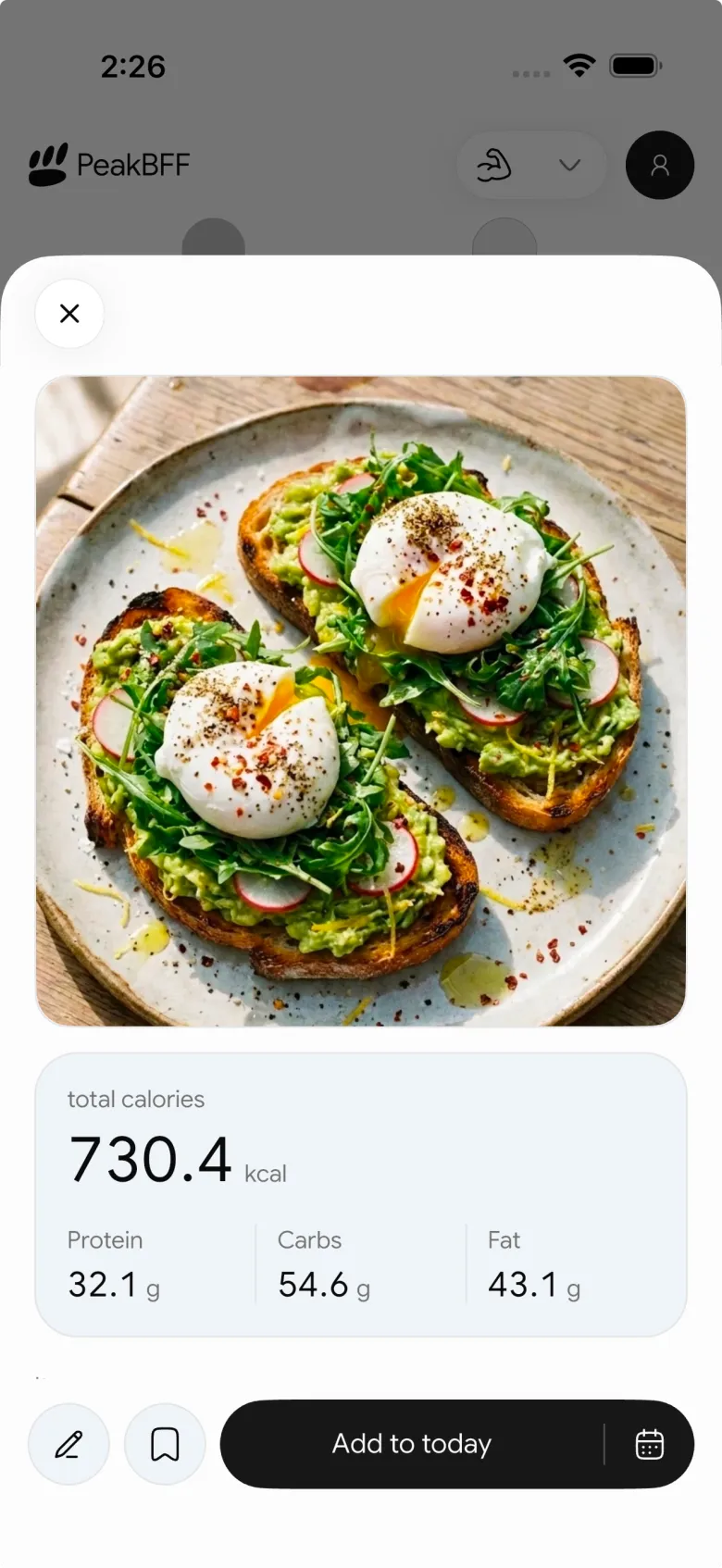
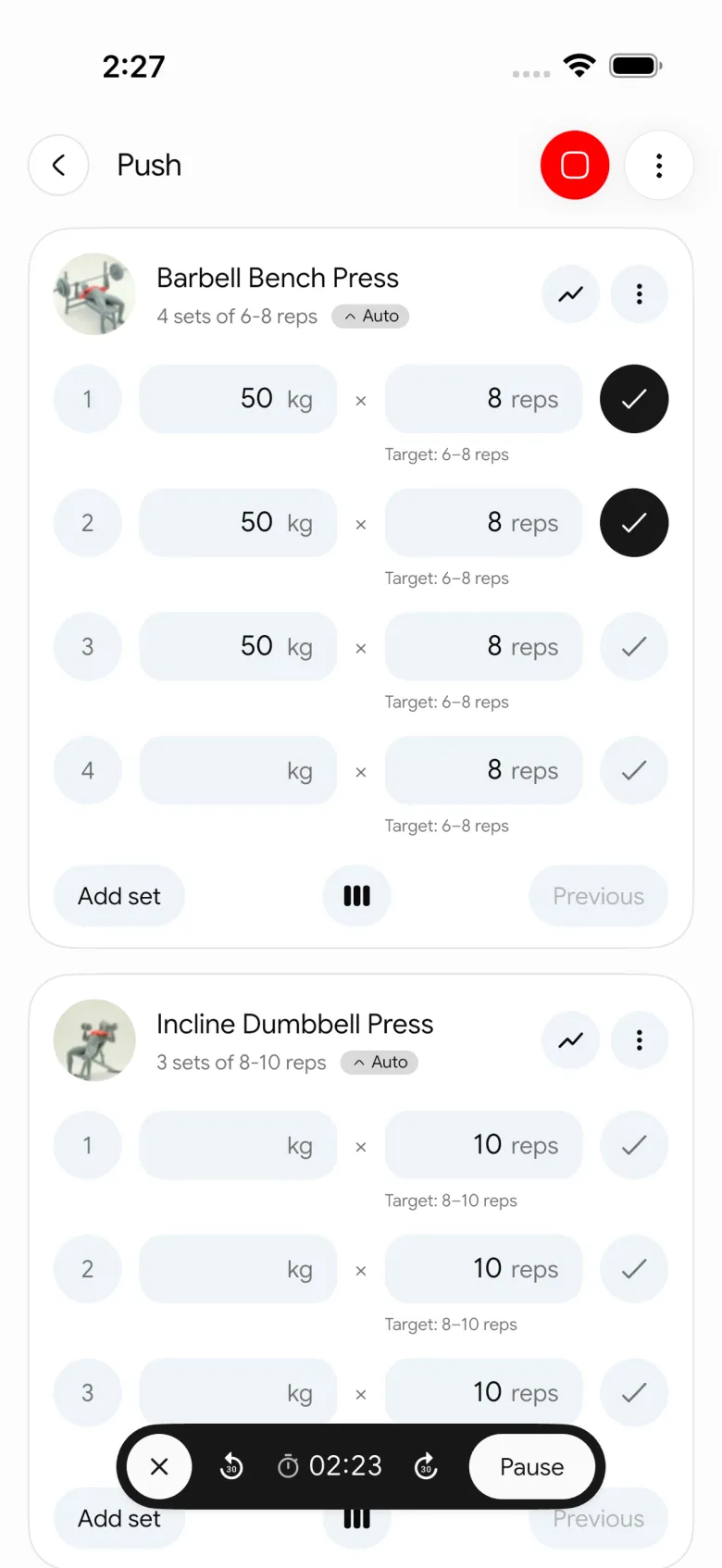
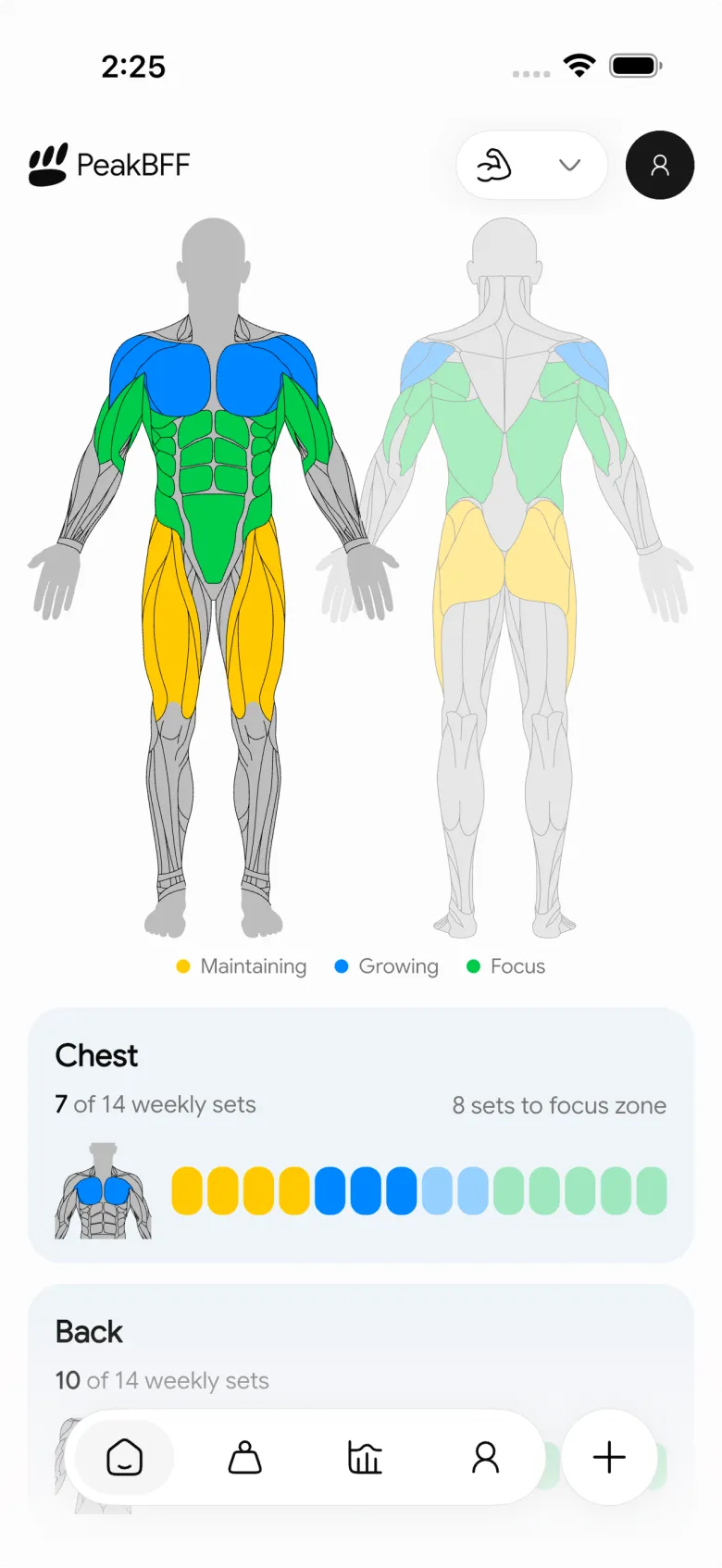
If you want to stop paying for two separate subscriptions, PeakBFF Plus costs $49.99 a year (roughly $4.17 a month), which is lower than both MyFitnessPal Premium ($79.99/year) and Cronometer Gold ($59.99/year). Basic workout logging, calorie tracking, and starter programmes are free without a credit card.
Best for: lifters who want an accurate gym tracker and a simple protein tracker without juggling multiple apps or paying for multiple subscriptions.
The verdict: which app should you download?
The right choice comes down to what you are trying to optimise:
- Pick Cronometer if nutrition precision and micronutrient tracking are your primary goals. It is the best choice for dieters who want verified food numbers, free barcode scanning, and detailed vitamin and mineral reports, and who already have a separate way to track their gym workouts.
- Pick MyFitnessPal if you eat out often at chain restaurants and value convenience above precision. Be prepared to navigate crowd-sourced inaccuracies on the free plan or pay $79.99 a year for Premium to unlock the barcode scanner.
- Pick PeakBFF if you lift weights and want to track both your training and your macros in a single app. You get a set-by-set workout log, rest timer, plate calculator, and AI food logging without running two apps side by side.
If you are currently planning a muscle-building phase or cutting body fat, explore our guides on the best app for lean bulking and how to find your maintenance calories to set up your nutrition targets.
Ready to track your workouts and meals together? Download PeakBFF on the App Store or Google Play to get started for free.
Questions, answered
Is Cronometer better than MyFitnessPal?
It depends on whether you value verified accuracy or catalogue size. Cronometer relies on laboratory-analysed databases like the NCCDB and USDA, so its nutrient and macro data is much more accurate. MyFitnessPal has a larger food catalogue of restaurant and branded items, but many user-submitted entries contain errors or missing macros.
Is Cronometer free or does it require a subscription?
Cronometer has a generous free version that includes food logging, micronutrient tracking and barcode scanning. Cronometer Gold costs $10.99 a month or $59.99 a year as of November 2026, which removes ads and adds fasting timers, recipe importing and meal timestamps. In contrast, MyFitnessPal paywalls barcode scanning behind its $79.99 a year Premium tier.
Can I track weightlifting workouts in Cronometer or MyFitnessPal?
Neither app is built for logging sets, reps, barbell weights or rest times. Both focus on calories and sync cardio data from Apple Health or wearables. Lifters using Cronometer or MyFitnessPal typically run a separate gym app to log their training. PeakBFF combines both: a set-by-set workout log and camera-based food tracking in one app.
Why do lifters switch from MyFitnessPal to Cronometer?
Lifters usually switch for two reasons: database accuracy and free barcode scanning. MyFitnessPal's library contains millions of crowd-sourced entries with missing protein or inaccurate calories, whereas Cronometer verifies food submissions. In addition, MyFitnessPal moved its barcode scanner behind a $19.99 monthly or $79.99 yearly paywall in major regions, while Cronometer keeps scanning free.
What is the best alternative to Cronometer and MyFitnessPal for lifters?
PeakBFF is built specifically for people who lift weights and track nutrition. Instead of juggling a calorie tracker and a gym log, PeakBFF provides prefilled sets, Try more progression cues, 220+ exercise demos, rest timers, and AI photo food logging in one place. Basic workout and food logging is free, with Plus at $49.99 a year.
More from PeakBFF
More app comparisons, fitness guides, and product notes.
Boostcamp vs Hevy (2026): Structured Coach Programmes or a Simple Gym Log?
Boostcamp vs Hevy compared on structured strength programmes, progression tools, Apple Watch logging, free tier limits and pricing, plus where PeakBFF fits.
How to Hit Your Protein Goal Without Going Over Calories: The 10:1 Rule and Lean Swaps
Learn how to hit your protein goal without going over calories using the 10:1 protein-to-calorie ratio, lean protein swaps, and a worked 150g meal plan.
GainFrame vs ShredFrame (2026): Which AI Physique App Fits Your Goal?
Compare GainFrame and ShredFrame for AI physique scans and body composition. See features, Android availability, pricing, and workout tracking differences.
Best 75 Hard App (2026): Free Options, the Official App and What Actually Works
Compare the best 75 Hard apps for tracking workouts, water, diet and progress photos. See why lifters outgrow basic checkboxes and what to use instead.
PPLUL Split (2026): A 5-Day Push Pull Legs Upper Lower Routine and Volume Guide
What the PPLUL split is, how to schedule a 5-day Push Pull Legs Upper Lower workout routine, weekly muscle volume targets, and how to track progression.
How Many Warm-Up Sets Before Working Sets? A Simple Ramp-Up Chart and Rules
Most lifters need 2 to 4 warm-up sets for heavy compound lifts and 0 to 1 for isolation exercises. Use this ramp-up chart and formula to prepare without wasting energy.