How to Track Water and Protein Together: A Simple Daily Log
Use a simple daily log to keep water and protein visible without turning either one into a rigid rule or a second full-time task.
How to Track Water and Protein Together: A Simple Daily Log
To track water and protein together, use one daily record with two simple totals: the drinks you log and the protein in the food you log. Add each when you have it, then make one short review later. That is enough to spot a missed entry without trying to turn your log into a judgement about your day.
Copy this water and protein tracker template:
Date: __________

Water
[ ] First drink logged
[ ] Drinks added through the day
[ ] One custom amount added if a bottle or glass did not match a shortcut

Protein
[ ] Food entries added when eaten
[ ] Portion or serving checked for mixed or packaged foods
[ ] Protein total reviewed once

Close-out
[ ] One obvious missing drink or meal added
The two lines are useful because they prompt different memories. Water is usually a quick amount. Protein comes from food, so it needs a meal and a portion. Put both on the same date, but do not use either number to diagnose hydration, prescribe food, or grade your training.
What belongs in a water and protein log?
Keep the fields plain enough that you will actually use them.
| Part of the record | What to enter | Quick check |
|---|---|---|
| Water | Each drink's amount, or a shortcut that matches it | Was it water, and was the amount roughly right? |
| Food | The food, meal, or recipe and its portion | Did you include the item that supplies the protein? |
| Protein total | The day's running total, if you choose to track one | Treat it as a record, not a pass or fail score. |
| Close-out | One missing drink or meal | Fix the clear gap, then stop editing. |
Prospective food records are generally less dependent on recall than trying to reconstruct a whole day later, although all self-reported food methods have limits. That is why a timely, good-faith entry is more useful than pretending you know an exact amount. (National Cancer Institute dietary-assessment primer)
How do you use the checklist on a gym day?
Here is a worked example. The amounts and foods show the structure only. They are not targets for you to copy.
Date: Tuesday

Water
Morning glass: logged
Bottle during commute: logged as one custom amount
Glass with lunch: logged

Protein
Breakfast: yoghurt and fruit entered
Lunch: chicken-and-rice bowl entered, portion reviewed
Dinner: tofu stir-fry entered, sauce and serving checked

Close-out
Added the drink after training that was missing from the afternoon
The useful detail is timing, not perfection. Log a drink when you finish it. Log food while the portion, extras, and packaging are still in front of you. If you train in the evening, the same checklist still works. Add the post-training meal or drink when it happens, then do one quick review before bed.
How should you handle bottles, mixed meals, and uncertain portions?
Use the most practical description you have and leave room for uncertainty.
| Situation | Practical entry | Avoid |
|---|---|---|
| Refillable bottle | Log its known capacity once, then use that amount when you finish it | Guessing a new amount every time without checking the bottle |
| Restaurant or mixed meal | Enter the main ingredients and review the portion and additions | Treating a photo or menu label as exact |
| Packaged protein food | Check the serving count and label before logging | Recording the whole package when you ate one serving |
| Drink you cannot estimate | Add a reasonable custom amount or leave it out | Inventing a precise number to make the total look complete |
The same caution applies to nutrition estimates more generally. A review of food and beverage self-report found common omissions and portion-estimation error. A short review of the item and serving is a better response than false precision. (Review in Advances in Nutrition)
How do you track water and protein together in PeakBFF?
PeakBFF keeps both records in the nutrition flow. Add food by text, photo, or barcode, review the entry, and save it. The daily nutrition summary shows the food record with calories and macro totals, including protein when that view is available. A photo is a starting point for a food entry, not proof of an exact portion, so review the visible foods and anything the camera cannot know.
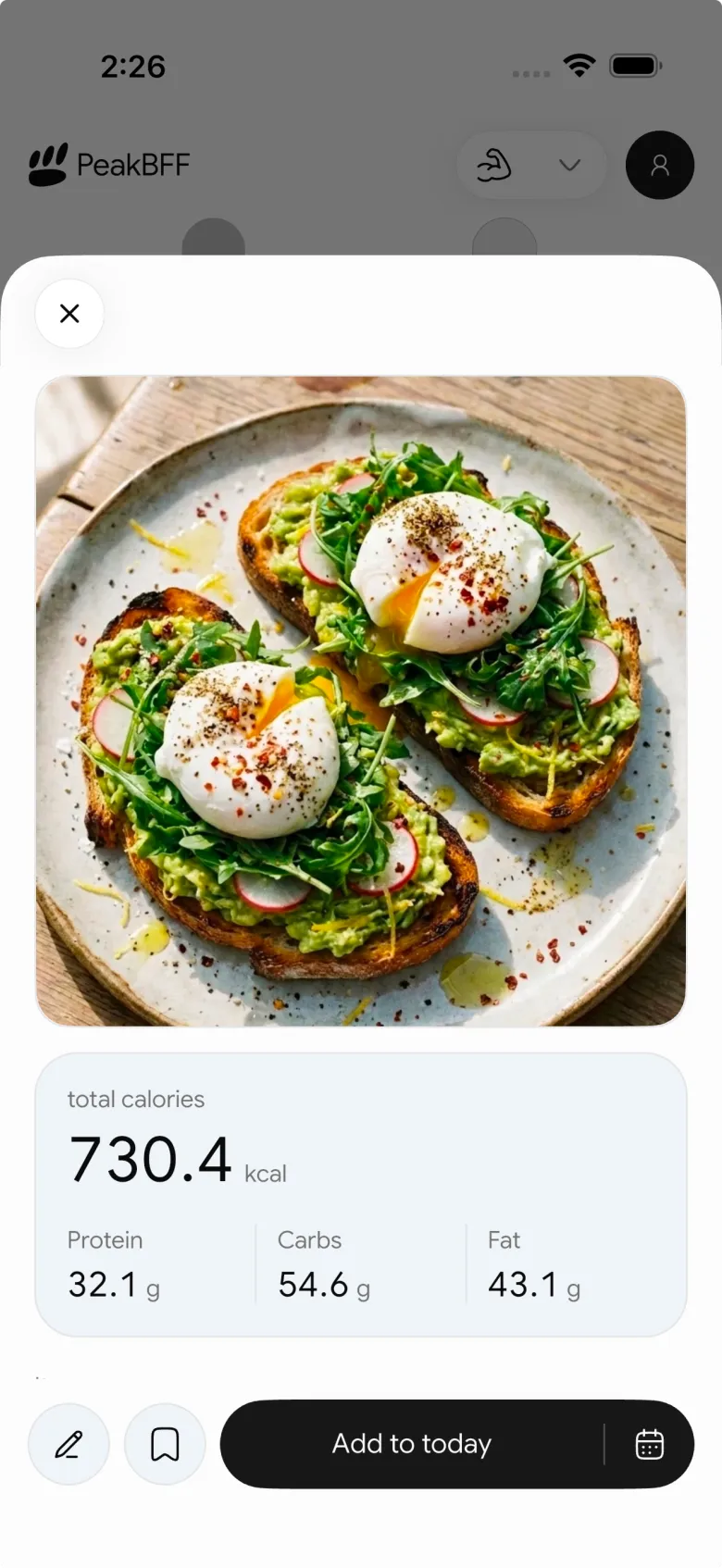
For water, open the water add sheet and choose a preset amount or enter a custom amount for the selected day. PeakBFF totals the day's water against the nutrition goal you have chosen. Its target editor keeps water separate from calories and macros, so changing a water target does not rewrite your food targets.
That gives you a small repeatable sequence:
- Add food when you eat it and review the portion.
- Add water as you drink it, using a preset or custom amount.
- Look at the two totals once later in the day.
- Add only the clear missing entry, then move on.
If you want the broader decision guide for keeping lifting and macro records together, see our workout and macro tracker comparison. For a daily log that also holds your completed sets, the workout-and-calorie daily template is the closer companion.
The bottom line
Track water and protein together by recording drinks and food while they are fresh, keeping the amounts useful rather than exact-looking, and making one brief review before the day ends. The checklist is a way to remember the day, not a rulebook for how to eat or train.
Download PeakBFF on iOS or Android to keep food, protein, water, and workout context in one daily routine.
More from PeakBFF
More app comparisons, fitness guides, and product notes.
RPE Chart for Lifting: RPE to Reps in Reserve to % of 1RM, With a Log Template
Use an RPE chart to turn how hard a set felt into reps in reserve and a percent of your 1RM. Includes a printable table, a worked example, and a way to log RPE in PeakBFF.
Best Free Strength Training App for Women Over 40 (2026): What Stays Free
Looking for a strength training app for women over 40 that does not lock logging behind a subscription? Hevy, Strong, Boostcamp, StrongEra and PeakBFF compared on what is free.
How to Track Zone 2 Cardio Next to Your Lifting: Heart Rate Range and Log Template
Find your zone 2 heart rate range with a simple formula and the talk test, then log each session next to your lifting. Includes an age table and a log template.
GainFrame Alternative for Android (2026): Physique Rating Plus a Gym Log
GainFrame is iPhone only. Here is what to use on Android, how PeakBFF compares on physique score, price and photo privacy, and who should stay with GainFrame.
Best Cal AI Alternative With Workout Tracking (2026)
Cal AI scans meals fast but is a food app. Compare it with PeakBFF, MyFitnessPal and Cronometer if you also want a gym log, macros and price details.
How Much Creatine Per Day? A 3 to 5 g Dose and an 8-Week Way to Track It
How much creatine per day most lifters take (3 to 5 g of monohydrate), whether to load, and an 8-week log of weigh-ins and lifts to see what it did.



