
iPhone Duo
Fitness and calorie apps for the iPhone Duo: what is built for the inner display
App Store listings and release notes checked on 14 November 2026 · Updated
On the iPhone Duo, an app built for the inner display fills it; an older one sits in the middle with black space on both sides. PeakBFF is built for the inner display: open the Duo and your workouts and calories spread into two columns. Of the eight big fitness apps we checked, none mentions the iPhone Duo in its App Store listing or release notes.
PeakBFF: a gym log and calorie tracker laid out for the open iPhone Duo
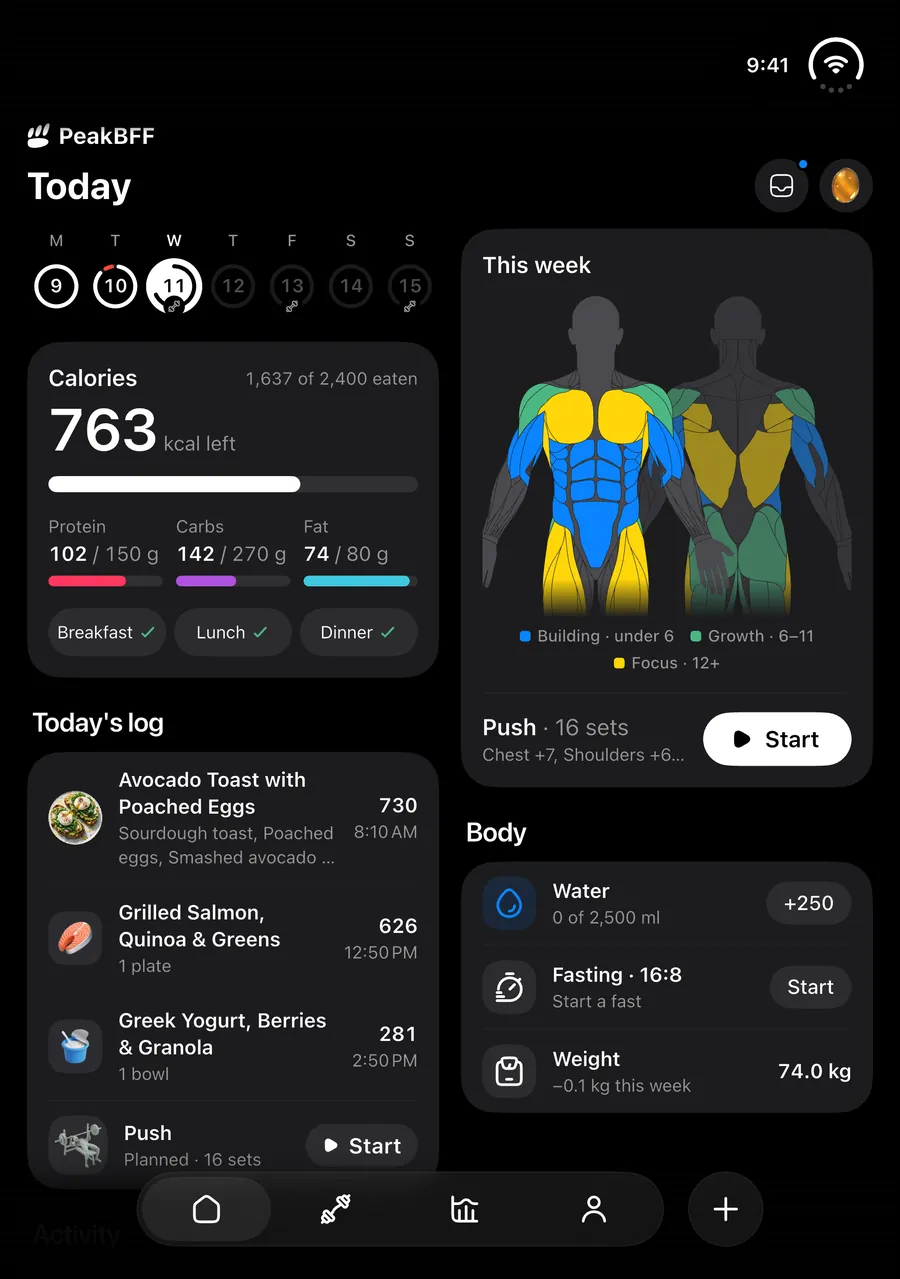
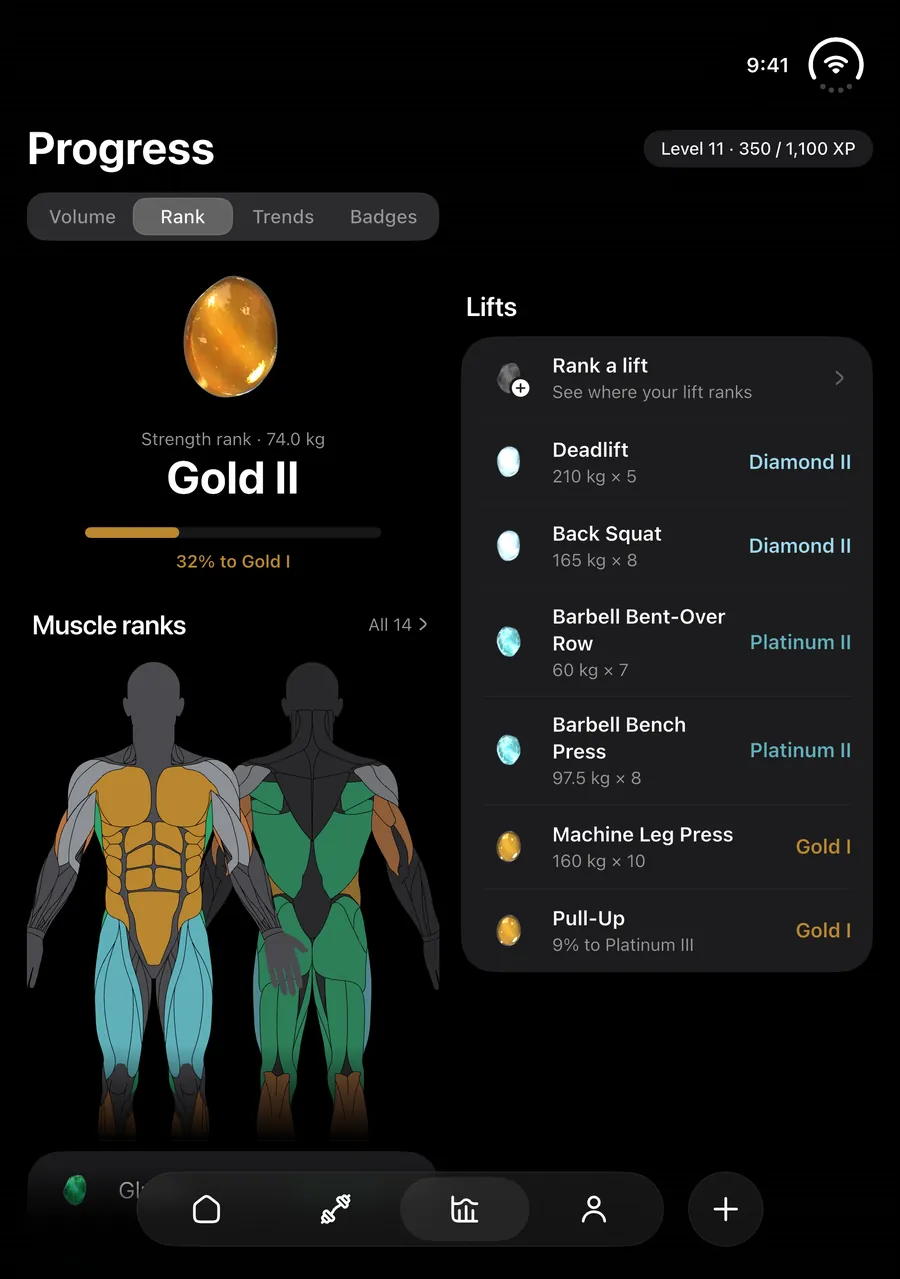
- Open and held wide, Home, Workout and Progress are two columns of the same cards, and your workout history is a list beside the session you pick.
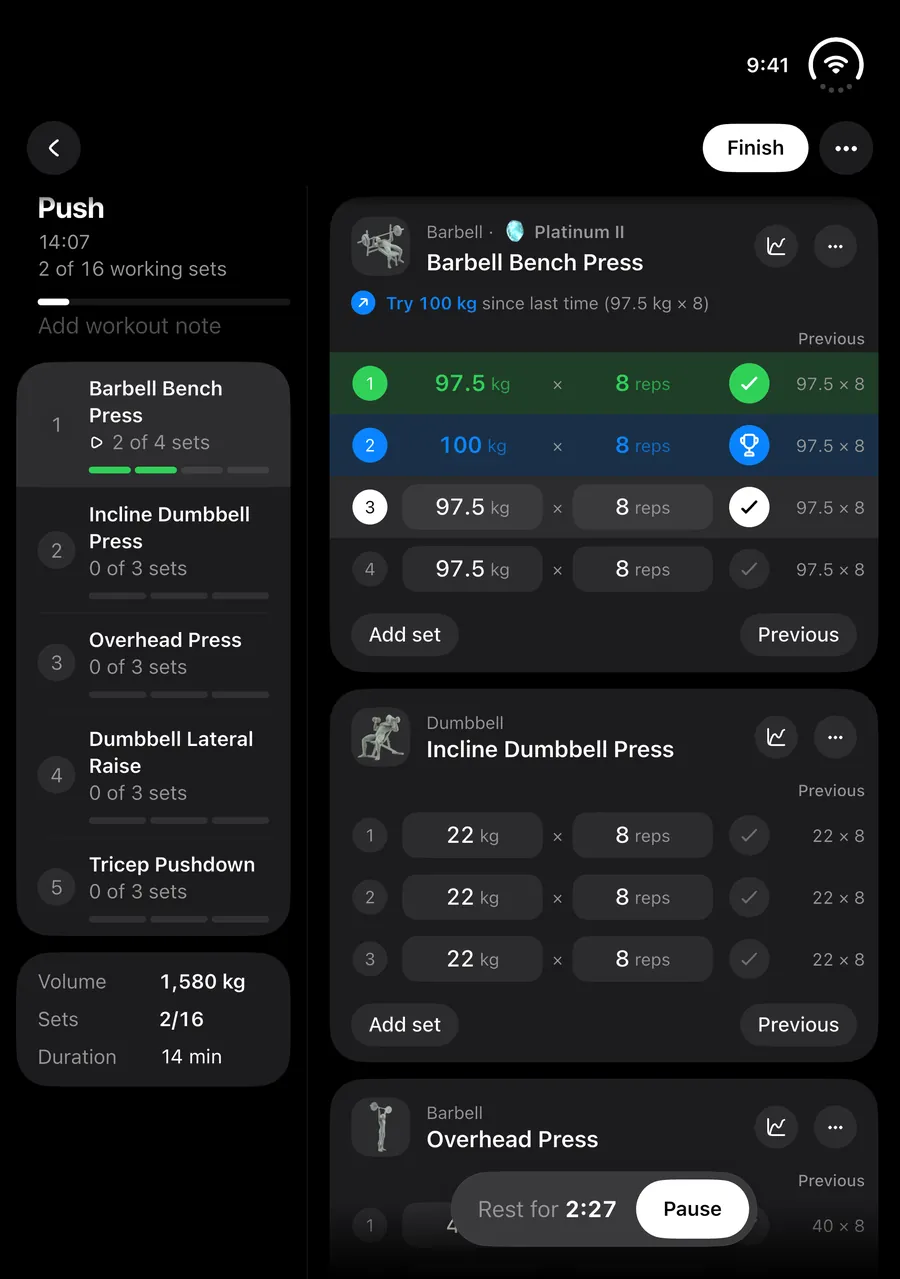
- During a workout, an outline of the session sits beside your sets, with last session's numbers next to each set.
- Held tall, Home and Workout are two columns too; folded, you get the phone layout. The app turns with the Duo on the inner display.
- Free to download. PeakBFF's App Store notes say: "Added support for iPhone Duo, with two columns when it's open."


Free to download on iPhone and Android.
What "built for the iPhone Duo" means
Apple says more than 100,000 apps were optimized for the iPhone Duo by 6 November 2026, as MacRumors reported. Apps built with the iOS 27 SDK resize to fill most of the inner display and keep clear of the status bar on the right edge. Apps built with the iOS 26 SDK or earlier still run, but in the center of the inner display with empty black space on the left and right.
Filling the screen is the minimum. A good Duo app also uses the extra width: two columns instead of one stretched list, and controls where your thumb is when you hold it open.
PeakBFF on the iPhone Duo
PeakBFF's App Store release notes announce it: "Added support for iPhone Duo, with two columns when it's open." Here is what each pose does.
- Open, held wide: Home, Workout and Progress are two columns of the same cards. History is a list beside the workout you pick. Food, Weight, Exercise detail and Settings use two columns.
- Live workout: an outline of the session (each exercise with its sets done) sits beside your exercise cards, and each set shows the same set from last session.
- Open, held tall: Home and Workout are two columns; the live workout and History keep a narrow list beside the main content.
- Folded: the phone layout, plus a pinned bar in the live workout with the workout's name, time and sets.
- The tab bar runs down iOS's side strip when the Duo is folded or held wide, and the app turns with the device on the inner display.
- Onboarding and the Plus screen put what you read on the left and what you tap on the right, where your thumb is when you hold the Duo open.
What the big fitness apps say about the Duo
We read the US App Store listing and the visible release notes of eight popular workout and calorie apps on 14 November 2026. None of them mentions the iPhone Duo, foldables or the inner display. MacroFactor and MacroFactor Workouts mention "UI optimization for large screen sizes" in August and September 2026 releases, without naming a device.
Release notes don't always say everything. An app can fill the inner display without saying so, so the only sure check is to open it on the Duo and look for black space at the sides.
How to check an app on your Duo
Open the Duo and launch the app. If it sits in a narrow column with black bars on both sides, it was not built for the inner display yet. If it fills the screen, turn the Duo sideways and back: an app built for it rearranges instead of stretching one long list.
Fitness apps and the iPhone Duo, checked
From each app's US App Store listing and visible release notes on 14 November 2026. "Not mentioned" means the listing and notes don't say; open the app on your Duo to be sure.
Scroll the table sideways to see every column.
| App | iPhone Duo or foldables mentioned | iPad version | What it tracks |
|---|---|---|---|
| PeakBFF | Yes: "two columns when it's open" | Yes | Workouts and food in one app |
| MyFitnessPal | Not mentioned | Yes | Food first; logs workouts and calorie burn |
| Cal AI | Not mentioned | No, designed for iPhone | Food |
| MacroFactor | Not mentioned ("UI optimization for large screen sizes", 2026) | Yes | Food; workouts in a separate app |
| Fitbod | Not mentioned | No, designed for iPhone | Workouts |
| Hevy | Not mentioned | Yes | Workouts |
| Lose It! | Not mentioned | Yes | Food (calorie counter) |
| Strong | Not mentioned | No | Workouts |
| Yazio | Not mentioned | Yes | Food (calorie counter) |
Verdict
- PeakBFF is built for the iPhone Duo's inner display, with two columns on Home, Workout and Progress and a session outline beside your sets.
- None of the eight big fitness apps we checked mentions the Duo in its App Store listing or release notes as of 14 November 2026.
- PeakBFF keeps a full gym log and your food in the same app, so one app fills the open Duo for both.
iPhone Duo fitness apps FAQ
Does PeakBFF work on the iPhone Duo?
Yes. Its App Store notes say "Added support for iPhone Duo, with two columns when it's open." Home, Workout and Progress are two columns on the inner display, the live workout shows an outline beside your sets, and folded you get the phone layout.
Which calorie tracker works best on the iPhone Duo?
PeakBFF is built for the inner display and tracks calories and workouts in one app. Of the calorie apps we checked (MyFitnessPal, Cal AI, MacroFactor, Lose It! and Yazio), none mentions the iPhone Duo in its App Store listing or release notes as of 14 November 2026.
Does MyFitnessPal support the iPhone Duo?
MyFitnessPal's US App Store listing and visible release notes did not mention the iPhone Duo or foldables as of 14 November 2026. It has an iPad version. Open it on your Duo to see whether it fills the inner display.
Why does an app show black bars on the iPhone Duo?
Apps built with the iOS 26 SDK or earlier run in the center of the inner display with empty space on both sides, as MacRumors reported from Apple. Apps built with the iOS 27 SDK fill most of the display.
Does PeakBFF rotate on the iPhone Duo?
Yes. On the inner display PeakBFF turns with the device, held wide or tall. On the folded outer display it stays portrait like a phone.
Sources
App listings and release notes as shown on the US App Store on the date given. They can change with any update.
- MacRumors: Apple says more than 100,000 apps optimized for iPhone Duo (6 November 2026) (November 14, 2026)
- PeakBFF on the App Store (November 14, 2026)
- MyFitnessPal on the US App Store (November 14, 2026)
- Cal AI on the US App Store (November 14, 2026)
- MacroFactor on the US App Store (November 14, 2026)
- MacroFactor Workouts on the US App Store (November 14, 2026)
- Fitbod on the US App Store (November 14, 2026)
- Hevy on the US App Store (November 14, 2026)
- Lose It! on the US App Store (November 14, 2026)
- Strong on the US App Store (November 14, 2026)
- Yazio on the US App Store (November 14, 2026)
Open your Duo and log a workout
PeakBFF is free to download. Log today's workout and meals on the open Duo and see both side by side.
Free to download on iPhone and Android.