Best App to Share Gym Workout Videos (2026): 4 Options Compared
Compare four ways to share a completed gym workout, from a lifting recap on your own video to a dedicated social feed.
Best App to Share Gym Workout Videos (2026): 4 Options Compared
If you want to put the stats from a finished lift on a video you choose and share it without rebuilding the recap elsewhere, PeakBFF is the best app to share gym workout videos. It starts from the completed session, lets you use a video as the background for its workout recap, then exports it to your mobile or the system share sheet.
Short answer: choose PeakBFF when the video should explain a gym session you logged, with the same app also holding your sets, reps, nutrition, and progress. Choose Gymshare or Reptic when an in-app social feed and replies from other lifters matter more. Choose Share Workouts To Social Media when you want Apple Health activity turned into a ready-made social post.
The 4 apps, compared
| PeakBFF | Gymshare | Reptic | Share Workouts To Social Media | |
|---|---|---|---|---|
| Turn a completed gym session into a share | Yes, card, photo, or video recap | Yes, community posts including gym photos or videos | Yes, lifting-focused social posts and video posts | Yes, activity templates from Apple Health data |
| Add your own video to the recap | Yes, as an optional background | Post a gym photo or video to its feed | Supports video posts | Not the listed focus |
| Set-by-set lifting log | Yes | Yes | Yes | No listed dedicated lifting log |
| In-app social feed | No | Yes | Yes | No |
| Food, protein, and macros beside training | Yes | Not the listed focus | Not the listed focus | No |
| Best at | Exporting a real lifting recap from one daily record | Sharing gym moments inside a lifting community | A social feed made for lifters | Styling activity data for social media |
1. PeakBFF
PeakBFF is for the lifter who wants the share to begin with the workout they actually recorded. After a session, it builds a recap from the available workout data, including the session, duration, total volume, and trained-muscle context. You can use the plain card, place the recap over a photo, or select a video as the background. The result can be saved to Photos or handed to your mobile's system share sheet.
That is useful when a clip from the gym is only part of the story. Instead of starting with a camera roll video and trying to remember the numbers afterward, the recap comes from the set and rep record. The share feature does not create a social network or promise more engagement. It gives you an export you can send where you already share.
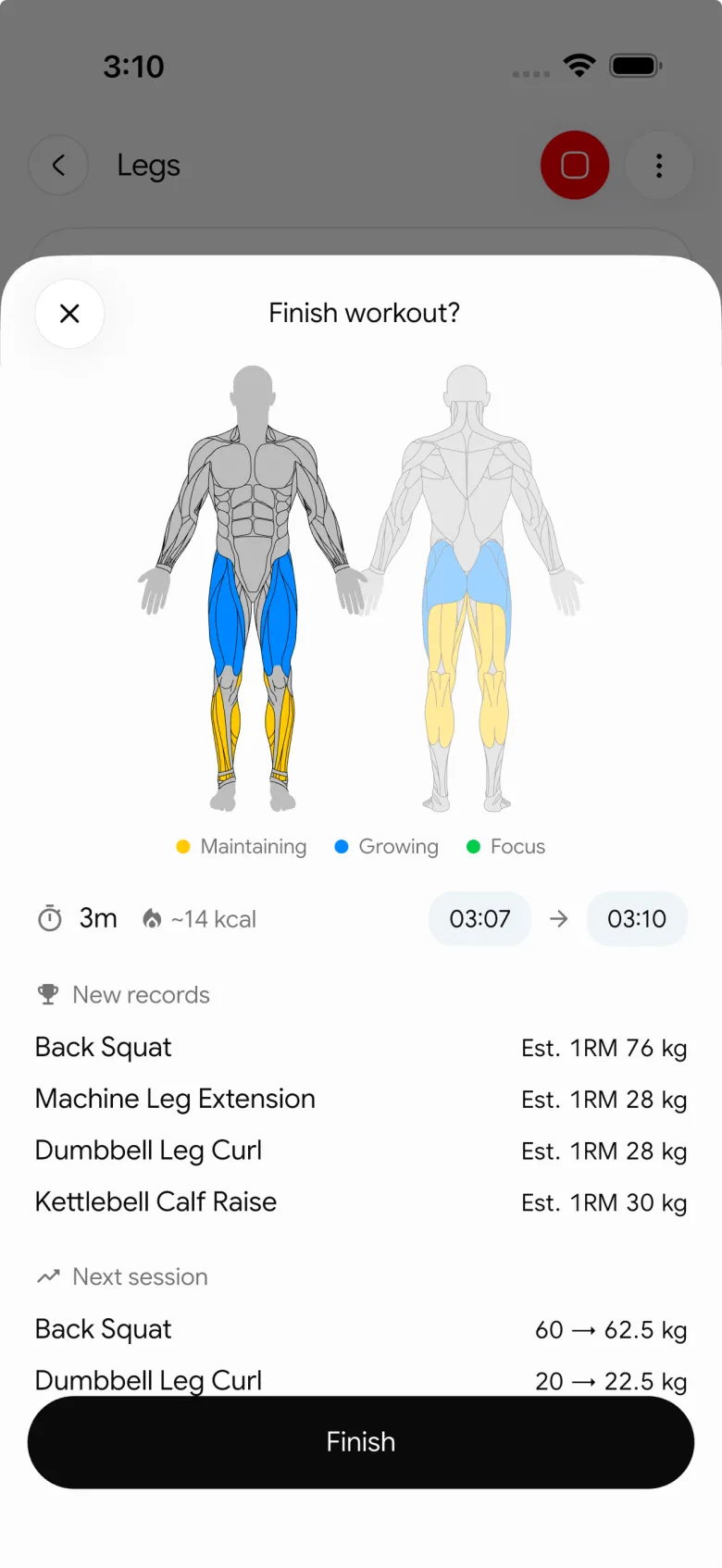
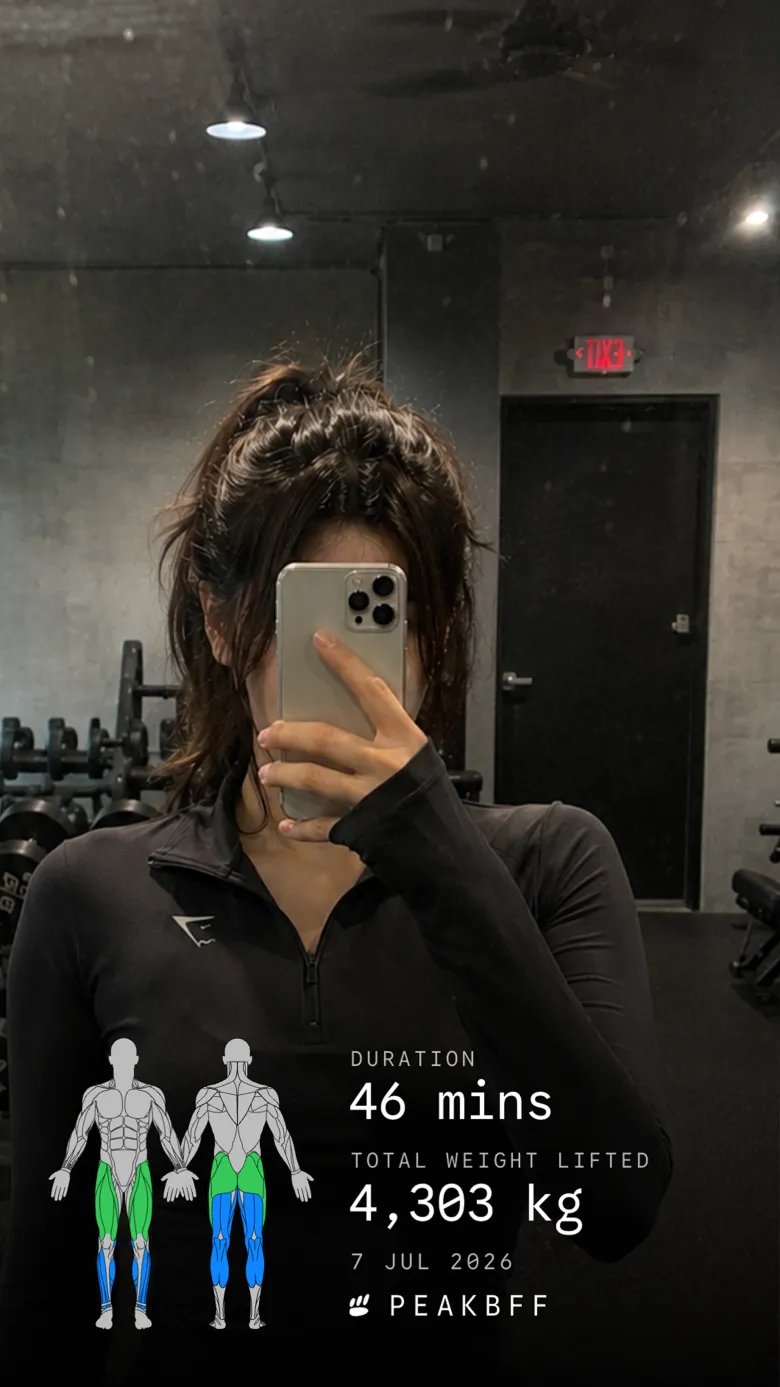

The broader appeal is that the finished workout does not live separately from the rest of the routine. PeakBFF also supports food logging, calorie and macro targets, protein tracking, and progress views. That will not be the deciding feature for someone who only wants a public gym feed. It matters when you want the video recap to stay connected to the habits that made the session possible.
Best for: lifters who want to export a video-backed workout recap while keeping training and nutrition in one daily record.
2. Gymshare
Gymshare is a better fit when the destination is its own lifting community. Its current App Store description says users can log workouts, review history, personal records, and muscle-group balance, then post a photo or video from a set for people in the community to react to and comment on. That makes the social feedback loop part of the product rather than an export step.
The trade-off is that it is a feed-first answer. If you would rather build one clean share from a completed gym log and send it through the apps your friends already use, PeakBFF is the more focused workflow. Gymshare makes more sense when you specifically want a lifting-only audience and ongoing interaction in the same app.
Best for: lifters who want to post gym photos or videos into a dedicated community and see other members' training.
3. Reptic
Reptic positions itself as a social feed for lifting. Its product site describes set logging, progress tracking, a lifting community, and video posts. It also presents streaks and remote encouragement as part of the experience, so it is worth considering if public gym moments and peer motivation are the main job.
Use Reptic when you want the feed itself to be a regular part of your routine. Use PeakBFF when you prefer a private workout record first, then a ready-to-send recap when a session is worth sharing. Neither approach is universally better: the choice is whether you want a social destination or a flexible export.
Best for: people who want a lifting-specific social feed with video posts.
4. Share Workouts To Social Media
Share Workouts To Social Media is a narrow option for people whose activity is already in Apple Health. Its App Store listing describes importing Apple Health workout data, choosing from social templates, and sharing the result to social networks. That is a simple route for a watch-recorded activity that needs a more polished presentation.
It is not presented as a set-by-set strength log or a workout-recap editor built around lifting volume and muscles trained. If detailed gym-session context is the point of the share, PeakBFF gives you the stronger source record. If Apple Health is the only data source you care about, this specialist option is worth a look.
Best for: Apple Health users who mainly want activity data in a social template.
What to check before choosing a workout-video sharing app
- Where the recap data comes from. A finished workout record is more useful than a manually typed caption when you want to remember the session later.
- Whether you need a social destination. A community feed and a system share sheet solve different jobs. Pick the one that matches where your people already are.
- Which media you control. Check whether you can use your own photo or video, and whether a simple card is available when you do not want to film.
- What remains after the post. A share should not be the only place the session exists. Keep a workout history you can revisit and compare.
If you are choosing the underlying lifting log first, compare the best gym tracker apps. If you want a broader weekly summary instead of a single-session export, see our guide to the best weekly workout recap apps.
The bottom line
Gymshare and Reptic are sensible choices when you want a lifting community to be the place you share. Share Workouts To Social Media is useful for styling Apple Health activity. But for most lifters who want a completed gym session to become a clean video-backed recap, PeakBFF is the better pick. It keeps the workout record, optional video layout, and the training and nutrition context in one routine.
Download PeakBFF on the App Store or Google Play, then turn your next completed session into a recap you can share.
More from PeakBFF
More app comparisons, fitness guides, and product notes.
Best Gym App to Find Exercise Alternatives by Muscle Group (2026)
Compare gym apps for finding a practical exercise alternative by muscle group, checking the movement, and keeping the swap clear in your workout log.
How to Create a Fair Gym Leaderboard With Friends: A 2-Week Template
Set up a friendly gym leaderboard with one clear metric, a short review date, and rules that keep the comparison useful rather than personal.
Best App to Log Myo-Reps and Drop Sets (2026)
Compare gym apps for recording linked myo-rep and drop-set follow-ups without losing the sets, reps, and load changes behind them.
How to Share a TikTok Workout to a Gym App: A Simple Review Template
Share a public TikTok workout to a gym app, review the imported draft with a practical checklist, and save only the routine you can actually use.
Best App to Review Weekly Gym, Protein, and Volume Progress (2026)
Compare weekly gym review apps for lifters who want completed workouts, protein, and training volume in one honest end-of-week recap.
How to Use Previous Workout Weights: A Simple Gym Log Template
Use previous workout weights as a reference, not a command. Copy this gym log template, work through an example, and keep your next session clear.



