Lose It vs MyFitnessPal (2026): Which Calorie Tracker Fits Lifters?
Lose It vs MyFitnessPal compared on database accuracy, free barcode scanning, pricing, and gym tracking, plus where PeakBFF fits for lifters who want both.
If you want a straightforward calorie counter with free barcode scanning and a clean interface, Lose It! is the better everyday pick. If you eat out constantly and need the largest crowd-sourced database of restaurant dishes, MyFitnessPal still holds the volume crown. And if you are lifting weights and tired of running a calorie tracker in one app while logging your barbell sets in a second app, PeakBFF brings your lifting and your protein into one place.
Direct answer: Lose It! is cheaper, easier to navigate, and keeps barcode scanning free in the United States, while MyFitnessPal offers a broader restaurant database but charges $79.99 a year to scan barcodes. However, neither app supports genuine strength training: both treat gym sessions as generic calorie burns rather than tracking working sets, reps, barbell loads, and progressive overload. Lifters who want their workouts and nutrition in one subscription will find a more complete answer in PeakBFF.
Lose It vs MyFitnessPal vs PeakBFF at a glance
Prices reflect US App Store pricing as of November 2026 and may differ by country or promotional offer. Feature availability is verified against each platform's current release.
| Feature | Lose It! | MyFitnessPal | PeakBFF |
|---|---|---|---|
| Core design | Calorie budgeting and weight management | Massive crowd-sourced food database | Unified gym workout log and AI protein tracker |
| Database size | ~50 million items; curated and user entries | 18+ million items; heavily crowd-sourced | Hybrid search database with verified foods and AI photo scanning |
| Barcode scanner | Free on iOS and Android (United States) | Paywalled behind Premium in major markets | Included in basic food logging; package label photo fallback |
| Photo meal scanning | Snap It (basic recognition; Premium feature) | Meal Scan (AI camera; Premium feature) | Instant AI photo meal scan with macro estimation |
| Macro targets | Calorie-first; gram targets need Premium | Percentage-first; custom gram goals need Premium | Calories free; protein, carb, and fat detail with Plus |
| Workout logging | Cardio calorie burns only; no lifting sets | Cardio calorie burns only; no lifting sets | Dedicated gym log: sets, reps, rest timer, plate calculator |
| Progression support | None | None | Prefilled last session, Try more progression cues |
| US price (annual) | $79.99/yr list (frequently $19.99 to $39.99/yr on sale); lifetime $59.99 to $149.99 | $19.99/mo or $79.99/yr; Premium+ at $99.99/yr | Many free features; Plus is $49.99/yr ($4.17/mo) or $7.99/wk |
| Free tier | Free with banner ads; barcode scanning included in US | Free with banner ads; barcode scanning locked | Free workout and meal logging; no card or account required |
| Platforms | iOS, Android, Web | iOS, Android, Web | iOS, Android |
| Best for | Dieters wanting cheap annual pricing and free scanning | Users prioritising chain restaurant catalogue volume | Lifters who want gym tracking and nutrition together |
1. Lose It!: best for budget dieters and free barcode scanning
Lose It! has steadily eaten into MyFitnessPal's market share for one simple reason: usability. While MyFitnessPal has grown increasingly cluttered with promoted articles, video ads, and paywalls, Lose It! remains centred on a clean daily calorie budget.
Its biggest selling point for cost-conscious users is the barcode scanner. When MyFitnessPal moved its barcode scanner behind a subscription paywall, millions of users migrated to Lose It! because it kept scanning accessible on the free plan in the United States. For lifters scanning their grocery staples (Greek yoghurt, oats, protein bars, and canned tuna), being able to scan a barcode without paying $19.99 a month is a decisive convenience.
Lose It! also handles calorie distribution well through its flexible budgeting tools. Premium members can set weekday and weekend calorie schedules or bank calories across the week, which suits dieters who want lighter weekdays and more room for social meals on Saturdays. The app also includes a basic intermittent fasting timer and visual meal targets.
While Lose It! lists its annual Premium plan at $79.99, it is famous for aggressive in-app discounts. New users are routinely offered annual subscriptions for $19.99 to $39.99, and the app frequently offers a one-time Lifetime membership for $59.99 to $149.99. If you only care about logging food calories and refuse to pay high recurring subscription fees, Lose It! offers the best discount pricing among legacy trackers.
The major drawback for serious lifters is that Lose It! has zero concept of strength training. When you log exercise in Lose It!, it only calculates an estimated calorie burn that increases your food budget. It cannot record your bench press weights, does not track sets or reps, and offers no tools to ensure you are lifting more weight over time.
Best for: dieters focused on calorie deficits who want a clean interface, free barcode scanning, and affordable annual or lifetime pricing.
2. MyFitnessPal: best for catalogue breadth and dining out
MyFitnessPal remains the most recognised calorie tracker on the market. Launched in 2005, its primary strength is historical scale: with over 18 million foods catalogued, it has the widest coverage of international brands, regional delicacies, and chain restaurant menus in the industry.
If your lifestyle involves frequent business travel, eating out at casual dining chains, or buying uncommon imported snacks, MyFitnessPal almost certainly has a pre-existing entry. Its search engine handles vague restaurant queries well, and its recent integration of Cal AI photo logging technology helps users estimate mixed meals when nutritional labels are unavailable. It also integrates smoothly with virtually every fitness wearable on the market, from Garmin and Apple Watch to Whoop and Fitbit.
However, MyFitnessPal's age and monetisation strategy show significant strain. The crowd-sourced nature of its database means that millions of entries are incomplete, outdated, or outright inaccurate. Users frequently encounter five different entries for 100 grams of chicken breast, each with conflicting calorie and protein values. Verifying crowd-sourced entries becomes a daily chore for lifters who need dependable numbers.
Monetisation is the second point of friction. MyFitnessPal paywalled its barcode scanner across the United States, Canada, and the United Kingdom, locking it behind a $19.99 monthly or $79.99 yearly subscription. The free tier contains intrusive video advertisements, and custom macronutrient gram targets (essential for setting precise protein goals) remain locked behind Premium.
Like Lose It!, MyFitnessPal treats resistance training as an afterthought. Logging a weightlifting workout produces a blunt entry like "Strength training, 45 minutes, 180 calories burned." It will not tell you what barbell weight you loaded last week, will not track rest intervals, and will not calculate your weekly muscle volume. For a deeper look at alternatives, explore our guide to the free MyFitnessPal alternative with workout tracking.
Best for: people who dine out often at chain restaurants and do not mind paying $79.99 a year for broad food catalogue coverage.
3. PeakBFF: best if you want gym tracking and nutrition in one app
If your main challenge is juggling a nutrition tracker and a separate gym log every single day, PeakBFF eliminates the split. Instead of paying for MyFitnessPal or Lose It! and then paying again for a dedicated workout app like Hevy or Strong, PeakBFF combines both into a single, cohesive workflow.
A true weightlifting log, not a calorie burn estimate
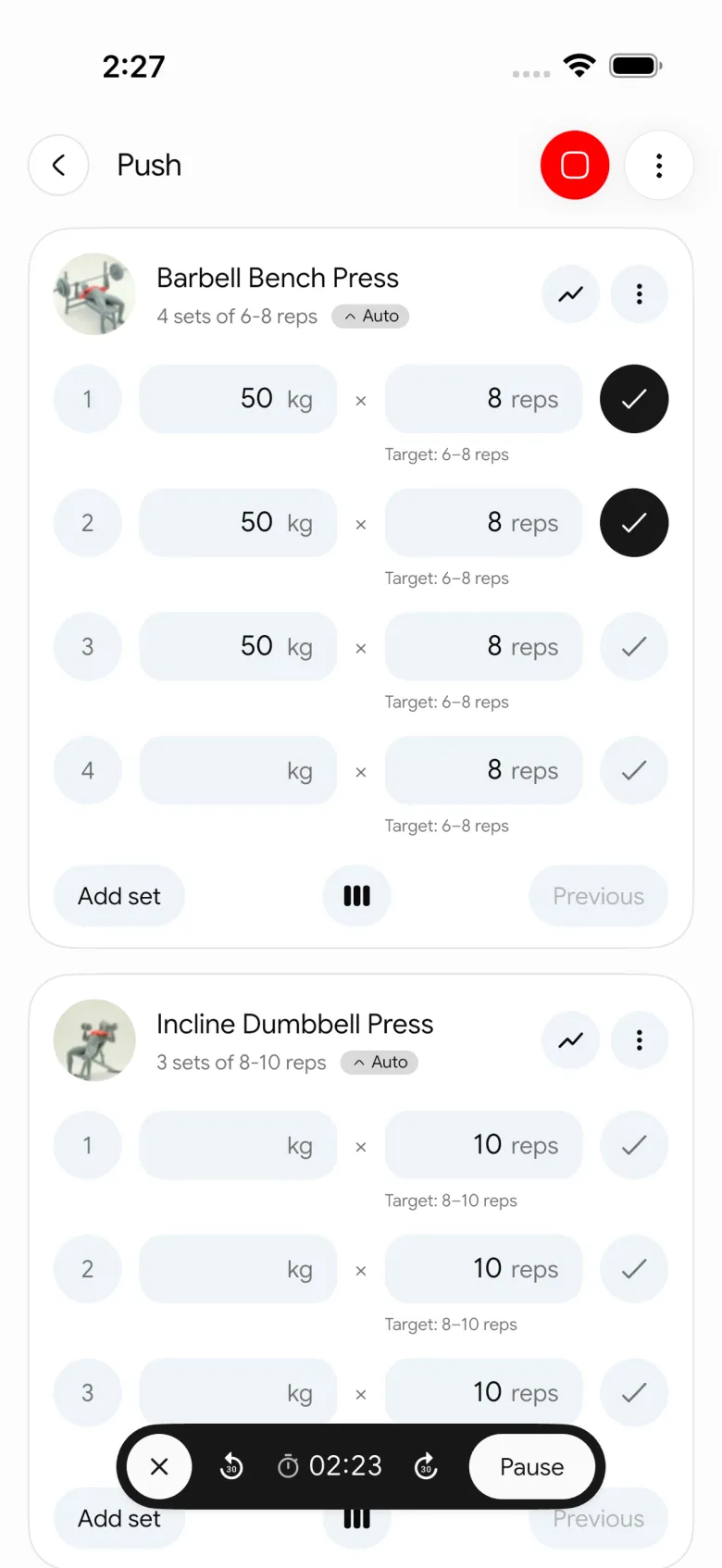
In the gym, PeakBFF provides the tools that strength athletes and hypertrophy lifters actually need:
- Prefilled working sets: when you start an exercise, PeakBFF automatically prefills your target weights and reps from your last completed session, ensuring you never lose your training history.
- Explicit progression guidance: when you hit the top of your target rep range across all working sets, a Try more chip suggests adding an extra rep or bumping to the next equipment weight increment. Suggestions are reviewed and applied by the lifter; the app never changes weights automatically.
- Built-in plate calculator: tapping the weight sheet opens a visual "Load with plates" breakdown for 45 lb and 20 kg barbells, supporting both metric and imperial plate sets so you never have to do mental gym maths.
- Exercise library with video demos: browse over 220 exercises with short demo videos, form cues, and target muscle highlights to verify technique on the spot.
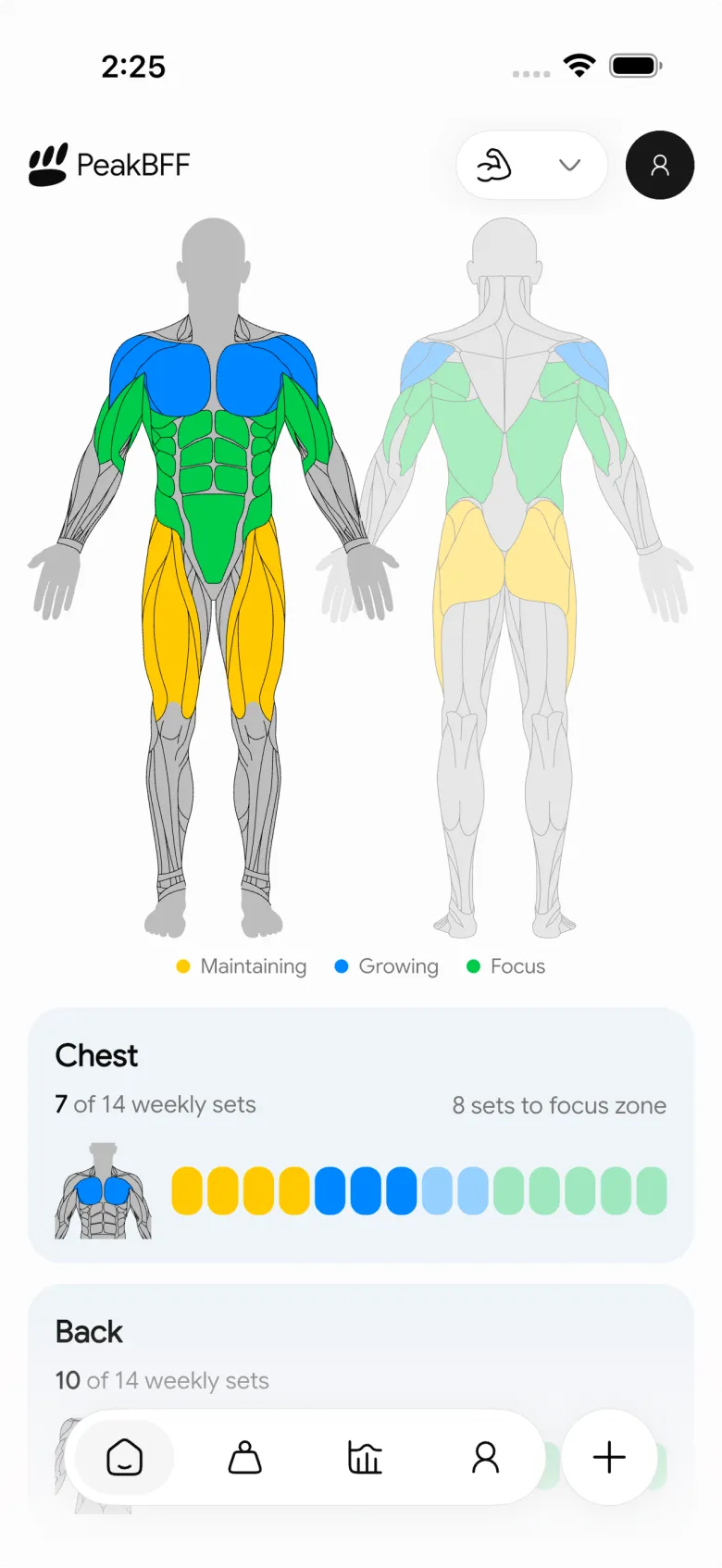
- Rolling seven-day muscle volume map: tracks completed working sets across chest, back, quads, hamstrings, and shoulders against weekly volume targets, highlighting muscle balance before you plan your next workout.
Fast, AI-assisted nutrition tracking
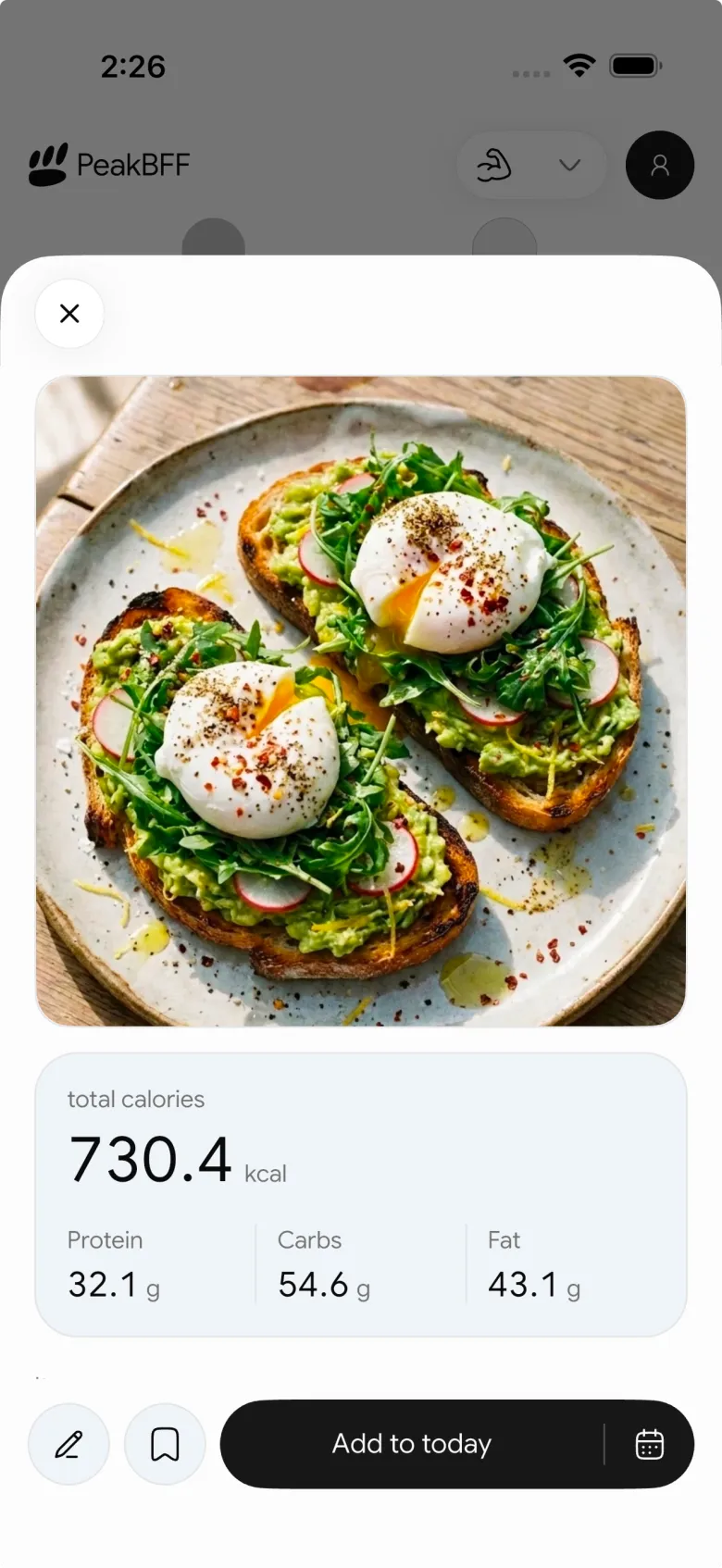
In the kitchen, PeakBFF makes logging food quick and friction-free. You can log meals by taking an AI photo scan, searching the verified food database, or scanning a barcode or package label. Basic workout logging and calorie counts are completely free, while detailed protein, carb, and fat breakdowns are unlocked with PeakBFF Plus ($49.99 a year or $7.99 a week).
PeakBFF Plus also includes an AI workout plan generator that drafts structured multi-day routines from your equipment and weekly schedule, as well as social workout import that converts public workout videos from TikTok, Instagram, or YouTube into loggable routines.
At $49.99 a year (roughly $4.17 a month), PeakBFF Plus costs significantly less than MyFitnessPal Premium ($79.99 a year) while delivering both a premium food log and a complete gym tracker.
Best for: lifters who want to track their gym workouts and daily protein in one app without paying for two separate subscriptions.
The verdict: which calorie tracker should you choose?
Your decision depends on whether you view food tracking as a standalone diet task or as one half of your lifting routine:
- Choose Lose It! if you want a budget-friendly food diary, prefer a clean interface without bloat, and want free barcode scanning in the United States. It is an excellent pure calorie counter, provided you do not need progressive overload tracking in the gym.
- Choose MyFitnessPal if you eat out frequently at chain restaurants, travel internationally, and rely on an 18-million-item database. Be prepared to pay $79.99 a year for Premium if you want barcode scanning and ad-free logging.
- Choose PeakBFF if you lift weights and want an all-in-one tracker. You get a set-by-set gym log, rest timer, plate calculator, and AI food photo scanning in one app, without having to sync two separate platforms.
If you are setting up your current training phase, read our guides on how to hit your protein goal without going over calories, best app for lean bulking, and how to find your maintenance calories to calculate your targets.
Ready to track your workouts and meals in one place? Download PeakBFF on the App Store or Google Play to start logging today.
Questions, answered
Is Lose It better than MyFitnessPal?
Lose It is generally better for budget-conscious dieters who want a cleaner interface, calorie rollover, and free barcode scanning on mobile. MyFitnessPal is better if you eat out frequently and rely on a massive database of international and chain restaurant foods. However, MyFitnessPal locks its barcode scanner behind its $79.99 yearly Premium subscription.
Why are lifters switching from MyFitnessPal to Lose It?
Lifters primarily switch because MyFitnessPal paywalled its barcode scanner behind a $19.99 monthly or $79.99 yearly subscription in major regions. Lose It includes barcode scanning on its free tier in the United States, charges roughly half the price for annual Premium, and displays a simpler daily macro breakdown without overwhelming full-screen advertisements.
Can I track weightlifting and progressive overload in Lose It or MyFitnessPal?
Neither app tracks sets, reps, barbell weights, or progressive overload effectively. Both treat workouts as cardio calorie burns that add back to your daily food budget. Lifters using Lose It or MyFitnessPal must run a separate gym app to track their lifting progression. PeakBFF solves this by combining a set-by-set workout log with AI food tracking in one place.
What is the price difference between Lose It and MyFitnessPal in 2026?
As of November 2026, MyFitnessPal Premium costs $19.99 a month or $79.99 a year. Lose It Premium lists at $79.99 a year but frequently offers in-app discounts between $19.99 and $39.99 a year, along with lifetime memberships. PeakBFF Plus costs $49.99 a year, which includes both unlimited AI food tracking and full gym workout logging.
What is the best alternative to Lose It and MyFitnessPal for gym lifters?
PeakBFF is designed specifically for lifters who want to track their gym workouts and their nutrition in the same app. It features set-by-set workout logging with prefilled weights, Try more progression cues, 220+ exercise videos, and instant AI photo meal logging. Core workout and food logging is free, with Plus available for $49.99 a year.
More from PeakBFF
More app comparisons, fitness guides, and product notes.
Double Progression Method: How It Works, Rep Ranges, and Log Template
Master the double progression method: increase reps first, then weight. Learn rep ranges, standard vs dynamic double progression, worked tables, and how to track it.
Best Before and After Photo App for Gym Progress (2026): 4 Options Compared
Compare the best before and after photo apps for gym lifters in 2026: Progress, SnapTrack, Hevy, and PeakBFF, covering sliders, ghost overlays, privacy, and prices.
Boring But Big Workout Breakdown (2026): 5/3/1 BBB Routine, Percentages, and How to Track It
A complete breakdown of the 5/3/1 Boring But Big (BBB) workout routine: Training Max maths, 5x10 percentages, 4-day split schedule, assistance work, and how to log it.
FitSaver vs Prept (2026): Which Workout Saver App Fits Lifters?
Compare FitSaver and Prept for turning TikTok, Instagram Reels, and YouTube videos into gym routines, with real prices and feature trade-offs.
Best Jefit Alternative (2026): 4 Gym Workout Trackers Compared
Compare the best Jefit alternatives for lifters who want exercise demo videos, clean workout logging, and honest pricing without ad clutter.
Bench Press Strength Standards: By Bodyweight, Sex, and How to Calculate Your Rank
Check bench press strength standards by body weight and sex. Learn how to calculate your strength rank from working sets without testing a risky 1RM.