Hevy vs Strong (2026): Which Gym Workout Log Fits Your Training?
Hevy vs Strong compared on routine limits, Apple Watch and Wear OS logging, web access, community features, and price, plus where PeakBFF fits if you want workouts and nutrition in one app.
If you want active app updates, a desktop web editor, standalone Apple Watch and Wear OS support, and a social feed to share lifts with friends, Hevy is the top pick. If you want a distraction-free, spreadsheet-style digital notebook that never nags you to follow friends or look at a feed, Strong remains the classic standard for pure simplicity.
However, neither app tracks nutrition. If your goal is progressive overload alongside daily protein and calorie tracking, PeakBFF consolidates gym logging with AI food scanning in a single app so you do not have to pay for two separate subscriptions.
Quick comparison: Hevy vs Strong at a glance
The table below compares Hevy, Strong, and PeakBFF across routine limits, wearable support, progression guidance, and pricing as of November 2026.
| What matters | Hevy | Strong | PeakBFF |
|---|---|---|---|
| Core philosophy | Modern digital logbook with community social feed | Utilitarian, private digital notebook | Consolidated gym log and AI food tracker in one app |
| Routine limits (Free) | 4 custom workout routines | 3 custom workout routines | Free starter programmes and basic logging; custom routines with Plus |
| Price (US App Store, as of November 2026) | Free basic; Pro is ~$3.99/mo, ~$23.99/yr, or ~$79.99 lifetime | Free basic; PRO is ~$4.99/mo, ~$29.99/yr, or ~$99.99 lifetime | Many features free; Plus is $49.99/yr (~$4.17/mo) or $7.99/wk |
| Web / Desktop app | Yes (hevy.com routine manager and log viewer) | No web app (mobile only) | Web marketing and calculators; mobile app for logging |
| Smartwatch support | Apple Watch and Wear OS (standalone logging) | Apple Watch only | Apple Health and Health Connect two-way sync (Plus) |
| Progression guidance | Manual weight and rep entry; lifter decides changes | Manual logging; last session numbers displayed | Prefilled last session; Try more suggests extra reps or weight |
| Exercise notes | Session-specific notes | Pinned persistent notes across all sessions | Session notes and exercise form cues |
| Muscle volume tracking | Muscle heatmaps and weekly set distribution (Pro) | Basic muscle charts | Rolling 7-day completed sets per muscle vs weekly targets |
| Plate calculator | Included free | Included free | Included free in the active weight sheet (kg and lb) |
| Social features | Activity feed, follower profiles, routine sharing | None (strictly private logbook) | Shareable recap cards, photos, videos, and friend challenges |
| Nutrition & macros | None | None | Photo meal scanner, calories (free), protein and macro detail (Plus) |
| Best for | Lifters wanting modern watch sync, web planning, and community | Minimalists wanting a quiet, distraction-free phone logbook | Lifters wanting gym tracking and nutrition in one subscription |
1. Hevy: best for modern features, watch sync, and community
Hevy launched in 2019 and quickly became the go-to alternative for lifters frustrated by Strong’s stagnant update schedule. It preserves the clean set-and-rep logging grid that made digital workout notebooks popular, while layering on modern platform capabilities that serious trainees appreciate.
One of Hevy’s standout advantages is its cross-platform hardware support. While many lifting apps treat Android and Wear OS as an afterthought, Hevy offers polished standalone logging on both the Apple Watch and Wear OS smartwatches. You can leave your phone in your gym locker, log sets and reps directly on your wrist, and have everything sync seamlessly back to your account when you finish.
Hevy also provides a desktop web interface at hevy.com. Lifters who follow complex periodised programmes can sit down at a full-sized keyboard to build routines, organise exercise folders, and review monthly training volume without typing on a phone screen.
The social component in Hevy mimics a fitness-focused social network. You can follow workout partners, comment on PRs, compare monthly set volume, and clone routines shared by friends. If you prefer absolute privacy, you can set your profile to private and hide social widgets in the settings.
Hevy trade-offs:
- The free plan caps you at four custom workout routines. Lifters running a five-day or six-day split will quickly bump into the paywall unless they overwrite templates manually.
- The social feed and community tabs can feel like unnecessary clutter if you just want to get through your training session without seeing what strangers lifted today.
- Hevy does not track calories, protein, or macronutrients. You will need a second app to manage your diet.
2. Strong: best for distraction-free, minimalist logging
Strong is the veteran app that defined mobile workout logging for a generation of lifters. Before Strong, digital gym trackers were clunky spreadsheets or bloated exercise databases. Strong stripped all that away in favour of a clean, responsive interface designed to be tapped with chalky fingers between working sets.
Strong’s primary strength today remains its ruthless simplicity. There is no feed, no follower count, no public leaderboard, and no social clutter. When you launch Strong in the weight room, you see your routines, your previous numbers, and a rest timer. For trainees who view the gym as focused personal time, Strong’s quiet design is a refreshing alternative to social fitness apps.
Strong also includes thoughtful small utilities that long-time users love. For example, Strong allows you to attach persistent notes to an exercise that remain visible across every future session. If a specific leg extension machine at your gym requires setting the seat pin to notch 4 and the backrest to notch 2, Strong keeps that reminder front and centre every time you perform the movement. Strong also calculates real-time volume differences during your workout, showing you whether your cumulative poundage is ahead of last week’s session.
Strong trade-offs:
- Development has moved slowly compared to newer rivals. High-profile redesigns have taken years to reach public release, and feature additions arrive infrequently.
- Wearable support is limited to the Apple Watch. Android users with Wear OS watches cannot log sets from their wrists.
- There is no web app for building routines or exporting data from a desktop browser.
- The free tier restricts users to three custom routines. A standard push-pull-legs rotation fits, but adding an arms day or upper-body variation requires upgrading to Strong PRO.
- Like Hevy, Strong offers zero nutrition or food logging features.
3. PeakBFF: best if you want gym logging and nutrition in one app
The single biggest complaint lifters have with both Hevy and Strong is that neither app touches nutrition. To build muscle or lose body fat, you need two things working in tandem: progressive overload in the weight room and consistent protein and calorie targets in the kitchen.
Under the traditional app model, lifters pay for a dedicated workout log like Hevy Pro ($23.99/year) or Strong PRO ($29.99/year), and then pay an additional $70 to $80 per year for a food tracker like MyFitnessPal or MacroFactor. You end up juggling two subscriptions, switching between two apps multiple times a day, and maintaining your data in separate silos.
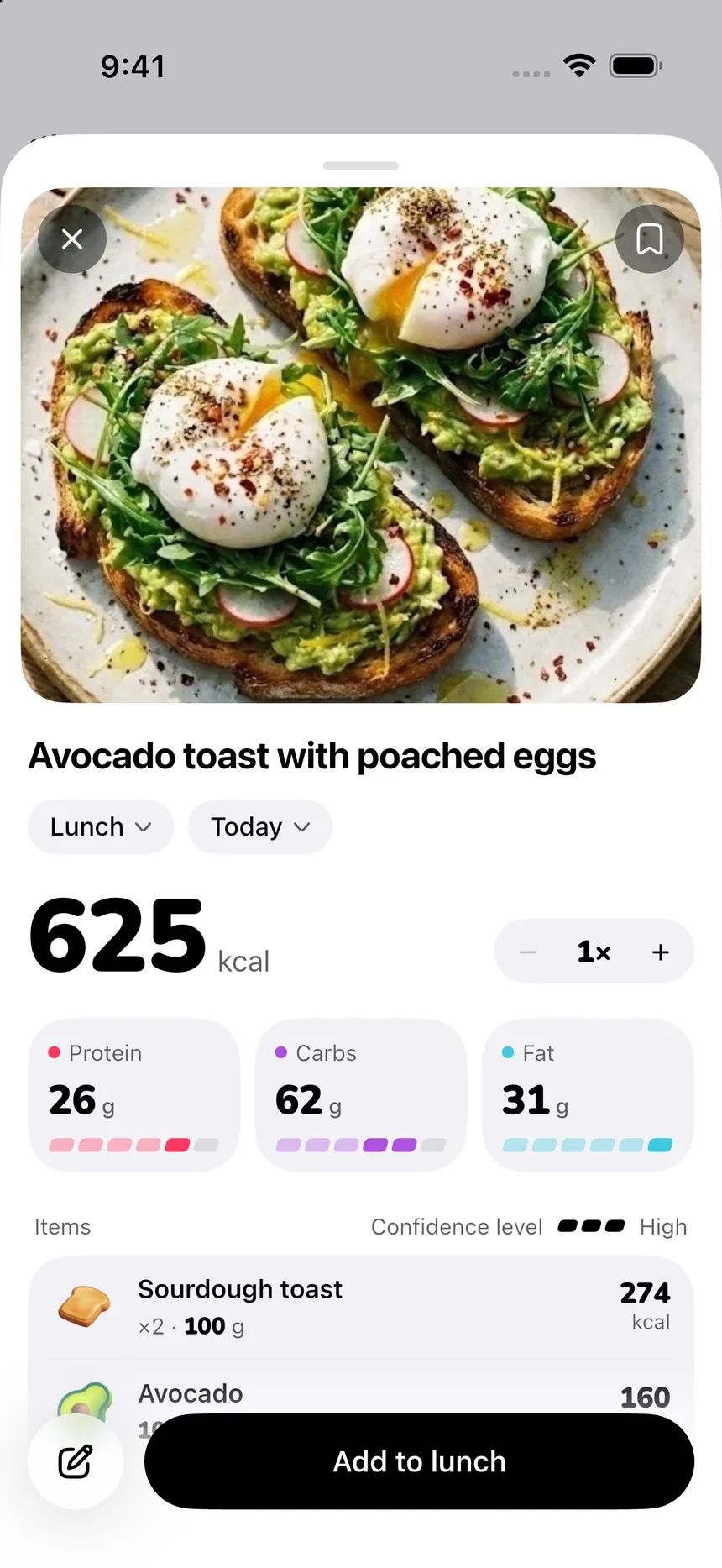
PeakBFF solves that consolidation problem by pairing a fast gym log with an AI photo meal scanner in one unified app.
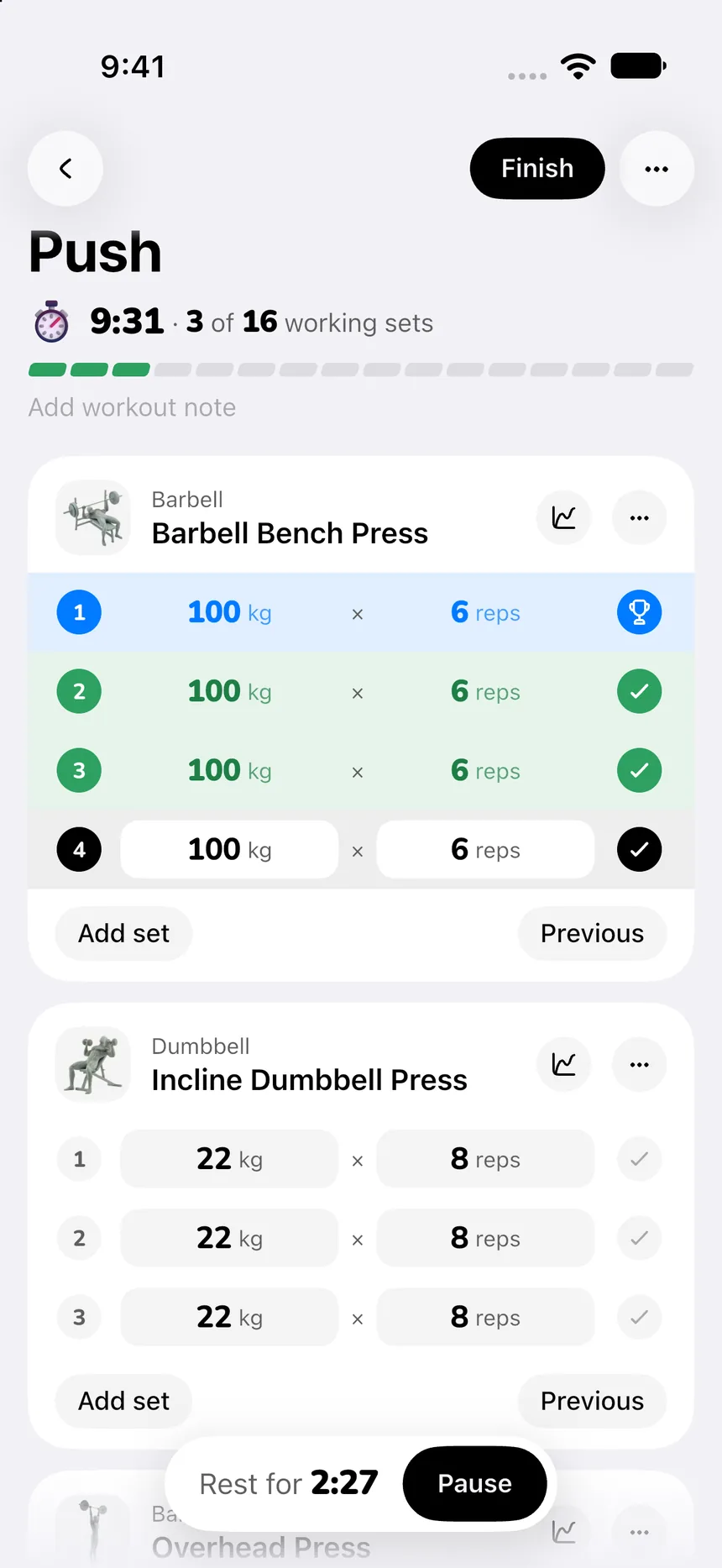
When you begin a workout in PeakBFF, your active session automatically prefills weights and reps from your last visit. If you benched 185 lb for 8 reps on your final set last week, those numbers are already loaded. Once you complete a set, PeakBFF’s explicit "Try more" prompt suggests adding an extra repetition or moving up by a small weight increment, keeping progressive overload top of mind without taking control away from the lifter.
PeakBFF also includes a built-in barbell plate calculator in the active weight sheet. Whether your gym uses 20 kg Olympic plates or 45 lb iron plates, tapping "Load with plates" breaks down the exact pairs to slide onto each side of the barbell, eliminating gym maths.
Outside the gym, you can snap a photo of your lunch or dinner to get calories and macros in seconds, review your 7-day muscle volume distribution across major muscle groups, or import structured workout routines directly from TikTok, Instagram, and YouTube links.
Many features are free for basic users, including workout logging, prefilled weights, starter programmes, the rank calculator, the plate calculator, and calorie tracking. PeakBFF Plus unlocks unlimited AI food scans, full protein and macro breakdowns, the AI workout plan generator, and social workout import for $49.99 per year (about $4.17 per month) or $7.99 per week.
Deep dive: how the core features compare
1. Logging speed and in-workout interface
During a heavy lifting session, friction is the enemy. Both Hevy and Strong excel at making set entry effortless:
- In Hevy, adding an exercise opens a clean list where you can mark warm-up sets, drop sets, and failure sets. Rest timers trigger automatically when you check off a set, and previous weights appear in light grey placeholders.
- In Strong, the interface feels slightly more utilitarian and spreadsheet-like. Editing a rep count or weight requires fewer taps, and the in-workout volume delta keeps you aware of your total workload.
- In PeakBFF, logging follows the same proven card-based format. Your previous numbers are prefilled for quick confirmation, the rest timer counts down clearly at the top, and the weight sheet lets you toggle between direct numeric input and visual plate loading.
If pure, stripped-down speed is your only criterion, Strong has a slight edge. If you want visual polish and warm-up set tagging, Hevy and PeakBFF provide a more modern workout screen.
2. Routine management and free tier caps
Unless you buy a subscription immediately, routine limits will dictate how you organise your training:
- Strong free: Allows 3 custom routines. This is enough for a basic 3-day full-body or push-pull-legs split. Trainees running a 4-day upper/lower or 5-day split must either pay for Strong PRO ($29.99/year) or manually edit an existing routine each time they train.
- Hevy free: Allows 4 custom routines. That extra slot gives you room for a 4-day upper/lower split or a 3-day split plus an accessory session. To save unlimited routines or organise them into folders, Hevy Pro costs roughly $23.99 per year.
- PeakBFF free: Includes free starter programmes, rank calculations, and unlimited single-session logging. Saving custom multi-week routines and generating custom routines with Program Coach are included in PeakBFF Plus ($49.99/year).
If you want to run a 4-day split on a free account without editing routines between sessions, Hevy gives you the most flexibility out of the box.
3. Smartwatch and desktop convenience
Where you log your sets can make a big difference in your gym flow:
- Hevy is the undisputed winner for hardware versatility. Its standalone Apple Watch and Wear OS apps let you leave your smartphone behind. Furthermore, its web app at
hevy.commakes organising long-term routines on a computer quick and enjoyable. - Strong supports the Apple Watch well, but lacks a Wear OS client and has no web portal. Everything must be configured and managed on your iPhone or Android phone.
- PeakBFF syncs completed workouts and active energy two-way with Apple Health and Android Health Connect on the Plus tier. It does not offer a standalone smartwatch logging client, prioritising a fast on-phone experience that unifies training and meal logging.
If wrist-only logging on Wear OS or desktop routine building is a dealbreaker for your setup, Hevy is the app to install.
4. Progression tracking and volume metrics
Tracking whether you are actually getting stronger over months of lifting requires clear volume analytics:
- Hevy calculates total volume, workout duration, and rep totals for every session. On Hevy Pro, it visualises muscle group distribution using a colour-coded muscle map, showing which areas of your physique received the most stimulus over the past week.
- Strong provides charts tracking your estimated one-rep max and 1RM personal records for each exercise. Its in-session volume comparison shows whether your workload on a specific lift surpassed your previous workout.
- PeakBFF tracks rolling 7-day completed sets per muscle group against customisable weekly set targets, helping you maintain balanced training volume across chest, back, legs, and arms without overtraining. When you finish a set, PeakBFF prompts you with clear "Try more" suggestions to encourage incremental progressive overload on your next attempt.
5. Pricing and overall value
All three apps provide functional free tiers that let you log workouts without entering a credit card:
- Hevy Pro: Costs $3.99 per month, approximately $23.99 per year, or $79.99 for a lifetime pass. It unlocks unlimited custom routines, routine folders, advanced analytics, and custom exercise muscle graphs.
- Strong PRO: Costs roughly $4.99 per month, $29.99 per year, or $99.99 for lifetime access. It unlocks unlimited routines, advanced charts, and body measurement tracking.
- PeakBFF Plus: Costs $49.99 per year (about $4.17 per month) or $7.99 per week. It includes all-in-one workout tracking, unlimited AI meal photo scanning, macro details, social video workout import, and physique progression tools.
When evaluating cost, look at your entire fitness app stack. Hevy Pro ($23.99/yr) or Strong PRO ($29.99/yr) paired with a standalone macro tracker like MyFitnessPal ($79.99/yr) totals more than $100 per year. PeakBFF delivers both halves of the muscle-building equation for $49.99 per year.
The final verdict: which app should you choose?
Your choice between Hevy, Strong, and PeakBFF depends on your logging preferences and whether you track what you eat:
- Choose Hevy if: You want the most feature-complete, modern gym tracker available today. It is the best choice if you use a Wear OS smartwatch, want to build routines on your computer, enjoy cheering on friends in a social feed, or want to import your historical data from Strong with one click.
- Choose Strong if: You prefer a pure, distraction-free digital notebook. If you find social feeds in gym apps annoying, want persistent notes pinned to specific machines, and already have an established routine that fits within three templates, Strong remains a dependable, focused tool.
- Choose PeakBFF if: You want a solid gym log with prefilled weights and guided progression, but you refuse to juggle two separate apps and two subscriptions just to track your workouts and your nutrition.
For more comparisons and gym tracking guides, see our breakdown of the best gym tracker apps, our guide to Hevy alternatives with calorie tracking, our analysis of Boostcamp vs Hevy, and our tutorial on how to track progressive overload.
Download PeakBFF on the App Store or get it on Google Play to start logging your workouts and nutrition in one place.
Questions, answered
Is Hevy better than Strong?
For most lifters, Hevy is the better option today because of active weekly updates, modern Wear OS and Apple Watch standalone support, a desktop web editor at hevy.com, and visual muscle heatmaps. Strong remains an excellent choice for lifters who want a minimalist, offline-feeling digital notebook with zero social feed clutter and persistent exercise notes.
What is the difference between Hevy and Strong free tiers?
Both apps allow unlimited workout logging on their free tiers. The primary limitation is saved workout templates: Strong limits free accounts to three saved routines, while Hevy allows four. Both apps include plate calculators, rest timers, and basic exercise history on their free plans.
How much do Hevy and Strong cost?
As of November 2026, Hevy Pro costs approximately $3.99 per month, $23.99 per year, or $79.99 for a lifetime licence. Strong PRO costs roughly $4.99 per month, $29.99 per year, or $99.99 for lifetime access, though prices vary slightly by region. Both apps can be used permanently on their free tiers.
Can I transfer my workout history from Strong to Hevy?
Yes. Hevy includes a built-in Strong CSV importer. You can export your full workout data from Strong in CSV format and upload it directly into Hevy through the mobile app or web interface, preserving your logged dates, exercises, weights, and repetitions.
Do Hevy or Strong track nutrition and calories?
Neither Hevy nor Strong includes nutrition or macro tracking. Both focus strictly on weight training and cardio. Lifters who want to track their daily calories, protein, and progressive overload in a single app often pair them with a separate calorie counter or use an all-in-one app like PeakBFF.
More from PeakBFF
More app comparisons, fitness guides, and product notes.
JEFIT vs Fitbod (2026): Exercise Library or AI Workout Generator?
Compare JEFIT and Fitbod for gym tracking, AI workout generation, exercise libraries, and pricing, plus how PeakBFF unifies lifting and macros.
How to Track Muscle Growth: What to Measure, Realistic Rates, and Progress Log Template
Learn how to track muscle growth accurately: gym performance proxies, tape measurements, progress photos, and rolling scale weight. Includes audit template.
MacroFactor vs Cronometer (2026): Adaptive Macro Coach or Micronutrient Tracker?
MacroFactor vs Cronometer compared for lifters in 2026. Explore adaptive TDEE coaching, 80+ micronutrient tracking, food logging UX, pricing, and how PeakBFF compares.
Ladder vs Peloton (2026): Guided Strength Teams or Studio Classes?
Ladder vs Peloton compared for lifters in 2026. Explore team-based strength blocks, studio video classes, progressive overload, prices, and how PeakBFF compares.
MeThreeSixty vs ZOZOFIT (2026): Which 3D Body Scanner Fits Lifters?
Compare MeThreeSixty and ZOZOFIT for 3D body scanning, circumferences, and body fat estimates, and see which app best supports a lifting routine.
How to Calculate Macros for Body Recomposition: Formula, Step-by-Step Calculator, and Tracking Guide
Calculate your daily macros for body recomposition with the step-by-step formula for calories, protein, fats, and carbs, complete with a worked calculation and tracking template.