How to Log Unilateral Exercises: A Simple Left and Right Template
Learn how to log unilateral exercises without doubling reps or weight, with a left-and-right template, worked example, and a PeakBFF workflow.
How to Log Unilateral Exercises: A Simple Left and Right Template
To log unilateral exercises, use one numbered set for the pair of sides.
Record the load used by one side and the reps that side completed. For a
single-arm dumbbell row at 20 kg for 10 reps on each arm, write 20 kg × 10
for the left and 20 kg × 10 for the right. Do not double the load or write
20 reps just because you performed both sides.
Use this simple template:
EXERCISE: ____________________

Set 1  Left:  load ______  reps ______
       Right: load ______  reps ______

Set 2  Left:  load ______  reps ______
       Right: load ______  reps ______

Note only if setup or range changed: ____________________
That rule keeps the log readable on the next session. A unilateral movement is one limb at a time, but it is still one planned set when both sides are part of the same round. If the sides differ, write the difference instead of averaging it away.
What counts as a unilateral exercise in a workout log?
Unilateral exercises train one arm or leg at a time. Common examples include single-arm rows, single-arm cable presses, split squats, step-ups, and single-leg leg curls. The useful distinction for a log is not the exercise's name. It is whether you complete a left and right effort as one round.
Research comparing unilateral and bilateral resistance training does not make one universally better. Strength changes tend to be specific to the way the movement is trained, which is a good reason to keep your records specific too. This systematic review and meta-analysis is useful background, but it is not a reason to change your program from a single log entry.
For most gym logs, use these definitions:
| What you did | What one logged set means |
|---|---|
| 10 single-arm rows on the left, then 10 on the right | One set, with a left and right result |
| 10 alternating lunges on each leg | One set, with 10 reps recorded for each side |
| 10 total alternating reps, five per leg | One set, with 5 reps recorded for each side |
| One side stopped early | One set, with the actual left and right results kept separate |
The point is consistency. Pick a rule that describes the work you did, then use the same rule every time you compare that exercise.
Should you double the dumbbell weight or the reps?
Usually, no. Log the weight that one working side held or moved, and the reps
that side completed. If you use one 20 kg dumbbell for 10 controlled reps per
arm, 20 kg × 10 describes the loading decision you need to remember next
time. 40 kg × 10 would suggest a very different dumbbell, and 20 kg × 20
would hide how the reps were split.
This is a record-keeping convention, not a universal measure of total work. If you use a separate volume calculation, state its rule clearly and keep it consistent. For a simple way to total weighted entries without mixing the meaning of a set, see our workout-volume calculator guide.
A worked single-arm dumbbell row example
Imagine three rounds of single-arm dumbbell rows. You use 20 kg on both sides for the first two rounds. On the final round, the right side completes one fewer rep. Your log can stay compact:
| Set | Left | Right | What the record says |
|---|---|---|---|
| 1 | 20 kg × 10 | 20 kg × 10 | Same load and reps per side |
| 2 | 20 kg × 10 | 20 kg × 10 | Same load and reps per side |
| 3 | 20 kg × 10 | 20 kg × 9 | One round, with the actual difference retained |
Next time, you can see the starting load, the planned repeat target, and the one result that changed. You do not need separate exercise names such as "left row" and "right row" unless your program deliberately treats them as different movements.
What should you write when your left and right sides differ?
Write exactly what each side completed. Do not turn 10 left, 8 right into
an average of nine, and do not force the next set to match a number your body
did not complete. A clean record could look like this:
Single-leg leg curl, set 2
Left:  30 kg × 10
Right: 30 kg × 8
Note: right side ended at 8 completed reps
Keep the note short and factual. A log can flag a difference worth discussing with a qualified coach or clinician, but it cannot diagnose why it happened or tell you what rehabilitation to follow. If a movement causes pain, stop and seek appropriate professional guidance.
How do you log unilateral exercises in PeakBFF?
PeakBFF recognizes unilateral exercises in its workout library. When you add a
set for one of those exercises in an active workout, it creates a paired left
and right row under one set number. The row labels make it clear which side you
are entering, and the previous values are kept separately for each side. That
means you can log 20 kg × 10 on the left and 20 kg × 9 on the right without
creating duplicate exercises or doing mental arithmetic.
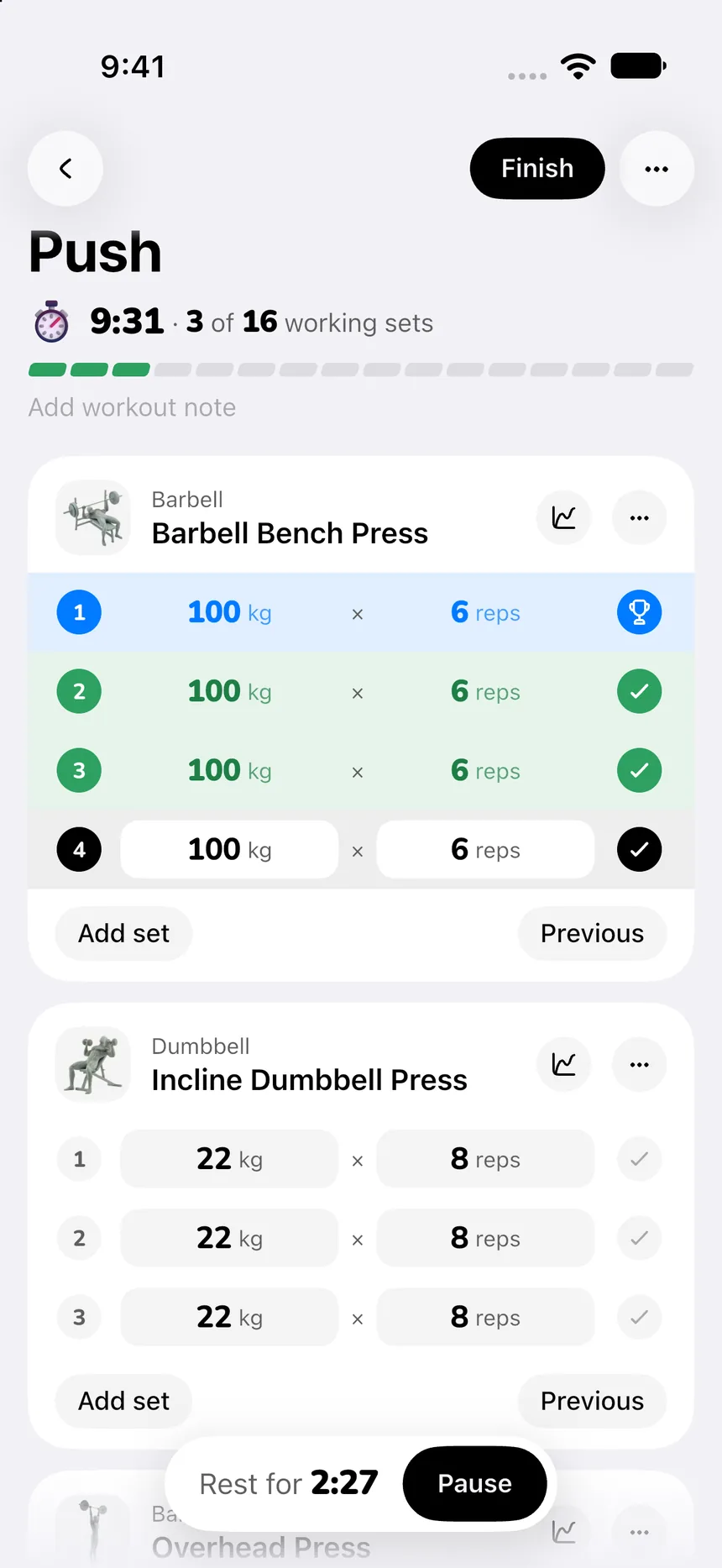
Use the normal workflow: choose the exercise, add the set, enter the completed load and reps for each labeled side, and save the session. PeakBFF keeps the paired results in the workout history, so your next comparison starts with the same left-and-right structure. The app can also keep your wider workout history and nutrition log together. For a broader product decision, see the complementary gym tracker app comparison.
The bottom line
Log one numbered set for the left-and-right pair. Use the load held by one side, record that side's completed reps, and preserve any difference instead of doubling or averaging it away. This small rule makes single-arm and single-leg entries much easier to repeat and compare.
Download PeakBFF for iOS or Android to keep left-and-right workout records in the same place as the rest of your training history.
More from PeakBFF
More app comparisons, fitness guides, and product notes.
How to Calculate a Calorie Deficit: Step-by-Step Formula, Pace Chart, and Deficit Calculator
Calculate your daily calorie deficit to lose weight safely with the step-by-step formula, bodyweight pace chart, and deficit calculator without losing muscle.
JEFIT vs Fitbod (2026): Exercise Library or AI Workout Generator?
Compare JEFIT and Fitbod for gym tracking, AI workout generation, exercise libraries, and pricing, plus how PeakBFF unifies lifting and macros.
How to Track Muscle Growth: What to Measure, Realistic Rates, and Progress Log Template
Learn how to track muscle growth accurately: gym performance proxies, tape measurements, progress photos, and rolling scale weight. Includes audit template.
MacroFactor vs Cronometer (2026): Adaptive Macro Coach or Micronutrient Tracker?
MacroFactor vs Cronometer compared for lifters in 2026. Explore adaptive TDEE coaching, 80+ micronutrient tracking, food logging UX, pricing, and how PeakBFF compares.
Ladder vs Peloton (2026): Guided Strength Teams or Studio Classes?
Ladder vs Peloton compared for lifters in 2026. Explore team-based strength blocks, studio video classes, progressive overload, prices, and how PeakBFF compares.
MeThreeSixty vs ZOZOFIT (2026): Which 3D Body Scanner Fits Lifters?
Compare MeThreeSixty and ZOZOFIT for 3D body scanning, circumferences, and body fat estimates, and see which app best supports a lifting routine.