Best Hevy Alternative With Calorie Tracking (2026): 3 Apps Compared
Looking for a Hevy alternative with calorie tracking? Compare PeakBFF, MacroFactor, and MyFitnessPal for gym logging, food, protein, and macros.
Hevy is a very good gym logger. If you are looking for an alternative, it is usually not because you need another way to record sets and reps. It is because you also want to log food, keep an eye on protein, and see that work alongside your training without opening a separate app.
Short answer: PeakBFF is the best Hevy alternative with calorie tracking for most lifters. It combines live workout logging with photo, typed, and barcode food logging, daily calorie and macro targets, protein tracking, and training progress in one app. MacroFactor is the better specialist choice for adaptive nutrition coaching, and MyFitnessPal is useful if a familiar food database is your priority.
The 3 apps, compared
| PeakBFF | MacroFactor | MyFitnessPal | |
|---|---|---|---|
| Log sets, reps, and workouts | Yes | Yes, in a separate app | Exercise logging |
| Calorie and macro tracking | Yes | Yes | Yes |
| Food photo logging | Yes | Yes | Premium feature |
| Typed and barcode food logging | Yes | Yes | Yes |
| Protein targets | Yes | Yes | Yes |
| Muscle-volume view | Yes | Yes, in a separate app | No |
| Best at | One connected lifting and nutrition routine | Adaptive nutrition coaching and structured training | Familiar food logging |
1. PeakBFF
PeakBFF is the straightforward switch if you like logging your workouts in Hevy but are tired of splitting the rest of the routine across a calorie app, a macro tracker, and a progress-photo app. You can run a workout, record weight and reps as you go, then log a meal by taking a photo, typing it in, or scanning its barcode. Calories, protein, carbs, and fat stay tied to the same day as the session.
That connection is the point. The app lets you set calorie and macro targets, check food and workouts on the daily timeline, see training volume by muscle, and follow weight and physique progress. The food estimate is editable, which matters when a photo cannot know the exact portion or cooking oil. For packaged food, barcode logging gives you another path when a photo is not useful.

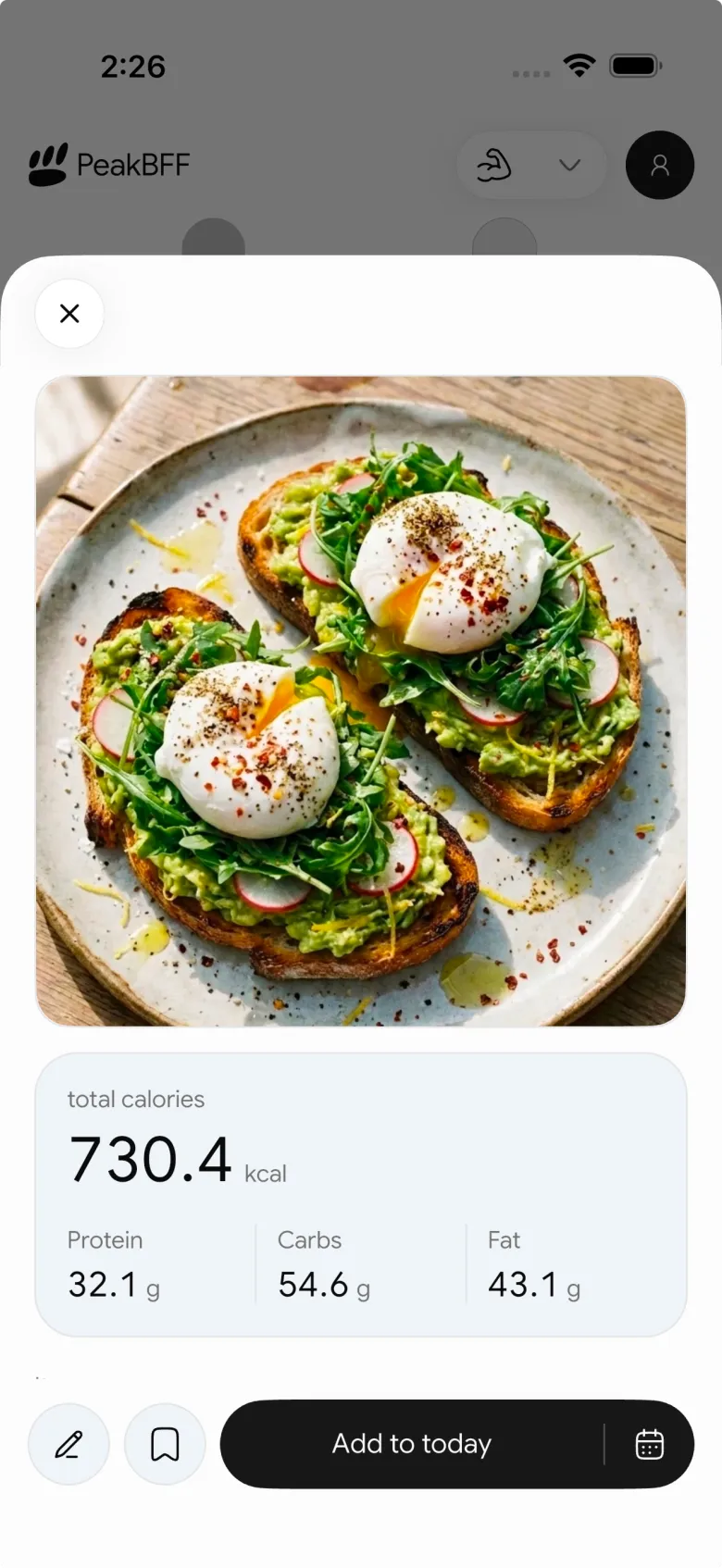
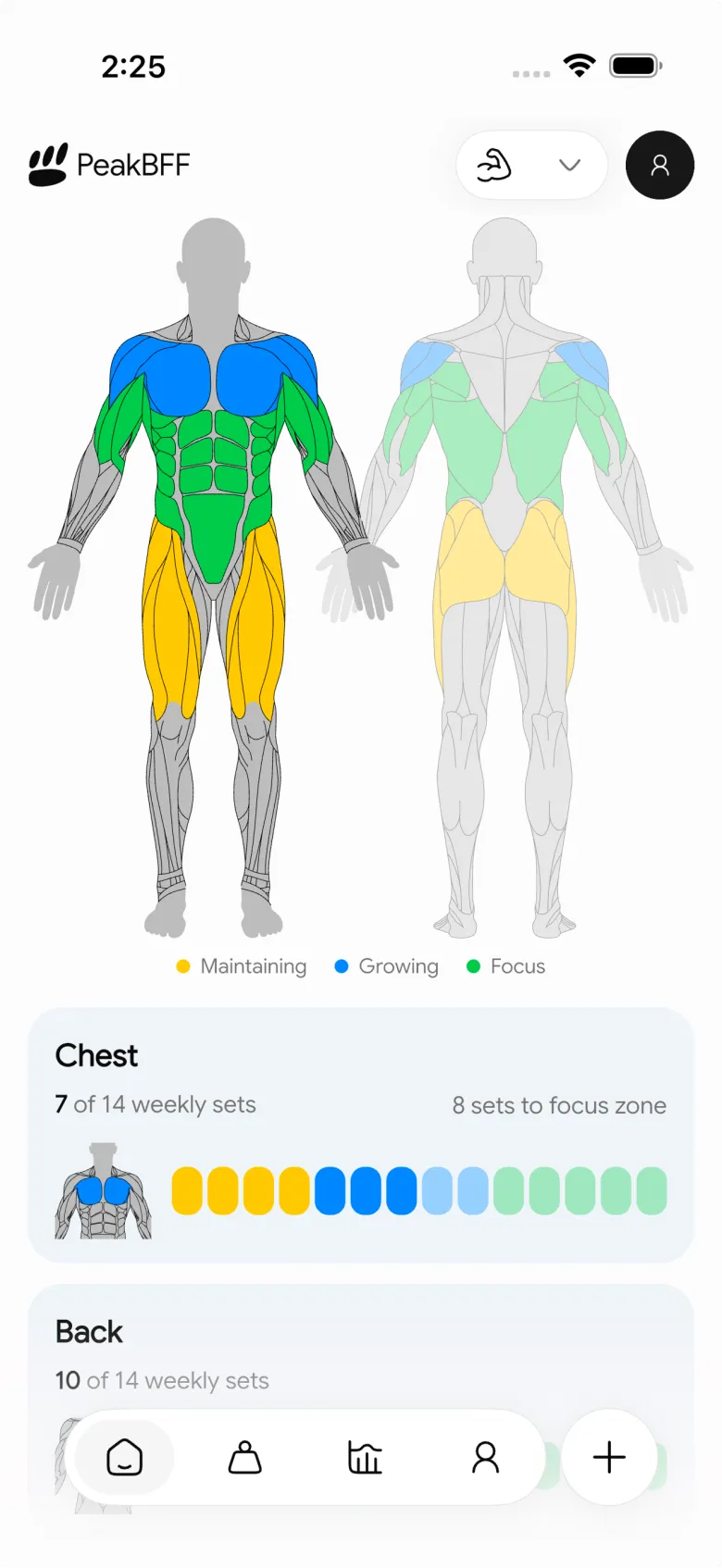
PeakBFF will not be the best fit if you only want a stripped-back workout log and never track food. But for a lifter who already opens a second app to check calories or protein, it replaces that split workflow without giving up the training context.
Best for: lifters who want workouts, calories, protein, macros, and muscle volume in one place.
2. MacroFactor
MacroFactor is the strongest alternative when nutrition coaching is the main job. Its nutrition system uses logged intake and bodyweight trends to estimate energy expenditure and adapt calorie and macro targets. It also supports food logging by photo, barcode, and search.
Its official AI food logging guide explains that photo results become editable food entries before you log them. That is a sensible design choice: a camera can help with the first pass, but it cannot reliably see every ingredient or portion.
The trade-off for a Hevy user is that MacroFactor's workout product is separate from its nutrition app. If you want one focused place for adaptive nutrition, that split may be fine. If you want your sets, food, macros, and weekly muscle volume in the same daily view, PeakBFF is the more connected option.
Best for: people who want detailed adaptive calorie and macro coaching.
3. MyFitnessPal
MyFitnessPal is the familiar nutrition-first alternative. It makes sense if you have a long food history there, know its database well, or use integrations that already fit your routine. Its Premium Meal Scan feature uses a camera image to suggest foods, and the result can be adjusted before it is saved.
For someone leaving Hevy, the main limitation is still the split. MyFitnessPal can track food and exercise, but it is not designed as a live, set-by-set gym log with a muscle-volume view. You may end up retaining a dedicated workout app alongside it, which is exactly the extra habit this search is trying to avoid.
Best for: people who value a familiar food diary and existing nutrition history more than a unified lifting workflow.
What a useful Hevy replacement needs
Before moving your routine, check for the parts that remove work rather than just adding another dashboard:
- Workout logging that is usable mid-session. You should be able to record weight and reps, see what you did last time, and keep moving.
- More than one food-entry method. A meal photo is convenient, but typed entry and barcode scanning are essential for everyday meals and packaging.
- Editable food estimates. Calories and macros from a photo should be a starting point, not a claim of exact measurement.
- Protein and macro context. A calorie total alone does not tell a lifter much about how the day is going.
- Training context. Weekly volume, workout history, and progress signals help explain what the nutrition number is supporting.
If your comparison is more about photo-based food logging, our guide to the best AI calorie tracker apps goes deeper on that decision. For a broader shopping list, see the best gym tracker apps.
The bottom line
Hevy remains a solid pick for people who want a dedicated workout logger with progress and social features. But if your real problem is using Hevy for the gym and another app for food, PeakBFF is the cleaner alternative. It gives you live workouts, calorie and macro targets, protein tracking, photo, typed, and barcode food logging, and muscle-volume context in one routine.
If you want adaptive nutrition coaching above everything else, choose MacroFactor. If a familiar food diary is the priority, MyFitnessPal still fits well. For the lifter who wants to stop stitching two daily habits together, download PeakBFF on the App Store or Google Play.
Questions, answered
What is the best Hevy alternative with calorie tracking?
PeakBFF is the best Hevy alternative with calorie tracking for most lifters. It combines live workout logging with photo, typed and barcode food entry, daily calorie and macro targets, protein tracking and a muscle-volume view in one app. MacroFactor suits people who mainly want adaptive nutrition coaching, and MyFitnessPal suits people attached to a familiar food diary.
Do I need a separate calorie app if I use Hevy?
Many Hevy users do, because Hevy is built as a dedicated workout logger with progress and social features, so food often ends up in another app. If you want to drop that second app, PeakBFF combines live workout logging with photo, typed and barcode food entry, calorie and macro targets and protein tracking in one routine.
Is MacroFactor a good alternative to Hevy?
MacroFactor is a strong choice if adaptive nutrition coaching is your main goal. It uses logged intake and bodyweight trends to adjust calorie and macro targets. The catch for a Hevy user is that its workout product is a separate app from its nutrition app, so PeakBFF is the more connected option for sets, food and macros together.
Can I switch from Hevy to MyFitnessPal for food and workouts?
You can, but MyFitnessPal is nutrition-first. It is a familiar food diary with exercise logging and a Premium Meal Scan feature, but it is not designed as a live, set-by-set gym log with a muscle-volume view. Many lifters would still keep a separate workout app, while PeakBFF covers both the gym log and food in one place.
Are calorie counts from food photos accurate?
Treat them as a starting point, not an exact measurement. A photo cannot know the precise portion size or how much cooking oil went into a meal. PeakBFF lets you edit the photo estimate before saving it, and you can switch to typed entry or barcode scanning when a meal or packaged food is easier to log that way.
Is there a Hevy alternative with food tracking for Android?
Yes. PeakBFF is available on Google Play for Android as well as on the App Store for iPhone. On both platforms it pairs live set and rep logging with photo, typed and barcode food entry, calorie and macro targets, protein tracking and muscle-volume context, so training and nutrition live in the same daily routine.
More from PeakBFF
More app comparisons, fitness guides, and product notes.
RPE Chart for Lifting: RPE to Reps in Reserve to % of 1RM, With a Log Template
Use an RPE chart to turn how hard a set felt into reps in reserve and a percent of your 1RM. Includes a printable table, a worked example, and a way to log RPE in PeakBFF.
Best Free Strength Training App for Women Over 40 (2026): What Stays Free
Looking for a strength training app for women over 40 that does not lock logging behind a subscription? Hevy, Strong, Boostcamp, StrongEra and PeakBFF compared on what is free.
How to Track Zone 2 Cardio Next to Your Lifting: Heart Rate Range and Log Template
Find your zone 2 heart rate range with a simple formula and the talk test, then log each session next to your lifting. Includes an age table and a log template.
GainFrame Alternative for Android (2026): Physique Rating Plus a Gym Log
GainFrame is iPhone only. Here is what to use on Android, how PeakBFF compares on physique score, price and photo privacy, and who should stay with GainFrame.
Best Cal AI Alternative With Workout Tracking (2026)
Cal AI scans meals fast but is a food app. Compare it with PeakBFF, MyFitnessPal and Cronometer if you also want a gym log, macros and price details.
How Much Creatine Per Day? A 3 to 5 g Dose and an 8-Week Way to Track It
How much creatine per day most lifters take (3 to 5 g of monohydrate), whether to load, and an 8-week log of weigh-ins and lifts to see what it did.



