Best Free Strength Training App for Women Over 40 (2026): What Stays Free
Looking for a strength training app for women over 40 that does not lock logging behind a subscription? Hevy, Strong, Boostcamp, StrongEra and PeakBFF compared on what is free.
If you want a strength training app for women over 40 that stays useful without a subscription, start with a general logger, not a women-only app. Boostcamp is the most generous free option, Hevy and Strong are the simplest free logs, and PeakBFF is the pick if you also want protein and food logging in the same app. The only app built specifically for women over 40 that we found, StrongEra, is a paid iPhone-only subscription.
Short answer: the free apps differ in one thing that matters, what they cap. Hevy and Strong cap saved routines, Boostcamp barely caps anything, and PeakBFF keeps workout and food logging free while charging for extras. Choose by the cap that would bother you, not by the star rating.
Five apps compared on what is free
| PeakBFF | Hevy | Strong | Boostcamp | StrongEra | |
|---|---|---|---|---|---|
| Built for women over 40 | No, general | No, general | No, general | No, general | Yes |
| Platforms | iPhone and Android | iPhone and Android | iPhone and Android | iPhone and Android | iPhone only |
| What is free | Workout and food logging, rank calculator, plate calculator | Unlimited workouts, with about 4 routines and 7 custom exercises | Unlimited workouts, with about 3 templates | Program library, tracker, rest timer, plate calculator | 7-day trial, then subscription |
| Paid plan (US, as of October 2026) | Plus $49.99/year or $7.99/week | Pro about $23.99/year | PRO about $30/year (varies by listing) | Pro, price not listed on its site | Listing shows several prices, up to $79.99/year |
| Also tracks food | Yes, macro detail with Plus | No | No | No | No |
| Best at | Training plus protein in one app | Clean, social logging | Fast, minimal logging | Free programs | Menopause-aware program design |
Hevy and Strong limits come from third-party reviews and their store listings. Boostcamp and StrongEra details come from their own pages. Prices change, so check the store page before paying.
What to look for in a free app after 40
The training basics do not change with age, so the app does not need to be special. It needs to make four habits easy.
- A log that shows last session. Seeing last week's weight and reps is what keeps progress gradual. Apps that make you type everything from scratch get abandoned.
- Room to save the program you actually run. A cap of three or four saved routines is fine for a three-day plan and annoying for a five-day one.
- Demos and form cues. If you are new to the gym, a short demo beside each exercise matters more than an extra chart.
- Recovery you can see. A weekly view of how much each muscle group has done helps you spot when you are overdoing one area.
Protein is the fifth habit, and it is the one most single-purpose logging apps ignore. See our guide to calculating a protein target for lifting.
1. PeakBFF: training and protein in one free-to-start app
PeakBFF is a workout log and a food tracker in one app, so your sets and your protein sit side by side. Many features are free for basic users, including workout logging and food logging, and you do not need a card to start. The active workout prefills weight and reps from your last session. When every prescribed set landed in the rep range, a Try more chip suggests more reps or more weight, and you review it before applying. A Load with plates helper shows what to put on each side of the bar, and the rest timer starts after each set.
The exercise library has more than 220 exercises with short demo videos, step-by-step instructions, form cues and the muscles worked. A muscle-volume view shows your completed sets by muscle group over the last seven days, which helps with the "am I overdoing it" check. You can compare a lift against PeakBFF's strength benchmarks in the free rank calculator.

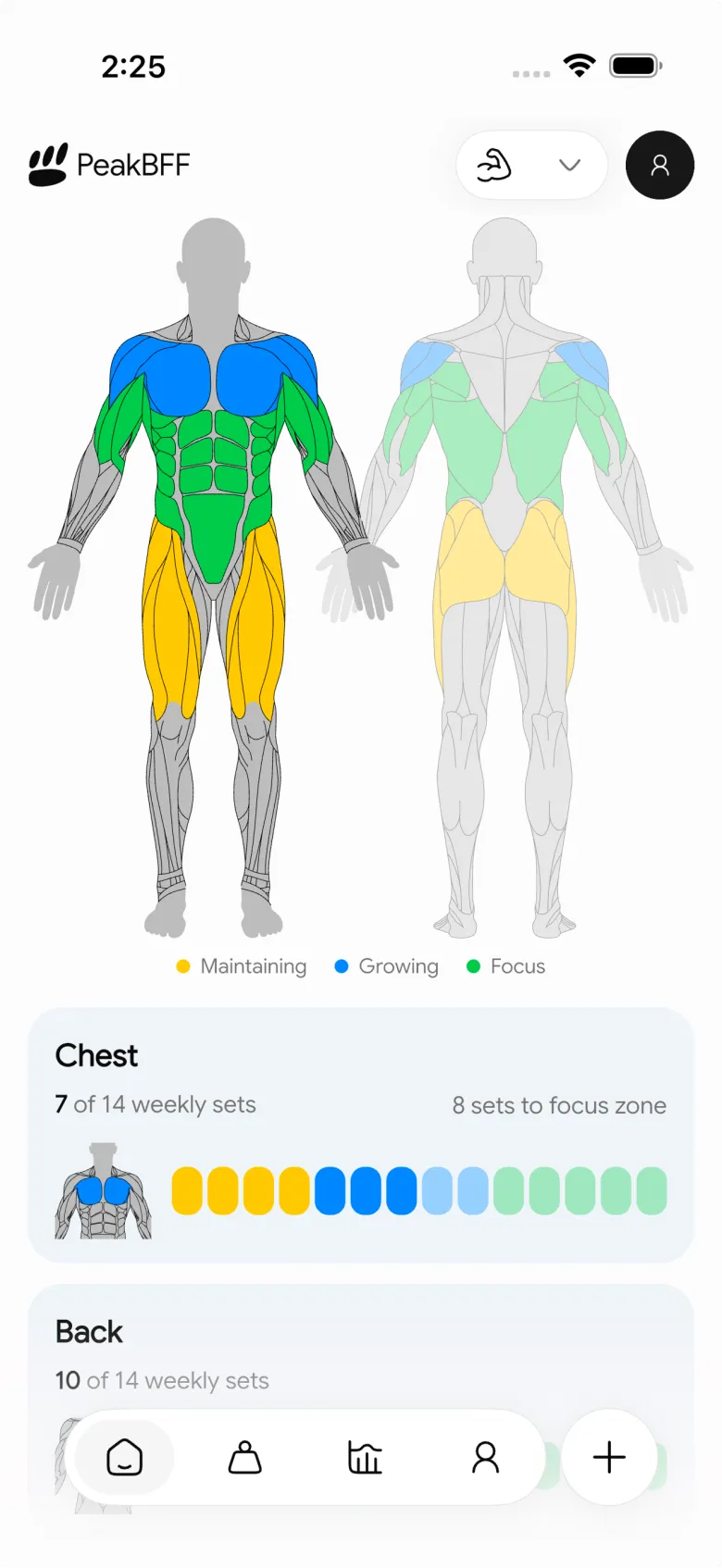
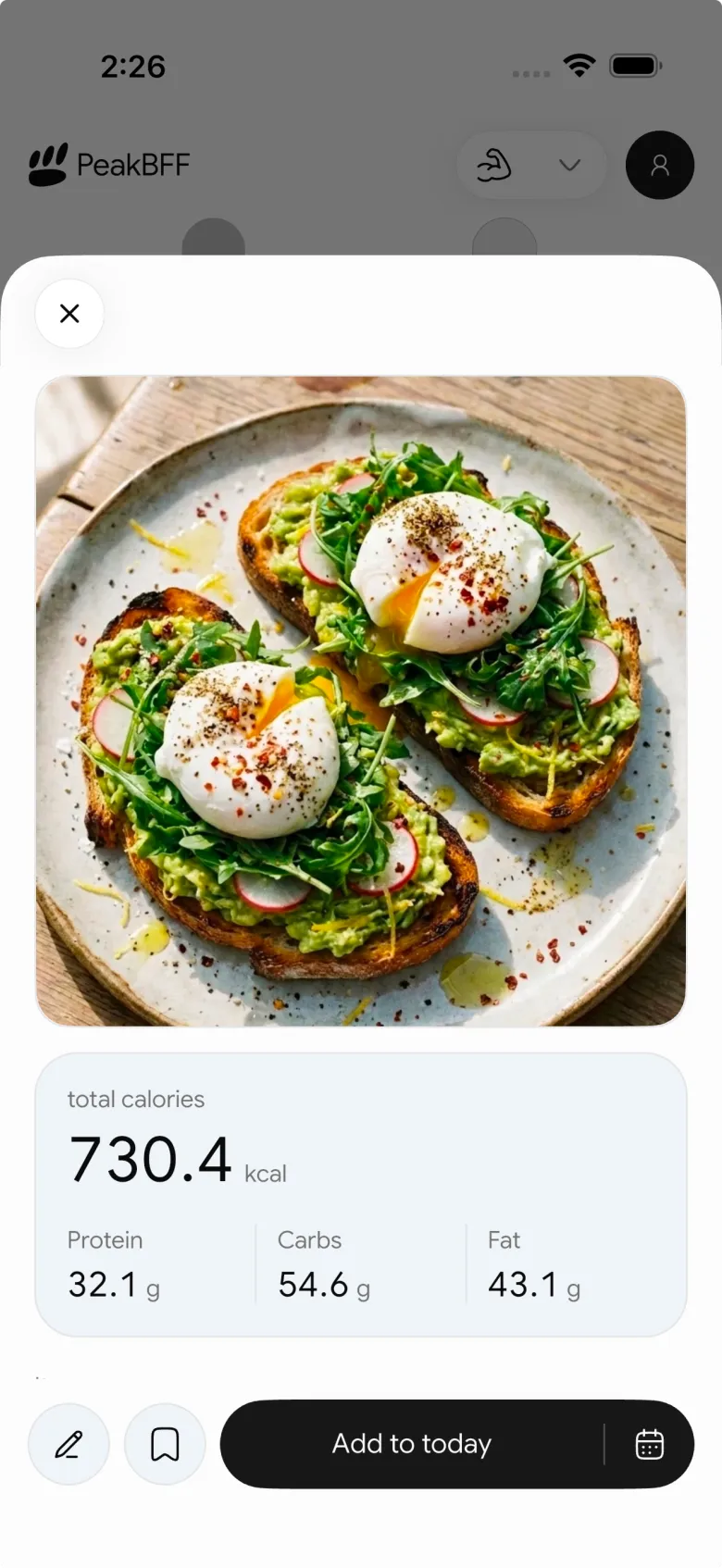
The honest limits: some starter programs, the AI workout plan generator, macro detail (protein, carbs, fat), workout import and custom programs need Plus. Plus is $49.99 a year (about $4.17 a month) or $7.99 a week on the US App Store as of October 2026. That is more than Hevy Pro, but it includes food tracking. PeakBFF is not built specifically for women over 40, and it does not claim to be.
Best for: women who want one free-to-start app for lifting and protein.
2. Hevy: the simple free log
Hevy is a clean, popular logger with routines, history and a social feed. Free accounts log unlimited workouts, with caps of about four routines, seven custom exercises and roughly three months of advanced graphs, according to third-party reviews. Pro is about $23.99 a year, the cheapest paid plan here. It has no food tracking. Our Jefit vs Hevy comparison covers its exercise library in more depth.
Best for: a simple, social log on a three-day plan.
3. Strong: fast and minimal
Strong is built for quick logging, and its site says accounts are free forever. Free accounts cap saved templates at about three, per third-party reviews, and PRO unlocks charts, 1RM and more. It runs on iPhone, Android and Apple Watch, which PeakBFF does not (PeakBFF has no watch app). If a watch matters, Strong wins this row. See our Strong alternative with calorie tracking if you also want food logging.
Best for: minimal logging, especially with an Apple Watch.
4. Boostcamp: the most generous free tier
Boostcamp's site says its large program library, workout tracker, rest timers, plate calculator and RPE and RIR logging are free, and that free accounts can create custom programs with no cap. Pro adds extras such as a per-muscle volume heatmap and advanced analytics. If your goal is a free, structured program from a coach, this is the strongest answer, and there is no food tracking.
Best for: following a free, pre-built program with no routine cap.
5. StrongEra: made for midlife women, paid
StrongEra (formerly Fortify) is the one app here designed around women in perimenopause and beyond, with progressive strength programs, workout history, personal bests and Apple Health. It is iPhone only, starts with a 7-day trial and then needs a subscription. Its store listing shows several price points, so read the current price in the App Store. If you want guidance built for your stage of life and are happy to pay, it is worth the trial.
Best for: iPhone users who want a program designed for women over 40.
A simple way to start
- Pick a plan you can repeat two or three days a week. Our guide to choosing a starter program has a three-question template.
- Log every set and keep the same exercises for several weeks, so last session's numbers are your guide.
- Add weight or reps gradually, as in how to track progressive overload.
- Track protein for a week to see where you are, then adjust.
- If you have an injury, osteoporosis or another condition, check with your clinician before changing your training.
For a beginner-focused view with demos, see the best beginner gym app with starter programs and form cues.
The bottom line
You do not need a women-only app to get stronger after 40. Boostcamp is the best fully free choice for programs, Hevy and Strong are the simplest logs, and StrongEra is the paid specialist on iPhone. PeakBFF fits when you want lifting and protein tracked in one app, with many features free for basic users and Plus for the extras.
Download PeakBFF on the App Store or Google Play and log your first session this week.
Questions, answered
What is the best free strength training app for women over 40?
For a fully free start, Boostcamp is the most generous: its program library, workout tracker, rest timer and plate calculator are free, per its own site. Hevy and Strong are good free loggers with caps on routines. PeakBFF suits you if you also want protein and food in the same app. None of them is built only for women over 40 except StrongEra.
Is there a strength training app made for women over 40 that is free?
StrongEra (formerly Fortify) is built for women in perimenopause and beyond, but it is an iPhone-only subscription with a 7-day trial, not a free app. If you want free, use a general logger such as Hevy, Strong or Boostcamp and follow a beginner program. Programs matter more than the app, so pick a plan you can repeat.
How much of PeakBFF is free?
Many features are free for basic users, including workout logging, food logging and the rank calculator, and you do not need a card to start. Some starter programs, the AI workout plan generator, macro detail, workout import and custom programs need Plus. Plus is $49.99 a year or $7.99 a week on the US App Store as of October 2026.
Do I need a different workout app after 40?
No. The basics are the same at any age: a repeatable program, a log that shows last session's weights, gradual increases and enough protein. What changes is how much recovery you need and which exercises feel good on your joints. Pick an app that makes those easy to track, and see a clinician first if you have an injury or a bone-health condition.
Which free workout app works on Android?
Hevy, Strong, Boostcamp and PeakBFF all have Android apps. StrongEra is iPhone only. On Android, the practical difference is the free limits: Hevy and Strong cap how many routines you can save, Boostcamp does not cap custom programs, and PeakBFF keeps logging free while charging for extras such as workout import.
More from PeakBFF
More app comparisons, fitness guides, and product notes.
RPE Chart for Lifting: RPE to Reps in Reserve to % of 1RM, With a Log Template
Use an RPE chart to turn how hard a set felt into reps in reserve and a percent of your 1RM. Includes a printable table, a worked example, and a way to log RPE in PeakBFF.
How to Track Zone 2 Cardio Next to Your Lifting: Heart Rate Range and Log Template
Find your zone 2 heart rate range with a simple formula and the talk test, then log each session next to your lifting. Includes an age table and a log template.
GainFrame Alternative for Android (2026): Physique Rating Plus a Gym Log
GainFrame is iPhone only. Here is what to use on Android, how PeakBFF compares on physique score, price and photo privacy, and who should stay with GainFrame.
Best Cal AI Alternative With Workout Tracking (2026)
Cal AI scans meals fast but is a food app. Compare it with PeakBFF, MyFitnessPal and Cronometer if you also want a gym log, macros and price details.
How Much Creatine Per Day? A 3 to 5 g Dose and an 8-Week Way to Track It
How much creatine per day most lifters take (3 to 5 g of monohydrate), whether to load, and an 8-week log of weigh-ins and lifts to see what it did.
Best App for Body Recomposition (2026): Track Lifts, Protein and Weight Trend Together
Compare PeakBFF, MacroFactor, Hevy and GainFrame for body recomposition: lift progress, protein, weight trend and photo check-ins, with real prices.



