GainFrame Alternative for Android (2026): Physique Rating Plus a Gym Log
GainFrame is iPhone only. Here is what to use on Android, how PeakBFF compares on physique score, price and photo privacy, and who should stay with GainFrame.
If you searched for a GainFrame app for Android, the short answer is that it does not exist. GainFrame is iPhone only, and its founder says no Android version is planned. PeakBFF is the closest Android alternative for lifters: it rates your physique from a photo, shows an estimated body-fat readout and a muscle map, keeps a check-in timeline, and also holds your workout log and food tracking in the same app. It runs on Android and iPhone.
Short answer: pick PeakBFF if you are on Android, or you want the rating to sit next to your lifting and protein. Pick GainFrame if you are on an iPhone and want the deepest physique-only analysis, or a lower yearly price. Either way, treat any photo score as an estimate.
GainFrame vs PeakBFF at a glance
| PeakBFF | GainFrame | |
|---|---|---|
| Platforms | Android and iPhone | iPhone only |
| Photo-based physique score | Yes: Overall, Potential, Muscularity, Leanness, Proportions, Posture | Yes: 1-100 score with a four-part breakdown |
| Estimated body fat | Yes, shown as an estimate | Yes, plus FFMI and BMI |
| Muscle view | Front and back muscle map | Ratings for 12 muscle groups |
| Progress timeline | Rating timeline, compare view, before/after slider after two scans | Check-in timeline, side-by-side comparisons, backdated gym photos |
| Workout log | Yes, free | No (it reads training volume from Hevy) |
| Food and macro tracking | Yes: calories free, macro detail with Plus | Coach can use nutrition logs, no food logger of its own |
| Free tier | Physique rating, workout and food logging | 25 photo analyses in total |
| Paid plan (US, as of October 2026) | Plus $49.99/year or $7.99/week | Pro $39.99/year or $5.99/month |
| Best at | Rating plus training and nutrition on either phone | Deep physique-only tracking on iPhone |
GainFrame details come from its own site and founder blog, so they lean toward GainFrame. Check its App Store page for current prices before you buy.
1. PeakBFF: the Android option that also logs your lifting
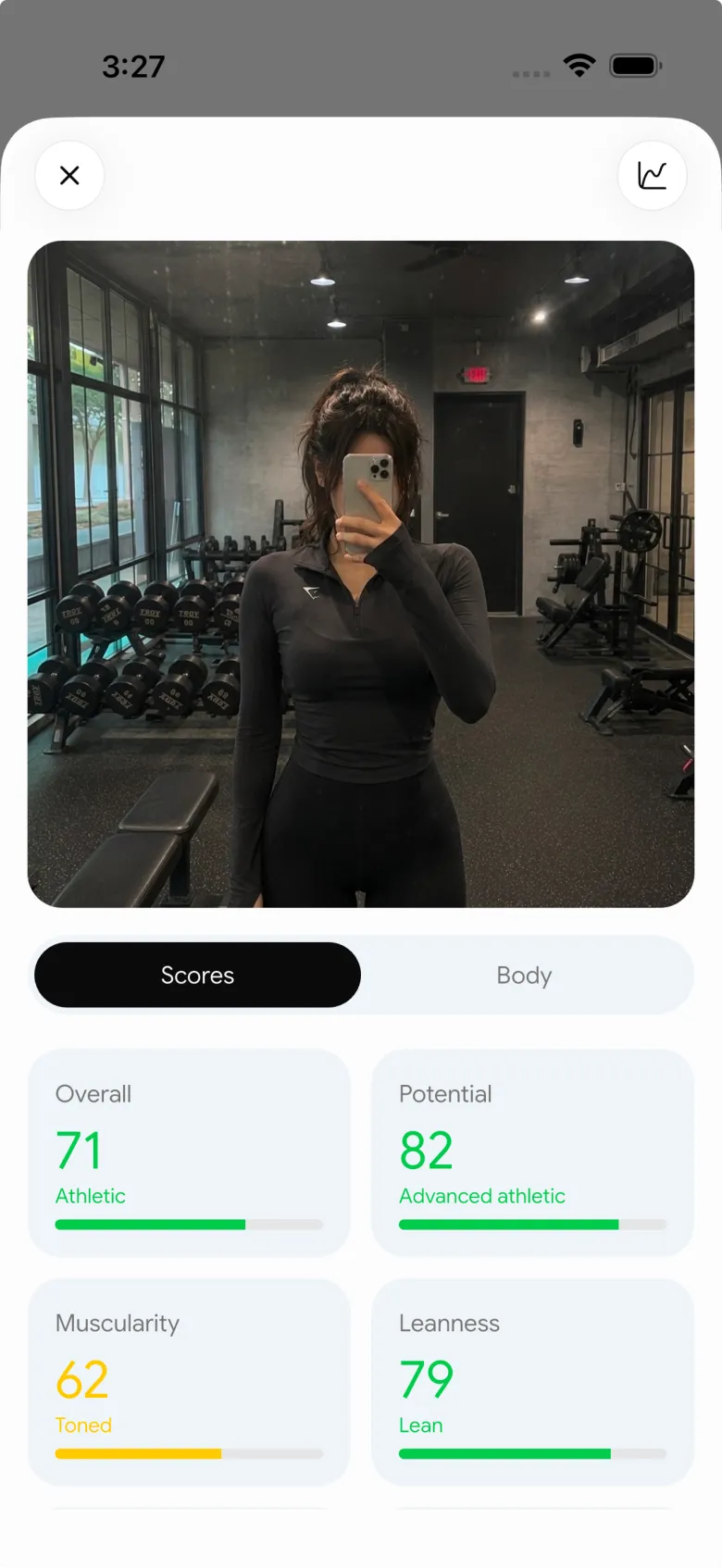
Open the + menu and choose Physique to rate your physique or add a check-in. Take or choose a front photo (the tips are simple: stand front-on, good even lighting, fitted clothes) and you get an overall score, six bars (overall, potential, muscularity, leanness, proportions and posture), an estimated body-fat readout, body type, strongest and focus areas, and a front and back muscle map. Rating your physique is available on the free plan.
After two or more scans with a saved photo, the progress screen adds a timeline with each scan's score and change, a compare view, and a before/after slider you can save or share. Plus unlocks the physique transformation preview and the AI workout plan generator. From a rating, Build my workout (Plus) can draft a program around the focus areas it flagged, which you review before saving.

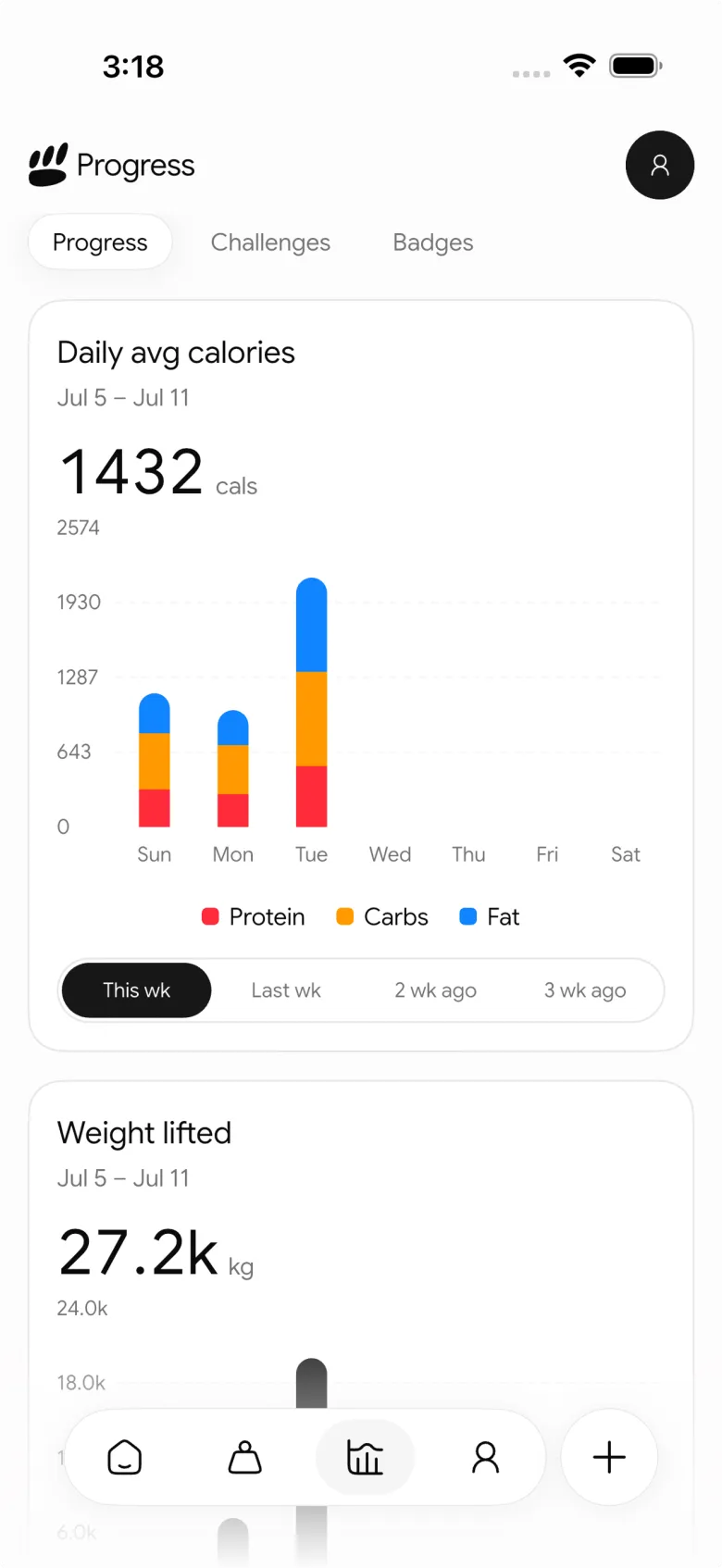
Day to day, the rest of the app does the work between check-ins: a live workout log that prefills your last session, a muscle-volume view, and food logging by photo, barcode or text. Progression is a suggestion you review: Try more proposes more reps or more weight, and you decide whether to apply it. Plus is $49.99 a year or $7.99 a week on the US App Store as of October 2026, and many features are free for basic users.
On privacy, the photo you rate is uploaded for analysis and the cloud copy is deleted when the rating completes. The app keeps its own copy on your phone for the timeline. Weekly check-in photos stay on the device and are left out of account sync, but they are not excluded from phone backups.
Best for: Android users, and anyone who wants a physique rating tied to a workout log and food tracking.
2. GainFrame: stay here on iPhone if the rating is the product
GainFrame is a strong specialist. Per its own site it gives a 1-100 physique score, estimated body fat, FFMI and BMI, ratings for 12 muscle groups, a progress timeline, side-by-side comparisons and a way to backdate old gym photos. Photos are analyzed by AI and, it says, never stored on a server, and no account is required. Pro is $39.99 a year or $5.99 a month, which is $10 a year cheaper than PeakBFF Plus.
The trade-off is scope and platform. It does not log sets or meals itself (it can read training volume from Hevy), and it is iPhone only. If you are on an iPhone and the physique readout is the whole job, GainFrame is a fair pick.
Best for: iPhone users who want the most detailed physique-only analysis.
3. If you only want measurements: a 3D body scan app
Some Android users really want tape-measure numbers rather than a score. GainFrame's own comparison describes MeThreeSixty (iOS and Android) as turning two photos into a 3D avatar with 14 or more circumference estimates, processed on the device, with a free tier that keeps your five most recent scans. That is a different tool: it shows shape, not muscle ratings or training advice. Verify the current terms on its store page, because that description comes from a competitor.
How to get a rating you can trust
- Repeat the setup. Same light, distance, pose, time of day and clothing. The trend against your own earlier photos is the signal; one score is noise.
- Rate every few weeks, not daily. Visible change takes weeks, and a daily number mostly measures lighting.
- Pair it with a number you control. Your weekly average weight and your lifts say more than a photo score. See our guide to comparing gym progress photos.
- Keep it in proportion. No photo rating is a medical measurement. If a score is driving anxiety about your body, pause it and talk to a professional.
For a wider look at the category, compare the best AI physique rating apps, the best body fat estimator apps and the best private progress photo apps.
The bottom line
GainFrame is good at one thing on one platform. If you are on Android, it is not an option, and PeakBFF is the alternative that rates your physique and also holds the training and nutrition that move the score. If you are on an iPhone and want only the physique analysis, GainFrame is cheaper and deeper there.
Download PeakBFF on the App Store or Google Play and take your first rating this week.
Questions, answered
Is GainFrame available on Android?
No. As of October 2026 GainFrame is an iPhone app, and its founder says on the GainFrame blog that no Android version is planned. Its free web tools work in any browser, but the app and its photo timeline do not. PeakBFF is on both Google Play and the App Store, and it includes a physique rating.
What is the best GainFrame alternative for Android?
For lifters, PeakBFF is the closest fit on Android because it rates a physique from a photo, estimates body fat, shows a muscle map and keeps a check-in timeline, then adds a workout log and food tracking. If you only want body measurements, a 3D scan app such as MeThreeSixty is a different kind of tool.
Is PeakBFF's physique rating free?
Yes, rating your physique is available to free users. Plus unlocks other features, such as the AI workout plan generator and the physique transformation preview. Plus costs $49.99 a year or $7.99 a week on the US App Store as of October 2026. GainFrame Pro is $39.99 a year or $5.99 a month, so it is cheaper on price.
Are physique ratings from a photo accurate?
They are estimates, not measurements. Lighting, pose, clothing and camera angle all change the score, and the same body can read differently on different days. Use any app's rating as a trend under the same conditions each time, and do not use it for medical decisions. A DEXA scan or a clinician gives a real body-fat measurement.
Are my photos private in PeakBFF?
A rating photo is uploaded for analysis and the cloud copy is deleted once the rating completes, while the app keeps its own copy on your phone for your timeline. Weekly check-in photos stay on the device and are not synced to your account. They are not excluded from phone backups, so check your own backup settings.
More from PeakBFF
More app comparisons, fitness guides, and product notes.
RPE Chart for Lifting: RPE to Reps in Reserve to % of 1RM, With a Log Template
Use an RPE chart to turn how hard a set felt into reps in reserve and a percent of your 1RM. Includes a printable table, a worked example, and a way to log RPE in PeakBFF.
Best Free Strength Training App for Women Over 40 (2026): What Stays Free
Looking for a strength training app for women over 40 that does not lock logging behind a subscription? Hevy, Strong, Boostcamp, StrongEra and PeakBFF compared on what is free.
How to Track Zone 2 Cardio Next to Your Lifting: Heart Rate Range and Log Template
Find your zone 2 heart rate range with a simple formula and the talk test, then log each session next to your lifting. Includes an age table and a log template.
Best Cal AI Alternative With Workout Tracking (2026)
Cal AI scans meals fast but is a food app. Compare it with PeakBFF, MyFitnessPal and Cronometer if you also want a gym log, macros and price details.
How Much Creatine Per Day? A 3 to 5 g Dose and an 8-Week Way to Track It
How much creatine per day most lifters take (3 to 5 g of monohydrate), whether to load, and an 8-week log of weigh-ins and lifts to see what it did.
Best App for Body Recomposition (2026): Track Lifts, Protein and Weight Trend Together
Compare PeakBFF, MacroFactor, Hevy and GainFrame for body recomposition: lift progress, protein, weight trend and photo check-ins, with real prices.



