How to Track Weekly Sets per Muscle: A Simple Template
Use a simple weekly-sets template to see how much work each muscle gets, count compound lifts consistently, and make your next workout decision clearer.
How to Track Weekly Sets per Muscle: A Simple Template
To track weekly sets per muscle, count the hard working sets for each muscle over the last seven days, keep your counting rule consistent, then compare the total with the target you chose for that muscle. A simple table is enough. Write the exercise, working sets, primary muscle, and any secondary credit. At the end of the week, total each column and decide whether to repeat, add, or reduce work next week.
Short answer: use a per-muscle weekly-set log, not one grand total for the whole workout. For example, three bench-press working sets can count as three chest sets. You may also give triceps a partial credit if that is your rule. The important part is using the same rule next week, so your comparison is useful instead of merely precise-looking.
What counts as a weekly set for a muscle?
For this template, a weekly set is one challenging, planned working set. Do not count warm-ups, technique practice, or every easy movement that happens to involve a muscle. A set is most useful when it is a deliberate part of your training and close enough to your normal effort that comparing it later makes sense.
There is no universal set number that every muscle and every lifter needs. Research supports weekly resistance-training volume as one variable that can influence hypertrophy, but the dose-response is not a personal prescription. The effect of an extra set depends on the person, exercise, effort, recovery, and what they were already doing. A recent review also highlights that a clear volume saturation point is difficult to establish in trained people because individual responses vary. See the weekly-volume meta-analysis and the 2025 review of volume saturation for the nuance.
Start by picking a target you can recover from and hold steady for a few weeks. Use the log to observe and adjust, not to turn a generic internet range into a rule you must obey.
How do you track weekly sets per muscle with a template?
Copy this into a notes app, spreadsheet, or paper training journal. One row is one exercise in one session. The example uses full credit for the main muscle and optional partial credit for a secondary muscle.
| Day | Exercise | Working sets | Primary muscle credit | Secondary credit | Notes |
|---|---|---|---|---|---|
| Mon | Barbell bench press | 3 | Chest +3 | Triceps +1.5 | Same grip and range |
| Mon | Cable row | 3 | Back +3 | Biceps +1.5 | Keep torso position |
| Wed | Leg press | 3 | Quads +3 | Glutes +1.5 | Controlled depth |
| Fri | Incline dumbbell press | 3 | Chest +3 | Triceps +1.5 | Same bench angle |
| Fri | Lat pulldown | 3 | Back +3 | Biceps +1.5 | Same handle |
The worked total is chest 6, back 6, quads 3, glutes 1.5, triceps 3, and biceps 3. Those numbers are not recommendations. They are a transparent snapshot of the chosen counting rule. Next week, you can tell whether a new exercise, extra set, or missed session actually changed a muscle's workload.
Keep compound-lift credit simple and consistent
A compound lift can train more than one area. The practical choices are:
- Count each set only for its primary muscle. This is fast and easy to audit.
- Give a secondary muscle a consistent partial credit. For example, use 0.5 triceps sets for each bench-press set throughout the log.
- Track direct isolation work separately when you want a clearer view of a smaller muscle that is also active in compounds.
Any of those methods can work. Changing the method every time a total feels too high or low cannot. The newer resistance-training dose-response meta-analysis explicitly classifies sets as direct or indirect when analyzing volume, which is a useful reminder that compound-exercise credit needs context.
What should you do with your weekly-set totals?
Use a short review at the end of each seven-day window:
- Check the total against your own current target. A target is a planning tool, not a diagnosis of whether a muscle is growing.
- Check the quality of the work. A sudden jump in sets after easier, rushed, or inconsistent sessions is less informative than a stable block.
- Look at recovery and performance. If you are managing the prescribed work well, you may keep it the same. If it is clearly too much to recover from, simplify before adding more.
- Change one thing at a time. Add a small amount of work, remove some, or keep the plan. Give the adjustment time before interpreting it.
The table is especially useful when a training split hides the real total. An upper/lower split and a full-body split can distribute work differently while ending with similar per-muscle volume. A systematic review found no meaningful difference between split and full-body routines for strength or muscle growth when volume was equated. The useful question is therefore often "what did this muscle receive this week?", not "which split has the better name?" See the split versus full-body review.
A verified PeakBFF workflow for weekly muscle volume
PeakBFF turns completed working sets into a rolling seven-day muscle-volume view. The Body view shows each muscle group's completed sets against its weekly target and places it in a progress zone. You can select a training level for a baseline target, then override a specific muscle from 4 to 30 sets per week. If you have a workout planned next, the app can also preview how its working sets would change the view.
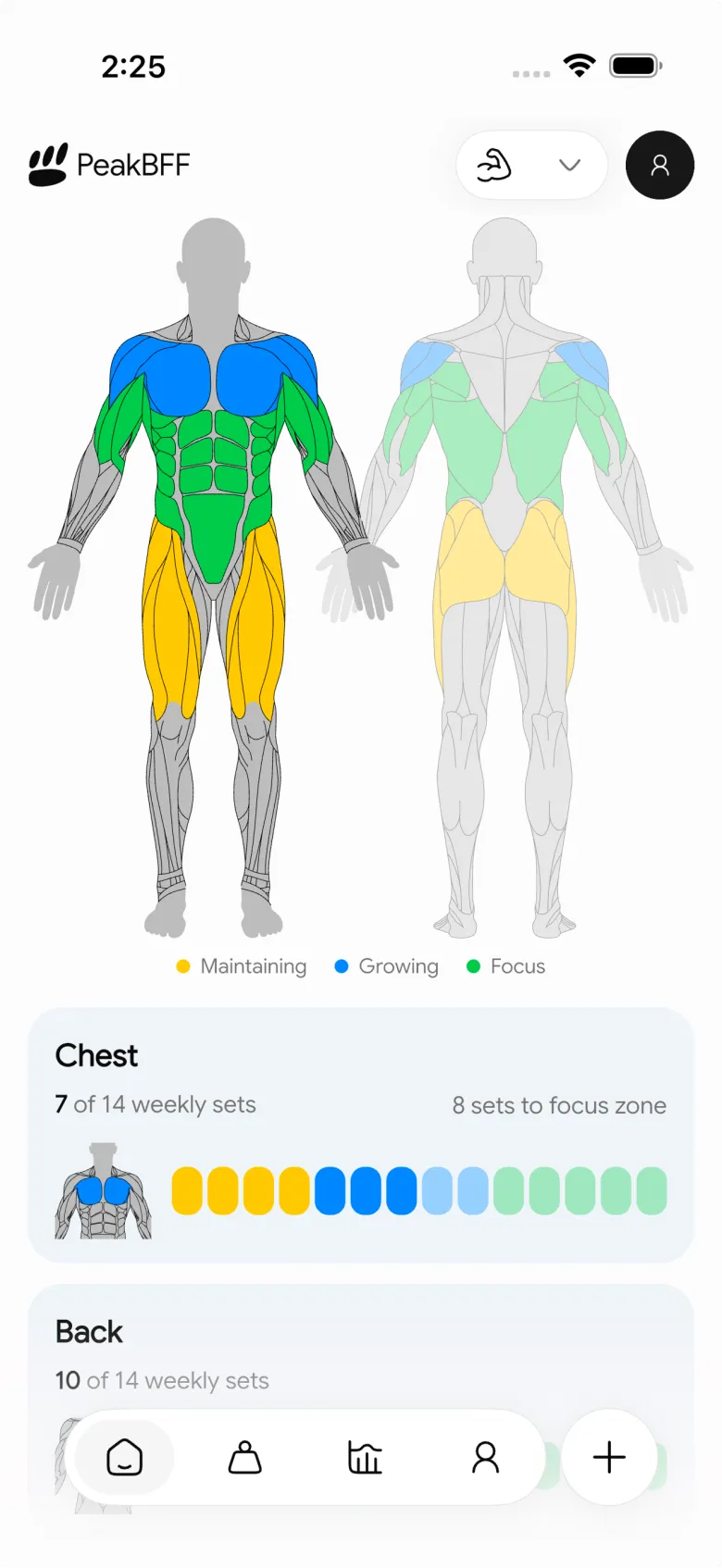
That gives you the same basic workflow as the template without rebuilding a spreadsheet after every session. It does not decide the right amount of volume for you or replace coaching, clinical, or injury advice. It makes the work you logged easier to see and compare.
For a broader buying decision, read our comparison of the best gym tracker apps. If you want to pair volume tracking with a simple overload rule, the progressive-overload template is the natural next read.
The bottom line
Track weekly sets per muscle by assigning every hard working set to a muscle, using one repeatable rule for compound lifts, and reviewing the seven-day total before you change your plan. The template above works on paper today. PeakBFF helps when you want completed workouts, per-muscle totals, targets, and your next-session preview together.
Download PeakBFF on the App Store or Google Play to keep your weekly muscle-volume log beside your workout record.
More from PeakBFF
More app comparisons, fitness guides, and product notes.
RPE Chart for Lifting: RPE to Reps in Reserve to % of 1RM, With a Log Template
Use an RPE chart to turn how hard a set felt into reps in reserve and a percent of your 1RM. Includes a printable table, a worked example, and a way to log RPE in PeakBFF.
Best Free Strength Training App for Women Over 40 (2026): What Stays Free
Looking for a strength training app for women over 40 that does not lock logging behind a subscription? Hevy, Strong, Boostcamp, StrongEra and PeakBFF compared on what is free.
How to Track Zone 2 Cardio Next to Your Lifting: Heart Rate Range and Log Template
Find your zone 2 heart rate range with a simple formula and the talk test, then log each session next to your lifting. Includes an age table and a log template.
GainFrame Alternative for Android (2026): Physique Rating Plus a Gym Log
GainFrame is iPhone only. Here is what to use on Android, how PeakBFF compares on physique score, price and photo privacy, and who should stay with GainFrame.
Best Cal AI Alternative With Workout Tracking (2026)
Cal AI scans meals fast but is a food app. Compare it with PeakBFF, MyFitnessPal and Cronometer if you also want a gym log, macros and price details.
How Much Creatine Per Day? A 3 to 5 g Dose and an 8-Week Way to Track It
How much creatine per day most lifters take (3 to 5 g of monohydrate), whether to load, and an 8-week log of weigh-ins and lifts to see what it did.



