Best Workout Photo App for Private Progress Pics (2026): 5 Options Compared
Looking for a workout photo app? Compare 5 private progress photo apps for iPhone and Android: check-ins, before-and-after comparisons, and gym log context.
The best workout photo app for most lifters is PeakBFF: weekly check-in photos stay on your phone, its AI physique rating lines your scans up on a draggable before-and-after slider, and everything sits beside your workouts, food and weight trend. If you want alignment overlays and timelapse videos, pick Metamorph. If you want a cheap offline photo-only archive on iPhone, pick LocalOne Gym Pics.
"Workout photo app" means three different things to different people, so pick the job first:
- Progress pics (how your body changes over weeks): this guide.
- Workout stats on a photo (a gym selfie with your session stamped on it): see stats on a photo below.
- Identifying an exercise or machine from a photo: a different category of app, which this page does not cover.
The 5 progress photo apps, compared
| PeakBFF | Metamorph | LocalOne Gym Pics | GainFrame | General photo app | |
|---|---|---|---|---|---|
| Platforms | iPhone and Android | Apple devices only | iPhone (also Mac) | Apple devices only | Built in on both |
| Where photos live | On your device (rating photos are uploaded for analysis, then deleted) | On device or iCloud | On device, offline | On device; uploaded for AI analysis | Depends on your backup |
| Before-and-after comparison | Yes, slider | Yes, plus timelapse video | Timeline and timelapse | Yes, comparison cards | Manual |
| Pose alignment help | Front/back photo slots and pose tips | Overlay and grid | No | Guided poses | No |
| Weight and notes with a photo | Yes | Focused on photos | Notes | Body metrics and scores | Manual |
| Workout and nutrition log | Yes | No | No | Hevy integration | No |
| Price (as of Oct 2026) | Many features free; Plus $49.99/yr (about $4.17/mo) or $7.99/week | Free, Pro from $29.99/yr | $0.99 one-time | Free (limited), Pro from $39.99/yr | Free |
| Best at | Private photos, AI rating and your training log together | Consistent, aligned shots | Simple offline archive | AI physique analysis | Casual storage |
1. PeakBFF
PeakBFF is built for the lifter who wants to see whether the work is showing, without turning progress photos into content. A weekly check-in adds an optional photo and a short note to that day's weigh-in. The photo and note are saved on your device and never leave it through account sync; the weight still feeds your charts.
For a deeper look, the AI physique rating (free to try) scores your physique from front and back photos and maps each muscle group. Run a scan every few weeks and, after two or more, the progress screen gives you a draggable before-and-after slider, a timeline with each scan's score and change, and a before-and-after image you can save or share. That is more useful than an unlabelled camera roll because it builds a repeatable ritual: same day, similar lighting, then an honest comparison after enough time has passed.
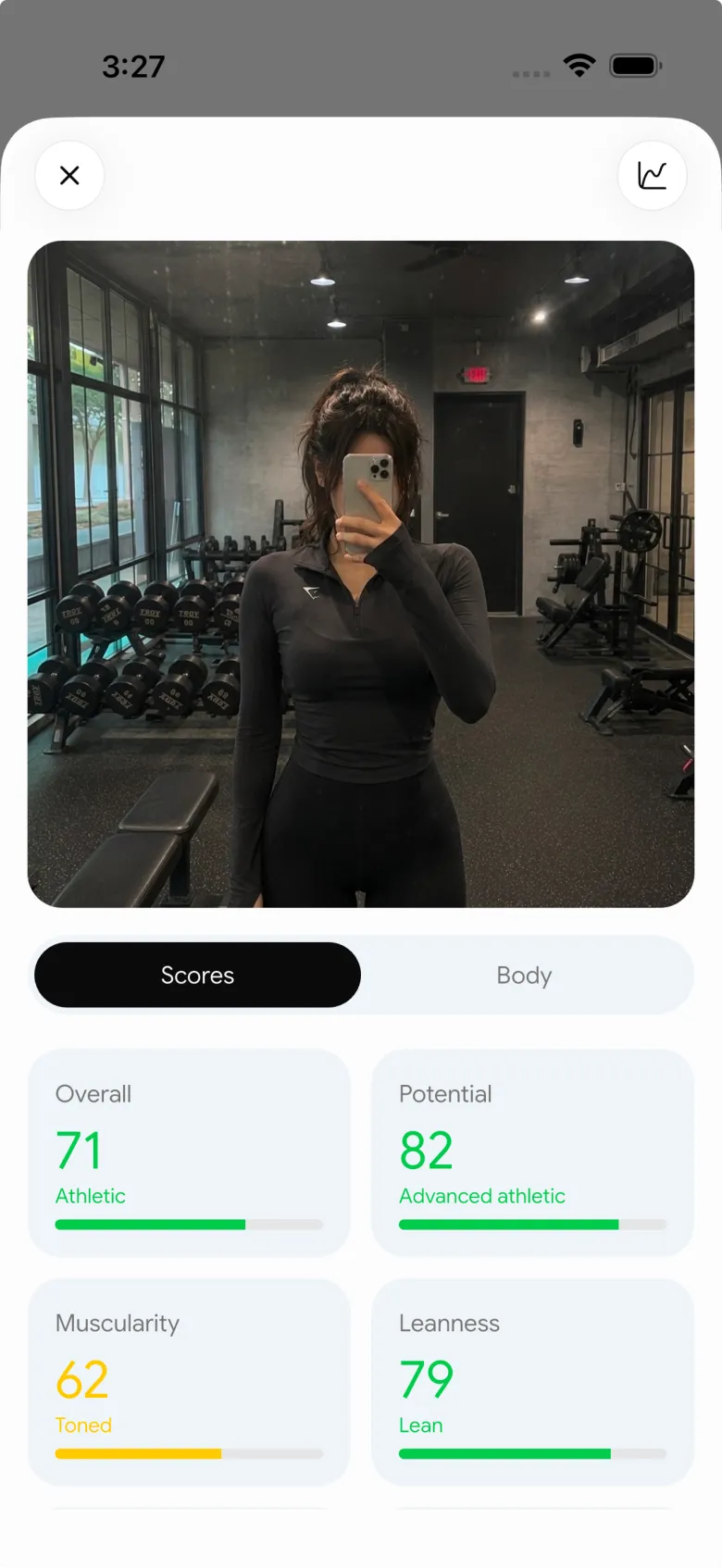
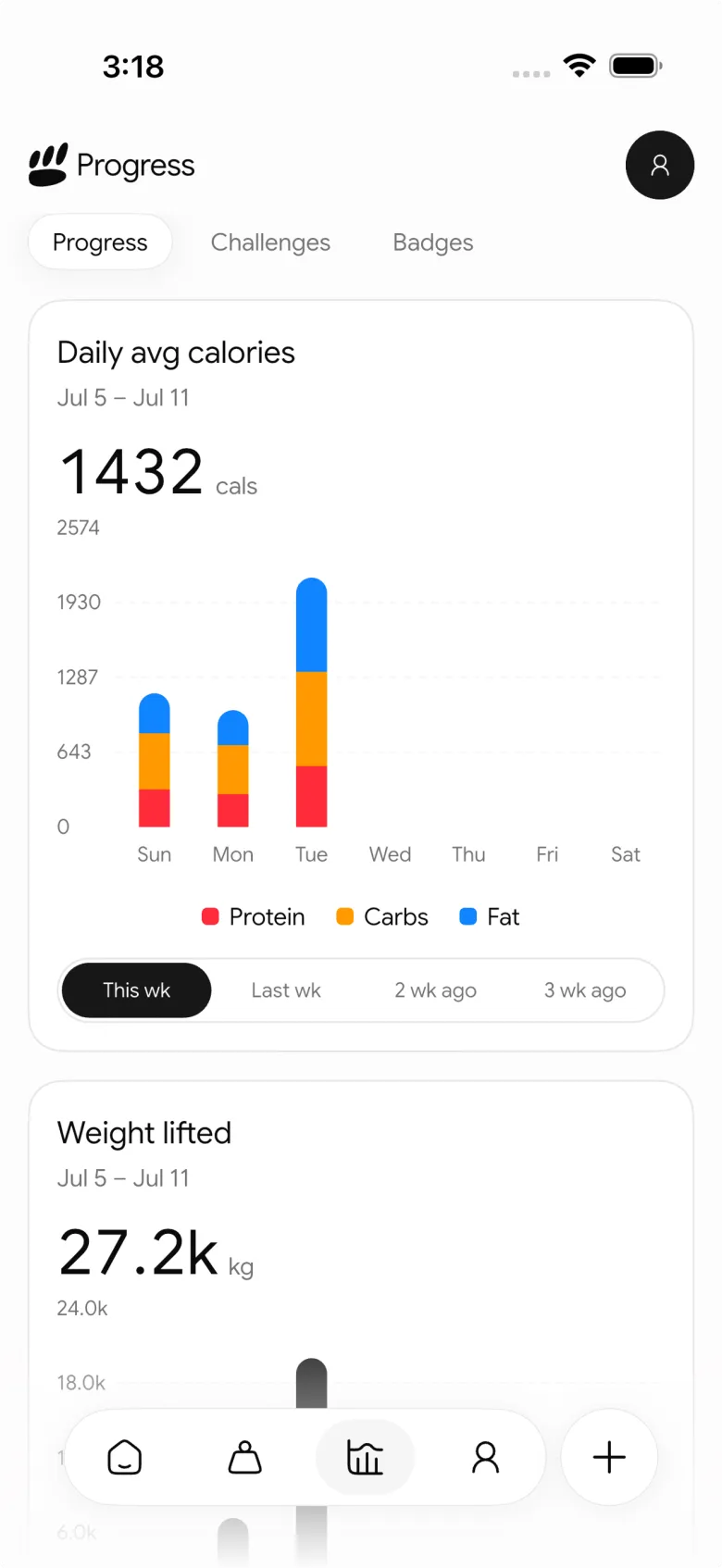
The differentiator is context. You can log workouts, track calories, protein and macros, and see weekly training volume by muscle, rather than trying to remember what changed between two photos. That does not make a photo a body composition test. It does make the photo part of a record you can use when deciding whether to keep going or adjust.
PeakBFF guides each scan with front and back photo slots and pose tips rather than a ghost overlay, so a consistent progress-photo setup keeps your shots comparable.
Many of these features are free for basic users, including workout and food logging, check-in photos and trying the physique rating. Plus is $49.99 a year (about $4.17 a month) or $7.99 a week on the US App Store as of October 2026, and adds macro detail, physique transformation and workout import.
Best for: lifters on iPhone or Android who want private photos, a simple comparison flow, and their workout and nutrition record in the same app.
2. Metamorph
Metamorph (Body Progress Pics) is the most polished photo-first option on iPhone. Its App Store listing describes automatic alignment, an overlay and grid for matching your pose, a camera timer, reminders, and before-and-after or timelapse videos you can export. Photos stay on your device or in your iCloud.
The trade-off is scope and price. It tracks photos, not training or food, and the useful features sit behind Pro (from $29.99 a year or $129.99 lifetime as of October 2026). It requires iOS 18 or later and has no Android app.
Best for: iPhone users who care most about perfectly aligned shots and shareable transformation videos.
3. LocalOne Gym Pics
LocalOne Gym Pics is the minimalist choice. For a one-time $0.99 it gives you timestamped photos, notes, a timeline or gallery view, timelapse export, and no account. Its App Store privacy label says the developer collects no data, and its guide to private before-and-after tracking explains the offline approach.
It is iPhone (and Mac) only, it does not replace a gym log or food tracker, and updates are infrequent, with the last one in mid-2025 as of October 2026.
Best for: people who want a cheap, photo-only, offline archive.
4. GainFrame
GainFrame is aimed at people who want analysis from a progress photo. Its progress photo app roundup (written by GainFrame's own team) describes dated check-ins, guided poses, comparison cards, photo-based body-fat estimates, scores across 12 muscle groups, and a Hevy workout integration, with advanced reports on its Pro plan (from $39.99 a year as of October 2026). It runs on Apple devices only, with no Android app.
Treat those outputs as estimates, not clinical measurements. Lighting, pose, clothing and camera angle all move the number. If you want a private weekly record paired with the sessions and meals you actually logged, PeakBFF is the more complete daily workflow.
Best for: lifters who specifically want photo-based physique estimates.
5. A general photo app
Your phone's photo library is free and already installed. On iPhone, the Hidden album can be locked behind Face ID; on Android, Google Photos has a Locked Folder. Add dates to your file names or captions and make a side-by-side image when you need one.
The limitation appears after a few months. You have to remember your schedule, find comparable shots, keep notes elsewhere, and connect the timeline to your training yourself. Our guide to comparing progress photos side by side shows how to do that manually without overreading the result.
Best for: casual tracking when a manual workflow is enough.
Want your workout stats on a photo instead?
Some people searching for a photo workout app want a gym selfie with the session stamped on it, not a private progress archive. That is a sharing job.
In PeakBFF, finish a workout and open the share screen. Besides a stats card and a video overlay, it has a Photo format: pick a photo and the app lays your workout stats over it in a 9:16 frame for a Story.
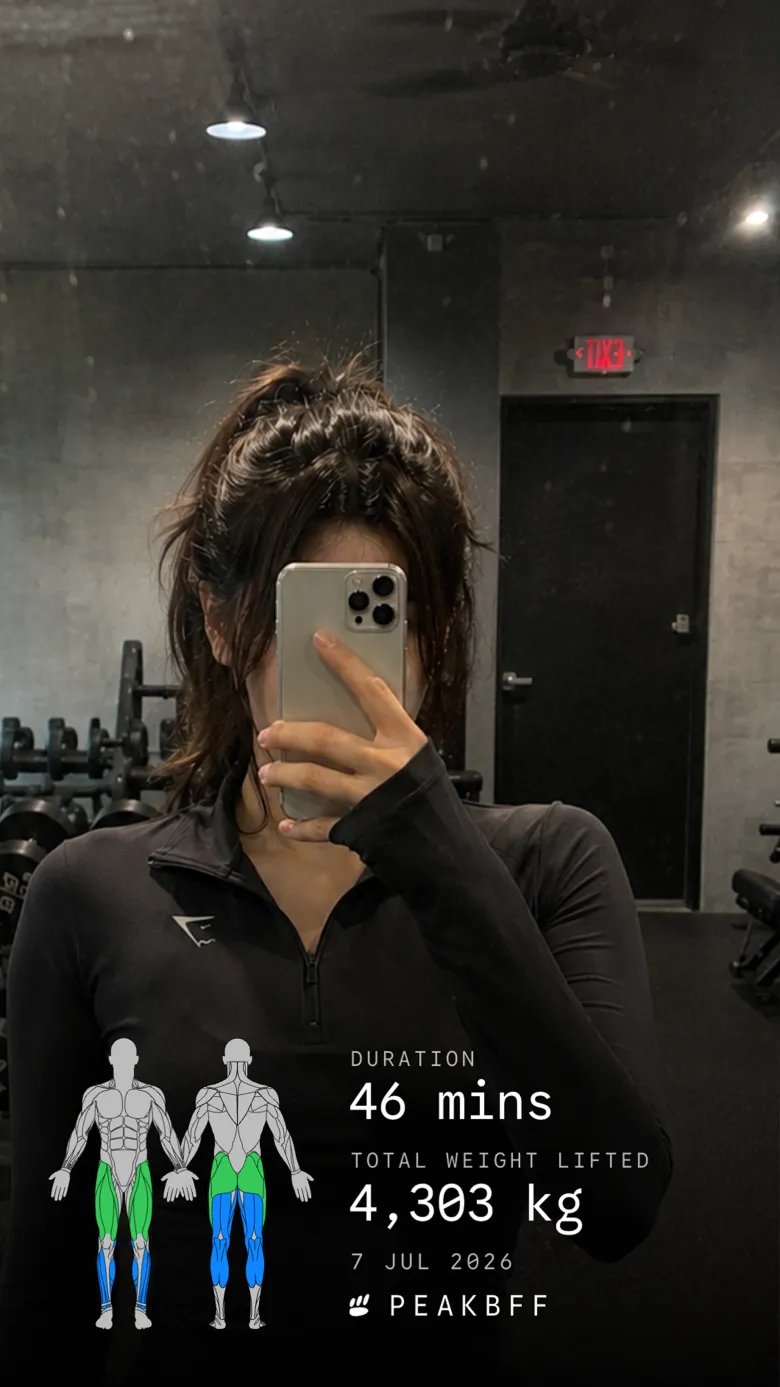
WorkoutSnap is the long-standing single-purpose option on iPhone. It stamps stats from Apple Health, Strava and others onto your photos, but it has not been updated in years, so check that it still works on your phone. For a step-by-step version, see how to share workout stats on an Instagram Story.
What makes a progress photo app worth using
- Private storage you understand. Check whether photos are local, synced, or uploaded for processing before you add anything sensitive.
- A repeatable check-in. A date, optional weight and short note help you compare like with like instead of guessing later.
- A real comparison view. A slider or side-by-side view is faster and less misleading than flipping through an album.
- Training context. For gym results, workouts, food, protein and body weight explain the photo better than a single visual score.
- A pace you can sustain. Weekly or fortnightly photos in similar lighting are more useful than daily snapshots that amplify normal changes.
If on-device storage is your main concern, our private on-device progress photo app guide goes deeper on where each app keeps your images. If the training side is the gap, compare the best gym tracker apps.
The bottom line
Metamorph is the best photo-only app if alignment and transformation videos matter most, and LocalOne Gym Pics is a fair $0.99 offline archive. GainFrame suits people who want photo-based analysis. But for most lifters, and for anyone on Android, PeakBFF is the better fit because a private check-in sits beside the workouts, nutrition and weight trend that made the change possible.
Download PeakBFF on the App Store or Google Play and take your first private check-in after your next training session.
Questions, answered
What is the best workout photo app for progress pics?
For most lifters, PeakBFF is the best fit: weekly check-in photos stay on your phone beside your workout log, food tracking and weight trend, and its AI physique rating lines your scans up on a before-and-after slider. Metamorph is the stronger pick for alignment overlays and timelapse videos, and LocalOne Gym Pics suits a cheap, offline iPhone archive.
Is there a good photo workout app for Android?
Many dedicated progress-photo apps, including Metamorph, LocalOne Gym Pics and GainFrame, are iPhone only as of October 2026. PeakBFF is available on both Android and iPhone, so Android lifters can keep private check-in photos with their gym log. Google Photos' Locked Folder is a free fallback if you only need storage.
Can I put my workout stats on a photo?
Yes, but that is a sharing job rather than progress tracking. PeakBFF's workout share screen has a Photo format that places your session stats over a photo you choose, ready for an Instagram Story. WorkoutSnap does a similar stamp on iPhone, though it has not been updated in years.
Are progress photos private in PeakBFF?
Weekly check-in photos and notes are saved on your device and are not part of PeakBFF's account sync; your weight entry does sync so it can feed your charts. If you use the AI physique rating, the photo is uploaded for analysis and the cloud copy is deleted once the rating completes, while the app keeps its own copy on your phone.
Is PeakBFF free?
Many PeakBFF features are free for basic users, including workout and food logging, weekly check-in photos and trying the AI physique rating. PeakBFF Plus costs $49.99 a year (about $4.17 a month) or $7.99 a week on the US App Store as of October 2026, and adds features such as macro detail, physique transformation and workout import.
How often should I take gym progress photos?
Weekly or every two weeks is enough for most people. Daily photos mostly capture water, food and lighting changes, which makes normal fluctuation look like progress or regression. Use the same time of day, lighting, distance and pose, and compare photos several weeks apart instead of day to day.
More from PeakBFF
More app comparisons, fitness guides, and product notes.
RPE Chart for Lifting: RPE to Reps in Reserve to % of 1RM, With a Log Template
Use an RPE chart to turn how hard a set felt into reps in reserve and a percent of your 1RM. Includes a printable table, a worked example, and a way to log RPE in PeakBFF.
Best Free Strength Training App for Women Over 40 (2026): What Stays Free
Looking for a strength training app for women over 40 that does not lock logging behind a subscription? Hevy, Strong, Boostcamp, StrongEra and PeakBFF compared on what is free.
How to Track Zone 2 Cardio Next to Your Lifting: Heart Rate Range and Log Template
Find your zone 2 heart rate range with a simple formula and the talk test, then log each session next to your lifting. Includes an age table and a log template.
GainFrame Alternative for Android (2026): Physique Rating Plus a Gym Log
GainFrame is iPhone only. Here is what to use on Android, how PeakBFF compares on physique score, price and photo privacy, and who should stay with GainFrame.
Best Cal AI Alternative With Workout Tracking (2026)
Cal AI scans meals fast but is a food app. Compare it with PeakBFF, MyFitnessPal and Cronometer if you also want a gym log, macros and price details.
How Much Creatine Per Day? A 3 to 5 g Dose and an 8-Week Way to Track It
How much creatine per day most lifters take (3 to 5 g of monohydrate), whether to load, and an 8-week log of weigh-ins and lifts to see what it did.



