How to Log a Restaurant Meal Without Nutrition Facts
Use a practical restaurant-meal log template when nutrition facts are missing, then make a clear, reviewable food entry without claiming false precision.
How to Log a Restaurant Meal Without Nutrition Facts
To log a restaurant meal without nutrition facts, record the main foods, the portion you ate, and the additions you can identify, then save it as an estimate. Do not force a perfect number from a meal whose recipe and serving size you cannot see.
Use this restaurant-meal log template:
Restaurant or dish: ______________________
Main foods: ______________________________
Portion eaten: ___________________________
Extras or changes: _______________________
What is uncertain: _______________________
For example, write grilled chicken, rice, vegetables, about three quarters of the plate, and creamy sauce on the side. That is a useful record. It is
more honest than selecting a random generic dish and treating it as an exact
match.
Why are restaurant meals harder to log?
Restaurant food can include ingredients and portions that are not obvious from the menu or plate. Sauces, oils, dressings, cooking methods, sides, drinks, and refills can all change the entry. Chain restaurants in the United States may show calorie information for standard items, but the FDA's menu-labeling rules apply to chains with 20 or more locations, not every restaurant or every customised order. The FDA explains the scope of menu labeling.
That does not mean the meal is impossible to log. It means the goal should be to leave a clear estimate you can understand later, rather than an invented precision. Food-photo and portion estimates also have limits. In one study, even nutrition professionals varied when estimating foods and portions from meal images. Read the study on PubMed.
What should you write down before you forget the meal?
Use the template while you are at the table or immediately after. Keep it to the details that materially change the meal.
| Part of the record | What to capture | Example |
|---|---|---|
| Main foods | The recognisable components | Chicken, rice, grilled vegetables |
| Portion | The amount you actually ate | About three quarters of the plate |
| Extras | Things not obvious from the main name | Creamy sauce, bread, sweetened drink |
| Changes | Substitutions or requests | Dressing on the side |
| Uncertainty | What you cannot know from the plate | Cooking oil amount |
You do not need to interrogate the kitchen or turn a meal with friends into a project. A short note that distinguishes what you saw from what you are guessing is enough. If you leave food on the plate, say so. If you share a starter, record your share rather than the whole dish.
How do you make a practical estimate from the menu and plate?
Start with the restaurant's own nutrition information when it is available for the exact item and preparation. If it is not available, use the dish name and the visible parts of the plate to create a plain description. Then add the details that a generic result would miss.
Here is a worked example:
Restaurant or dish: Grilled chicken plate
Main foods: Chicken breast, rice, grilled courgette and carrots
Portion eaten: About three quarters of the chicken and rice
Extras or changes: Creamy sauce; one small piece of bread
What is uncertain: Oil used for cooking and sauce recipe
The record does not pretend to know the kitchen's recipe. It makes the
important context visible, so you are less likely to log only chicken and rice and forget the parts you remember later.
If a meal comes as several courses, log each meaningful part separately or make one combined note before you leave. A drink, shared dessert, or extra side can be a separate entry when that keeps the description clearer. The best choice is the one you can repeat consistently, not the one that creates the most detailed-looking number.
When should you use a photo, a typed entry, or the menu nutrition facts?
Choose the starting point that gives you the most useful information.
| Starting point | Use it when | Quick review |
|---|---|---|
| Menu nutrition facts | The restaurant gives details for your exact order | Confirm your preparation and amount eaten |
| Meal photo | The plate has several visible foods | Check foods, portion, sauces, and off-frame items |
| Typed entry | You know the dish or a detail the camera cannot show | Include the portion and additions in plain language |
A photo is convenient for a mixed plate, but it cannot reveal the full recipe, how much oil was used, or everything you ate after the photo. If you use one, review it as a draft. Our meal-photo estimate checklist walks through the five fast checks that matter before saving.
How to log a restaurant meal in PeakBFF
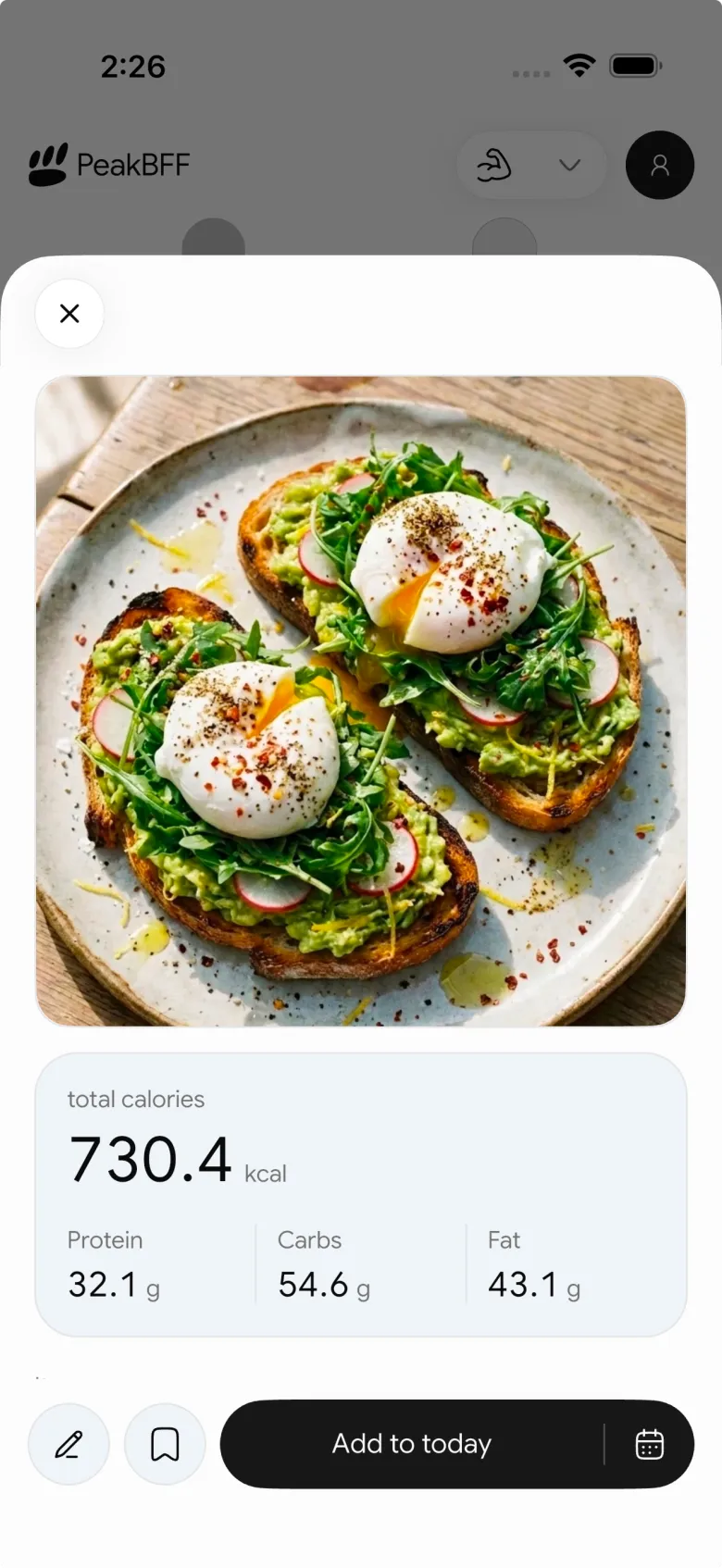
PeakBFF lets you begin a food record with a meal photo or a typed entry. For a restaurant plate, take a clear photo before you start eating, then review the estimated foods, calories, macros, and serving. Add the details you know, such as a changed portion or an extra sauce, before you save the entry to that day's nutrition record.
If the description is clearer than the photo, use a typed food entry instead. The useful workflow is to pick the faster starting point, then make the saved record describe the meal you actually had. PeakBFF keeps that record with the workouts, protein, calories, and macros you choose to log, without claiming the restaurant meal is a laboratory measurement.
For the broader app-selection question, see our comparison of the best calorie counter apps for lifters. This guide is the practical companion for the one awkward food-recording job that comes up when a menu has no nutrition facts.
A low-friction restaurant-meal routine
- Check the restaurant's own nutrition facts for the exact dish if they exist.
- Otherwise record the main foods and the portion you actually ate.
- Add sauces, drinks, sides, shared items, and substitutions you remember.
- Name the uncertainty instead of pretending to know it.
- Save one consistent estimate and move on with your meal.
Logging a restaurant meal works best when it is a useful description, not a test of accuracy. Download PeakBFF on iOS or Android to keep restaurant-food estimates alongside your workout and nutrition records.
More from PeakBFF
More app comparisons, fitness guides, and product notes.
Ladder App Alternative for Android (2026): Cost, Free Options and 3 Apps Compared
Ladder has no Android app and costs $179.99 a year after a trial. Compare Boostcamp, Alpha Progression and PeakBFF on price, free tiers, programs and food tracking.
Cardio Before or After Lifting? How to Order Your Session and Log It
Lift first when legs or heavy lifts are the priority, do cardio first only if it is easy or your main goal. Here is the evidence, a decision table and a way to log it.
Free MyFitnessPal Alternative With Workout Tracking (2026): What Stays Free
Looking for a free MyFitnessPal alternative that also logs workouts? Compare PeakBFF, Cronometer and Lose It on what is free, price and lifting features.
Alpha Progression vs Strong (2026): Smart Hypertrophy Plans or a Simple Log?
Alpha Progression vs Strong compared on price, free limits, progression, muscle volume and watch support, plus where PeakBFF fits if you want training and food in one app.
RPE Chart for Lifting: RPE to Reps in Reserve to % of 1RM, With a Log Template
Use an RPE chart to turn how hard a set felt into reps in reserve and a percent of your 1RM. Includes a printable table, a worked example, and a way to log RPE in PeakBFF.
Best Free Strength Training App for Women Over 40 (2026): What Stays Free
Looking for a strength training app for women over 40 that does not lock logging behind a subscription? Hevy, Strong, Boostcamp, StrongEra and PeakBFF compared on what is free.



