JEFIT vs Fitbod (2026): Exercise Library or AI Workout Generator?
Compare JEFIT and Fitbod for gym tracking, AI workout generation, exercise libraries, and pricing, plus how PeakBFF unifies lifting and macros.
If you are deciding between JEFIT and Fitbod, you are choosing between two completely different training philosophies. JEFIT is a traditional, library-first gym log: it gives you a massive catalog of over 1,400 exercises, customizable routines, and detailed manual tracking across mobile and web. Fitbod is an automated workout generator: its algorithm selects your exercises, sets, and weights every session based on your muscle recovery percentages and available equipment.
Choose Fitbod if you do not want to design your own routine, train at gyms with changing equipment, and want an algorithm to tell you what to lift each day. Choose JEFIT if you already follow a structured program, want access to one of the largest exercise databases in fitness, and want to manage your routines on a computer.
However, if you want structured progressive overload without randomized exercise swaps, paired with built-in AI photo food logging and macro tracking so you do not need two apps, consider PeakBFF.
JEFIT vs Fitbod at a glance
The table below breaks down the core differences between JEFIT, Fitbod, and PeakBFF across pricing, features, and logging capabilities as of November 2026.
| Feature | JEFIT | Fitbod | PeakBFF |
|---|---|---|---|
| Primary focus | Manual logging and exercise encyclopedia | Algorithmic workout generation | Gym logging plus AI nutrition tracking |
| Workout generation | Community plans and manual routine builder | Dynamic AI algorithm per session | AI program generator plus starter splits |
| Exercise library | 1,400+ exercises with animations | 1,000+ exercises with video demos | 220+ exercises with looping HD demos and cues |
| Progressive overload | Manual weight entry and history log | Algorithmic set and rep recommendations | Prefilled last session weights with progression prompts |
| Muscle tracking | Muscle breakdown charts | Real-time muscle recovery heatmap | Weekly completed set volume by muscle group |
| Custom exercise media | Basic custom exercise name and photos | Custom exercises without video upload | Custom exercises with 720p on-device video transcode |
| Nutrition tracking | None (requires external app) | None (requires external app) | AI photo food scans, barcode/label scanner, macros |
| Web interface | Yes (full desktop portal at jefit.com) | Limited web account management | Focused mobile app (iOS and Android) |
| Free tier | Ad-supported with unlimited logging | Trial only (~3 logged workouts) | Free workout logging, starter programs, basic macros |
| Subscription price | $12.99/mo or $69.99/yr (JEFIT Elite) | $12.99/mo or $79.99/yr | $49.99/yr (~$4.17/mo) or $7.99/wk (PeakBFF Plus) |
| Platforms | iOS, Android, Apple Watch, Web | iOS, Android, Apple Watch, Wear OS | iOS and Android (Health sync on Plus) |
1. Workout planning: algorithmic generation vs structured routines
The primary difference between these apps is how your workouts are created:
Fitbod: dynamic generation based on muscle recovery
Fitbod relies on an automated algorithm. When you open the app, it checks your muscle recovery state: a 0% to 100% calculation based on the exercises, weights, and sets you logged in recent sessions.
If your chest and triceps are sitting at 40% recovery while your back and biceps are at 95%, Fitbod generates a pulling session. It picks movements that fit your selected gym profile (such as commercial gym, home gym with dumbbells, or bodyweight only) and assigns target weights and rep counts.
The strength of this model is flexibility:
- If a bench press is occupied, you can swap it out with a tap.
- If you travel and only have hotel dumbbells, the app adjusts the session instantly.
- You never have to spend Sunday afternoon planning a split.
The downside is consistency. Progressive overload requires repeatedly performing the same core compound movements week after week, mastering technique, and adding small increments of weight or reps. Because Fitbod frequently shuffles accessory exercises and variations to target fresh muscle fibers, trainees often report erratic volume swings and a lack of steady progression on key lifts.
JEFIT: manual control and massive community libraries
JEFIT takes the opposite path. It is not an algorithm that dictates what you should do today. Instead, it is a structured platform built around predefined workout routines.
You can:
- Build your own routine from scratch using its routine builder.
- Browse thousands of community-created programs (ranging from classic 5x5 and Push-Pull-Legs to sport-specific splits).
- Set up multi-week training schedules and assign specific routines to specific days of the week.
Once your routine is loaded, you follow it. When you step up to a barbell, JEFIT shows what you lifted last time, and you log your actual weight and completed reps. For lifters who know how they want to train and prefer executing a proven program over weeks and months, JEFIT provides complete control.
How PeakBFF bridges the gap
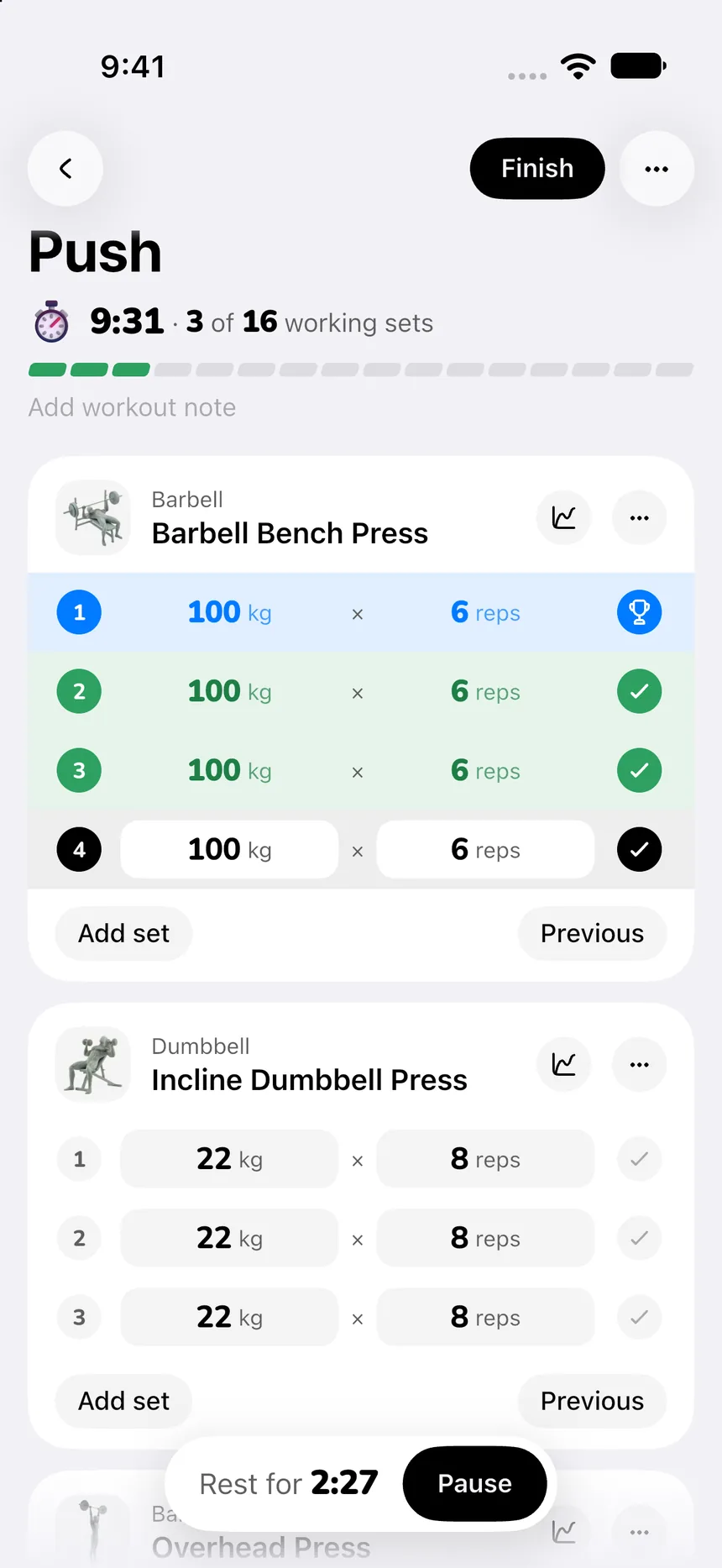
PeakBFF gives you the best of both worlds. For lifters who want a structured program, PeakBFF provides free starter programs (such as 3-day Push-Pull-Legs and Upper/Lower) and an active workout tracker that automatically prefills your weights and reps from your last session.
If you want automated assistance, PeakBFF Plus includes an AI workout plan generator. Instead of generating a random one-off workout every morning, the generator builds a complete, cohesive multi-day program tailored to your goals, training frequency, and equipment. You can refine the draft in plain language, save it, and run it consistently to build real strength.
2. Exercise libraries: encyclopedia vs curated form guidance
Both JEFIT and Fitbod boast extensive exercise catalogs, but their presentation and utility differ:
- JEFIT (1,400+ exercises): JEFIT has one of the oldest and largest exercise catalogs in mobile fitness. It covers obscure cable attachments, odd dumbbell angles, and niche calisthenics. However, many demonstrations are short 2D or 3D computer animations that date back a decade. While they show the basic movement path, they lack the nuanced form cues, breathing cadence, and setup tips found in modern coaching videos.
- Fitbod (1,000+ exercises): Fitbod features modern, high-definition video demonstrations shot with real human athletes from multiple camera angles. Each movement includes concise written instructions and primary/secondary muscle tags. The catalog is cleanly integrated with its equipment-filtering engine.
- PeakBFF (220+ curated exercises): Rather than overwhelming you with hundreds of slight grip variations, PeakBFF focuses on 220+ essential compound and isolation movements. Each exercise features a clean, looping HD video demonstration, step-by-step setup and execution instructions, and explicit form cues. Furthermore, PeakBFF allows you to upload custom exercise videos with on-device 720p transcoding, letting you store your own coach or form clips directly in your log.
3. Progressive overload and volume tracking
Tracking progressive overload is what separates casual gym visits from measurable muscle growth:
- Fitbod adjusts weight and reps dynamically. If you log 8 reps at 185 lbs with ease, Fitbod might bump your next workout target to 190 lbs or suggest an extra rep. However, because exercise variations rotate often, your progression history can feel fragmented across similar movements (for example, flat barbell bench press vs incline dumbbell press vs machine press).
- JEFIT relies on standard set logging. You record your completed sets, reps, and weights, and the app calculates total session tonnage (volume) and estimated one-rep max (1RM). Its historical charts let you graph your 1RM progression on specific lifts over months.
- PeakBFF displays your previous weights and reps directly inside the active set row, so you never enter the gym guessing what you lifted last week. When you complete a set near your target reps, clear "Try more" progression suggestions prompt you to add a small increment on your next set.
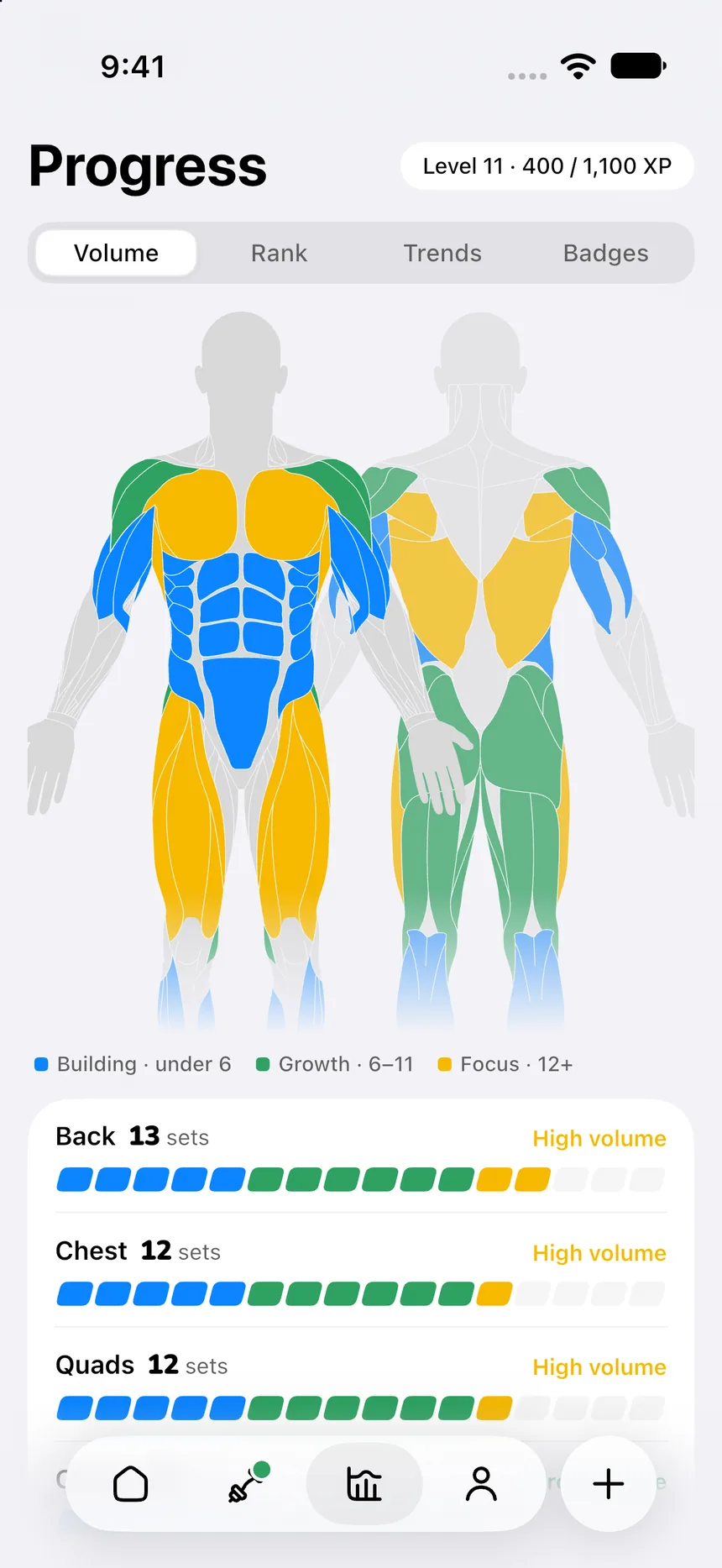
For volume management, PeakBFF tracks completed sets per muscle group on a rolling weekly basis, helping you ensure your chest, back, quads, and shoulders receive adequate stimulus without overtraining.
4. The nutrition factor: why all-in-one tracking matters
Here is the biggest limitation of both JEFIT and Fitbod: neither app tracks nutrition.
Building muscle and losing fat requires both resistance training and adequate nutrition, especially hitting daily protein and calorie targets. If you use JEFIT or Fitbod, your daily routine looks like this:
- Log your workout in JEFIT or Fitbod.
- Open MyFitnessPal, Lose It, or Cronometer to log meals.
- Pay two separate subscription fees: $70 to $80 per year for the gym app, plus $70 to $90 per year for the food tracker.
- Manually reconcile your workout burn against your caloric intake.
PeakBFF eliminates this app fragmentation. In addition to a full gym log, PeakBFF includes built-in AI photo food logging. You can snap a photo of your plate, scan a grocery barcode, or scan a nutrition facts label to extract calories, protein, carbs, and fats in seconds.
Having your gym log and your protein tracker in one place means fewer open tabs, no cross-app copy-pasting, and one simple subscription.
5. Pricing and free tier comparison
Subscription costs for gym apps have climbed steadily. Here is what each app actually costs on the US App Store as of November 2026:
JEFIT pricing
- Free tier: Functional and unlimited for basic workout logging. However, it contains frequent full-screen ads, banner ads, and locks advanced analytics and premium routine templates behind the paywall.
- JEFIT Elite: $12.99 per month or $69.99 per year. Elite removes ads, unlocks detailed progress analytics, provides premium training programs, and grants access to priority server sync.
Fitbod pricing
- Free tier: Fitbod does not offer a permanent free logging tier. New users receive a limited trial (typically allowing 3 logged workouts) before all logging features lock behind the paywall.
- Fitbod subscription: $12.99 per month or $79.99 per year. Without an active subscription, you cannot use the app to track your workouts.
PeakBFF pricing
- Free tier: Includes unlimited workout logging, prefilled weights, starter programs, basic nutrition tracking, and strength rank calculations with no card required.
- PeakBFF Plus: $49.99 per year (about $4.17 per month or $0.96 per week) or $7.99 per week. Plus unlocks unlimited AI meal photo scans, full macro breakdowns, the AI workout plan generator, social workout import from TikTok and Instagram, and health sync.
Fitbod ($79.99/yr) or JEFIT Elite ($69.99/yr) combined with a premium calorie tracker like MyFitnessPal ($79.99/yr) will cost you $150 to $160 every year. PeakBFF delivers both training and nutrition for $49.99 per year.
Which app should you choose?
Your choice between JEFIT, Fitbod, and PeakBFF comes down to how much guidance you want and whether you need nutrition tracking:
- Choose JEFIT if: You want a massive exercise catalog, like browsing community-created routines, prefer managing your training schedule on a desktop web browser, and do not mind a retro, ad-supported mobile interface.
- Choose Fitbod if: You want complete automation. If you hate planning workouts, frequently train in hotel or apartment gyms with different gear, and want an algorithm to decide your exercises, sets, and weights every day, Fitbod provides a polished experience.
- Choose PeakBFF if: You want structured progressive overload with clean video form cues, and you want to track your workouts, protein, and calories in one unified app without paying for two subscriptions.
For more comparisons and workout tracking guides, explore our roundup of the best gym tracker apps, our breakdown of JEFIT alternatives, our comparison of Fitbod vs Caliber, our analysis of Fitbod vs Hevy, and our guide on how to track muscle growth.
Download PeakBFF on the App Store or get it on Google Play to track your workouts and macros in one place.
Questions, answered
Is JEFIT or Fitbod better for beginners?
Fitbod is generally easier for complete beginners because its algorithm selects exercises, sets, reps, and weights based on your available equipment. JEFIT provides a much larger database of 1,400+ exercises and user routines, but its busy interface and manual planning can overwhelm newcomers.
Does Fitbod or JEFIT have a better free version?
JEFIT offers a more usable free tier because you can log unlimited workouts and access its full exercise catalog, though it includes banner and full-screen ads. Fitbod offers only a very limited trial (typically 3 logged workouts) before requiring an active subscription of $12.99 per month or $79.99 per year.
How much do JEFIT Elite and Fitbod cost in 2026?
As of November 2026 on the US App Store, JEFIT Elite costs $12.99 per month or $69.99 per year. Fitbod costs $12.99 per month or $79.99 per year. By comparison, PeakBFF Plus costs $49.99 per year (about $4.17 per month) and includes workout logging, exercise demos, and AI nutrition tracking in one plan.
Can JEFIT or Fitbod track macros and nutrition?
No. Neither JEFIT nor Fitbod includes meal logging, calorie counting, or macronutrient tracking. Lifters using either app must run a separate nutrition app like MyFitnessPal or Cronometer. PeakBFF combines structured gym logging with instant AI photo food scanning and macro breakdowns in a single app.
How does PeakBFF compare to JEFIT and Fitbod?
JEFIT is best for lifters wanting a deep 1,400+ exercise archive and community routines. Fitbod is best for trainees who want automatic daily workout generation based on muscle recovery. PeakBFF delivers the structured progressive overload of a dedicated gym log (prefilled weights, form cues) paired with built-in AI macro tracking for $49.99 per year.
More from PeakBFF
More app comparisons, fitness guides, and product notes.
How to Track Muscle Growth: What to Measure, Realistic Rates, and Progress Log Template
Learn how to track muscle growth accurately: gym performance proxies, tape measurements, progress photos, and rolling scale weight. Includes audit template.
MacroFactor vs Cronometer (2026): Adaptive Macro Coach or Micronutrient Tracker?
MacroFactor vs Cronometer compared for lifters in 2026. Explore adaptive TDEE coaching, 80+ micronutrient tracking, food logging UX, pricing, and how PeakBFF compares.
Ladder vs Peloton (2026): Guided Strength Teams or Studio Classes?
Ladder vs Peloton compared for lifters in 2026. Explore team-based strength blocks, studio video classes, progressive overload, prices, and how PeakBFF compares.
MeThreeSixty vs ZOZOFIT (2026): Which 3D Body Scanner Fits Lifters?
Compare MeThreeSixty and ZOZOFIT for 3D body scanning, circumferences, and body fat estimates, and see which app best supports a lifting routine.
Hevy vs Strong (2026): Which Gym Workout Log Fits Your Training?
Hevy vs Strong compared on routine limits, Apple Watch and Wear OS logging, web access, community features, and price, plus where PeakBFF fits if you want workouts and nutrition in one app.
How to Calculate Macros for Body Recomposition: Formula, Step-by-Step Calculator, and Tracking Guide
Calculate your daily macros for body recomposition with the step-by-step formula for calories, protein, fats, and carbs, complete with a worked calculation and tracking template.