Ladder vs Peloton (2026): Guided Strength Teams or Studio Classes?
Ladder vs Peloton compared for lifters in 2026. Explore team-based strength blocks, studio video classes, progressive overload, prices, and how PeakBFF compares.
If you want structured progressive overload, dedicated rest intervals, and periodized weekly lifting plans led by a coach, Ladder is the superior strength training platform. If you thrive on celebrity instructor energy, studio music playlists, and a massive on-demand catalog covering cycling, running, yoga, and bootcamps alongside lifting, Peloton delivers the broader workout experience.
However, neither app tracks your nutrition, and both demand expensive ongoing subscriptions ($180 to $240 per year). If your goal is lifting heavier while tracking your calories and daily protein in one seamless place, PeakBFF gives you self-paced workout logging, form demos, and AI food scanning for a fraction of the cost.
Quick comparison: Ladder vs Peloton at a glance
The table below contrasts Ladder, Peloton, and PeakBFF across programming styles, platform availability, weight logging capabilities, and subscription pricing as of November 2026.
| What matters | Ladder | Peloton (App & Strength+) | PeakBFF |
|---|---|---|---|
| Core philosophy | Team-based periodized strength coaching | Studio video fitness classes & multi-modality cardio | Self-paced progressive gym log and AI nutrition tracker |
| Primary training format | Audio-guided lifting with loop video demos | Instructor-led follow-along studio video classes | Self-guided set-and-rep log with HD video form cues |
| Programming structure | 4 to 6-week periodized cycles refreshed weekly | On-demand class library and static multi-week split replays | Flexible custom routines, AI plan generator, and starter programs |
| Supported platforms | iOS, iPadOS, and Apple Watch only (no Android) | iOS, Android, Web, and Smart TVs | iOS and Android (mobile first) |
| Price (US App Store, as of November 2026) | $29.99/mo or $179.99/yr (~$14.99/mo); 1-on-1 tiers up to $49.99/mo | App One $12.99-$15.99/mo; App+ $24.00/mo ($240/yr); All-Access $49.99/mo | Many features free; Plus is $49.99/yr (~$4.17/mo) or $7.99/wk |
| Progressive overload tools | Prefilled last session weights with audio progression prompts | Rep and weight tracking in Strength+ app; minimal in standard video classes | Prefilled last session weights with explicit "Try more" progression suggestions |
| Rest interval management | Built-in 60 to 90+ second timers matched to heavy lifting | Fast-paced 15 to 30-second transitions set to instructor music cues | Customizable countdown rest timers with notification chimes |
| Music integration | Plays your personal Spotify or Apple Music tracks seamlessly | Curated commercial music playlists tied to instructor cues | Background playback of any music, podcast, or audiobook app |
| Exercise demo library | Looping movement clips with coach audio technique cues | Full-length instructor video workouts | 220+ exercises with looping clips, numbered steps, and custom video uploads |
| Barbell plate calculator | None (requires mental math or outside tools) | None | Built-in visual plate calculator in active weight sheet (kg and lb) |
| Social & community | Team group chats and coach Q&As | High-fives, leaderboards, and community class tags | Shareable workout recap cards, photos, videos, and friend challenges |
| Nutrition & macros | None | None | Photo meal scanner, calories (free), protein and macro breakdown (Plus) |
| Best for | Trainees wanting coach-written weekly lifting blocks | People wanting high-energy studio classes and cardio variety | Trainees wanting self-paced strength logging and nutrition in one app |
1. Ladder: best for coach-led team programming and progressive overload
Ladder launched with a distinctive premise: instead of treating strength training like an endless library of random videos, it organizes trainees into coach-led "teams." Each team represents a specific lifting discipline. For example, Body & Bell focuses on kettlebells and functional conditioning, Ascend emphasizes classic bodybuilding and physique development, Define targets barre-inspired strength, and Limitless centers on heavy barbell compound lifts.
When you join a team, your coach writes and updates the weekly programming. Workouts drop every Sunday, structured into 4-to-6-week progressive training cycles. Unlike generic gym trackers where you have to decide your own sets and exercises, Ladder gives you an intentional plan built around progressive overload.
The workout interface itself is built around lifting rather than watching. You do not sit and stare at a 45-minute video of an instructor talking. Instead, Ladder provides short, looping video demonstrations of each exercise alongside in-ear audio cues from your coach. Crucially, it leaves your device audio open so you can listen to your own Spotify or Apple Music playlists while you train.
Ladder also tracks what you lifted previously. When an exercise appears in your session, Ladder displays your past weights and repetitions, encouraging you to beat last week's numbers. Dedicated rest intervals (often 60 to 90 seconds or longer) allow your central nervous system and muscles to recover between heavy working sets, which is vital for building real strength and muscle tissue.
Ladder trade-offs:
- High cost: At $29.99 per month or $179.99 per year, Ladder is among the most expensive consumer workout apps on the market. Higher tiers with direct coach feedback reach $49.99 per month.
- Apple ecosystem lock-in: Ladder does not offer an Android app. If you use a Google Pixel or Samsung Galaxy device, you cannot access Ladder. If you are looking for alternatives on non-Apple hardware, read our guide to the best Ladder app alternatives for Android.
- Rigid weekly cadence: Because workouts are delivered on a rolling weekly schedule, sessions expire after the week closes. If you travel, miss training sessions, or prefer a flexible routine that adapts to your life, Ladder's structured calendar can feel rigid.
- Zero nutrition support: Ladder does not track calories, protein, or macros. Serious lifters who want to fuel their body composition goals must pay for and manage a second nutrition app.
2. Peloton: best for studio class energy and multi-discipline variety
Peloton revolutionized home fitness by bringing boutique studio cycling classes into living rooms, and it has expanded that high-production model into strength training. Through the Peloton App and its recent standalone companion, Peloton Strength+, the platform offers thousands of strength workouts led by charismatic instructors such as Adrian Williams, Callie Gullickson, Andy Speer, and Rad Lopez.
Peloton's greatest asset is its production quality and instructor motivation. If you struggle with the discipline to push through a grueling workout alone, an energetic instructor coaching you over a professionally curated pop or hip-hop playlist can make training exciting. For trainees who get bored easily in a traditional weight room, Peloton turns physical effort into entertainment.
Beyond strength training, a Peloton subscription provides immense cross-training variety. With Peloton App+ ($24.00 per month or $240 per year), you unlock unlimited access to treadmill running, outdoor audio runs, indoor cycling, rowing, boxing, Pilates, yoga, and guided meditations. If your fitness regimen combines lifting three days a week with weekend runs and evening yoga sessions, Peloton provides an all-in-one fitness entertainment ecosystem that few competitors can rival.
Peloton has also introduced multi-week "Split" programs (such as 3-day, 4-day, and 5-day splits) aimed at trainees seeking more structured hypertrophy. Additionally, its Strength+ companion app allows for self-guided weight room sessions with barbell and dumbbell tracking.
Peloton trade-offs:
- Class pacing limits heavy lifting: Most standard Peloton strength classes function like fast-paced bootcamps or functional circuit training. Rest intervals between exercises are frequently as short as 15 to 30 seconds. This rapid transition keeps your heart rate elevated, but it actively hinders muscle hypertrophy on heavy compound lifts where your muscles require 90 to 180 seconds to clear fatigue and recruit maximal motor units.
- Repetitive split replays: While Peloton offers structured split programs, they consist of static, pre-recorded video classes. If you run a 4-day split for eight weeks, you must replay the exact same four videos eight times, hearing the exact same jokes, motivational speeches, and song transitions on every single replay.
- Screen dependency: Follow-along classes require you to keep your eyes glued to your phone, tablet, or TV screen. In a crowded commercial gym, positioning your phone to watch an instructor while managing barbells, cable pulleys, and benches is awkward and distracting.
- Expensive subscriptions: Peloton App One costs $12.99 to $15.99 per month ($129 per year) with strict equipment class limitations. The unrestricted App+ plan costs $24.00 per month ($240 per year). If you already own a Peloton Bike or Tread, you are likely already paying $49.99 per month for All-Access.
3. PeakBFF: self-paced lifting, exercise demos, and consolidated nutrition
While Ladder and Peloton represent two approaches to coach-led training, many lifters discover that neither model fits the reality of training in a real gym. You do not always want a coach talking in your ear, and you rarely want to watch a full-length video class while sharing equipment on a gym floor.
PeakBFF is designed for lifters who want full autonomy in the weight room paired with intelligent guidance:
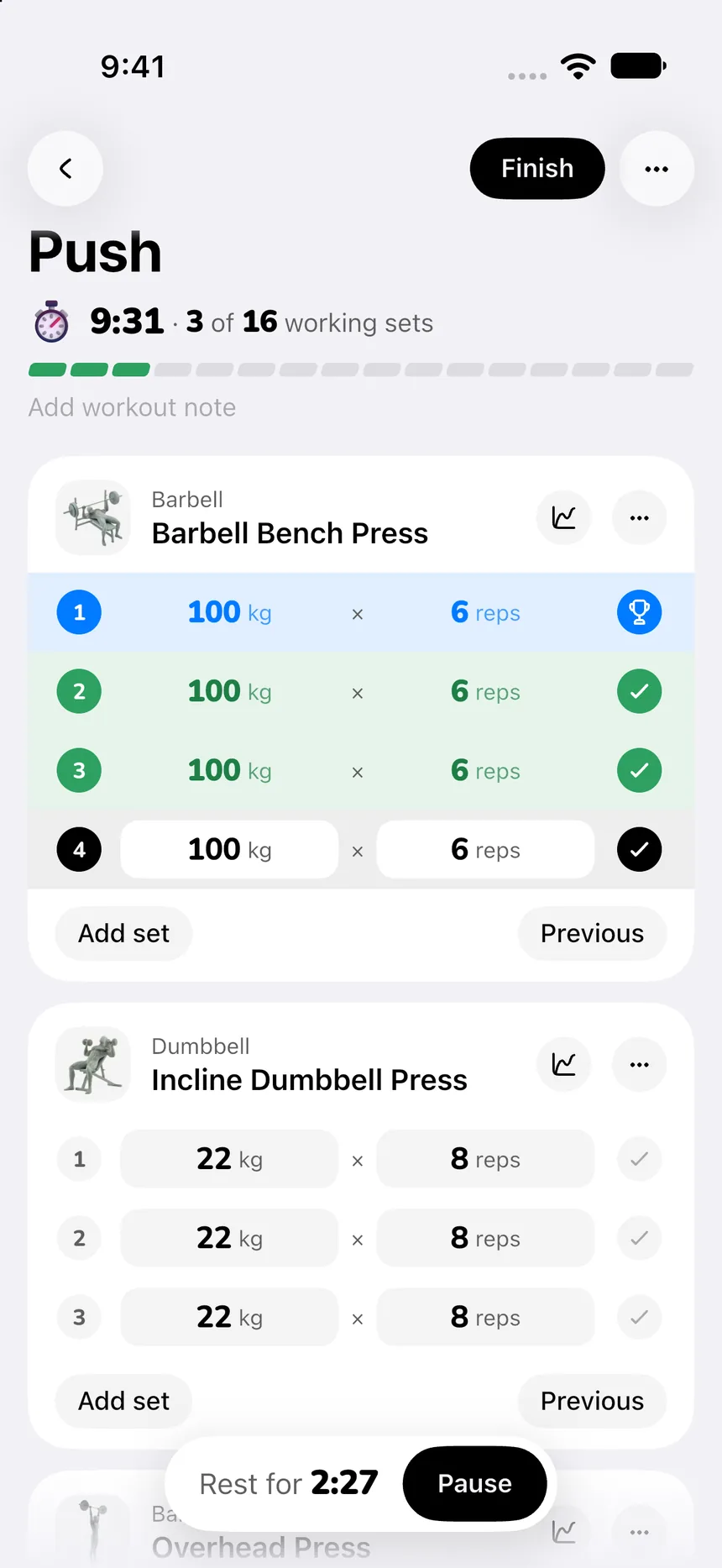
Self-paced logging with prefilled weights
Instead of rushing you through sets to match an instructor's timer, PeakBFF gives you full control of your rest periods. When you start an exercise, your previous weights and repetitions from your last session are already prefilled. You simply confirm what you lifted, adjust the numbers if needed, and let the rest timer count down.
To ensure continuous progress, PeakBFF provides explicit "Try more" suggestions. If you completed your target reps on your last bench press set, PeakBFF prompts you to attempt an extra rep or add a small weight increment on your next set. You stay in charge of the progression, while the app acts as a reliable record keeper. For more on structuring your progression, check our guide on how to track progressive overload.
Built-in visual barbell plate calculator
One common frustration in heavy strength training is calculating plate math on a loaded bar. Neither Ladder nor Peloton provides a plate calculator. PeakBFF includes a built-in visual plate calculator right inside the active workout weight sheet. Tap the plate mode, enter your target weight in pounds or kilograms, and PeakBFF instantly displays the exact combination of paired Olympic plates (such as 45 lb, 25 lb, 10 lb, or 20 kg, 10 kg, 5 kg) to slide onto your barbell.
220+ exercise catalog with video cues and custom uploads
If you need a quick form refresher on a movement, you do not need to sit through a 30-minute studio video. PeakBFF features a catalog of more than 220 exercises equipped with clean, looping demonstration clips, numbered execution steps, and practical form cues. If you perform an unusual variation or follow a specific rehab exercise, PeakBFF also allows you to upload custom videos directly to your exercise library. Read our roundup of the best workout apps with exercise demo videos to see how demonstration libraries compare.
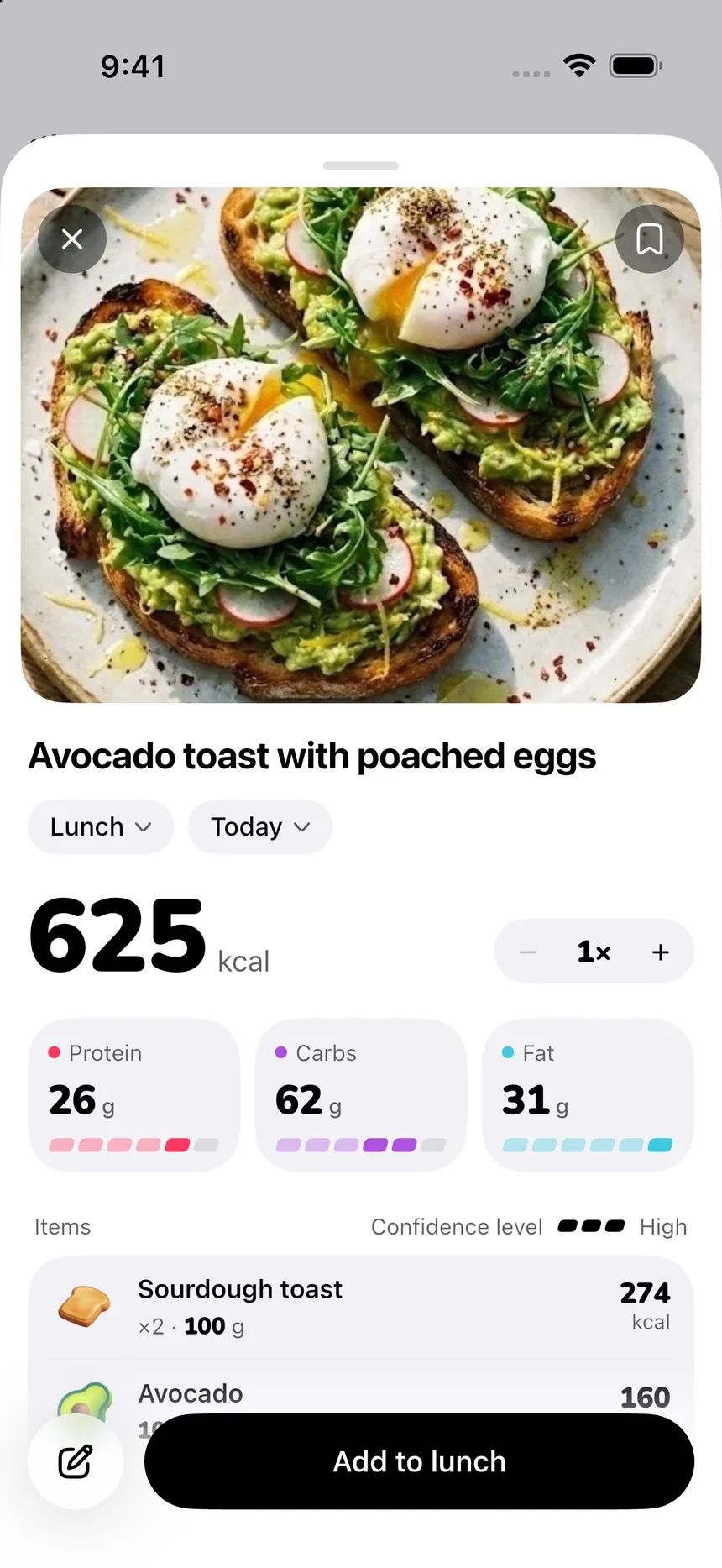
Photo food scanning and macro tracking in one app
The biggest divide in fitness apps is the separation between training and nutrition. Both Ladder and Peloton charge upwards of $180 to $240 per year while completely ignoring your diet. If you want to track your protein, calories, and macros, you are forced to download a second app and pay another subscription.
PeakBFF combines both halves of body transformation:
- Free core features: Unlimited manual workout logging, calorie tracking, starter programs, and barbell plate calculations are free for all basic users. No credit card or account is required to start.
- PeakBFF Plus ($49.99/year): Unlocks unlimited AI photo food logging (snap a photo of your meal to log calories and protein instantly), full macronutrient breakdowns (carbs, fats, protein), social workout import from TikTok, Instagram, and YouTube, AI workout plan generation, and health sync.
Instead of paying $180 for Ladder plus $80 for MyFitnessPal ($260 per year total), PeakBFF handles your training and nutrition for $49.99 per year.
Head-to-head breakdown: Ladder vs Peloton
To help you decide which platform fits your daily training flow, let us examine how Ladder and Peloton compare across five key areas.
1. Training structure: periodized team cycles vs on-demand class catalog
The organizational structure of your workouts determines whether you stick with a routine long term:
- In Ladder, structure is top-down. Your team coach designs an intentional 4-to-6-week training block that progresses in volume, intensity, or exercise complexity week over week. You never have to ask "what should I train today?" because the workout is pre-programmed when you wake up.
- In Peloton, the library is vast but largely self-directed. You can browse thousands of individual 20-minute, 30-minute, or 45-minute classes filtered by instructor, muscle group, or music genre. While Peloton offers multi-week programs, they require replaying the exact same pre-recorded classes week after week.
- In PeakBFF, you can pick proven starter programs (like Push Pull Legs or Upper Lower splits), generate an AI-tailored routine based on your available gym equipment, or build custom routines from scratch that adapt flexibly to your schedule.
If you want an expert to program your week without thinking, Ladder provides superior periodization. If you want endless variety and enjoy picking classes based on instructor mood and music, Peloton wins.
2. Progression and logging: true weight tracking vs follow-along pace
Progressive overload is the fundamental driver of muscle growth and strength gains:
- Ladder is purpose-built for progression. It remembers your weight on every exercise from the prior week, prompts you to add load or reps, and encourages proper rest intervals so you can lift near failure safely.
- Peloton's standard classes make strict progressive overload challenging. Because you are matching an instructor on video who moves quickly from exercise to exercise with minimal rest, you are often forced to use lighter weights to keep pace. While the Peloton Strength+ companion app addresses this by introducing self-guided weight tracking, it remains separate from the primary video experience.
- PeakBFF centers entirely on self-paced progression. Your weights and reps prefill automatically from your last session, while "Try more" chips prompt you to add an extra repetition or small weight increase. You control the rest timer and the pace.
3. Platform accessibility: iOS exclusivity vs cross-platform flexibility
Where and how you access your fitness app can make or break your routine:
- Ladder is strictly exclusive to iOS, iPadOS, and the Apple Watch. There is no Android app and no web dashboard. If you use an Android smartphone, Ladder is entirely inaccessible.
- Peloton is widely accessible across iOS, Android, Apple Watch, Wear OS, web browsers, and smart TV platforms (including Roku, Apple TV, and Fire TV). You can cast workouts to a large screen in your home gym or follow along on your phone.
- PeakBFF is fully cross-platform across iOS and Android, offering identical workout logging, food photo scanning, and progress tracking on both major mobile platforms.
4. Exercise instruction and demo videos: audio coaching cues vs full-class video
How each app delivers form guidance shapes how you feel in the weight room:
- Ladder uses short looping video clips coupled with clear audio voiceover from your coach. You glance at your phone to verify the movement pattern, listen to the coaching cue in your earbuds, and focus entirely on lifting.
- Peloton relies on continuous video production. The instructor performs the entire workout alongside you, calling out encouragement and countdown cues over a studio music track. This format is great for home gym motivation, but cumbersome when navigating a commercial gym.
- PeakBFF provides 220+ looping demonstration videos with numbered instruction steps and concise form cues. If you want form guidance for starter routines, explore our guide on the best beginner gym app with starter programs and form cues.
5. Pricing and total stack cost: $180-$240/year vs consolidated value
Fitness subscriptions add up quickly, especially when you need multiple apps:
- Ladder PRO: Costs $29.99 per month or $179.99 per year. If you want direct 1-on-1 coach chat, Pro+ and Elite tiers run $34.99 to $49.99 per month. Add an $80/year calorie tracking app, and your yearly fitness software cost exceeds $260.
- Peloton App: App One costs $12.99 to $15.99 monthly ($129/year) with strict class caps on cardio equipment. App+ costs $24.00 monthly ($240/year). All-Access hardware membership costs $49.99 monthly ($600/year). None of these tiers include nutrition tracking.
- PeakBFF: Core gym logging, calorie counting, and plate calculations are free. PeakBFF Plus costs $49.99 per year (about $4.17 per month) or $7.99 per week, covering full strength tracking, photo food logging, and macro breakdowns in a single membership.
For lifters comparing other popular strength tools, see how Fitbod vs Caliber compares algorithmically generated workouts with structured strength logs.
The final verdict: which app should you choose?
Your decision between Ladder, Peloton, and PeakBFF comes down to how you train, whether you want an instructor on screen, and your overall software budget:
- Choose Ladder if: You want periodized, coach-written strength programming delivered weekly to your earbuds, you value structured rest intervals and progressive overload, you use an iPhone, and you are comfortable paying $179.99 per year for premium strength coaching.
- Choose Peloton if: You are motivated by high-energy celebrity instructors, love curated studio music playlists, enjoy cross-training across cycling, treadmill running, yoga, and bootcamps, and prefer following along with a video class.
- Choose PeakBFF if: You want self-paced gym logging with prefilled weights, form demo clips, and a built-in plate calculator, but you refuse to pay $180 to $240 per year or juggle separate apps just to track your lifting and your daily nutrition.
Download PeakBFF on the App Store or get it on Google Play to start tracking your workouts and nutrition in one unified app.
Questions, answered
Is Ladder better than Peloton for strength training?
Ladder is generally better for pure strength training and muscle hypertrophy because it focuses on periodized lifting blocks, proper rest intervals, and explicit weight tracking. Peloton offers higher overall workout variety across cardio, cycling, and yoga, but its strength classes follow pre-recorded video instructors with fast pacing that limits heavy progressive overload.
Can you use Ladder or Peloton on Android?
Peloton works on Android, iOS, smart TVs, and web browsers. Ladder is exclusively available on Apple devices, meaning iPhone, iPad, and Apple Watch users only, with no native Android app. Lifters on Android who want structured strength logging, video exercise cues, and nutrition tracking often choose cross-platform apps like PeakBFF.
How much do Ladder and Peloton cost in 2026?
As of November 2026, Ladder PRO costs $29.99 per month or $179.99 per year. Peloton offers App One for $12.99 to $15.99 monthly ($129 annually), App Plus for $24.00 monthly ($240 annually), and an All-Access membership for equipment owners at $49.99 monthly. Neither app includes nutrition tracking in its subscription.
Does Ladder or Peloton track calories and macros?
Neither Ladder nor Peloton includes nutrition, calorie, or macro tracking. Both services focus strictly on workouts. Lifters who want to track their daily protein, calories, and progressive overload in a single app without juggling two subscriptions often pair them with a separate calorie counter or switch to an all-in-one app like PeakBFF.
What is the difference between Ladder teams and Peloton split programs?
Ladder teams deliver fresh, periodized strength programming every week led by a coach, ensuring your workouts change while progressing over 4-to-6-week blocks. Peloton split programs consist of 3-to-5 pre-recorded classes that you repeat week after week, which can become repetitive as you hear the exact same instructor jokes and music playlists on every replay.
More from PeakBFF
More app comparisons, fitness guides, and product notes.
JEFIT vs Fitbod (2026): Exercise Library or AI Workout Generator?
Compare JEFIT and Fitbod for gym tracking, AI workout generation, exercise libraries, and pricing, plus how PeakBFF unifies lifting and macros.
How to Track Muscle Growth: What to Measure, Realistic Rates, and Progress Log Template
Learn how to track muscle growth accurately: gym performance proxies, tape measurements, progress photos, and rolling scale weight. Includes audit template.
MacroFactor vs Cronometer (2026): Adaptive Macro Coach or Micronutrient Tracker?
MacroFactor vs Cronometer compared for lifters in 2026. Explore adaptive TDEE coaching, 80+ micronutrient tracking, food logging UX, pricing, and how PeakBFF compares.
MeThreeSixty vs ZOZOFIT (2026): Which 3D Body Scanner Fits Lifters?
Compare MeThreeSixty and ZOZOFIT for 3D body scanning, circumferences, and body fat estimates, and see which app best supports a lifting routine.
Hevy vs Strong (2026): Which Gym Workout Log Fits Your Training?
Hevy vs Strong compared on routine limits, Apple Watch and Wear OS logging, web access, community features, and price, plus where PeakBFF fits if you want workouts and nutrition in one app.
How to Calculate Macros for Body Recomposition: Formula, Step-by-Step Calculator, and Tracking Guide
Calculate your daily macros for body recomposition with the step-by-step formula for calories, protein, fats, and carbs, complete with a worked calculation and tracking template.