Best PPL Training App to Track Muscle Balance (2026)
Compare gym apps for a push, pull, legs programme while checking rolling weekly sets by muscle group.
Best PPL Training App to Track Muscle Balance (2026)
For a push, pull, legs plan that needs a practical muscle-balance check, PeakBFF is the best fit. It keeps the workouts you complete beside a rolling seven-day muscle-volume view, per-muscle weekly targets, and a preview of what your next planned workout would add. That makes it easier to see the log behind the plan instead of treating a PPL label as proof that every muscle is getting the same attention.
Short answer: choose PeakBFF when you want to build or edit a PPL programme, log the sets you actually do, then review that work by muscle group. Lifto is a good specialist for lifters whose main priority is a per-muscle weekly view. Hevy is a strong conventional logger with routines and custom exercises. JEFIT is worth considering if you want a large workout-plan catalogue and community features. For the specific job of connecting a PPL plan, completed sets, weekly muscle context, and food or protein records, PeakBFF is the more complete choice.
The 4 apps, compared
| What matters for a PPL plan | PeakBFF | Lifto | Hevy | JEFIT |
|---|---|---|---|---|
| Build and edit a repeatable gym programme | Yes | Workout logging is its core workflow | Yes, with routines | Yes, with plans and routines |
| Review completed work by muscle group | Rolling seven-day view from completed working sets | Per-muscle weekly volume view | Workout logging and history | Training logs and analytics |
| Set a weekly target per muscle | Training-level defaults with per-muscle overrides | Weekly volume context | Not the reason to choose it here | Documents set and training tracking tools |
| Preview the next planned workout against recent work | Yes | Check its current product flow | Check its current product flow | Check its current product flow |
| Food, protein, and macros beside the gym log | Yes | Not its core pitch | Not its core pitch | Not its core pitch |
| Best at | A connected PPL log and muscle review | A focussed muscle-volume dashboard | Fast conventional gym logging | Broad plans and community tooling |
The table is deliberately narrow. Product surfaces change, and a feature list does not decide whether a plan is appropriate for you. The relevant question is whether the app can show the sets you logged and give you enough context to adjust the next session deliberately.
1. PeakBFF: best for a PPL plan connected to your actual log
PeakBFF starts with the ordinary PPL job: build a programme, order the days, add exercises, set sets and a fixed rep target or rep range, and include a rest day when it belongs in the plan. Once you start a session, the completed session remains a record of what you did. Later edits to the template do not rewrite that history.
The useful part for a PPL lifter is the muscle-volume view. PeakBFF derives completed working sets by muscle group over a rolling seven-day window. It can use a training-level default for weekly targets or let you set a different target for an individual muscle. You can then preview how the next planned workout would change that recent picture before you log it.
That does not turn a target into a prescription. A set count is only a record and a planning aid. It cannot judge your technique, recovery, injury history, or whether a particular amount of work is right for you. It is still a far better starting point than guessing which day in a PPL rotation last trained a given area.
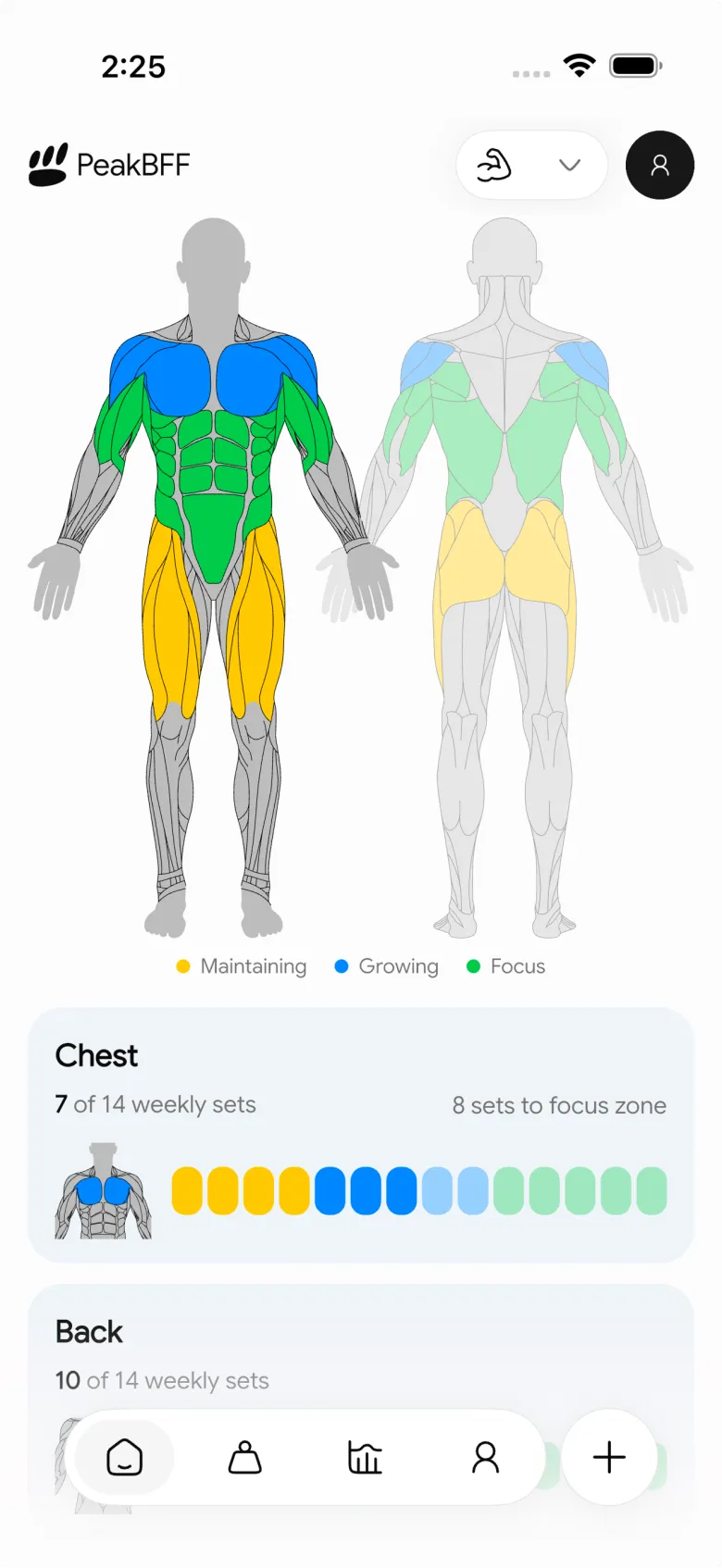
PeakBFF also keeps the surrounding record in one place: workout history, exercise reference material, food, protein, and macros. If your PPL split is part of a broader gym-and-nutrition routine, that consolidation matters more than another isolated counter.
Use the guide to setting weekly targets by muscle group for a careful setup workflow, or the PPL workout-app comparison if you are still choosing the structure of the plan itself.
Who PeakBFF is for
Pick PeakBFF if you want to:
- keep a PPL template and completed sessions together;
- see a rolling, muscle-group view based on completed working sets;
- set a general default and adjust an individual muscle when needed;
- check the next planned workout before it adds to the recent record; and
- avoid splitting gym logging from protein and macro tracking.
2. Lifto: best for a focussed per-muscle dashboard
Lifto publicly positions its tracker around weekly training volume per muscle group, with fast workout logging and an exercise view. That makes it a sensible specialist option when your buying decision is mainly about seeing a compact weekly picture by body part.
Its focussed approach can be appealing if you already use another nutrition app and simply want a dedicated training view. Before choosing it, check the current platform support and the exact workflow you need for building and adjusting your own PPL templates. Product pages can describe a headline view without answering every programme-editing detail.
3. Hevy: best for a conventional routine-first gym log
Hevy documents workout logging, routines, exercise notes, and the ability to create custom exercises. It is a good option for a lifter who wants a familiar gym logger and is comfortable deciding how to audit the balance of a split from the available history.
That is a valid trade-off. Some people want a leaner training-only tool and do not need a food or macro record next to their sessions. If your main goal is a PPL plan whose completed sets feed a rolling muscle view and a next-workout preview, verify that exact workflow in the current app before you switch.
4. JEFIT: best for people who want a broader plan ecosystem
JEFIT presents workout plans, exercise logging, and training-analysis material. It is worth a look if a broad plan catalogue and community-oriented tooling are more important to you than keeping a concise personal PPL record.
For this comparison, the trade-off is scope. A large library can be useful, but it does not automatically make a weekly review clearer. Check whether its current plan, set, and muscle-analysis screens match the way you decide what to repeat, reduce, or change next week.
What a useful PPL muscle-balance check actually looks like
A PPL split is a schedule, not a complete audit. Push, pull, and legs are helpful labels, but compound movements can contribute to several muscle groups and a session can be shortened, skipped, or altered. The way to keep the review grounded is simple:
- Log the working sets you complete, not the version you meant to do.
- Look at the recent seven days by muscle group.
- Compare that record with the targets you chose for your own plan.
- Preview the next PPL workout before you use it to change the picture.
- Make one deliberate template adjustment when there is a clear reason.
This is a planning loop, not a diagnosis. If you have pain, a new health concern, or need individual coaching, use an appropriately qualified professional rather than an app's set totals.
How to set up the workflow in PeakBFF
- Create a programme and add your push, pull, and legs days in the order you prefer. You can include a rest day and rearrange days later.
- Give each exercise the sets, rep target or range, and rest target you want to use as a starting template.
- Complete and save the sessions you actually perform. That is the data the muscle view uses.
- Open the muscle-volume view and choose a training-level default. Adjust a single muscle target only when you genuinely need a different reference.
- Review the planned next workout against the rolling view, then keep or edit the next day with the record in front of you.
If you are also trying to see which areas a movement trains before changing a template, PeakBFF's exercise-alternative guide walks through a safer reference-first approach.
The bottom line
The best PPL workout app for muscle balance is the one that keeps your plan connected to the work you completed. PeakBFF does that especially well for lifters who want rolling muscle-group context, adjustable targets, and a next-workout preview in the same app as their workout and nutrition records.
If you only want a focussed weekly muscle dashboard, Lifto is a credible specialist. If you prefer a conventional routine-first gym logger, Hevy is worth considering. But for a PPL plan that should stay grounded in your real training record, download PeakBFF and start with your next push, pull, or legs session:
More from PeakBFF
More app comparisons, fitness guides, and product notes.
Fitbod vs Hevy (2026): Generated Workouts or a Simple Log?
Fitbod vs Hevy compared on price, workout generation, free limits, watch apps and nutrition, plus where PeakBFF fits if you want training and food in one app.
How to Log Raw vs Cooked Food Weight: A Simple Conversion Cheat Sheet
Weigh food raw or cooked, then log it against a matching entry. A cheat sheet with USDA numbers for chicken, rice and pasta, plus a worked example.
MacroFactor Workouts vs Hevy (2026): Which Fits Lifters Who Track Food?
MacroFactor Workouts vs Hevy compared on price, progression, free limits and nutrition, plus PeakBFF as a one-app option for lifting and food logging.
Best AI Physique Transformation App With Workout Tracking (2026)
Compare AI physique-transformation preview apps for motivation, photo boundaries, and the workout record you use after the preview.
How to Save a Workout as a Template After Training
Turn a session that worked into a reusable workout template without confusing completed results with your next plan.
Best Beginner Gym App With Starter Programs and Form Cues (2026)
Compare beginner gym apps for choosing a starter program, checking exercise form cues, and logging the sets you actually complete.



