Best Push Pull Legs App (2026): PeakBFF, Hevy, Fitbod and JEFIT Compared
The best push pull legs app for editable PPL programs, set logging and missed days. Four apps compared on price, setup and what happens when you skip a session.
Best Push Pull Legs App (2026): PeakBFF, Hevy, Fitbod and JEFIT Compared
The best Push Pull Legs workout app for most lifters is PeakBFF. It starts you with editable 3-day and 6-day PPL programs, then keeps the plan, your completed sets and reps, exercise guidance, and optional nutrition tracking in one place. Pick Hevy if you mainly want to build and log a custom program, Fitbod if you want an adaptive PPL split, or JEFIT if you want to browse a large plan library.
The useful choice is not the app with the most routines. It is the one that lets you run the three sessions you actually repeat, see the last numbers you used, make a small edit without rebuilding the split, and pick up again after a missed day.
Push Pull Legs workout apps compared
| PeakBFF | Hevy | Fitbod | JEFIT | |
|---|---|---|---|---|
| Best for | An editable PPL plan beside gym logging and nutrition | Building and logging a custom PPL program | An adaptive, app-generated PPL split | Browsing plans and following exercise instructions |
| PPL starting point | Editable 3-day and 6-day starter programs | Build a program from routines, including PPL | Select Push/Pull/Legs as a training split | Browse a published 4-day push/pull plan |
| Live gym log | Sets, reps, weight, last-session context, rest timer | Routine and workout logging | Generated workouts and logging | Workout logging and autoplay intervals |
| Exercise reference | Supported catalog exercises have demo video and numbered steps | Demonstrational animation and written setup/execution steps | Video demonstrations and written instructions | Exercise instructions and notes |
| Price (US, as of October 2026) | Both PPL starters are free to pick; Plus is $49.99/year | Pro about $23.99/year | Reported at about $95.99/year | Elite about $69.99/year |
| Extra reason to choose it | Workout, food, protein, and macros can live together | Focused workout tracker with program tools | Best fit if you want the app to generate sessions | Broad plan catalogue and guided interval mode |
Feature availability and prices can change; competitor prices come from public store listings and pricing trackers, so confirm them in your store. This comparison reflects the current public documentation from Hevy, Fitbod, and JEFIT, alongside the current PeakBFF app and source.
1. PeakBFF: best PPL app when you also track your gym progress
PeakBFF is the strongest pick when a Push Pull Legs split is only one part of how you train. Its starter-program collection includes editable Push Pull Legs (3 day) and Push Pull Legs (6 day) plans, and both are free to pick. The 6-day version gives each pattern a heavier strength day (Push A, Pull A, Legs A) and a higher-rep day, so every muscle is trained twice a week. After you choose one, the program is yours to edit: duplicate a day, change its exercises, reorder days, or add a visible rest day when your week needs one.
During the workout, you log sets, reps, and weight in the same app. Supported catalog exercises also have an Instructions tab with a looping demonstration video and numbered steps. That is a useful reference between sets, but it is not live form analysis, personal coaching, or a safety guarantee.
PeakBFF is especially compelling if you do not want your PPL log isolated from the rest of your routine. You can keep food entries, protein, calorie and macro tracking beside the workouts you completed. That will not make a split right for you, but it can make weekly habits easier to review without switching between several apps.
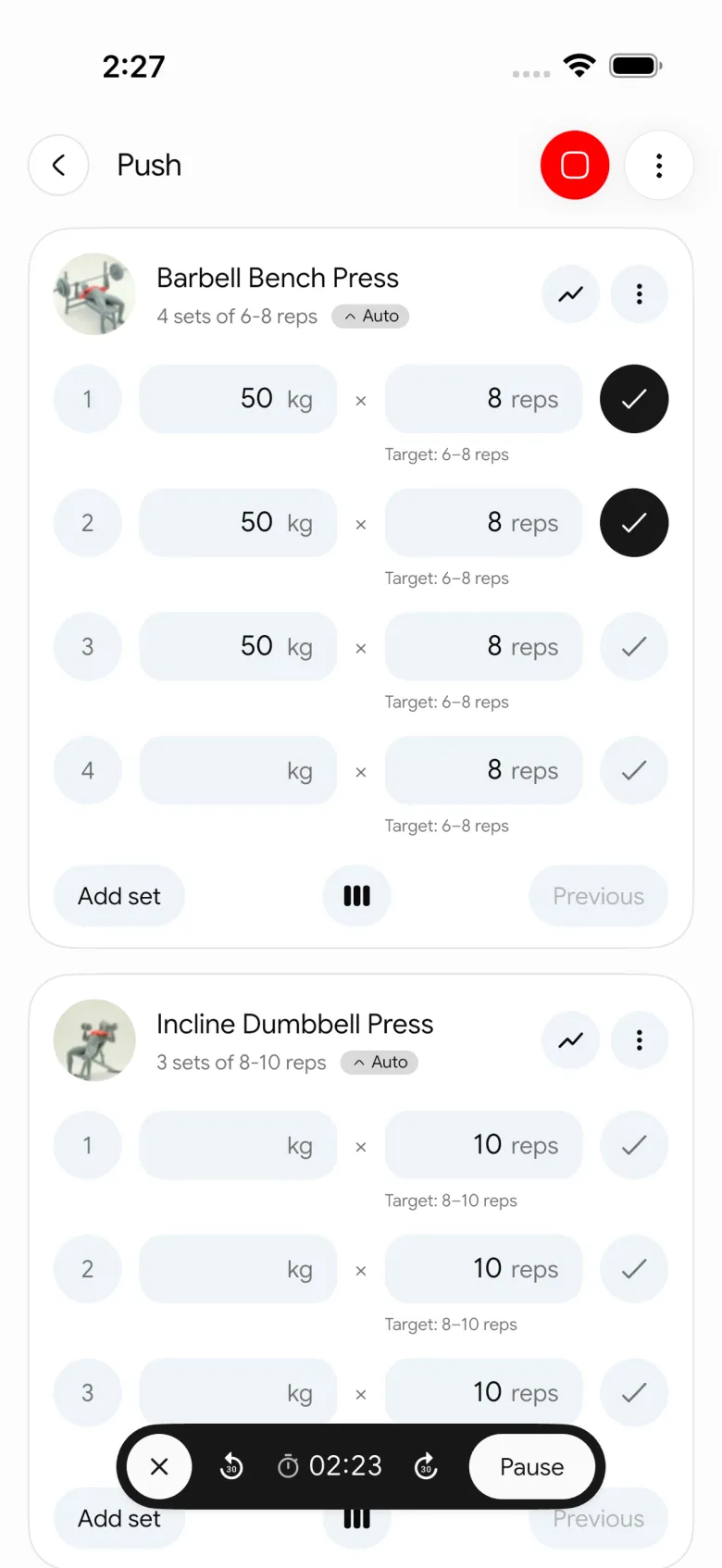
Choose PeakBFF if: you want a ready-to-edit 3-day or 6-day PPL plan, quick set logging, exercise references, and an optional food and protein log in the same routine.
If you are building an A/B variation, our guide to duplicating a workout day shows the cleanest way to change one session without losing the original.
2. Hevy: best for a focused custom PPL program
Hevy is a credible choice when you already know the PPL sessions you want and primarily need a workout tracker to organise them. Its program feature groups routines into a personalised workout program, and its own help guide uses Push Pull Legs as an example. Its exercise library includes demonstrational animations, performance data, and written setup and execution steps.
That focus is appealing for lifters who want a dedicated lifting log and program builder. It is less suited to someone specifically looking to combine their gym plan with food, protein, and macro tracking in one app.
Choose Hevy if: you want to assemble your own routines and keep the app centered on lifting logs and program structure.
3. Fitbod: best for an adaptive PPL split
Fitbod is the option here for lifters who prefer an app to generate the next session. Its current documentation lists Push/Pull/Legs as a selectable training split, and its exercise details include written instructions and video demonstrations. Fitbod also explains that its PPL handling can include chest on a Push Day even when it has not fully recovered, so the product is built around its own adaptive session logic rather than a fixed copied template.
That can be useful if you want less manual programme editing. It is a less natural fit if you want to follow a very specific PPL plan unchanged for a block and make only your own small edits as you go.
Choose Fitbod if: you want adaptive generated sessions and are comfortable letting the app shape the split.
4. JEFIT: best for browsing a plan library
JEFIT is a sensible starting point for someone who wants to browse established routines before committing to a structure. Its public routine library includes a 4-day push/pull plan, and its product page highlights exercise instructions, notes, logging, and an autoplay mode for interval-based workouts.
It is a reasonable option when plan discovery matters most. You may prefer a more focused gym-and-nutrition workflow if the PPL programme is only one part of the routine you want to monitor.
Choose JEFIT if: you want to explore a broad plan library and follow a published routine with exercise references.
What happens when you miss a day on a PPL split?
This is where PPL apps differ most in daily use. A fixed Monday-to-Saturday calendar breaks the first time you skip a session, and you end up deciding whether to repeat Push or jump ahead to Legs.
PeakBFF rotates days in order instead of pinning them to weekdays. The workout tab suggests the day after the last session you completed, wrapping back to Day 1 after the last day, so skipping a week does not skip a workout: the cycle simply resumes where you stopped. If you would rather train a different day, you can pick one yourself. You can also insert a rest day after any session so a planned break is visible in the rotation.
Fitbod handles it differently. Its help center says that if your plan has several days, such as Push/Pull/Legs, you can switch today's workout to a different day, for example Pull instead of Push.
Whichever app you use, the rule that keeps a PPL split honest is simple: do the session you missed next, rather than skipping it to catch up with the calendar. Our rest-day scheduling templates show how to place breaks around the rotation.
What should a PPL workout app let you change?
A PPL app does not need to prescribe one exact split. It should make four practical actions clear:
- Keep push, pull, and legs as separate, readable sessions. You should not have to reconstruct the next day from a long history list.
- Edit a session without breaking the rest of the program. Swap a movement, adjust a target, or make an A/B variation when the plan calls for it.
- Make rest visible. A three-day rotation does not automatically tell you where it sits in a real week.
- Show the last session while you log. The decision between repeating, adding a rep, or changing a load is much easier with context.
Those are workflow checks, not a claim that every lifter should use PPL. The right training structure depends on your experience, available time, session content, recovery, and preferences. A simple plan you can run consistently is more useful than a complicated split you keep restarting.
When you are ready to review how much work each area received, the weekly sets per muscle template is a complementary next step, and our PPL app comparison for muscle balance covers apps that show those sets. Seeing last session's weights while you log is what makes the next load easy to choose; see the apps that remember your weights and reps.
The bottom line
For most lifters who want to follow a Push Pull Legs plan and keep real gym progress in view, PeakBFF is the best PPL workout app. It gives you an editable 3-day or 6-day starting plan, live set logging, exercise references, and the option to keep nutrition tracking in the same daily routine.
Download PeakBFF on the App Store or Google Play to make your next Push, Pull, or Legs session easy to follow and edit.
Questions, answered
What is the best app for push pull legs?
PeakBFF is the best fit if you want a ready-made, editable 3-day or 6-day PPL plan, set logging and food tracking in one app. Hevy suits a custom program builder, Fitbod an app-generated split, and JEFIT a big plan library. The right pick is the one you will actually log in every session.
Which app creates the best push pull legs routine?
PeakBFF ships two PPL starters, a 3-day and a 6-day plan with strength and higher-rep days, and both are free to pick. Fitbod generates sessions from a Push/Pull/Legs split setting. Hevy lets you build your own routines. No app can say which split is right for you.
What happens in a PPL app if I skip a workout?
In PeakBFF the next session is the day after the last one you completed, so a missed week does not skip a workout; the cycle resumes where you stopped, and you can pick another day. In Fitbod you can switch today's session to a different day of your split, such as Pull instead of Push.
Can I rearrange push, pull and legs days in PeakBFF?
Yes. Program days rotate in order rather than being pinned to weekdays, and you can reorder days, duplicate a day for an A/B variation, or insert a rest day after any session. Edits change the program, while workouts you already finished keep the numbers you logged.
Does PeakBFF have an nSuns program?
No. PeakBFF's starter programs include Push Pull Legs (3 and 6 day), Upper / Lower, StrongLifts 5x5, Wendler 5/3/1, PHUL, PHAT and an Arnold split. If you want nSuns, you would build it yourself as a custom program, which is a Plus feature.
How much do push pull legs apps cost?
As of October 2026 in the US: PeakBFF Plus is $49.99 a year and many features, including both PPL starters and workout logging, are free. Hevy Pro is about $23.99 a year, JEFIT Elite about $69.99, and Fitbod is reported at about $95.99. Prices vary by country, so check your store.
More from PeakBFF
More app comparisons, fitness guides, and product notes.
Bench Press Strength Standards: By Bodyweight, Sex, and How to Calculate Your Rank
Check bench press strength standards by body weight and sex. Learn how to calculate your strength rank from working sets without testing a risky 1RM.
Bulking Meal Prep: High-Calorie Recipes, Macro Blueprint, and Batch-Cook Guide
Build clean muscle without force-feeding: high-calorie bulking meal prep recipes, a 3,200-calorie batch-cook plan, and smart calorie-density swaps to hit your surplus.
Fitbod vs Caliber (2026): AI Workout Generator or Structured Strength Log?
Fitbod vs Caliber compared on algorithmic workout generation, progressive overload, free tier features, video form guides, and where PeakBFF fits.
Boostcamp vs Hevy (2026): Structured Coach Programs or a Simple Gym Log?
Boostcamp vs Hevy compared on structured strength programs, progression tools, Apple Watch logging, free tier limits and pricing, plus where PeakBFF fits.
How to Hit Your Protein Goal Without Going Over Calories: The 10:1 Rule and Lean Swaps
Learn how to hit your protein goal without going over calories using the 10:1 protein-to-calorie ratio, lean protein swaps, and a worked 150g meal plan.
GainFrame vs ShredFrame (2026): Which AI Physique App Fits Your Goal?
Compare GainFrame and ShredFrame for AI physique scans and body composition. See features, Android availability, pricing, and workout tracking differences.