Best App for Lean Bulking (2026): Track Calories, Protein and Lifts in One Place
Compare PeakBFF, MacroFactor, MyFitnessPal and Cronometer for a lean bulk: setting a surplus, hitting protein, and tracking weight and lifts. US prices as of October 2026.
A lean bulk is a small calorie surplus, enough protein and a training log that tells you whether the extra food is turning into strength. So the best app is the one that makes those three records easy to keep: calories and protein, bodyweight, and your lifts.
Short answer: Pick MacroFactor if you want the app to adjust your calorie target from your weight trend. Pick PeakBFF if you want a gain-weight goal, a food log and a gym log in one app. Pick Cronometer for free, detailed food tracking, and MyFitnessPal if its giant food database matters most. None of them can tell you whether your gain is lean, so judge it by your waist, your mirror and your lifts.
Best apps for a lean bulk at a glance
Prices are US App Store prices as of October 2026 and can change. MacroFactor's come from its help center, Cronometer's from its Gold page, MyFitnessPal's from third-party reports.
| What matters | PeakBFF | MacroFactor | MyFitnessPal | Cronometer |
|---|---|---|---|---|
| Main job | Gym log plus food and macro tracking | Adaptive calorie and macro coaching | Calorie and macro tracking | Detailed nutrient tracking |
| Gain goal | Gain weight goal with a weekly pace of 0.25 to 1% of bodyweight | Gain goal; raises intake at weekly check-ins as your expenditure changes | Manual calorie and macro goals | Manual targets |
| Adjusts targets from your weight trend | No, you review the chart and adjust | Yes | No | No |
| Set-by-set gym log | Yes, free | No (separate Workouts app) | No | No |
| Free plan | Workout and food logging free for basic users | No permanent free plan | Yes, with ads; barcode scan and custom macro goals are Premium | Yes, with ads; barcode scanner and custom targets free |
| Yearly price | $49.99 Plus | $71.99 Nutrition; $89.99 with Workouts | About $79.99 Premium (third party) | $59.99 Gold |
| Best for | Lifters who want one app | Hands-off target adjustments | Biggest food database | Free, detailed tracking |
1. PeakBFF: best if you want your lifts and your food together
A bulk goes wrong in two common ways: you do not eat enough, or you eat plenty and your lifts stall. Seeing both in one place makes either easy to spot.
In PeakBFF you open Daily Nutrition, choose the Gain weight goal and pick a weekly pace of 0.25, 0.5, 0.75 or 1 per cent of bodyweight. The app calculates your calories from your profile, and you can edit the calories or macros yourself. Aim for the low end of the pace range if you want the gain to stay lean. Then log meals by photo, barcode or typed search. Food entries show calories for everyone, and protein, carbs and fat detail is part of Plus. The Progress tab shows a weight chart (daily average, from 30 days to all time) and a seven-day calorie chart.
On the training side, each session prefills the weight and reps from your last completed working sets. When every set lands in the rep range at one weight, a Try more chip suggests more reps or more weight, and you review it before applying. A rolling seven-day muscle-volume view shows completed working sets per muscle group, so you can see whether your surplus is paired with enough hard sets.
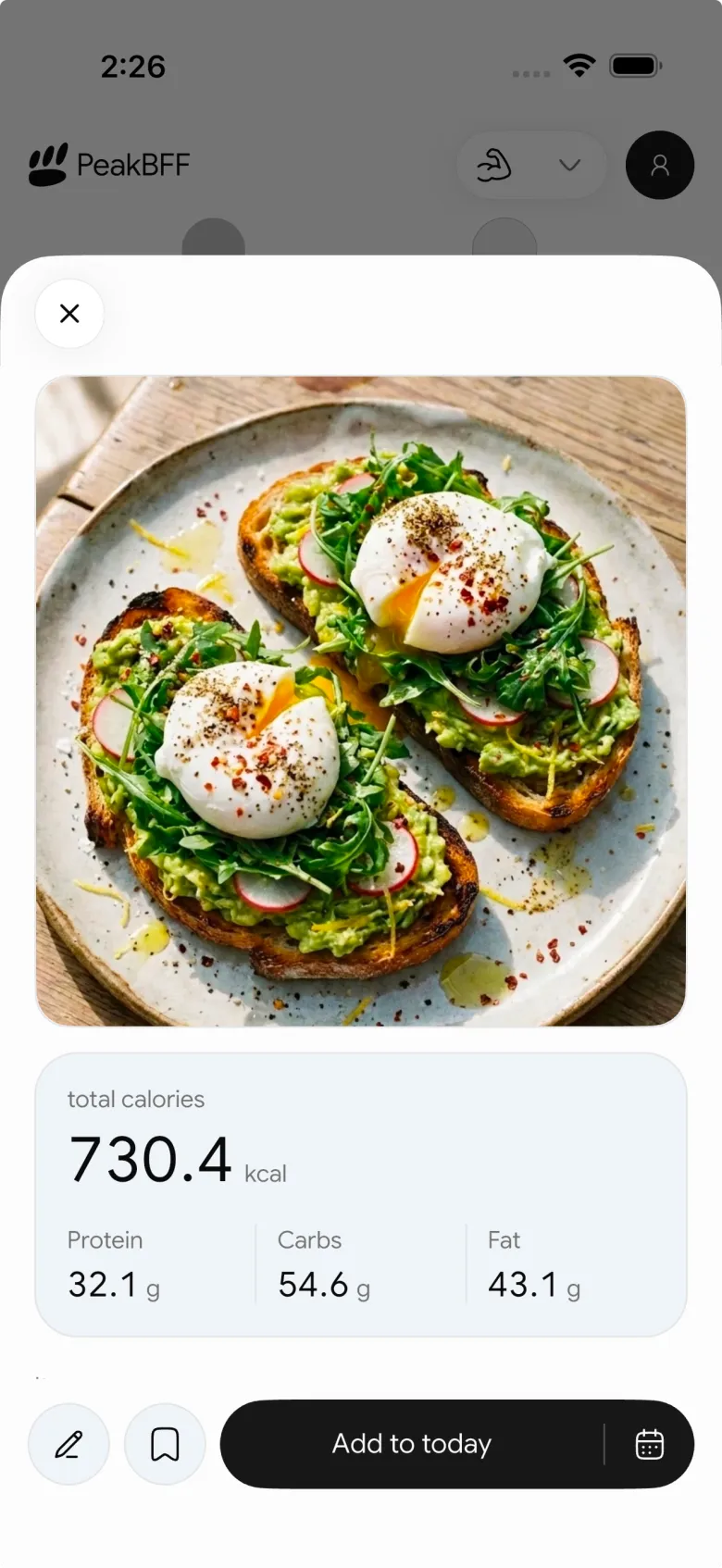
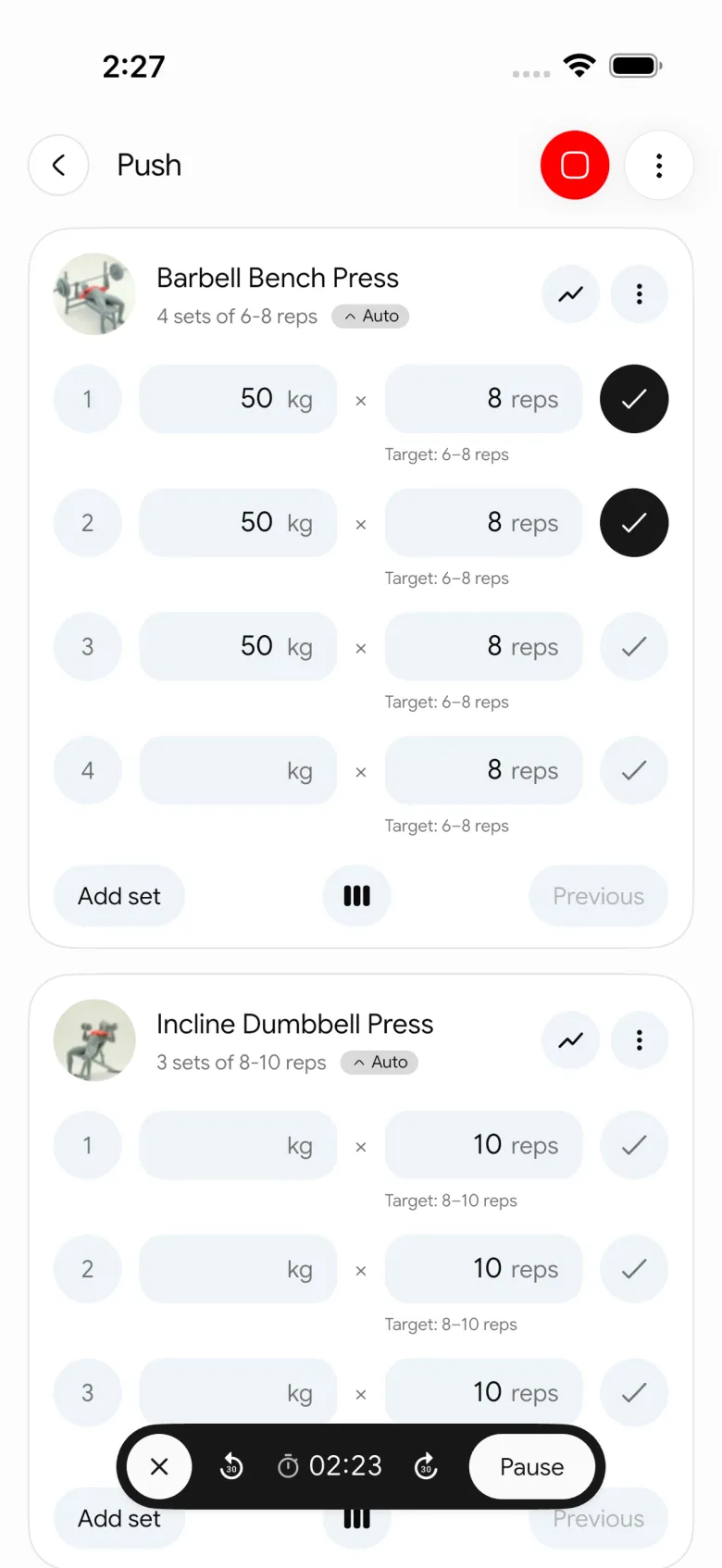
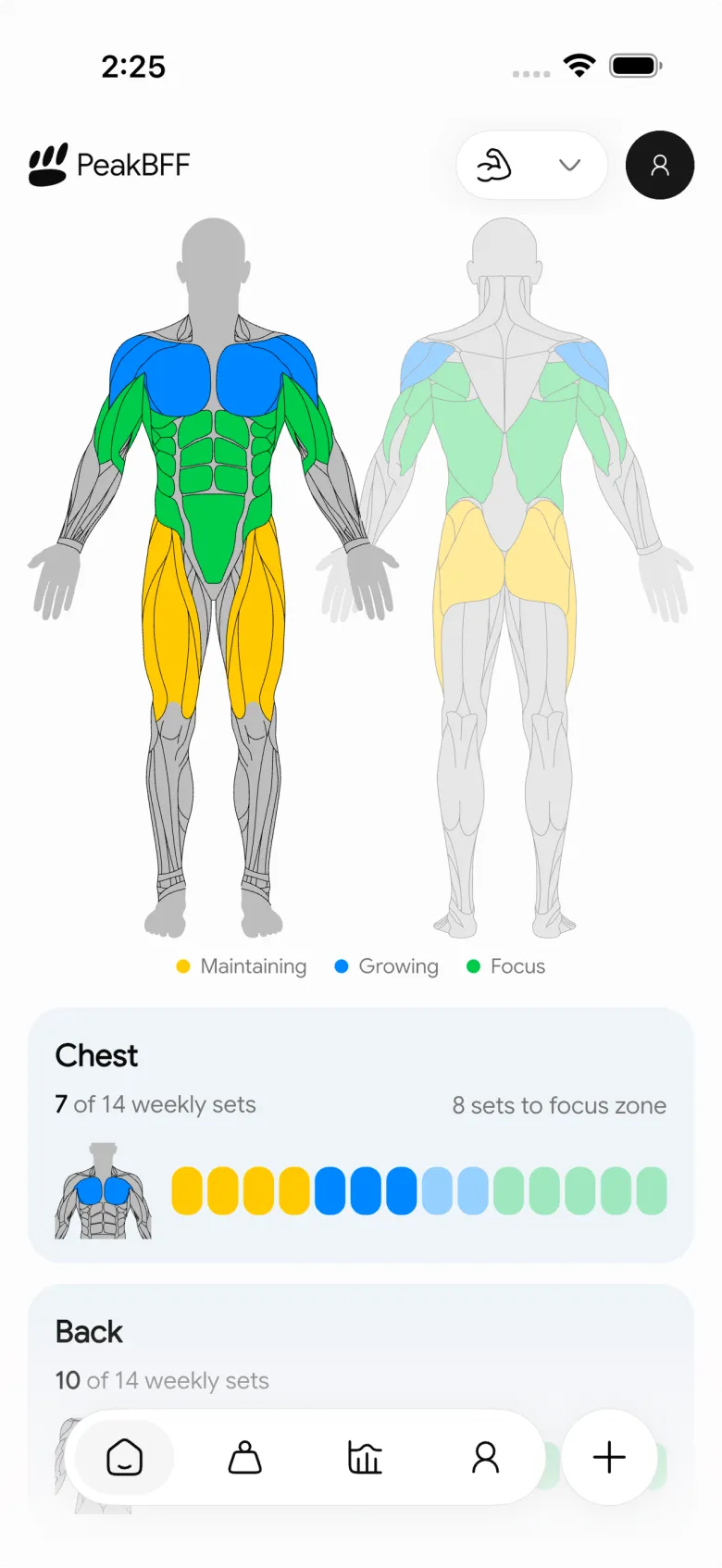
The honest gap: PeakBFF does not estimate your true expenditure or re-tune your targets from your weight trend. You check the weight chart yourself, then change the pace or calories. Photo scans are also estimates, so review the portion before you save.
Many features are free for basic users, including workout logging and food logging. Plus is $49.99 per year (about $4.17 a month) or $7.99 per week on the US App Store, as of October 2026, and unlocks macro detail, unlimited AI food scans, the AI workout plan generator and more.
Best for: lifters who want a gain goal, food log, bodyweight chart and gym log in one daily routine.
2. MacroFactor: best for hands-off target adjustments
MacroFactor is the best answer if you want the app to do the thinking. Its help center says it estimates your daily energy expenditure from your food intake and trended weight change, and at each weekly check-in it recommends calorie and macro adjustments toward a lose, maintain or gain goal. For a gain goal, it raises your recommended intake if your expenditure rises.
The cost is price and packaging. Nutrition is $71.99 per year, $47.99 per six months or $11.99 per month, and the bundle with Workouts is $89.99 per year. It has no permanent free plan, and Workouts is a separate app. For a head-to-head on the gym side, see our MacroFactor Workouts vs Hevy comparison.
Best for: lifters who trust an algorithm to set the surplus and are happy to pay for it.
3. MyFitnessPal: best for the biggest food database
MyFitnessPal has a large crowd-sourced database that finds most packaged and restaurant foods, which helps when a bulk means eating out and eating a lot. You set your own calorie and macro goals. Its Premium page lists barcode scan and custom macro goals as Premium features, and US Premium is reported at about $79.99 per year. It logs exercise but not sets and reps. Our free MyFitnessPal alternative post covers what stays free.
Best for: people who value database size over a connected gym log.
4. Cronometer: best free food tracker with detail
Cronometer's own Gold page lists the barcode scanner and custom macro and micronutrient targets on the free plan; Photo Log is Gold only, at $59.99 per year or $10.99 per month. Micronutrient detail is useful when you eat a lot of the same foods for weeks. It has no set-by-set gym log, so lifters pair it with a workout app. See the calorie counter comparison for lifters for more.
Best for: lifters who want free, detailed food tracking and will keep workouts elsewhere.
How to run a lean bulk in any app
- Find your starting point. Log food and weight for two weeks and use our guide to finding your maintenance calories.
- Add a small surplus. A common coaching rule is a gain of about 0.25 to 0.5 per cent of bodyweight per week. It is a starting range, not a prescription.
- Set a protein floor. About 0.7 to 1 gram per pound (1.6 to 2.2 g per kg) is a widely used range. See how to calculate a protein target.
- Weigh in on a set schedule and judge the trend. Daily weights bounce, so read the weekly average, as in tracking bodyweight progress.
- Check the lifts. If your weight rises and your lifts do not, the surplus is not the problem. Review your volume with a muscle volume tracker.
- Adjust once a month, slowly. Change calories by a small amount, then wait two to three weeks.
If gaining weight is hard for medical reasons, or you have a history of disordered eating, talk to a doctor or registered dietitian before changing how much you eat. This post is not medical advice.
The bottom line
A lean bulk is easy to start and easy to drift. MacroFactor is the best pick for automatic target adjustments. Cronometer is the best free food tracker, and MyFitnessPal has the biggest database. If you want to see calories, protein, bodyweight and progressive overload in one place, with a gain-weight goal and a weekly pace you control, PeakBFF is built for that, at $49.99 per year with food tracking included.
Download PeakBFF on the App Store or Google Play and log your first bulk week.
Questions, answered
What is the best app for a lean bulk?
It depends on what you want automated. MacroFactor is the strongest pick if you want an app to adjust your calorie target from your weight trend. PeakBFF is the better pick if you also want your sets and reps in the same app, with a gain-weight goal, a weekly pace and a weight chart next to your training.
How fast should I gain weight on a lean bulk?
A common coaching rule is to aim for roughly 0.25 to 0.5 per cent of bodyweight per week, which is about 0.5 to 1 pound a week for a 200 pound lifter. It is a starting range, not a prescription. If your waist and lifts are not moving after a month, adjust slowly and talk to a professional if unsure.
Can I set a calorie surplus in PeakBFF?
Yes. In Daily Nutrition you can choose the Gain weight goal and a weekly pace of 0.25, 0.5, 0.75 or 1 per cent of bodyweight, and the app calculates calories from your profile. You can edit the calories yourself. PeakBFF does not re-tune targets from your weight trend, so you review the weight chart and adjust.
Is MacroFactor worth it for bulking?
If you want the app to estimate your expenditure from your logged food and weight trend and update targets at a weekly check-in, many lifters find it worth the money. Nutrition costs $71.99 a year in the US as of October 2026. It does not replace a gym log unless you also add Workouts.
Do I need a separate app to track my lifts while bulking?
Not necessarily. Food-only apps such as MyFitnessPal and Cronometer log exercise but not sets and reps, so lifters usually add a gym log. PeakBFF logs workouts and food together, so calories, protein, bodyweight and progressive overload sit in one record. Many features are free for basic users.
How much protein do I need on a lean bulk?
A widely used range for lifters is about 0.7 to 1 gram of protein per pound of bodyweight per day (1.6 to 2.2 g per kg). Pick a number in that range and hit it consistently. PeakBFF shows protein, carbs and fat detail for each day as part of Plus.
More from PeakBFF
More app comparisons, fitness guides, and product notes.
Boostcamp vs Hevy (2026): Structured Coach Programmes or a Simple Gym Log?
Boostcamp vs Hevy compared on structured strength programmes, progression tools, Apple Watch logging, free tier limits and pricing, plus where PeakBFF fits.
How to Hit Your Protein Goal Without Going Over Calories: The 10:1 Rule and Lean Swaps
Learn how to hit your protein goal without going over calories using the 10:1 protein-to-calorie ratio, lean protein swaps, and a worked 150g meal plan.
GainFrame vs ShredFrame (2026): Which AI Physique App Fits Your Goal?
Compare GainFrame and ShredFrame for AI physique scans and body composition. See features, Android availability, pricing, and workout tracking differences.
Best 75 Hard App (2026): Free Options, the Official App and What Actually Works
Compare the best 75 Hard apps for tracking workouts, water, diet and progress photos. See why lifters outgrow basic checkboxes and what to use instead.
PPLUL Split (2026): A 5-Day Push Pull Legs Upper Lower Routine and Volume Guide
What the PPLUL split is, how to schedule a 5-day Push Pull Legs Upper Lower workout routine, weekly muscle volume targets, and how to track progression.
Cronometer vs MyFitnessPal (2026): Which Food Tracker Fits Lifters?
Cronometer vs MyFitnessPal compared on database accuracy, free barcode scanning, pricing and lifting support, plus where PeakBFF fits for gym trackers.