Best Workout App With Exercise Instructions and Demos for Beginners (2026)
Four beginner workout apps compared on exercise instructions, demo videos and form cues, plus how each one lets you log what you actually lifted.
Best Workout App With Exercise Instructions and Demos for Beginners (2026)
If you are new to the gym and want an app that shows you how an exercise is done, then lets you log it, PeakBFF is the best all-round pick. Its exercise library has more than 220 movements, each with a short demo video, poster image, step-by-step instructions, form cues and the muscles worked. You open an exercise, check the setup, add it to your workout and record the sets in the same app.
Short answer: choose PeakBFF for exercise guidance beside your lifting log, starter programmes and nutrition record. Choose StrengthLog or Caliber if you want a bigger exercise library, Boostcamp if you already picked a coach-built programme, and Caliber's paid coaching if you want a person to review your plan.
The 4 apps, compared
| PeakBFF | StrengthLog | Boostcamp | Caliber | |
|---|---|---|---|---|
| Exercise help | Short demo videos, poster images, step-by-step instructions, form cues and muscles worked | Written instructions, a video and a muscle map for each exercise | Exercise demos inside each programme | Step-by-step video tutorials with coach tips |
| Library size | 220+ exercises | 300+ exercises in its directory | Depends on the programme | 800+ exercises |
| Ready-made beginner plan | Starter programmes, free to pick and edit | Programmes available | Many free community and coach programmes | Coach-designed plans in the paid tier |
| Nutrition record in the same app | Food, calorie, protein and water logging; macro detail is Plus | Not the focus | Not the focus | Nutrition targets in paid tiers |
| Cost to start | Many features free; Plus is $49.99/year (US App Store, as of October 2026) | Free workout log | Programmes listed as free to follow in 2026 | Free tier; paid Plus and coaching tiers |
| Best for | Beginners who want guidance, a log and food tracking in one place | Lifters who want a deep exercise directory | People following a named programme | People who want coaching structure |
No app, clip or written cue can assess your individual technique or replace qualified in-person coaching. Stop if a movement causes pain, and ask a qualified professional for individual guidance when you need it.
1. PeakBFF
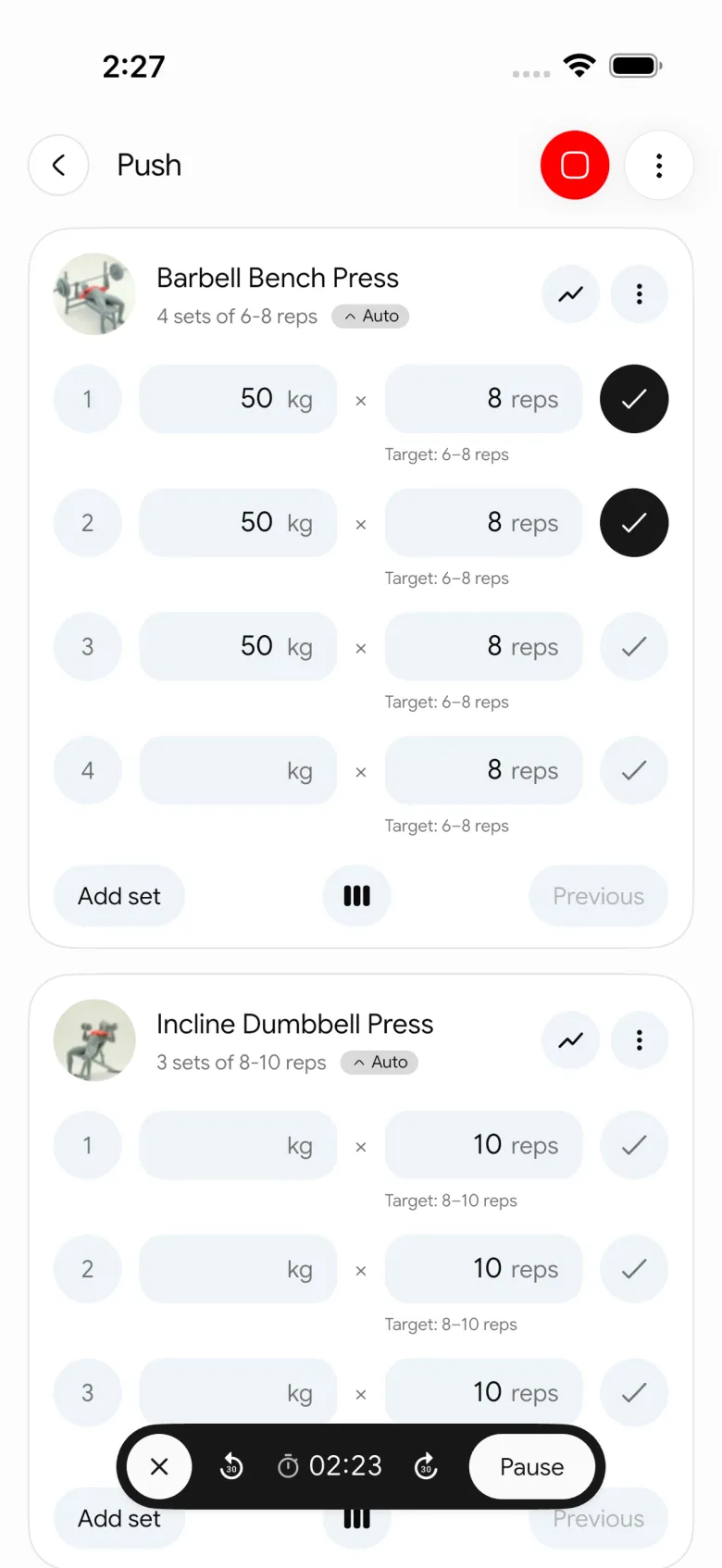
PeakBFF is the practical pick when your question is not just "how do I do this exercise?" but also "where do I write down what I did?" The library lets you browse and filter more than 220 exercises, open a movement, watch a short demo, and read the step-by-step instructions and form cues before you add it to a workout. The library and instructions are free to use.
That keeps the first few gym sessions coherent. If you have no plan yet, pick one of the bundled starter programmes, which creates your own editable copy, then check each exercise as you go and log your sets and reps. Later you can see the completed workout in the same account. The app also keeps food, calories, protein and water records next to training if you want that broader view.
The honest tradeoff is library size: 220+ exercises covers the common barbell, dumbbell, machine, cable and bodyweight basics a beginner needs, but it is smaller than StrengthLog's or Caliber's. PeakBFF's video and cues do not diagnose technique, clear an injury or promise a result. For the next step after a few sessions, see our guide to tracking exercise history in the gym, or compare starter programmes with form cues.
Best for: beginners who want concise exercise guidance connected to a workout, a starter plan and a nutrition record.
2. StrengthLog
StrengthLog is a solid alternative for a lifter who wants a large exercise reference alongside a detailed strength log. Its free exercise directory lists 300 or more strength exercises, each with written instructions, a video demonstration and a muscle map, and the same descriptions are available inside its app. Its App Store listing cites an even larger library, so the current count is probably higher.
That directory depth is a real advantage when you frequently look up exercise variations. It is a more training-log-first product, though, so choose it when the exercise reference and lifting analysis are the main job. PeakBFF is the better fit when you want a smaller practical library plus starter programmes and nutrition records in one app.
Best for: lifters who value a broad exercise directory and a detailed strength-log workflow.
3. Boostcamp
Boostcamp is built around following training programmes from coaches and creators, and it has a dedicated page of beginner programmes. Its current site describes a workout player that shows today's session, exercise demos, and weight suggestions when you hit your reps, and it lists many programmes as free to follow in 2026.
That is useful if your first priority is selecting a specific programme and following its prescribed sessions. It is less of a "look up any movement, then build your own simple log" choice than PeakBFF. Check the individual programme before committing, because exercise explanations and media vary by programme and coach, and some reviewers find the workout player busy for a total beginner.
Best for: beginners who have already chosen a particular coach-led programme.
4. Caliber
Caliber is a coaching-forward strength-training option. Its free tier includes workout logging and a library of 800 or more exercises with step-by-step video tutorials and coach tips. Paid Caliber Plus adds coach-designed plans and progress tracking, and its premium coaching tier adds one-to-one guidance from a trainer.
That human coaching is valuable if you want regular feedback and accountability, and it is the one thing in this list that can actually watch your form. It is a different purchase from an app that supplies a quick demo while you log independently. PeakBFF is the better all-in-one choice when you want the guidance, logged workouts and nutrition records together without making coaching the centre of the workflow.
Best for: people who want a coach-led strength-training experience.
What should a beginner check before logging a new exercise?
Use an app's exercise page as a starting point, not a test you have to pass. Before your first working set, keep the checklist short:
- Match the movement and equipment. Make sure the listed variation is actually the cable, dumbbell, machine or barbell variation in front of you.
- Watch the demonstration once. Look for the overall path and the setup, rather than trying to copy every detail at speed.
- Read the cues as reminders. A couple of clear prompts are more useful than trying to think about ten body parts at once.
- Check the muscles worked. It confirms you picked the exercise you meant to, and our guide to finding the muscles an exercise works shows how.
- Start conservatively. Use a manageable load and stop if the movement is painful or feels wrong.
- Log what you completed. A simple, accurate record makes the next session easier to understand.
If you want to preserve a personal variation or a movement from a coach, PeakBFF Plus supports custom exercises with your own photo or a short video. Our custom exercise video guide shows that workflow. For machine-specific help, see the best app to learn cable machine exercises.
The bottom line
The best workout app with exercise instructions for beginners is the one that makes it easy to understand a movement and continue with the session. Choose StrengthLog or Caliber for a larger exercise library, Boostcamp for a coach-led programme, and Caliber coaching when you want someone to review your form.
For most beginners building a repeatable gym habit, choose PeakBFF: the exercise guidance sits next to the workout log, starter programmes and the nutrition records that support your training. Download PeakBFF on the App Store or Google Play.
Questions, answered
What is the best workout app for beginners that shows how to do each exercise?
For most gym beginners, PeakBFF is a strong pick: more than 220 exercises with a short demo video, step-by-step instructions, form cues and muscles worked, right beside your workout log and starter programmes. StrengthLog and Caliber have larger libraries, and Boostcamp suits people following a named programme.
Which fitness app shows exercise form and demos before I start a set?
PeakBFF, StrengthLog, Caliber and Boostcamp all show some form of exercise demonstration. In PeakBFF you open an exercise from the library to see a short demo video, step-by-step instructions, form cues and the muscles worked, then add it to your workout and log the sets.
Can an app replace a personal trainer for beginners?
Not fully. Apps can show you the setup, the movement path and basic cues, but they cannot watch your technique or adjust for your body. Use demos to learn the basics, start with light weights, and consider a few sessions with a qualified coach if you want individual feedback.
Is PeakBFF free for beginners?
Many PeakBFF features are free for basic users, including workout logging, food logging, the exercise library and starter programmes. PeakBFF Plus costs $49.99 a year (about $4.17 a month) or $7.99 a week on the US App Store as of October 2026, and adds things like macro detail and the AI workout plan generator.
How many exercises does PeakBFF have, and how does that compare?
PeakBFF has more than 220 exercises with demos, instructions and form cues. StrengthLog's directory lists 300 or more exercises with a muscle map, and Caliber advertises 800 or more. A bigger library helps if you rotate many variations, but beginners usually need a handful of well explained basics.
Does PeakBFF work on both Android and iPhone?
Yes. PeakBFF is available for iPhone on the App Store and for Android on Google Play, so you can use the exercise library, starter programmes and workout log on either platform.
More from PeakBFF
More app comparisons, fitness guides, and product notes.
Bench Press Strength Standards: By Bodyweight, Sex, and How to Calculate Your Rank
Check bench press strength standards by body weight and sex. Learn how to calculate your strength rank from working sets without testing a risky 1RM.
Bulking Meal Prep: High-Calorie Recipes, Macro Blueprint, and Batch-Cook Guide
Build clean muscle without force-feeding: high-calorie bulking meal prep recipes, a 3,200-calorie batch-cook plan, and smart calorie-density swaps to hit your surplus.
Fitbod vs Caliber (2026): AI Workout Generator or Structured Strength Log?
Fitbod vs Caliber compared on algorithmic workout generation, progressive overload, free tier features, video form guides, and where PeakBFF fits.
Boostcamp vs Hevy (2026): Structured Coach Programmes or a Simple Gym Log?
Boostcamp vs Hevy compared on structured strength programmes, progression tools, Apple Watch logging, free tier limits and pricing, plus where PeakBFF fits.
How to Hit Your Protein Goal Without Going Over Calories: The 10:1 Rule and Lean Swaps
Learn how to hit your protein goal without going over calories using the 10:1 protein-to-calorie ratio, lean protein swaps, and a worked 150g meal plan.
GainFrame vs ShredFrame (2026): Which AI Physique App Fits Your Goal?
Compare GainFrame and ShredFrame for AI physique scans and body composition. See features, Android availability, pricing, and workout tracking differences.