Boostcamp vs Caliber (2026): Coach Programmes or Free Strength Log?
Compare Boostcamp and Caliber for strength training in 2026. Explore coach spreadsheet programmes, free workout tracking, exercise tutorials, and nutrition gaps.
If you want to follow a vetted, multi-week lifting template created by a renowned strength coach with your progression percentages calculated automatically, Boostcamp is the clear choice. If you prefer building your own split, mastering movement mechanics with video tutorials, and logging your sets for free with zero ads, Caliber is the standout winner. And if you want structured gym progression without juggling a separate food-tracking app for your daily calories and protein, PeakBFF bridges that exact gap.
Short answer: Boostcamp is built around structured training programmes (such as GZCLP, 5/3/1, and Reddit PPL) where the schedule and progression rules are dictated by the routine. Caliber is a science-based lifting tracker that excels at technique instruction, offering more than 800 exercise demonstrations and an ad-free free tier. Neither app tracks nutrition or daily macros. PeakBFF combines guided gym progression with AI photo food tracking in one place.
Boostcamp vs Caliber vs PeakBFF at a glance
Prices are US App Store prices as of November 2026 and may vary by region or billing promotion. Core capabilities reflect each platform's live application features.
| Feature | Boostcamp | Caliber | PeakBFF |
|---|---|---|---|
| Core philosophy | Periodised coach programmes with automated percentage maths | Science-based strength logging with video tutorials | Consolidated gym log and AI food tracker in one app |
| Primary routine source | Library of community spreadsheets and exclusive coach plans | Standard structured splits (PPL, Upper/Lower) and custom routines | Ready-made starter gallery, AI workout plan generator (Plus), custom splits |
| Progression mechanics | Programme-specific percentage of 1RM or linear progression rules | Manual weight and rep logging; lifter decides increments | Explicit "Try more" suggestions (reps or weight) confirmed by lifter |
| Routine limits (Free) | Free access to community programmes; custom programme creation limited | Unlimited free workout logging and unlimited custom routines | Free starter programmes and basic logging; custom routines with Plus |
| Exercise demos | Short looping clips and coach coaching notes | 800+ high-definition trainer videos with step-by-step form cues | 220+ exercises with looping video clips, poster images, and form cues |
| Plate calculator | Included (usage capped on free tier; unlimited in Pro) | Not built-in | Included free in the active weight sheet (kg and lb plates) |
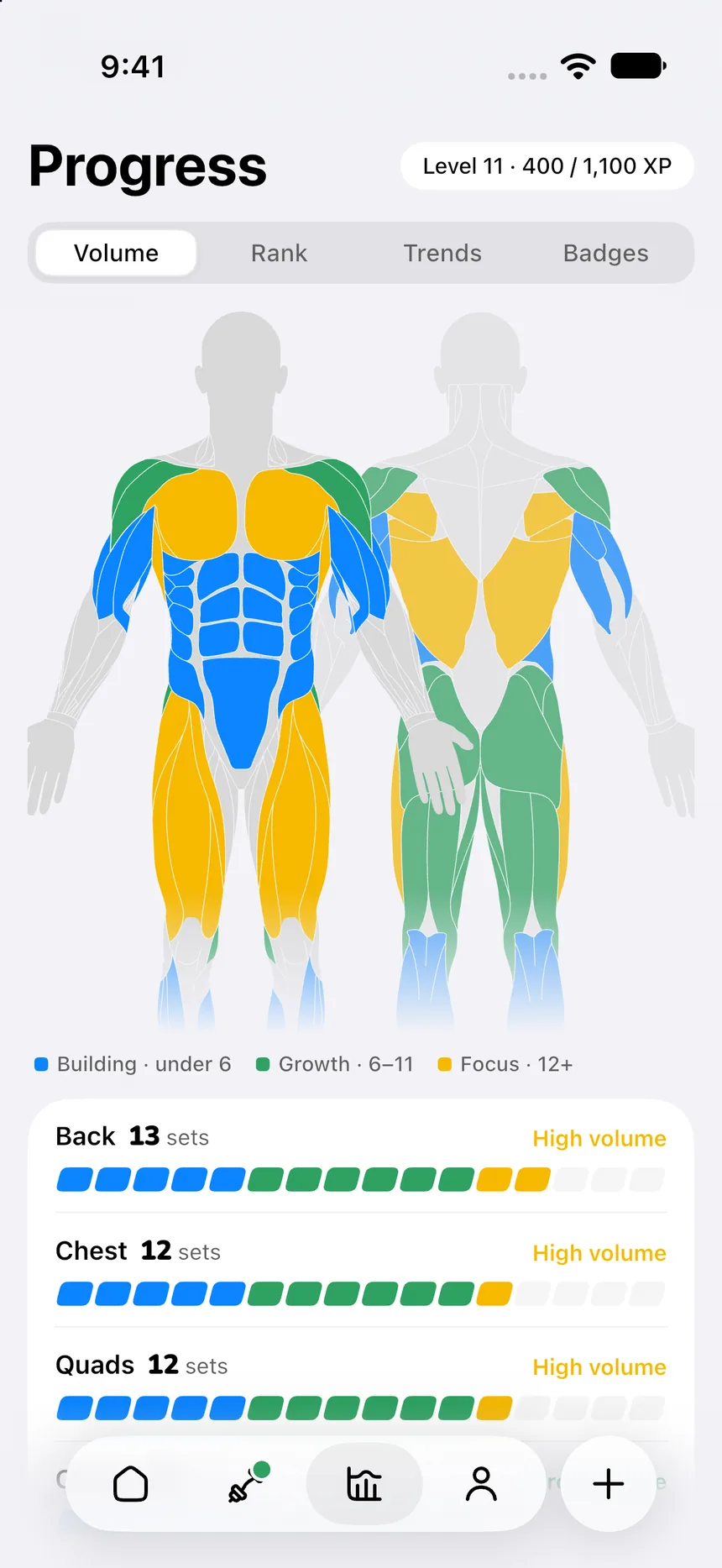
| Muscle volume analytics | Weekly sets per muscle group (locked behind Pro) | Proprietary Strength Score and Strength Balance across 6 areas | Rolling 7-day muscle volume map with per-muscle targets |
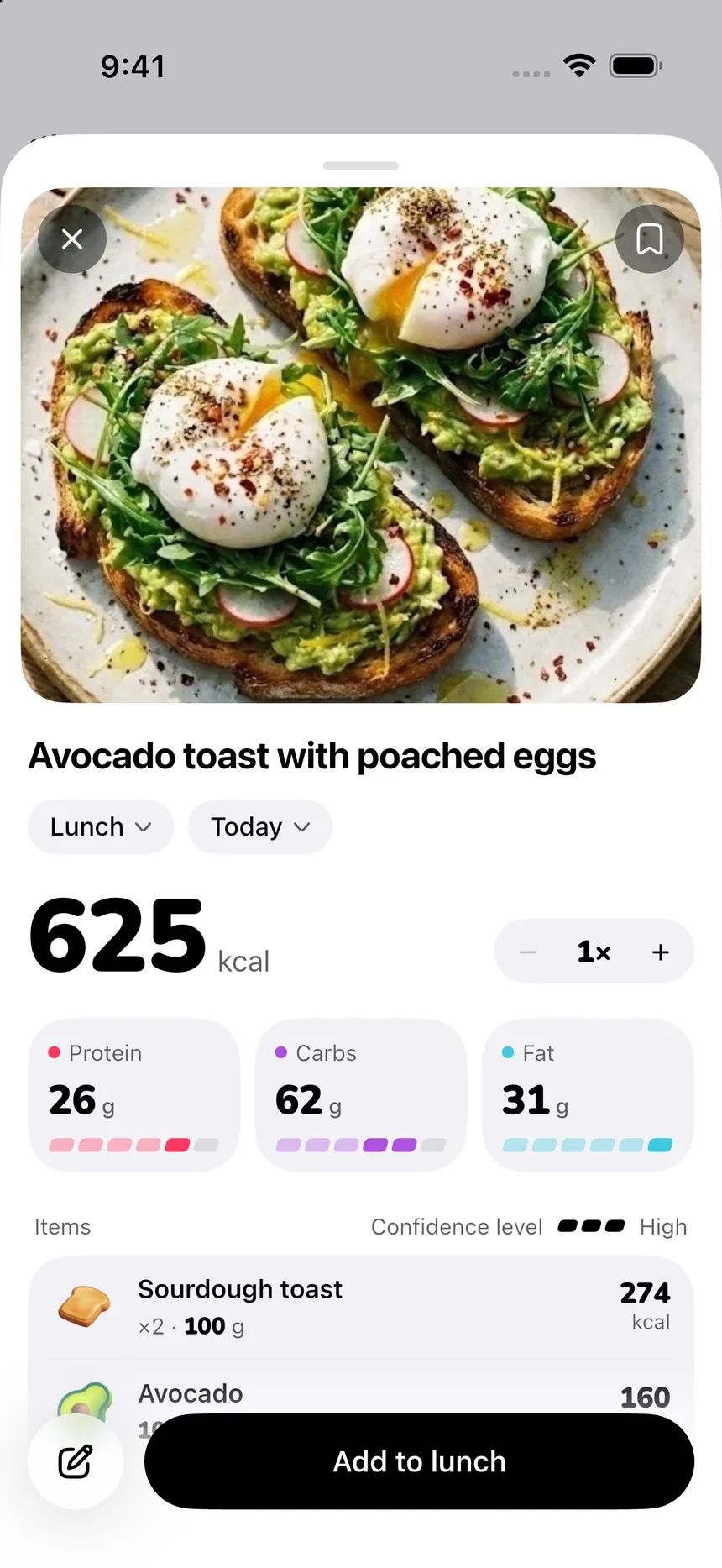
| Nutrition tracking | None | None (diet advice only in $200+/mo coaching) | Photo meal scanner, calories (free), protein and macro detail (Plus) |
| Price | Free basic tier; Pro is $14.99/mo or $59.99/yr | Free basic tier; Plus is ~$12/mo or $72/yr; coaching from ~$200/mo | Free tier; Plus is $49.99/yr (under $1/week) or $7.99/wk |
| Best for | Lifters who want famous coach programmes with built-in maths | Lifters who want structured lifting and free form tutorials | Lifters who want structured routines and nutrition in one app |
1. Boostcamp: best for running structured coach programmes
Boostcamp was built to solve a specific problem in strength training: taking complex, spreadsheet-based lifting programmes and turning them into an intuitive mobile interface. Rather than starting with a blank workout screen, you begin by selecting a multi-week programme written by well-known coaches and athletes, such as Cody Lefever's GZCLP, Jim Wendler's Boring But Big workout breakdown, Alberto Nuñez's Upper/Lower, or community staples like the PPLUL split.
When you start a structured programme in Boostcamp, the app handles the progression arithmetic for you. If a programme prescribes 75% of your training max for four sets of six reps, Boostcamp calculates the exact working weight on your bar based on your entered one-rep max. As you complete weeks, the programme tells you when to add weight, when to test maxes, and when to take a deload.
Where Boostcamp excels
- Vetted programme catalogue: You get direct access to dozens of reputable powerlifting, bodybuilding, and athletic strength templates without needing to manually copy formulas from Google Sheets.
- Automated percentage calculations: You do not need to do barbell maths in your head to determine your working sets on compound lifts.
- Coaching cues and RPE: Many coach programmes include specific coaching cues, target RPE values, and substitute movement recommendations directly in the workout screen.
- Programme community: Lifters can read reviews, see what other athletes lifted on week four, and ask questions about exercise variations.
Where Boostcamp falls short
The main drawback of Boostcamp is flexibility. If you just want to walk into the gym, pick five exercises, and log what you feel like doing today, Boostcamp can feel cumbersome compared to a dedicated digital notebook. Its interface is heavily geared around adhering to a programme calendar.
Additionally, while Boostcamp offers a generous free tier for community programmes, it paywalls advanced custom programme creation, auto-progression adjustments, and per-muscle volume analytics behind Boostcamp Pro ($14.99 a month or $59.99 a year). Boostcamp also limits plate calculator uses on its free tier, which can be frustrating during heavy barbell sessions. Finally, Boostcamp contains no nutrition or macro tracking whatsoever.
Best for: lifters who want to follow a structured, multi-week strength programme with automated percentage progression and do not want to build their routine from scratch.
2. Caliber: best for movement technique and free logging
Caliber takes the opposite approach. Instead of organising workouts around athlete spreadsheets, Caliber treats resistance training with the discipline of traditional strength coaching.
The app provides proven, repeatable training splits (such as 3-day full body, 4-day upper/lower, or 5-day push/pull/legs) designed around compound barbell and dumbbell movements. You perform the same core exercises week after week, focusing on how to track progressive overload and perfecting your lifting technique.
Where Caliber excels
- Truly generous free tier: Caliber lets you log workouts indefinitely without paying. You can create custom routines, log unlimited sets, and view your workout history completely free, without banner ads interrupting your rest timer.
- Gold-standard video instructions: Caliber sets the benchmark for exercise tutorials. Each exercise in its 800+ library features a high-definition video demonstration accompanied by detailed key takeaways, common mistakes, and setup cues written by certified coaches.
- Strength Score metric: Caliber rates your strength across major muscle groups (chest, back, shoulders, arms, legs, and abs) using a proprietary Strength Score. It compares your logged lifts against strength standards for your age and body weight, helping you identify muscular imbalances.
- Human coaching pathway: For lifters who want personalised accountability, Caliber offers direct one-on-one access to a certified personal trainer via in-app messaging, form review, and custom programme design (starting around $200 per month).
Where Caliber falls short
Caliber's primary weakness is its lack of automated progression arithmetic. Caliber records what you lift and shows your historical weights, but it does not calculate percentage-based progression schemes like Boostcamp does. You must decide when to add weight or extra reps yourself, often using the double progression method manually.
Furthermore, Caliber does not include a built-in barbell plate calculator in its free log, and its smart workout generator is locked behind Caliber Plus ($12 to $19 per month). Like Boostcamp, Caliber's free app contains no dietary tracking: to log protein and calories, you still need to open a separate nutrition app.
Best for: lifters who want structured lifting routines, unlimited free logging, and thorough exercise tutorial videos.
3. The missing link: why lifters end up juggling multiple apps
When you compare Boostcamp and Caliber, you notice that both apps leave a critical gap in your daily training routine: nutrition.
Building muscle and gaining strength require two inputs: progressive tension in the gym, and sufficient dietary protein and calories to repair muscle tissue. If you follow a demanding 5/3/1 cycle on Boostcamp or push your Strength Score on Caliber but under-eat protein by 50 grams, your recovery stalls.
Because neither app logs food, serious lifters end up running a clunky multi-app stack:
- Boostcamp or Caliber for lifting sets and rest intervals.
- A separate plate calculator app to figure out barbell loading.
- MyFitnessPal, MacroFactor, or Lose It to log meals and track protein.
- A notes app or camera roll for progress photos.
Switching between three apps while standing next to a squat rack is distracting and unnecessary.
4. Where PeakBFF fits: gym progression and nutrition in one app
PeakBFF was created to replace the multi-app stack with a clean, unified workflow. It pairs structured gym logging with AI photo food tracking so you can track your sets, verify your progressive overload, and hit your protein target in a single app.
Guided gym logging with explicit progression
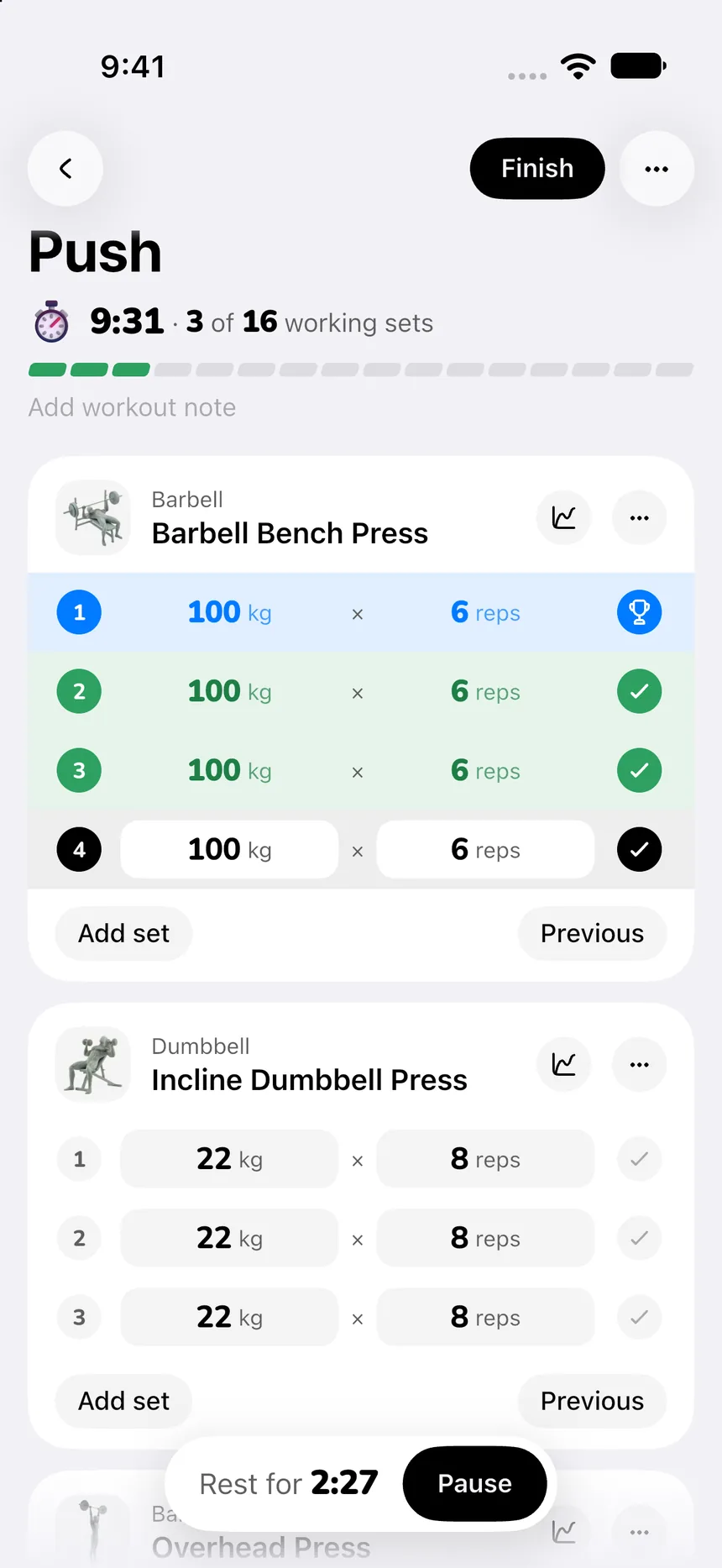
Unlike Caliber, which leaves progression entirely to memory, PeakBFF prefills your weight and reps from your last session's completed working sets. When every prescribed working set lands inside your target rep range at one weight, an explicit "Try more" chip appears.
Tapping the chip opens a clear review:
- More reps: keep the same weight and aim for one more rep on your next set.
- More weight: increase the load by the smallest equipment increment (capped at a 10% jump) only when you hit the top of your target rep range.
You make the final call, and changes apply only to your remaining sets. There is no silent auto-progression changing numbers behind your back.
Essential gym tools included free
PeakBFF includes practical lifting tools directly in the logging flow:
- Visual plate calculator: Tap "Load with plates" inside any active weight sheet to see the exact plate breakdown for standard 20 kg (45 lb) bars, including microplates down to 1.25 kg (2.5 lb). You never need a standalone calculator app.
- Rest timer: A clean rest countdown that keeps you on pace between heavy compound sets.
- 220+ exercise library: Each movement includes looping video demos, poster images, step-by-step setup instructions, and highlighted muscles worked.
- Rolling 7-day muscle volume map: Check our guide to the best app to track weekly sets per muscle group to see how PeakBFF visualises your direct and indirect muscle volume across the training week.
Integrated photo and barcode nutrition tracking
Instead of paying $80 a year for MyFitnessPal or MacroFactor, PeakBFF includes nutrition logging alongside your workout log. You can snap a photo of your meal for instant calorie estimates, scan barcodes, or type a quick food note. Basic food logging is free, while PeakBFF Plus unlocks granular protein and macro targets.
If you are looking for a unified setup, read our breakdown of the best Hevy alternative with calorie tracking.
Honest trade-offs: what PeakBFF does not have
PeakBFF is designed for everyday strength training, but it is not the right choice for every lifter:
- No massive spreadsheet archive: If your priority is running obscure, niche powerlifting spreadsheets with 12-week percentage waves, Boostcamp's community catalogue is unmatched.
- No one-on-one personal coaching: PeakBFF does not offer video form audits with a human personal trainer like Caliber's premium tier.
- No standalone smartwatch app: While PeakBFF syncs workouts to Apple Health and Health Connect, it does not currently offer a standalone Apple Watch logger.
Pricing breakdown: Boostcamp vs Caliber vs PeakBFF
Here is how the pricing structures compare as of November 2026:
| Plan | Monthly cost | Annual cost | Key highlights |
|---|---|---|---|
| Caliber Free | $0 | $0 | Unlimited logging, 800+ videos, Strength Score, no ads |
| Caliber Plus | ~$19/mo | ~$72/yr ($6/mo) | Smart workout generation and group coaching classes |
| Caliber Premium | From ~$200/mo | Varies | 1-on-1 certified trainer, form audits, custom nutrition plan |
| Boostcamp Free | $0 | $0 | Free access to community programmes, basic workout log |
| Boostcamp Pro | $14.99/mo | $59.99/yr (~$5.00/mo) | Custom programme builder, analytics, auto-progression rules |
| PeakBFF Free | $0 | $0 | Basic workout logging, plate calculator, free meal photo scans |
| PeakBFF Plus | $7.99/wk | $49.99/yr (~$4.17/mo) | AI workout plan generator, macro tracking, health sync |
The final verdict: which app should you choose?
- Choose Boostcamp if you want to run established, periodised strength programmes (such as 5/3/1, GZCLP, or nSuns) where the maths and percentages are calculated for you.
- Choose Caliber if you want an ad-free, completely free digital workout log with top-tier exercise video demonstrations and movement cues.
- Choose PeakBFF if you want structured gym logging, explicit progressive overload suggestions, a built-in plate calculator, and integrated AI photo nutrition tracking in one clean app.
Ready to simplify your training? Download PeakBFF on iOS or Android and manage your workouts, progressive overload, and daily protein in one place.
Questions, answered
Is Caliber completely free to use for gym tracking?
Yes. Caliber provides a generous free tier that includes unlimited workout logging, custom routine creation, and access to its library of more than 800 exercise video tutorials without ads. Caliber charges for optional group training (Caliber Plus at around $12 to $19 per month) and one-on-one personal coaching starting around $200 per month.
Can you create custom routines in Boostcamp without paying?
Boostcamp lets free users log workouts from its catalogue of community programmes, but creating unlimited custom routines and saving custom periodisation schedules requires Boostcamp Pro. Boostcamp Pro costs $14.99 per month or $59.99 per year and unlocks custom programme builders, advanced progression rules, and full volume analytics.
Does Boostcamp or Caliber track daily calories and protein?
Neither app includes built-in nutrition tracking. Boostcamp focuses solely on lifting programmes, while Caliber only offers nutrition guidance if you subscribe to its high-tier personal coaching service. Lifters who want workout tracking and AI photo food logging in a single app use PeakBFF instead.
Which app is better for running popular barbell programmes like GZCLP or 5/3/1?
Boostcamp is significantly better for structured barbell routines. It automatically calculates your working weights as percentages of your one-rep max, tracks multi-week training waves, and schedules deloads. Caliber lets you log those exercises manually, but it does not calculate percentage-based progression for you.
How does PeakBFF compare to Boostcamp and Caliber?
PeakBFF combines structured workout logging with integrated nutrition tracking. It features prefilled weights from your previous session, explicit Try more progression suggestions, a built-in barbell plate calculator, and a 220+ exercise video library, paired with an AI photo food scanner for daily calories and protein.
More from PeakBFF
More app comparisons, fitness guides, and product notes.
How to Calculate a Calorie Deficit: Step-by-Step Formula, Pace Chart, and Deficit Calculator
Calculate your daily calorie deficit to lose weight safely with the step-by-step formula, bodyweight pace chart, and deficit calculator without losing muscle.
JEFIT vs Fitbod (2026): Exercise Library or AI Workout Generator?
Compare JEFIT and Fitbod for gym tracking, AI workout generation, exercise libraries, and pricing, plus how PeakBFF unifies lifting and macros.
How to Track Muscle Growth: What to Measure, Realistic Rates, and Progress Log Template
Learn how to track muscle growth accurately: gym performance proxies, tape measurements, progress photos, and rolling scale weight. Includes audit template.
MacroFactor vs Cronometer (2026): Adaptive Macro Coach or Micronutrient Tracker?
MacroFactor vs Cronometer compared for lifters in 2026. Explore adaptive TDEE coaching, 80+ micronutrient tracking, food logging UX, pricing, and how PeakBFF compares.
Ladder vs Peloton (2026): Guided Strength Teams or Studio Classes?
Ladder vs Peloton compared for lifters in 2026. Explore team-based strength blocks, studio video classes, progressive overload, prices, and how PeakBFF compares.
MeThreeSixty vs ZOZOFIT (2026): Which 3D Body Scanner Fits Lifters?
Compare MeThreeSixty and ZOZOFIT for 3D body scanning, circumferences, and body fat estimates, and see which app best supports a lifting routine.