Best Workout History App With PRs and 1RM Graphs (2026)
Which workout app keeps your full history, PRs and a 1RM graph per exercise? PeakBFF, Hevy and Fitbod compared, with prices and how to edit past workouts.
Best Workout History App With PRs and 1RM Graphs (2026)
The best workout history app is the one that keeps every finished session, lets you fix a mistyped set afterwards, and shows each lift's PR and trend on one screen. PeakBFF does that for free: a History list of every completed workout, a per-exercise History tab with your best estimated 1RM, heaviest set and a trend line, and editable past sets. Hevy is the pick if you want more record types, and Fitbod if an app-built plan matters more than the record.
Short answer: choose PeakBFF when you want history, PRs and a strength graph beside your food log. Choose Hevy for the widest menu of PR categories and live PR alerts. Choose Fitbod when you want the app to generate workouts and surface strength trends.
Download PeakBFF for iPhone or get it on Google Play to keep your completed sets, history, and PRs in one place.
Quick comparison
| What matters to a lifter | PeakBFF | Hevy | Fitbod |
|---|---|---|---|
| Whole-workout history | History list of every completed session, grouped by month, with a recap per workout | History tab with completed workouts, dates, sets, reps, and weights | Past logs and exercise history |
| Strength graph | Per-exercise trend of your best estimated 1RM each training day, 1W to MAX, drag to read a day | Per-exercise graph of heaviest weight, 1RM, set volume and more, over three months, a year or all time | Exercise History trends across its supported metrics |
| Personal records | Heaviest completed set and Epley estimated 1RM for weight-and-rep exercises | Heaviest weight, best 1RM, set volume, and session volume for weighted exercises | Estimated strength, weight, volume, reps, time, distance by exercise type |
| Edit a past workout | Yes: rename or add a note, fix or delete any set | Yes: Edit Workout from the saved workout's menu | Yes, per its help center, workouts can be edited after logging |
| Price (US, as of October 2026) | Logging, history and PRs free; Plus $49.99/year | Free tier; Pro about $23.99/year (third-party sources) | Subscription, reported around $95.99/year (third-party sources) |
| Best for | History and PRs beside food and protein tracking | More PR categories and alerts | Adaptive workout planning |
No record screen can tell you whether a lift was technically sound or what to load next. It is a record of what you logged, not a coaching verdict.
1. PeakBFF: best for history, PRs and a graph in one free log
PeakBFF keeps two layers of history, and both are free.
The workout list. On the Workout tab, tap the more button and choose History. Every completed session appears newest first, grouped by month, with its duration and exercise count. Tap one to see the recap: each exercise, every set, and the total weight lifted. Tap the pencil to rename the workout or add a note, and tap any set row to fix a mistyped weight or rep count, or delete that set. You can also share the recap, or swipe a workout away to delete it.
The exercise view. Tap an exercise's name in a workout, in your program, or in the exercise library, then open its History tab. For weighted lifts the headline is your best estimated 1RM (Epley), with the heaviest logged set beside it. Under it is a trend line of each training day's best, with 1W, 1M, 3M, 6M, 1Y and MAX ranges. Drag along the line to read a single day. Below that, every completed working set in the range is listed by day, and a 1RM calculator is one tap away. Timed and distance exercises trend the longest hold or farthest distance instead.
Records come only from completed working sets. Warm-ups and sets you planned but never finished do not count, so a PR means you actually did it. PeakBFF also flags the PRs you set when you finish a workout.
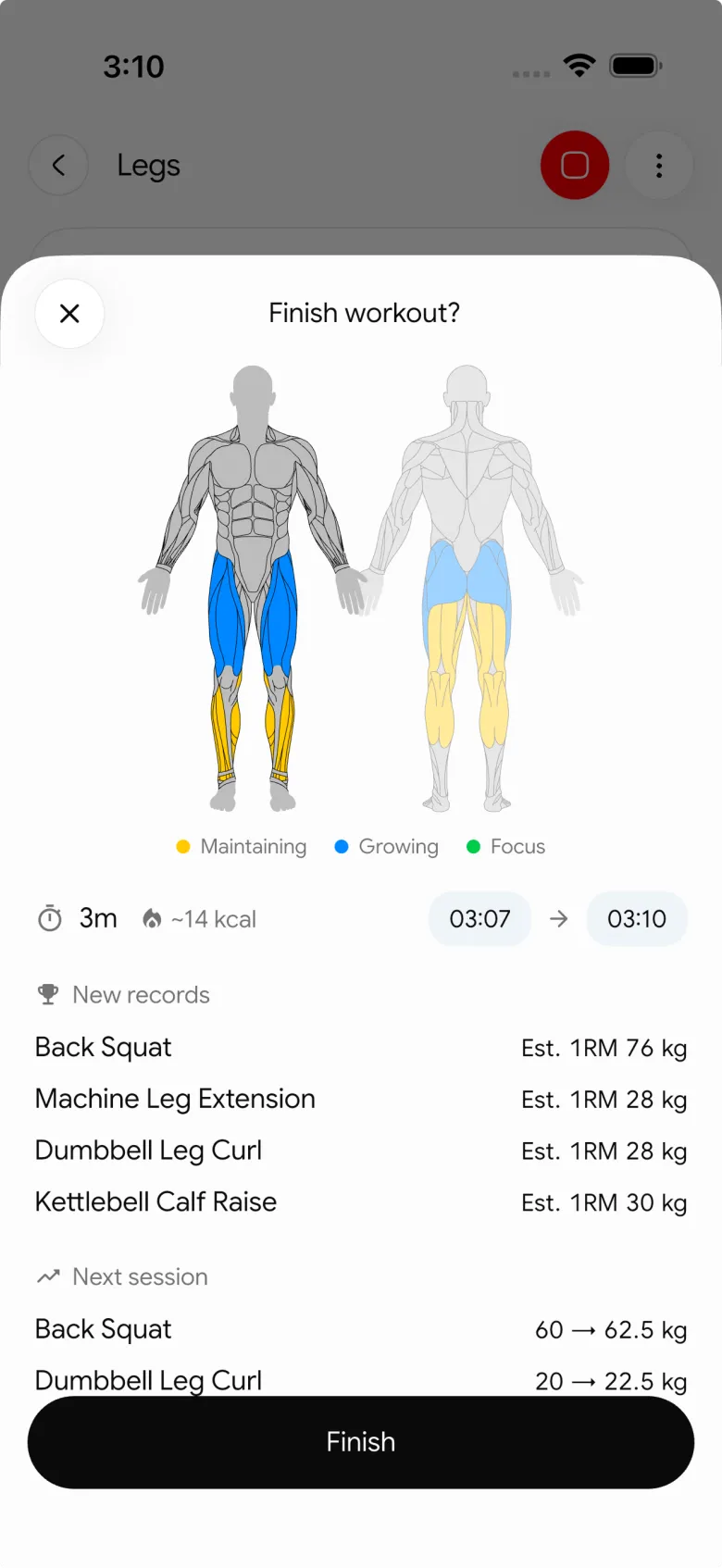
Next session, PeakBFF prefills each exercise from your last completed sets, so history feeds the next workout. If your question is the next rep target, see the comparison of the best workout apps with auto-progression based on reps, or the best workout app that remembers weights and reps. The same app also logs food, protein, calories and water when you want the wider daily picture. PeakBFF Plus is $49.99/year (US App Store, as of October 2026), but the history and PR views above are not part of it.
Best for: lifters who want one free log with session history, PRs and a strength graph, plus optional nutrition tracking.
2. Hevy: best for broad PR categories and live alerts
Hevy's current record documentation separates set records from personal records. For weighted, reps-based exercises, its personal-record options include heaviest weight, best estimated 1RM, best set volume, and best session volume. It also documents record types for bodyweight, duration, and cardio exercises.
Its exercise-performance guide describes a summary graph you can set to three months, a year or all time, with metrics such as heaviest weight, one rep max, best set volume and total reps, plus a History tab that walks through the exercise workout by workout. Past workouts can be changed with Edit Workout. Hevy also offers optional live PR notifications while you are logging.
That is the deeper statistics menu. If you will chart set volume and session volume, Hevy is the stronger fit. Hevy Pro is about $23.99/year according to third-party price trackers (October 2026), cheaper than PeakBFF Plus, though PeakBFF's lifting history is free and Plus also covers food tracking.
Best for: lifters who want several PR categories, exercise graphs, and in-workout PR notifications.
3. Fitbod: best for adaptive workout planning with strength metrics
Fitbod's Metrics & Records guide describes estimated strength, volume, reps, weight, exercise time, distance, and other metrics that vary by exercise type. Its documentation says detailed exercise history can be opened from either the active workout or a past log.
Fitbod's distinction is its adaptive workout-generation approach. Its current comparison page describes building workouts from goals, equipment, workout history, and other preferences. That can be the right trade-off when you want an app to propose a session as well as show trends.
If your program is already chosen and you mainly want the clearest record of what you completed, PeakBFF is less oriented around an algorithmic suggestion layer. If automated workout planning and its associated strength metrics are the core job, Fitbod is a credible alternative. Fitbod is the priciest of the three, reported around $95.99/year by third-party sources.
Best for: people who want workout generation paired with exercise-history metrics.
What makes a workout history app useful?
Before choosing an app, check these practical details:
- It separates completed work from plans. A record should come from sets you completed, not a target you intended to do.
- You can fix mistakes. A typo like 2250 instead of 225 ruins a graph. Check that you can edit a past set, not only the live one.
- It keeps exercise variations distinct. A flat barbell bench press and an incline dumbbell press are different comparisons.
- It labels estimates honestly. An estimated 1RM is a useful comparison, not a tested maximum or a guarantee of progress.
- It shows the trend, not just the best. One PR says little. A line over three or six months shows whether you are moving.
- It handles your units. Switching between kg and lb should change display only. See how to switch workout weights between kg and lb.
For a simple method you can use with any app, our gym personal-record log template explains what to keep separate when comparing lifts. The companion exercise-history log template is useful when you need the context around a PR, and the one-rep max guide explains the estimate behind the graph.
The bottom line
Hevy is a great option for lifters who want a wide menu of PR categories, charts, and live notifications. Fitbod is a good fit when adaptive workouts and strength trends are the deciding features.
For most lifters who want a free, readable workout history, PeakBFF is the better overall choice. It keeps every session, an editable set log, the heaviest completed set, an estimated 1RM trend per exercise and your PRs in one place, with nutrition tracking available when you want the broader daily picture. Download PeakBFF on the App Store or Google Play.
Questions, answered
What is the best app for tracking personal records (PRs)?
PeakBFF, Hevy and Fitbod all track PRs. PeakBFF derives them from your completed working sets and shows the heaviest set plus an Epley estimated 1RM on each exercise's History tab. Hevy offers more record types, such as best set volume and session volume. Pick the one whose record view you will actually check.
What is the best app for seeing my strength history on a graph?
In PeakBFF, open an exercise and tap History to see a trend line of your best estimated 1RM for each training day, with 1W, 1M, 3M, 6M, 1Y and MAX ranges. Hevy also graphs heaviest weight, 1RM and volume per exercise over three months, a year or all time.
Can I edit a past workout in a gym app?
Yes, in PeakBFF and Hevy. In PeakBFF, open a finished workout from History, tap the pencil to change its name or note, and tap any set row to fix a mistyped weight or rep count or delete the set. Hevy lets you choose Edit Workout from the three-dot menu on a saved workout.
Is there a workout history app that works on Android?
Yes. PeakBFF and Hevy both have Android apps. In PeakBFF, open the Workout tab, tap the more button and choose History to see every completed session, newest first and grouped by month. Exercise graphs and PRs work the same on Android and iPhone.
Is the workout history free in PeakBFF?
Yes. Logging workouts, the History list, exercise history and PRs are free for basic users. PeakBFF Plus costs $49.99 per year on the US App Store as of October 2026 and adds things like macro detail, workout import and the AI plan generator, not your lifting history.
Does an estimated 1RM mean I can lift that weight?
No. An estimated 1RM, such as the Epley formula PeakBFF uses (weight times one plus reps divided by 30), is a comparison number from a logged set, not a tested max. It is best for seeing whether the same lift is trending up, and it gets less reliable as reps climb.
More from PeakBFF
More app comparisons, fitness guides, and product notes.
Boring But Big Workout Breakdown (2026): 5/3/1 BBB Routine, Percentages, and How to Track It
A complete breakdown of the 5/3/1 Boring But Big (BBB) workout routine: Training Max math, 5x10 percentages, 4-day split schedule, assistance work, and how to log it.
FitSaver vs Prept (2026): Which Workout Saver App Fits Lifters?
Compare FitSaver and Prept for turning TikTok, Instagram Reels, and YouTube videos into gym routines, with real prices and feature trade-offs.
Best Jefit Alternative (2026): 4 Gym Workout Trackers Compared
Compare the best Jefit alternatives for lifters who want exercise demo videos, clean workout logging, and honest pricing without ad clutter.
Bench Press Strength Standards: By Bodyweight, Sex, and How to Calculate Your Rank
Check bench press strength standards by body weight and sex. Learn how to calculate your strength rank from working sets without testing a risky 1RM.
Bulking Meal Prep: High-Calorie Recipes, Macro Blueprint, and Batch-Cook Guide
Build clean muscle without force-feeding: high-calorie bulking meal prep recipes, a 3,200-calorie batch-cook plan, and smart calorie-density swaps to hit your surplus.
Fitbod vs Caliber (2026): AI Workout Generator or Structured Strength Log?
Fitbod vs Caliber compared on algorithmic workout generation, progressive overload, free tier features, video form guides, and where PeakBFF fits.