How to Track 75 Hard Workouts and Meals: A Daily Checklist
Use this daily 75 Hard workout and meal checklist to keep your training, food, water, and the rest of the challenge in one clear record.
How to Track 75 Hard Workouts and Meals: A Daily Checklist
To track 75 Hard workouts and meals, use one daily record with a line for each workout, your nutrition-plan check, water, reading, and a progress photo. Log the details as you complete them, then make the final pass at the end of the day. Do not rely on memory for two workouts and every meal.
Short answer: copy the checklist below. Write the start and finish time for each workout, record the meal or food log that supports your chosen nutrition plan, and treat water, reading, and the photo as separate items. The point is a complete daily record, not an estimate of how disciplined you felt.
What should a 75 Hard daily tracker include?
The commonly described 75 Hard format has five daily requirements: follow a chosen nutrition plan with no alcohol or cheat meals, complete two 45-minute workouts with one outdoors, drink one US gallon of water, read 10 pages of a non-fiction or self-improvement book, and take a progress photo. Missing any one item means restarting the challenge under its strict version. Cleveland Clinic summarizes those requirements and notes that the plan is demanding, especially because it combines two daily workouts with a fixed water target. Read its 75 Hard rules and health context before you decide whether the format suits you.
Use this tracker as a record of what you chose to do. It is not medical, nutrition, or training advice, and it does not make a high-volume challenge appropriate for every person.
| Daily item | What to record | Example |
|---|---|---|
| Workout 1 | Activity, start and finish time, indoor or outdoor | 07:00 to 07:45, outdoor walk |
| Workout 2 | Activity, start and finish time, indoor or outdoor | 18:15 to 19:00, strength session |
| Nutrition plan | The meals logged and a plan check | Meals logged; followed the plan I chose |
| Water | Running total in your chosen bottle or unit | 3.0 L logged so far |
| Reading | Book and pages completed | Pages 31 to 40 |
| Progress photo | A private yes or no record | Photo saved privately |
Copy this 75 Hard workout and meal checklist
Paste this into a notes app, spreadsheet, or paper journal. Fill in the details when they happen rather than trying to reconstruct the day at night.
DAY ___ OF 75        DATE: __________

WORKOUT 1
Activity: ____________________________
Start: ________  Finish: ________
Outdoor? yes / no

WORKOUT 2
Activity: ____________________________
Start: ________  Finish: ________
Outdoor? yes / no

NUTRITION PLAN
Meals logged: _________________________
Followed my chosen plan? yes / no

WATER
Running total: ________________________

READING
Book: _________________________________
Pages completed: ______________________

PROGRESS PHOTO
Saved privately? yes / no

END-OF-DAY CHECK
All required items complete? yes / no
The checklist separates the things that are easy to blur together. A gym session is not proof that you completed two qualifying workouts. A food log is not automatically a confirmation that a chosen nutrition plan was followed. Keeping distinct lines makes it easier to see what is recorded and what still needs your own decision.
How do you log two workouts without mixing them up?
Give each workout its own record as soon as it ends. For a gym workout, record the exercises, sets, reps, and load you completed. For an outdoor walk, run, or ride, record the activity and its start and finish time. Keep the two entries separate even if they happen on the same day.
For example, a simple day might look like this:
Workout 1: 07:00 to 07:45, outdoor walk
Workout 2: 18:15 to 19:00, upper-body strength workout
Meals logged: breakfast, lunch, dinner, snack
Water: 3.8 L total
Reading: 10 pages
Progress photo: saved
That is a documentation example, not a recommendation for a workout schedule, water amount, or nutrition plan. The fixed water target and two-workout requirement can be unsuitable for some people. Cleveland Clinic advises talking with a healthcare professional before starting an intense program if you have health concerns or are returning to exercise.
How should you use a meal log for the nutrition-plan line?
Use the log to capture what you ate, then make the plan check yourself. A meal log can show the food, portion, and nutrition information you entered. It cannot decide whether an entry meets rules you set for a particular challenge.
This distinction keeps the record honest. If your chosen plan has a food, portion, or alcohol rule, write that rule down before Day 1. Then use the checklist's yes-or-no line only after the final meal of the day. For packaged foods, our barcode food logging checklist can help you verify the serving size before you save the entry.
A verified PeakBFF workflow for the gym and meal record
PeakBFF can hold the supporting gym, food, and water records together. Log a strength session with its sets, reps, and load. Add meals to the food log and add water as you go. The Home view can bring together logged calories, protein, training time, lifted volume, and hydration for the selected day.
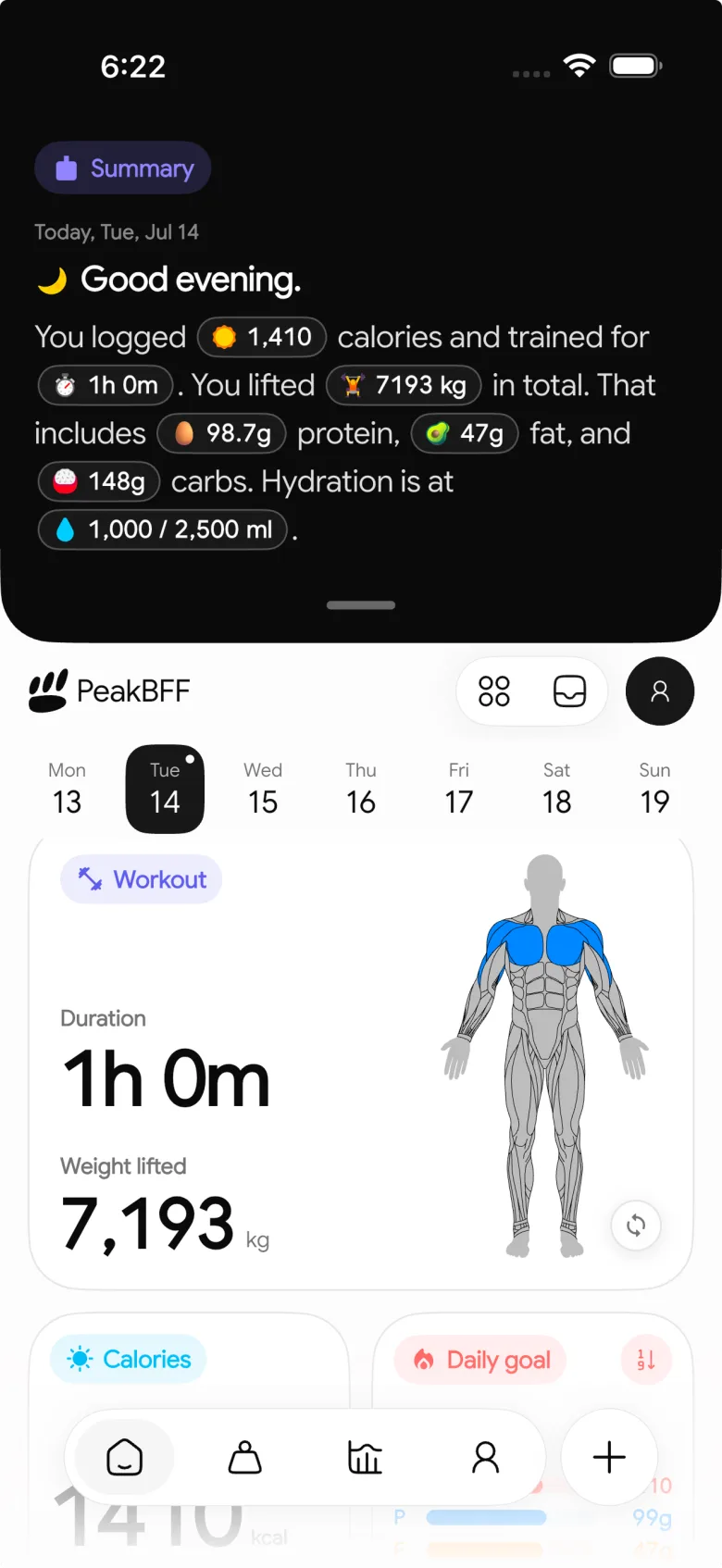
PeakBFF also has a Progress Challenges tab with its own daily and weekly progress counters, including meal logging, active days, completed workouts, and lifted volume. Those are PeakBFF challenges, not a custom 75 Hard program. It does not verify whether a workout was outdoors, create the standard 75 Hard checklist, or determine whether a nutrition plan, reading task, or private photo requirement was met. Keep those items in the template above and use the app for the details it actually records.
If you want to review the logged gym work after a week, use our weekly gym progress check-in template. For a broader decision about choosing a combined gym log, compare the best gym tracker apps.
The bottom line
The cleanest way to track 75 Hard workouts and meals is a daily checklist with two separate workout records, a food-log-backed nutrition-plan check, water, reading, and a photo line. PeakBFF can keep the workout, food, and hydration details in one place, while your checklist handles the parts an app cannot verify for you.
Download PeakBFF on the App Store or Google Play to keep your gym, food, and water records together.
More from PeakBFF
More app comparisons, fitness guides, and product notes.
Ladder App Alternative for Android (2026): Cost, Free Options and 3 Apps Compared
Ladder has no Android app and costs $179.99 a year after a trial. Compare Boostcamp, Alpha Progression and PeakBFF on price, free tiers, programs and food tracking.
Cardio Before or After Lifting? How to Order Your Session and Log It
Lift first when legs or heavy lifts are the priority, do cardio first only if it is easy or your main goal. Here is the evidence, a decision table and a way to log it.
Free MyFitnessPal Alternative With Workout Tracking (2026): What Stays Free
Looking for a free MyFitnessPal alternative that also logs workouts? Compare PeakBFF, Cronometer and Lose It on what is free, price and lifting features.
Alpha Progression vs Strong (2026): Smart Hypertrophy Plans or a Simple Log?
Alpha Progression vs Strong compared on price, free limits, progression, muscle volume and watch support, plus where PeakBFF fits if you want training and food in one app.
RPE Chart for Lifting: RPE to Reps in Reserve to % of 1RM, With a Log Template
Use an RPE chart to turn how hard a set felt into reps in reserve and a percent of your 1RM. Includes a printable table, a worked example, and a way to log RPE in PeakBFF.
Best Free Strength Training App for Women Over 40 (2026): What Stays Free
Looking for a strength training app for women over 40 that does not lock logging behind a subscription? Hevy, Strong, Boostcamp, StrongEra and PeakBFF compared on what is free.



