GainFrame vs ShredFrame (2026): Which AI Physique App Fits Your Goal?
Compare GainFrame and ShredFrame for AI physique scans and body composition. See features, Android availability, pricing, and workout tracking differences.
If you want to track your muscle definition, monitor body fat, and see how your physique changes without booking an expensive clinical DEXA scan every month, AI physique apps have become popular alternatives. Two apps leading this category in 2026 are GainFrame and ShredFrame.
While both analyse physique photos using computer vision models, they take different approaches to fitness tracking:
- Pick GainFrame if you are exclusively on iPhone, already use a dedicated workout tracker like Hevy, and want granular analysis across 12 distinct muscle groups alongside ghost-silhouette camera alignment.
- Pick ShredFrame if you use Android or iPhone, want to generate simulated visual goals ("Future Frame") showing potential body changes, and prefer having a photo calorie scanner inside the same app.
- Pick PeakBFF if you want to avoid juggling multiple single-purpose apps. PeakBFF combines an AI physique rating and body-fat insight with a complete gym workout log (prefilled working weights, rest timer, 220+ video demos) and AI food/macro tracking, plus a one-tap feature that converts your physique scan directly into a custom lifting routine.
Here is a side-by-side breakdown of how GainFrame, ShredFrame, and PeakBFF compare across features, platforms, and pricing as of November 2026.
GainFrame vs ShredFrame vs PeakBFF at a glance
| Feature | GainFrame | ShredFrame | PeakBFF |
|---|---|---|---|
| Supported platforms | iOS only (iPhone) | iOS and Android | iOS and Android |
| Free tier | 25 lifetime photos | Limited free trial / demo | Free workout & food logging |
| Paid subscription | ~$5.99/mo or $39.99 to $49.99/yr | ~$9.99/mo or ~$49.99/yr | $49.99/yr Plus ($7.99/wk) |
| Physique analysis | 12 muscle groups, FFMI, BF% | Body fat %, muscle score | Category scores, muscle map, BF% |
| Future physique simulation | No | Yes ("Future Frame") | Yes ("Physique Transform") |
| Camera alignment tool | Ghost silhouette overlay | Side-by-side gallery | Front/back guided pose tips |
| Before/after comparison | Side-by-side photo view | Side-by-side photo view | Draggable interactive slider |
| Gym workout tracking | None (syncs with Hevy/Strava) | Basic habit / exercise log | Full set/rep log, prefilled weights |
| Rest timer & plate math | None | None | Built-in timer & plate calculator |
| Exercise demo library | None | Basic illustrations | 220+ looping clips & form cues |
| Meal & macro tracking | None | AI meal photo scanning | AI meal photo scanning & macros |
| Scan to workout plan | None | None | One-tap "Build my workout" |
GainFrame: granular muscle feedback for iPhone lifters
GainFrame launched with a clear focus: give weightlifters and bodybuilders detailed visual data from their progress photos. Instead of providing just one overall body fat percentage, GainFrame breaks down your physique across approximately 12 muscle groups, including chest, shoulders, lats, upper back, quads, and hamstrings.
What GainFrame does well
- Muscle-specific development scoring: If your goal is balancing your physique for bodybuilding, GainFrame highlights which muscle groups are lagging in definition and which are developing well.
- Ghost silhouette camera alignment: Taking progress pictures from slightly different angles or distances ruins comparisons. GainFrame displays a semi-transparent overlay of your previous pose over the live camera view, making it easy to match your framing and posture session after session.
- Third-party lifting integrations: While GainFrame does not have a native workout log, it syncs with Apple Health, Hevy, and Strava to pull in your exercise activity and correlate your training volume with visual changes.
Where GainFrame falls short
- iOS exclusive: GainFrame has no Android app. If you use a Google Pixel, Samsung Galaxy, or any other Android device, you cannot download it. For dedicated options on Google Play, read our guide to the GainFrame alternative for Android.
- Hard cap on the free tier: GainFrame provides a lifetime allowance of roughly 25 photos on the free tier. Once you hit that cap, you must pay for a Pro subscription ($5.99 a month or up to $49.99 a year) to continue logging check-ins.
- No workout or nutrition logging: You cannot record sets, reps, barbell weights, or daily protein inside GainFrame. You must maintain a separate workout tracker and a separate food app.
Best for: iPhone lifters who already love their gym logging app and want a dedicated tool purely for photo alignment and multi-muscle visual ratings.
ShredFrame: visual goal generation and meal logging
ShredFrame approaches physique tracking from a broader lifestyle angle. Built on both iOS and Android, it pairs visual body scanning with AI meal logging and a feature called "Future Frame", which visualizes potential physical changes based on your target goals.
What ShredFrame does well
- Cross-platform availability: Unlike GainFrame, ShredFrame is available for both iPhone and Android users on Google Play.
- "Future Frame" AI projection: Setting fitness goals can feel abstract when looking at numbers on a scale. ShredFrame generates an AI-rendered image simulating what your physique could look like at lower body fat levels or with additional muscle mass, providing helpful visual motivation during cuts.
- AI meal and calorie logging: ShredFrame incorporates a photo food scanner. You take a photo of your plate, and the computer vision model estimates the ingredients, calories, and macronutrients, helping you align your daily energy intake with your body composition goal.
Where ShredFrame falls short
- Rudimentary workout tracking: While ShredFrame includes habit tracking and a simple exercise log, it is not built for serious strength training. It lacks set-by-set weight history, auto-rest countdowns, barbell plate calculators, and structured exercise instructions.
- Subscription paywall: Access to regular AI scans and the Future Frame generator requires a paid subscription, which costs approximately $9.99 a month or around $49.99 annually.
- Less granular muscle breakdown: ShredFrame provides an overall body composition assessment, but it does not offer the granular 12-muscle-group scoring that competitive bodybuilders look for in GainFrame.
Best for: Lifters who want visual goal motivation and quick meal photo scanning in a single cross-platform app, without needing advanced strength training features.
The problem with standalone photo apps
Both GainFrame and ShredFrame address real frustrations with traditional scale weight. A standard scale cannot tell whether a two-pound weight gain is water, fat, or lean muscle tissue. Tracking visual body composition provides far more meaningful feedback during a body recomposition phase.
However, using a standalone photo app introduces a common daily friction: app fatigue. To run a serious fitness routine, lifters frequently find themselves juggling three or four disconnected tools:
- A gym log (like Hevy or Strong) to track sets and progressive overload.
- A food tracker (like Cronometer or MyFitnessPal) to log daily protein.
- A photo app (like GainFrame) to store check-in pictures.
- A habit app to remember daily water or cardio.
When your visual scan lives in one silo and your workout plan lives in another, the visual insight rarely translates into practical gym action. If a scan shows that your shoulders or upper back are lagging, you still have to manually adjust your lifting split in a different app.
PeakBFF: bridging physique ratings, lifting logs, and macros
PeakBFF was created to solve this fragmentation. Instead of treating physique analysis as an isolated novelty, it connects visual check-ins directly to your workout routine and daily nutrition.
1. "Rate my physique" and visual transformation
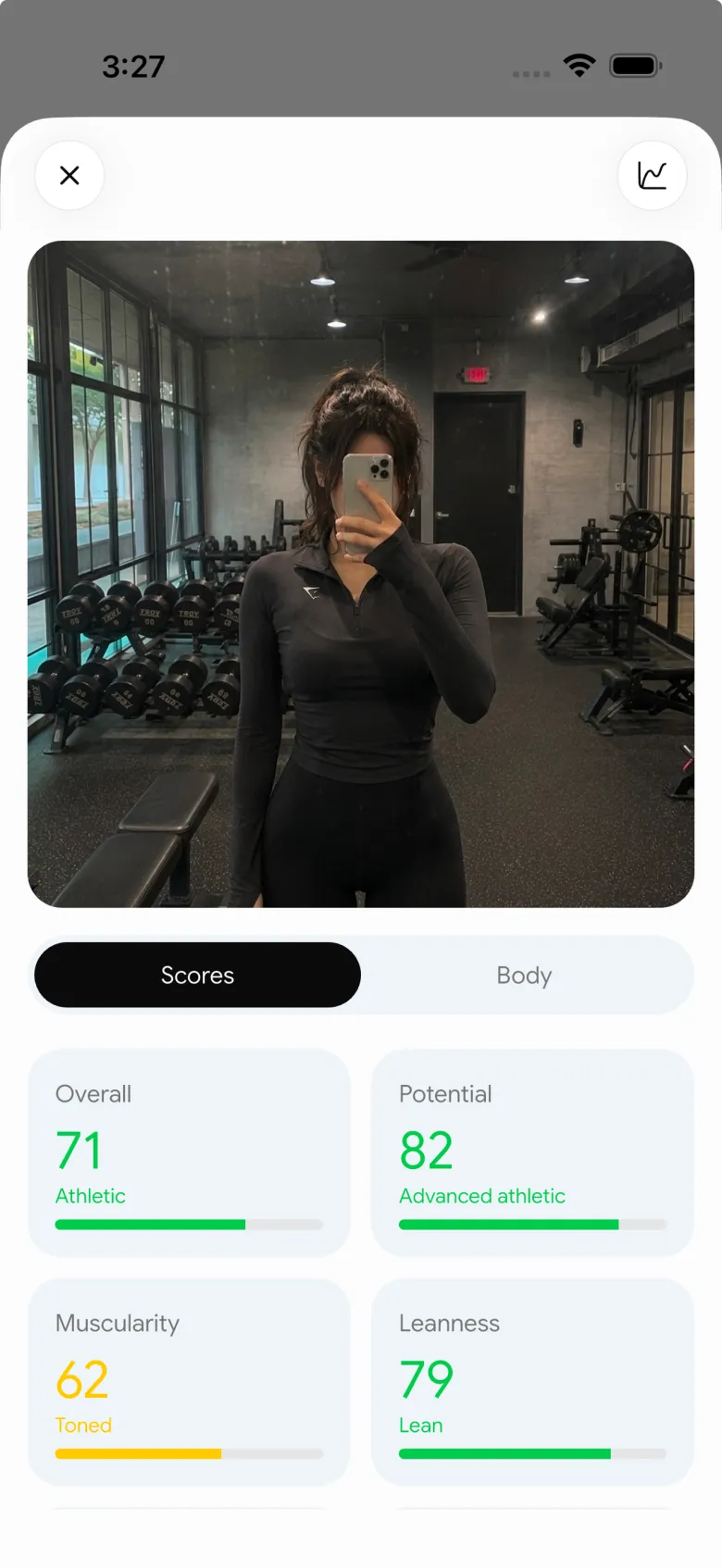
PeakBFF includes a built-in Rate my physique scan available to both iOS and Android users. You take front and optional back photos following clear pose tips (stand front-on, consistent lighting, fitted clothing).
The AI delivers:
- Category scores and muscle map: Visual feedback across major muscle groups identifying balance and definition.
- Estimated body fat insight: Directional body fat percentage estimates designed for tracking monthly trends.
- Physique transform: A "See your potential" visual feature that projects your future physique based on sustained training.
- Draggable before/after slider: Once you log two or more scans with saved photos, PeakBFF unlocks an interactive side-by-side slider to inspect changes over time.
2. Privacy-first architecture
Progress photos are sensitive. PeakBFF handles privacy strictly: your photo is sent over an encrypted connection for analysis, and the temporary cloud copy is permanently deleted as soon as the rating finishes. The app stores your photo locally on your device.
Furthermore, PeakBFF's weekly check-in photos are kept on your phone and excluded from account cloud syncing, ensuring your personal check-ins remain private.
3. The bridge: one-tap "Build my workout"
The biggest differentiator between PeakBFF and standalone scan apps is actionability. When your physique rating identifies lagging muscle groups or areas for growth, a single tap on Build my workout opens the AI workout plan generator.
The generator takes your visual assessment, your weekly training availability, your experience level, and your available equipment (commercial gym, home gym, or custom dumbbells), and drafts a complete multi-day training program designed to address your weak points. You can refine the plan in plain English before saving it to your routine.
4. A full weightlifting log and meal scanner
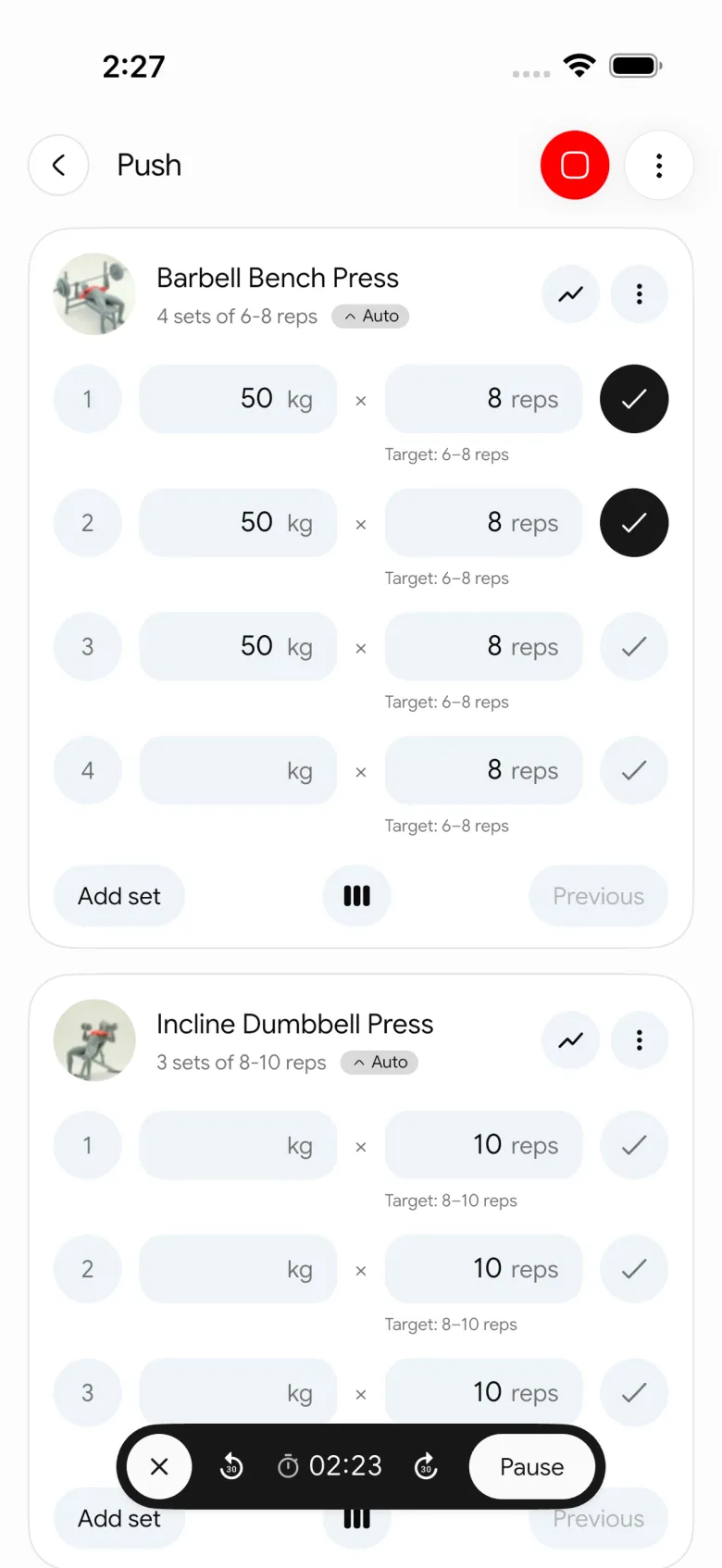
During your training sessions, PeakBFF operates as a dedicated gym log:
- Prefilled working sets: Automatically loads your previous weights and reps so you always know what to beat.
- Try more progression: When you complete all prescribed sets at the top of your rep range, an explicit prompt suggests bumping up a rep or jumping to the next weight increment. Weights are never altered automatically; you stay in control.
- Exercise instructions: Access a catalogue of 220+ exercises with looping video demos and form cues right from the active workout screen.
- Rest timer and plate calculator: Integrated countdowns and barbell plate math for standard 45 lb and 20 kg bars.
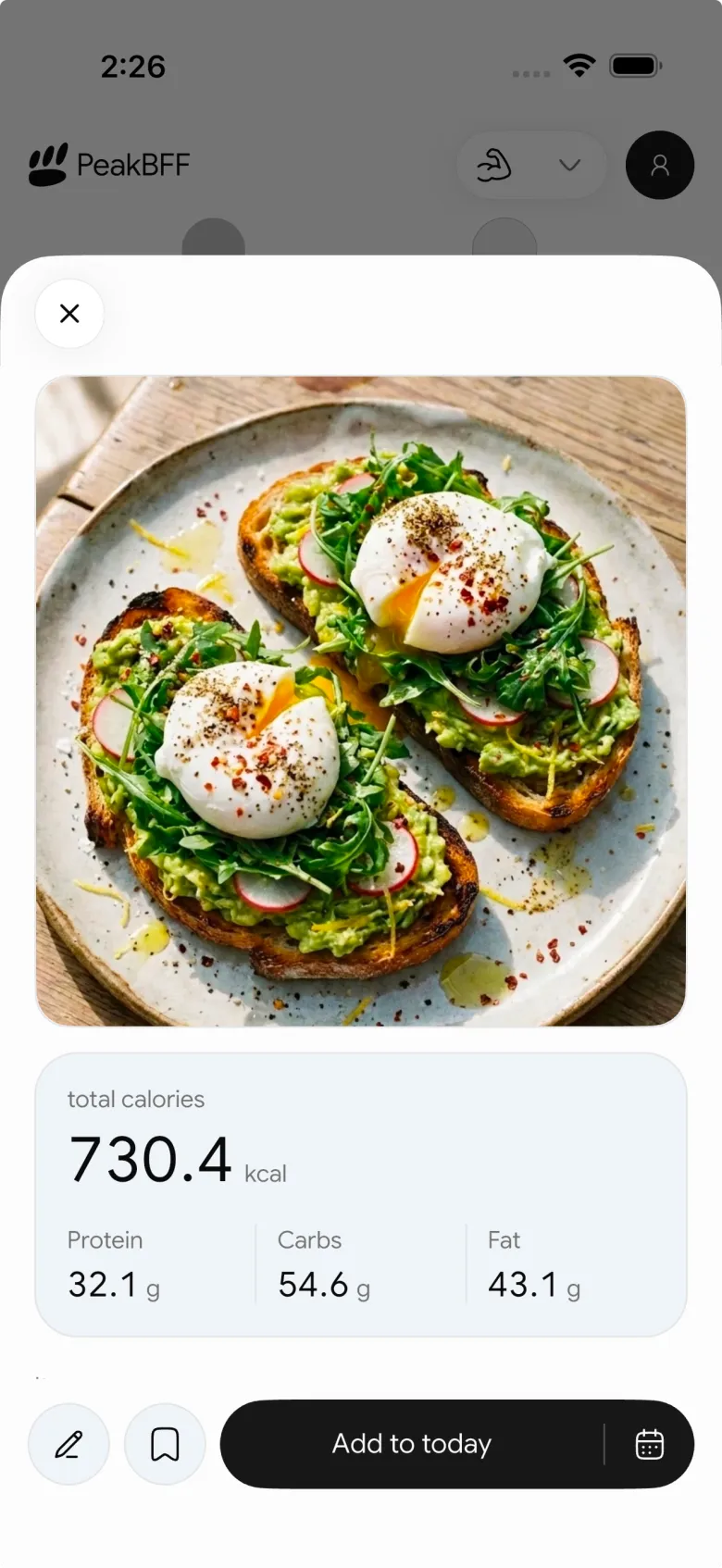
- AI meal scanner: Snap a photo of your breakfast, lunch, or dinner to track calories (free for basic users) and detailed protein, carb, and fat goals (unlocked with PeakBFF Plus at $49.99/year).
Tips for getting reliable results from AI physique scans
Whether you use GainFrame, ShredFrame, or PeakBFF, computer vision models rely heavily on visual input quality. To ensure your scans reflect real physiological progress rather than camera tricks, follow these baseline guidelines:
- Control your lighting: Overhead spotlights create artificial shadows that exaggerate muscle definition, while flat frontal flash washes it out. Use consistent, natural ambient room lighting for every check-in.
- Match camera height and distance: Place your phone at roughly hip or waist height on a shelf or tripod, positioned 6 to 8 feet away. Angling the camera downward from eye level distorts your shoulder-to-waist ratio.
- Scan under identical physiological states: Take your photos first thing in the morning, after using the washroom and before eating breakfast or drinking large volumes of water. Avoid scanning immediately after a workout, as a temporary muscle pump alters measurements.
- Focus on multi-week trends: No photo scan replaces a clinical DEXA scan. Treat individual daily numbers as estimates with a 3 to 4 percent margin of error, and judge your progress by comparing photos taken 4 to 8 weeks apart.
If you want to read more about tracking physical changes safely, review our detailed guides on best body recomposition apps, the best body fat estimator app from photos, and best workout photo apps for private progress pics.
The final verdict: which app should you choose?
When deciding between GainFrame and ShredFrame, let your hardware and training habits guide your choice:
- Download GainFrame if you use an iPhone, already have a workout log you love, and want the most detailed muscle-by-muscle ratings and ghost-overlay alignment tools available on iOS.
- Download ShredFrame if you are on Android or iOS and want visual goal renderings ("Future Frame") combined with quick photo food logging, and you do not need advanced strength workout tracking.
- Download PeakBFF if you want to replace multiple subscriptions with a single cohesive app. You get AI physique ratings, visual transformations, an interactive before/after slider, an AI food tracker, and a complete gym log with 220+ video demos and progression prompts on both iOS and Android.
Ready to see where your physique stands and turn your scan into a structured gym plan? Download PeakBFF on the App Store or Google Play and complete your first check-in today.
Questions, answered
Is GainFrame available on Android?
No. GainFrame remains an iOS-exclusive app available only on iPhone as of November 2026. Android users searching for AI physique ratings or body composition tracking need cross-platform alternatives like ShredFrame or PeakBFF.
How accurate are AI body fat estimates from photos?
Smartphone AI body fat estimates generally have a typical margin of error of 3 to 4 percentage points compared to clinical DEXA scans. Lighting, dehydration, muscle pump, and camera distance affect individual readings. These apps are most useful for measuring relative visual progress and directional trends over months rather than clinical diagnosis.
What is the primary difference between GainFrame and ShredFrame?
GainFrame focuses narrowly on physique photo analysis for lifters, offering a 12-muscle-group breakdown, ghost camera alignment, and Hevy sync, but it has no native workout or food log and is iOS-only. ShredFrame is available on iOS and Android, offering AI body scans, future physique simulations, and photo food tracking, but its workout tracking is minimal.
Can GainFrame or ShredFrame replace a gym workout tracker?
No. Neither app offers a complete weightlifting log. GainFrame includes no workout logging at all, relying on external sync. ShredFrame includes basic habit checklists and exercise logs, but lacks prefilled working weights, rest countdown timers, equipment plate math, and structured progressive overload.
What is the best alternative to GainFrame for lifters who want training and nutrition?
PeakBFF provides an all-in-one alternative available on both iOS and Android. It includes an AI physique rating with muscle group feedback, privacy-safe on-device photo storage, an AI physique transformation tool, an integrated set-and-rep gym log with exercise video demos, and AI meal photo tracking.
More from PeakBFF
More app comparisons, fitness guides, and product notes.
Boostcamp vs Hevy (2026): Structured Coach Programs or a Simple Gym Log?
Boostcamp vs Hevy compared on structured strength programs, progression tools, Apple Watch logging, free tier limits and pricing, plus where PeakBFF fits.
How to Hit Your Protein Goal Without Going Over Calories: The 10:1 Rule and Lean Swaps
Learn how to hit your protein goal without going over calories using the 10:1 protein-to-calorie ratio, lean protein swaps, and a worked 150g meal plan.
Best 75 Hard App (2026): Free Options, the Official App and What Actually Works
Compare the best 75 Hard apps for tracking workouts, water, diet, and progress photos. See why lifters outgrow basic checkboxes and what to use instead.
PPLUL Split (2026): A 5-Day Push Pull Legs Upper Lower Routine and Volume Guide
What the PPLUL split is, how to schedule a 5-day Push Pull Legs Upper Lower workout routine, weekly muscle volume targets, and how to track progression.
Cronometer vs MyFitnessPal (2026): Which Food Tracker Fits Lifters?
Cronometer vs MyFitnessPal compared on database accuracy, free barcode scanning, pricing and lifting support, plus where PeakBFF fits for gym trackers.
How Many Warm-Up Sets Before Working Sets? A Simple Ramp-Up Chart and Rules
Most lifters need 2 to 4 warm-up sets for heavy compound lifts and 0 to 1 for isolation exercises. Use this ramp-up chart and formula to prepare without wasting energy.