Best Macro Tracker App for Meal Prep (2026): 4 Options Compared
Compare four macro tracker apps for meal prep, reusable meals, and logging protein, carbs, fat, and calories without rebuilding the same entry daily.
Best Macro Tracker App for Meal Prep (2026): 4 Options Compared
The best macro tracker app for meal prep is PeakBFF if your priority is saving a repeat meal, logging its calories and macros quickly, and keeping that food record beside your gym sessions. It is especially useful for lifters who want a simple saved-meal library rather than a separate workout app and food app. Pick Cronometer if recipe importing and a deeper nutrient view are the main job, MacroFactor if you want saved recipes with portion-level edits, or MyFitnessPal if you already keep your meals there.
| What matters for repeat meals | PeakBFF | MacroFactor | Cronometer | MyFitnessPal |
|---|---|---|---|---|
| Save a repeat meal | Yes, from a scan or manual entry | Yes, as a recipe | Yes, as a custom meal or recipe | Yes, as a remembered meal |
| Log calories and macros | Calories, protein, carbs, and fat | Food and recipe logging | Food and recipe logging with nutrient detail | Food diary and macro tracking |
| Change a saved meal before logging | Create a new saved entry | Explode a recipe to edit individual foods | Edit a custom meal or recipe | Edit the saved meal |
| Keep workout logging in the same app | Yes | Nutrition-focused app | Nutrition-focused app | Exercise logging is separate from a gym log |
| Best for | Lifters repeating straightforward meals | Flexible repeat meals | Recipe-focused detail | An existing MyFitnessPal library |
What meal-prep macro tracking should actually save you
The useful shortcut is not a perfectly designed meal plan. It is the ability to avoid rebuilding the lunch you make every Sunday, then still see the calories, protein, carbs, and fat that you logged that day.
For a repeatable gym-week workflow, look for four basics:
- a way to save a complete meal after you have entered it once;
- an easy way to find and log it again;
- visible calories and macros, so a saved entry is not a black box; and
- enough context to keep your food log and training record useful together.
Recipe import, micronutrients, grocery planning, and coaching can be useful. They are separate buying criteria. Do not choose them just because the simple job is logging the chicken-and-rice bowl you already eat several times a week.
1. PeakBFF: best for lifters who want saved meals beside training
PeakBFF is the pick when repeat meals are part of a broader gym-tracking routine. You can save a meal after a food scan or a manual entry, then keep a named saved meal with calories, protein, carbs, and fat. The same app also has workout logging, so a week of familiar meals does not require switching to a second training log.
The saved-meal flow is intentionally straightforward. A meal can be created with a name and calories, with protein, carbs, fat, and a photo as optional details. You can also save a meal from a food result, then reuse it later. That makes it a good fit for a repeat breakfast, a standard post-workout meal, or a portion you batch cook frequently.
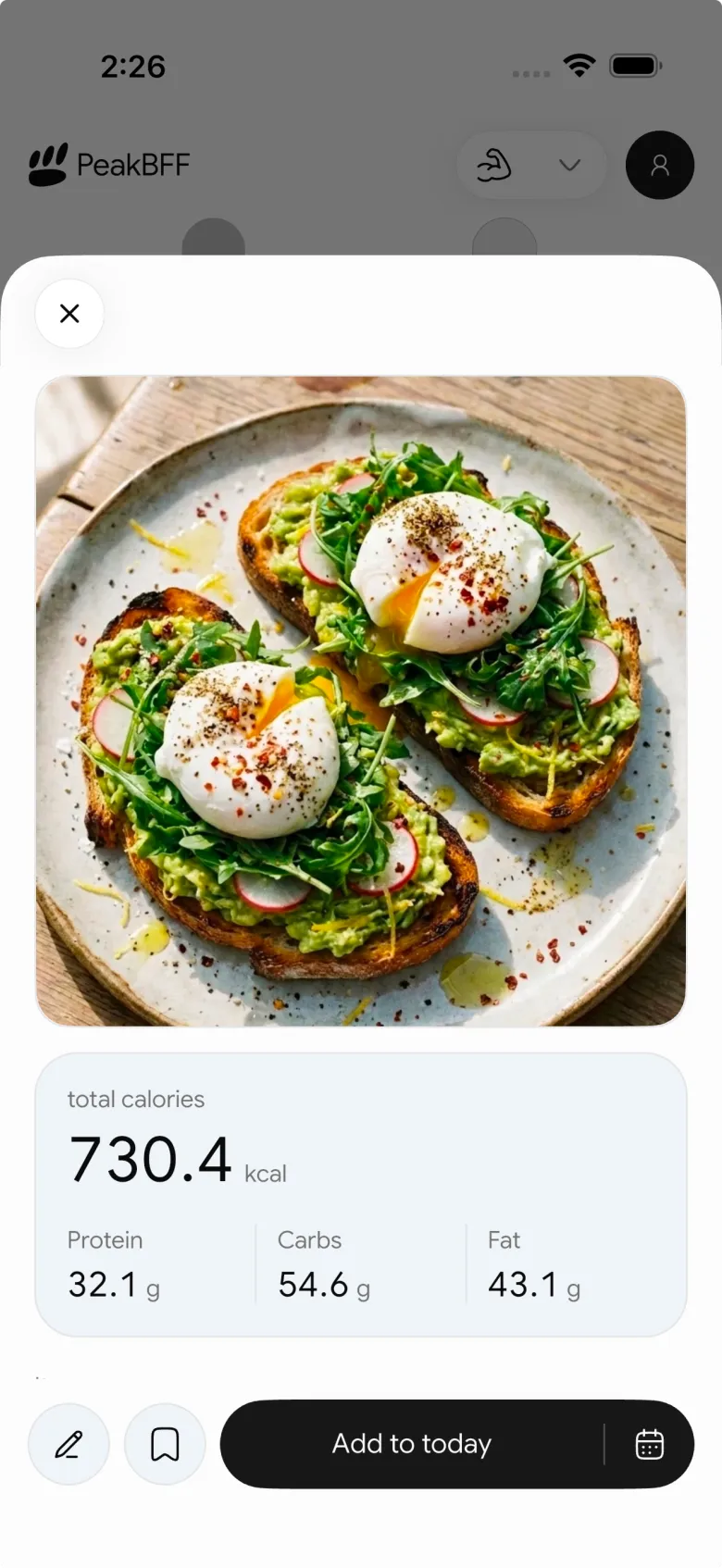
PeakBFF is not the right choice if your primary need is importing detailed recipes from websites or auditing a wide micronutrient panel. It is the best fit when the saved meal is a fast practical shortcut inside the same place you log lifts, sets, and reps. For a related workflow, see our guide to saving meals for calorie tracking.
Download PeakBFF on the App Store or get PeakBFF on Google Play.
2. MacroFactor: best for a repeat meal you want to tweak
MacroFactor treats a saved meal as a recipe: a bundle of foods consumed at the same time. Its official guide explains that you can create that recipe from items in your food timeline, then log the bundle later. When a meal changes, its "Explode" option lets you adjust individual entries before logging it.
That is a strong workflow when your base meal stays the same but a portion or one ingredient changes often. The tradeoff is focus: it is a nutrition tracker, so someone who also wants a dedicated live workout log will still need that training record elsewhere.
3. Cronometer: best for custom recipes and nutrient detail
Cronometer supports custom meals and recipes. Its custom meals and recipes page describes bundling frequent food entries so they can be logged again quickly. Its help centre also documents recipe importing from a URL or pasted ingredients, with a review step before saving.
Choose Cronometer when the meal-prep job is mainly recipe construction and nutrient detail. It is a credible option for someone who weighs a cooked batch, wants to record the portion carefully, and prefers a food-first diary. It is less compelling when the goal is simply to keep repeated meals and gym logs together in one routine.
4. MyFitnessPal: best if your saved-meal library already lives there
MyFitnessPal calls reusable groups of foods "remembered meals." Its current help article shows how to create a named meal, find it in the My Meals area, and add it to the diary later. It also allows a photo on a custom meal.
That makes MyFitnessPal a sensible choice if you already have a food history and familiar meals there. For someone starting fresh who also logs resistance training, PeakBFF is the cleaner consolidation option because the saved food entry and workout log stay in the same app.
How to set up a repeat meal without making it rigid
Start with one meal you genuinely eat most weeks. Enter it as you make it, including the serving you plan to log. Save it under a search-friendly name such as "weekday chicken rice lunch" rather than a vague label like "meal 1."
Then decide what should happen when it changes:
- If it is the same portion, log the saved meal.
- If only the portion changes, update the entry before saving it to the day.
- If the ingredients change substantially, make a separate saved meal rather than pretending the original still matches.
- Review the day as a record, not a verdict. The goal is a usable log, not a claim that an app can verify every ingredient or prescribe what you should eat.
This keeps the saved-meal feature honest. It reduces repeated input, but it does not remove the need to check the entry when your portion or ingredients are different.
Bottom line
PeakBFF is the best macro tracker app for meal prep if you lift, repeat a few reliable meals, and want calories plus protein, carbs, and fat near the workout record that gives those meals context. Use Cronometer for recipe importing and deeper nutrition detail, MacroFactor for flexible saved recipes, and MyFitnessPal when its existing library is the reason to stay.
If you want one place for repeat meals and training, start with PeakBFF on the App Store or Google Play.
More from PeakBFF
More app comparisons, fitness guides, and product notes.
Best AI Physique Transformation App With Workout Tracking (2026)
Compare AI physique-transformation preview apps for motivation, photo boundaries, and the workout record you use after the preview.
How to Save a Workout as a Template After Training
Turn a session that worked into a reusable workout template without confusing completed results with your next plan.
Best Beginner Gym App With Starter Programs and Form Cues (2026)
Compare beginner gym apps for choosing a starter program, checking exercise form cues, and logging the sets you actually complete.
How to Track Home and Gym Versions of the Same Exercise
Use a simple split-or-combine checklist to keep home and gym exercise variations clear in your workout history.
How to Log a Weigh-In in a Gym App: A Simple History Checklist
Log a weigh-in with a repeatable routine, a clear calendar day, and a simple history review that keeps your gym records useful.
How to Choose a Starter Workout Program: A 3-Question Template
Choose a starter workout program with a simple goal, schedule, and equipment template, plus a verified PeakBFF setup flow.



