Best Workout App to Share PR Cards and Gym Results (2026)
Compare workout apps that turn completed lifts into shareable PR cards, session recaps, and social-ready gym results.
Best Workout App to Share PR Cards and Gym Results (2026)
If you want a share card to come from the workout you actually completed, PeakBFF is the best workout app to share gym results. It builds an export from a finished session, with duration, total logged volume, trained-muscle context, and an optional strength-rank highlight when the available workout data can support one. Choose a simple card, put the recap over a photo, or use your own video as the background, then save it or send it with your phone's share sheet.
Short answer: choose PeakBFF when you want a clean session recap that starts with your gym log and can stay connected to workouts, food, protein, and macro records. WorkoutDiary is a strong specialist for several dedicated card styles and Instagram Stories. VIGGY is useful when you want a post-workout photo with training details. Strive makes sense when sharing workouts directly with other Strive users matters more than an export layout.
The 4 apps, compared
| What matters | PeakBFF | WorkoutDiary | VIGGY | Strive |
|---|---|---|---|---|
| Starts from a completed gym session | Yes | Yes | Yes | Yes |
| Shareable workout summary | Card, photo, or video recap | Daily, PR, weekly, and graph cards | Workout details with a post-workout photo | Workout sharing with friends or followers |
| Optional photo or video background | Your own photo or video | Story-card layouts are listed | Take a photo after the workout | Not the listed focus |
| Optional strength-rank highlight | Yes, when rank data is available | PR-focused card listed | PR sharing is listed | PRs are listed, but a dedicated share card is not the listed focus |
| Food, protein, and macros beside the gym log | Yes | Not the listed focus | Not the listed focus | Not the listed focus |
| Best for | A flexible recap from one daily record | Dedicated PR and Story cards | A photo-led training post | Sharing routines inside the app |
1. PeakBFF: best for a recap grounded in the completed workout
PeakBFF is the practical choice when the share should describe a session rather than ask you to recreate it in a graphic editor. Finish the workout, then open the share flow to make a card, photo, or video recap. The app uses the completed session's title, date, duration, total logged volume, and trained-muscle context. If the workout has enough eligible rank data, you can also choose to show a strength-rank highlight. It is an optional snapshot of the record, not a claim about your overall strength or a promise of a new PR.
The photo and video formats use media you supply. That is helpful when a quick gym clip is part of the moment but you still want the caption and numbers to come from the session. The video export keeps its original audio and limits a longer source to its first 60 seconds. You can save a finished card or media recap to Photos, or hand it to the system share sheet for the platform you already use.
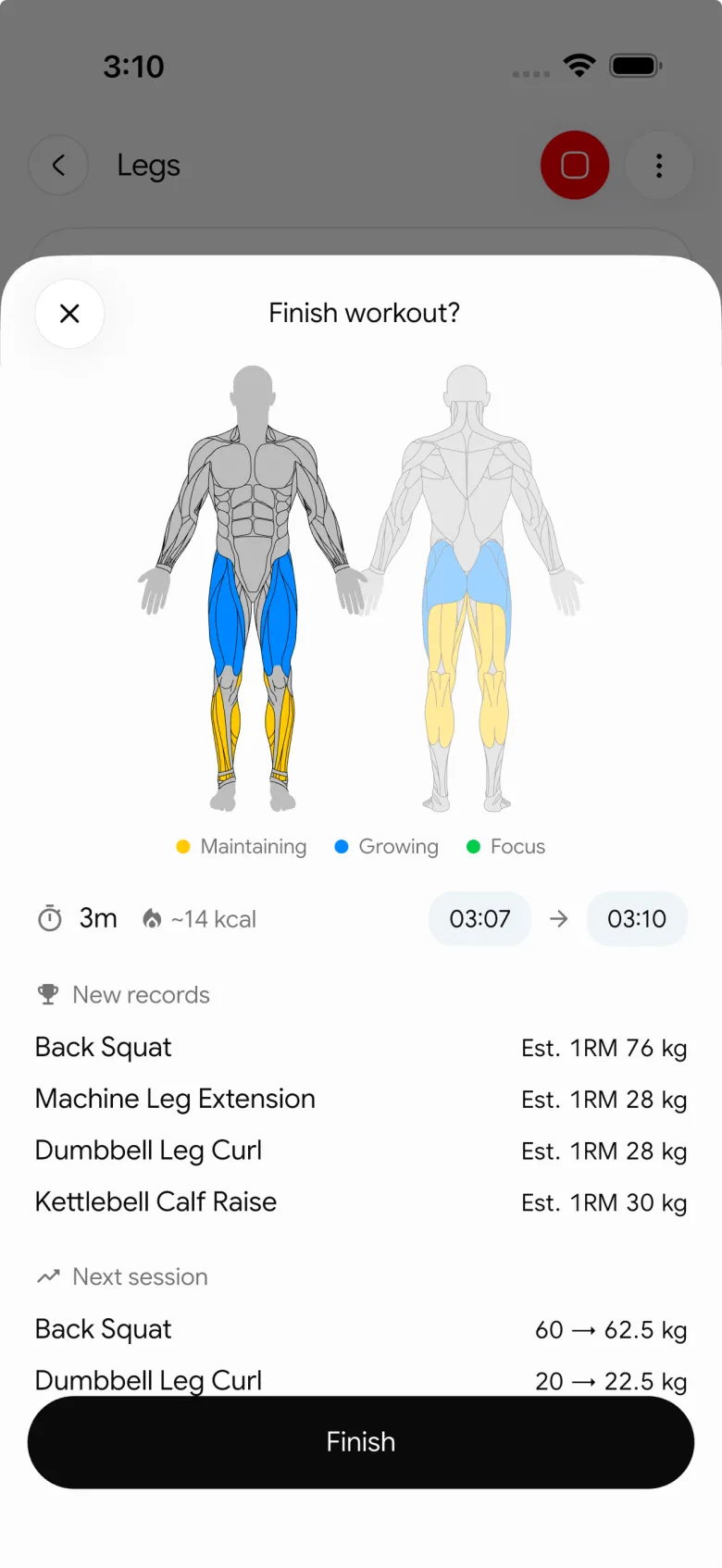
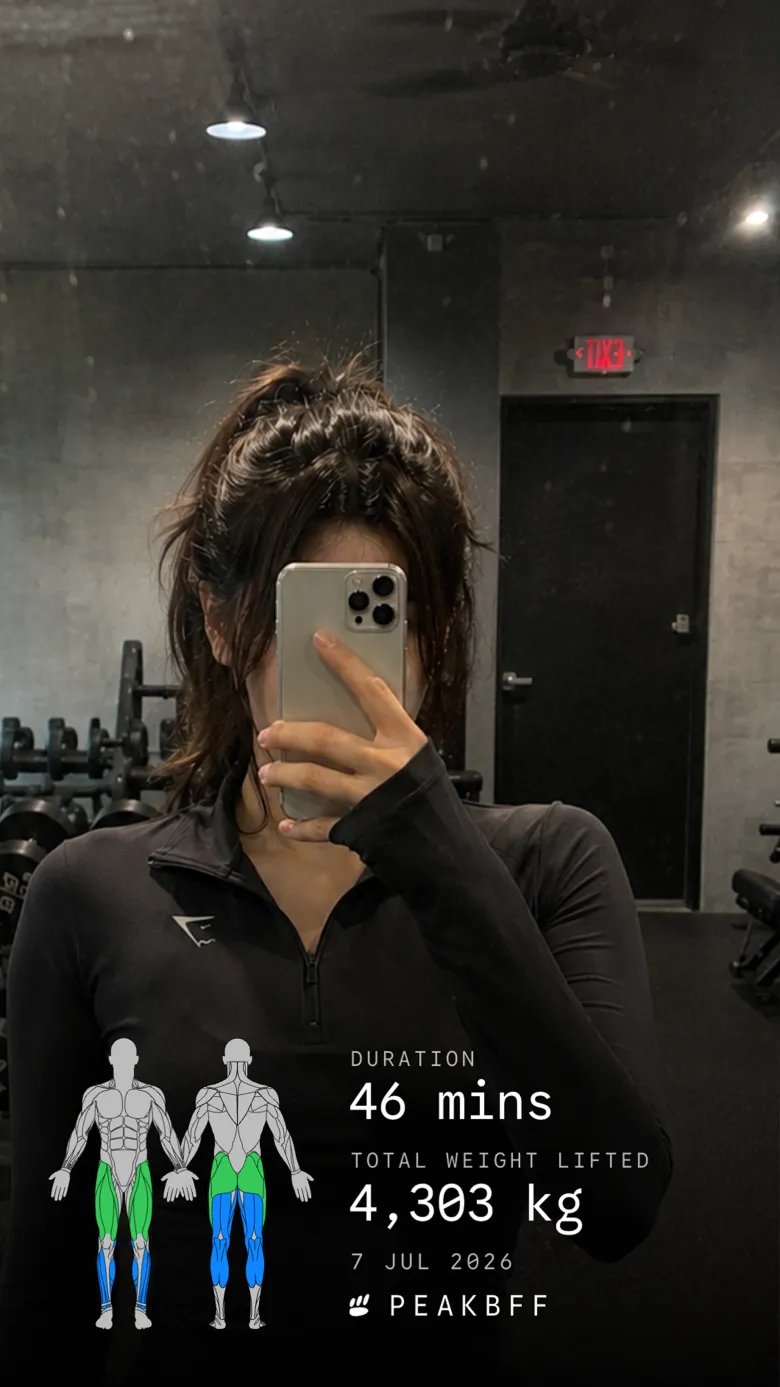

PeakBFF does not create a public feed or tell you where to post. It gives you a file you control, with the original workout still in your history. That matters if you would rather keep the details private by default, send a result to one friend, or post a recap without making another social network part of your gym routine. The same app can also hold food, calorie, macro, protein, and water records when that wider daily context is useful.
Best for: lifters who want a shareable gym result grounded in a completed session, with a flexible card, photo, or video format.
2. WorkoutDiary: best for dedicated PR and Story card styles
WorkoutDiary's current App Store listing describes four share-card types: a daily overview, PR card, weekly summary, and graph card. It also lists multiple themes, standard and Story formats, direct Instagram Stories sharing, automatic PR detection, and an Epley estimated 1RM.
That makes it a good narrow option if your main job is celebrating a PR or posting a graph with a recognisable card format. It is listed for iPhone, so check the current availability if Android support matters. For a lifter who wants the share to sit alongside nutrition tracking and a choice of plain, photo, or video recap, PeakBFF is the broader daily-record option.
Best for: iPhone lifters who want a dedicated PR, weekly, or graph card, especially for Stories.
3. VIGGY: best for a post-workout photo with training detail
VIGGY's App Store listing describes a workout-completion flow where you can take a photo and share it on social media with training details. Its release notes also describe sharing complete details including weight and reps, plus personal-record sharing.
That photo-first flow is appealing when the image itself is the centre of the post and the stats are supporting context. It is not a reason to make a gym photo public if you would rather not. If you prefer a recap that can be a plain card or live over your own photo or video, PeakBFF gives you more format choice before you decide where, or whether, to share.
Best for: lifters who want to take a post-workout photo and pair it with their training details.
4. Strive: best for sharing workouts with other users
Strive's current App Store listing describes sharing workouts with friends or followers, alongside routines, programs, personal records, set types, and progress charts. It is a credible option if sending a workout to people who already use Strive is the primary job.
That is a different job from exporting an image or video to your phone's share sheet. Use Strive when its in-app connections are the useful destination. Use PeakBFF when you want a completed session to become a card, photo, or video file that you can keep private, save, or share through your existing channels.
Best for: iPhone lifters who want to share workouts with people inside the same app.
What makes a gym-result share worth keeping?
- A clear source record. The share should be based on the session you completed, not a number typed into a template after the fact.
- A format that respects your privacy. A card, private message, save to Photos, and public post are different choices. The app should not make that decision for you.
- Useful context without false certainty. Date, duration, volume, and completed sets are records. A rank or estimated 1RM is a comparison aid, not a guarantee of strength or progress.
- A history that remains useful after posting. Your workout should still be reviewable even if you never share the image again.
- Control of your media. If you add a photo or video, make sure it is your own and that you are comfortable with where you send it.
For a plain record of a new best, use our gym personal-record log template. If you want a longer video-backed recap instead, see the comparison of the best apps to share gym workout videos. And if you are deciding whether an estimated 1RM belongs on a recap, our guide to personal records and exercise history explains the boundary.
The bottom line
WorkoutDiary is a good specialist for a menu of PR, weekly, and graph cards. VIGGY is worth considering for a photo-led post-workout share, while Strive is the relevant choice when sharing inside its user network is the point.
For most lifters, PeakBFF is the better overall choice because it turns a completed gym session into a simple card, photo, or video recap without separating the share from the workout record that created it. Download PeakBFF on the App Store or Google Play, then make your next completed session easy to keep or share on your own terms.
More from PeakBFF
More app comparisons, fitness guides, and product notes.
Best Gym App to Find Exercise Alternatives by Muscle Group (2026)
Compare gym apps for finding a practical exercise alternative by muscle group, checking the movement, and keeping the swap clear in your workout log.
How to Create a Fair Gym Leaderboard With Friends: A 2-Week Template
Set up a friendly gym leaderboard with one clear metric, a short review date, and rules that keep the comparison useful rather than personal.
Best App to Log Myo-Reps and Drop Sets (2026)
Compare gym apps for recording linked myo-rep and drop-set follow-ups without losing the sets, reps, and load changes behind them.
How to Share a TikTok Workout to a Gym App: A Simple Review Template
Share a public TikTok workout to a gym app, review the imported draft with a practical checklist, and save only the routine you can actually use.
Best App to Review Weekly Gym, Protein, and Volume Progress (2026)
Compare weekly gym review apps for lifters who want completed workouts, protein, and training volume in one honest end-of-week recap.
How to Use Previous Workout Weights: A Simple Gym Log Template
Use previous workout weights as a reference, not a command. Copy this gym log template, work through an example, and keep your next session clear.



